
вступ
The Acoustic Research Portable Outdoor Wireless Speaker with LED Flickering Flame Light is designed to provide high-quality audio and ambient lighting for various indoor and outdoor settings. This rechargeable speaker features multiple light modes, including a realistic flickering flame, and is built with an IPX5 water-resistant rating, making it suitable for outdoor use. It also includes built-in nature sounds for relaxation and can be stereo-paired with another compatible AR speaker for an enhanced audio experience.
Вміст упаковки
- Acoustic Research Portable Outdoor Wireless Speaker (Model: AWSF9R)
- USB-кабель для зарядки
- Посібник користувача
Особливості продукту
- 7 режими освітлення: Soft White, Bright White, Flicker Flame, Soft Glow, Candlelight, Aurora. Separate controls for light and speaker.
- Розширений час відтворення: До 12 годин відтворення аудіо на одному заряді.
- Водонепроникність: IPX5 rated for protection against splashing water.
- Звуки природи: Includes Forest, Waves, Running Stream, and Rain.
- Портативний дизайн: Attractive lantern style with a handle for easy carrying or hanging.
- Підключення Bluetooth: Безперебійна бездротова потокова передача аудіо із сумісних пристроїв.
- Сполучення стерео: Connect two AWSF9R speakers for true wireless stereo sound (second speaker sold separately).
Елементи управління та індикатори

малюнок 1: Speaker Control Panel. This image shows a close-up of the speaker's control buttons, including power, volume, track skip, light mode, and nature sound buttons, along with the DC charging port.
| Кнопка/індикатор | функція |
|---|---|
| Кнопка живлення (⏻) | Press and hold to power the speaker ON or OFF. Press briefly to Play/Pause music. |
| Зменшення гучності / попередній трек (− / ⏮) | Натисніть коротко, щоб зменшити гучність. Натисніть і утримуйте, щоб перейти до попереднього треку. |
| Збільшення гучності / Наступний трек (+ / ⏭) | Press briefly to increase volume. Press and hold to go to the next track. |
| Кнопка світлового режиму (💡) | Press to cycle through 7 light modes: Soft White, Bright White, Flicker Flame, Soft Glow, Candlelight, Aurora, and OFF. |
| Кнопка звуку природи (♫) | Press to cycle through 4 nature sounds: Forest, Waves, Running Stream, Rain, and OFF. |
| Порт зарядки постійного струму | Connect the USB charging cable here to recharge the speaker's battery. |
| Світлодіодний індикатор | Indicates charging status and Bluetooth pairing status. |
Налаштування
Зарядка динаміка
- Locate the DC charging port on the speaker's control panel.
- Connect the small end of the provided USB charging cable to the speaker's DC port.
- Підключіть більший кінець USB-кабелю до USB-адаптера живлення (не входить до комплекту) або USB-порту комп’ютера.
- The LED indicator will illuminate to show charging status. Allow approximately 3-4 hours for a full charge. The indicator will change or turn off when charging is complete.
Примітка: Fully charge the speaker before first use to maximize battery life.
Інструкція з експлуатації
Увімкнення/вимкнення
- To power ON, press and hold the ⏻ Power button for 2-3 seconds until you hear an audible prompt.
- To power OFF, press and hold the ⏻ Power button for 2-3 seconds until you hear an audible prompt.
Bluetooth-парування
- Ensure the speaker is powered ON and within 10 meters (33 feet) of your Bluetooth device (smartphone, tablet, etc.).
- The speaker will automatically enter Bluetooth pairing mode when powered on for the first time or if no device is connected. The LED indicator will flash, indicating it's ready to pair.
- On your Bluetooth device, go to the Bluetooth settings and enable Bluetooth.
- шукати available devices and select "AR Speaker" (or similar name) from the list.
- Після сполучення світлодіодний індикатор перестане блимати та світитиметься постійно, і ви почуєте звуковий сигнал підтвердження.
- Тепер ви можете відтворювати музику зі свого пристрою через динамік.
Примітка: Динамік автоматично спробує повторно підключитися до останнього сполученого пристрою після ввімкнення.
Controlling Light Modes
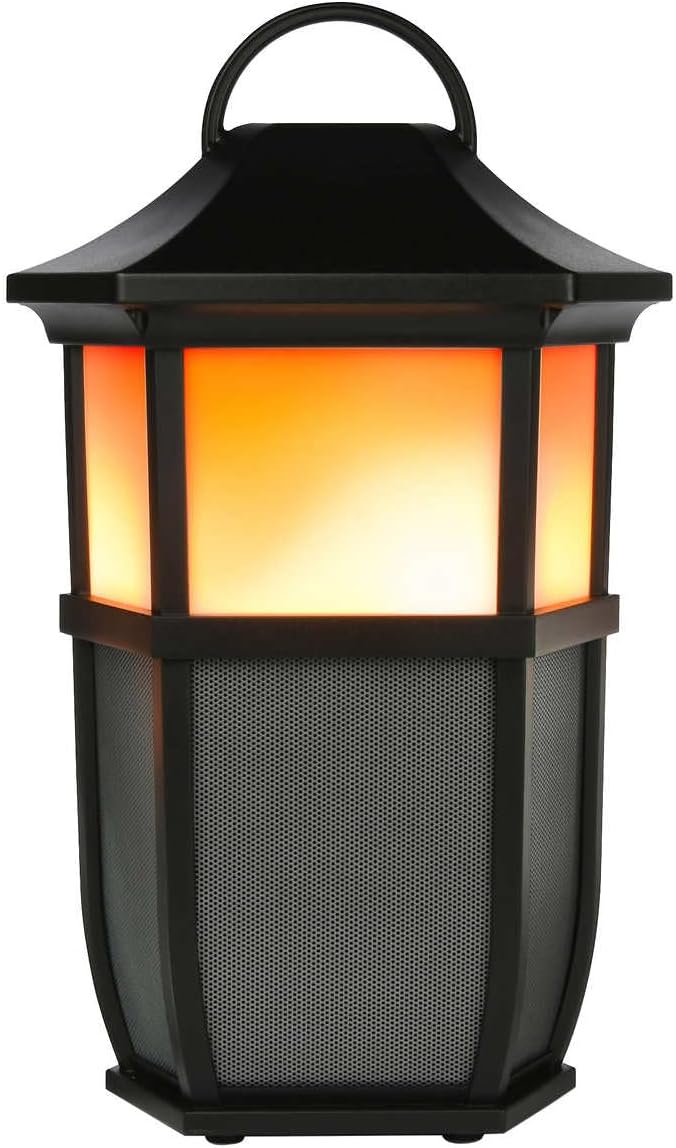

малюнок 2: Speaker Light Modes. The left image shows the speaker with a warm, flickering flame light, while the right image shows it with a bright white light, demonstrating two of the available light modes.
Натисніть 💡 Light Mode button repeatedly to cycle through the 7 available light modes:
- Мерехтливе полум'я
- М'який білий
- Яскравий білий
- М'яке світіння
- Світло свічок
- Аврора
- Світло ВИМКНЕНО
Playing Nature Sounds
Натисніть ♫ Nature Sound button repeatedly to cycle through the 4 built-in nature sounds:
- Ліс
- Хвилі
- Running Stream
- Дощ
- Nature Sound OFF
Сполучення True Wireless Stereo (TWS) (опціонально)
To achieve a true stereo sound experience, you can pair two Acoustic Research AWSF9R speakers together. (Second speaker sold separately).
- Переконайтеся, що обидва динаміки увімкнені та не підключені до жодного пристрою Bluetooth.
- На одному динаміку (це буде ваш основний динамік) натисніть і утримуйте ⏻ Power button for 5 seconds until you hear a distinct pairing tone.
- The primary speaker will now search for the second speaker.
- Once connected, you will hear a confirmation tone, and the LED indicators on both speakers will change to indicate a successful TWS connection.
- Тепер підключіть свій пристрій Bluetooth до основного динаміка, як описано в розділі «Спарювання Bluetooth». Звук відтворюватиметься стерео через обидва динаміки.
Примітка: TWS pairing only works with two identical AWSF9R speakers.
Технічне обслуговування
- Прибирання: Використовуйте м’яку суху тканину для очищення зовнішньої поверхні динаміка. Не використовуйте абразивні засоби для чищення або розчинники.
- Вплив води: While IPX5 water-resistant, do not submerge the speaker in water. Ensure the charging port cover is securely closed when exposed to water.
- Зберігання: Зберігайте динамік у прохолодному, сухому місці, подалі від прямих сонячних променів та екстремальних температур, якщо він не використовується протягом тривалого часу.
- Догляд за акумулятором: To prolong battery life, fully charge the speaker at least once every three months, even if not in regular use.
Усунення несправностей
| проблема | Можливе рішення |
|---|---|
| Динамік не вмикається. | Ensure the battery is charged. Connect the speaker to a power source using the USB cable and allow it to charge for at least 30 minutes before attempting to power on again. |
| Неможливо створити пару з пристроєм Bluetooth. |
|
| Немає звуку або гучність низька. |
|
| Light modes are not working. | Press the Light Mode button repeatedly to cycle through all modes. Ensure the speaker has sufficient battery charge. |
| Nature sounds are not working. | Press the Nature Sound button repeatedly to cycle through all sounds. |
Технічні характеристики

малюнок 3: Product Dimensions. This image illustrates the height (9.76 inches), width (7.2 inches), and depth (6.54 inches) of the speaker.
| Особливість | Деталь |
|---|---|
| Назва моделі | AWSF9R |
| Бренд | Акустичні дослідження |
| Тип динаміка | Зовнішній, Портативний |
| Підключення | Bluetooth (бездротовий) |
| Діапазон Bluetooth | До 10 метрів (33 фути) |
| Водонепроникність | IPX5 (водонепроникність) |
| Вихідна потужність | 30 Вт |
| Режим аудіовиходу | Стерео (з під’єднанням TWS) |
| Термін служби батареї | До 12 годин |
| Джерело живлення | Працює від батареї |
| Розміри продукту (Д x Ш x В) | 6.54 см x 7.2 см x 9.76 см |
| Вага товару | 5 фунта |
| UPC | 044476151811 |
Гарантія та підтримка
This Acoustic Research product comes with a Обмежена гарантія. For detailed warranty information, technical support, or service inquiries, please refer to the warranty card included with your product or visit the official Acoustic Research webсайт. Будь ласка, збережіть підтвердження покупки для гарантійних претензій.
For further assistance, you may contact Acoustic Research customer support through their official channels.