
Ampire CPM 101
AMPIRE CPM 101 Smartphone Monitor User Manual
Model: CPM 101
1. Вступ
This user manual provides comprehensive instructions for the installation, operation, and maintenance of your AMPIRE CPM 101 Smartphone Monitor. Please read this manual thoroughly before using the device to ensure proper functionality and safety.
2. Інформація про безпеку
Завжди дотримуйтесь наступних запобіжних заходів, щоб запобігти пошкодженню пристрою або травмуванню себе:
- Не намагайтеся розібрати чи модифікувати пристрій.
- Перед увімкненням переконайтеся, що всі з’єднання надійні.
- Уникайте впливу екстремальних температур, прямих сонячних променів або вологи на пристрій.
- Install the monitor in a location that does not obstruct the driver's view or interfere with vehicle safety systems.
- Використовуйте лише надані кабелі та аксесуари.
3. Продукт закінчивсяview
The AMPIRE CPM 101 is a 10-inch high-resolution touchscreen monitor designed to integrate smartphone functionalities like Apple CarPlay and Android Auto into your vehicle. It also supports the display of an optional rearview камера.
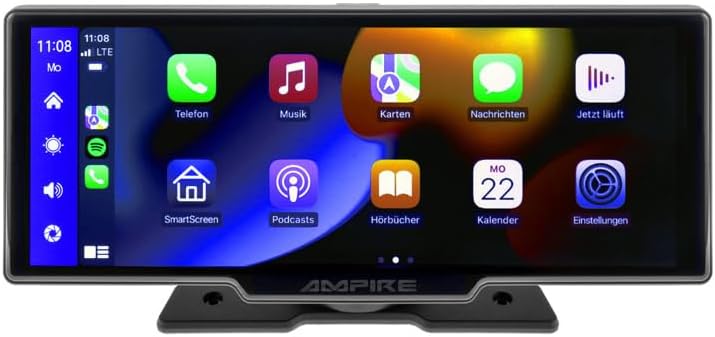
Малюнок 3.1: Спереду view з AMPIRE CPM 101 monitor showing the user interface with various app icons.

Рисунок 3.2: AMPIRE CPM 101 monitor with its base, highlighting key features such as Bluetooth, Apple CarPlay, Android Auto, 1080p Full HD, Wi-Fi, and 10-inch display.

Figure 3.3: Contents of the AMPIRE CPM 101 package, including the monitor, rearview camera, and various connection cables.

Рисунок 3.4: AMPIRE CPM 101 monitor displaying a split screen with navigation on one side and a rearview camera feed on the other.
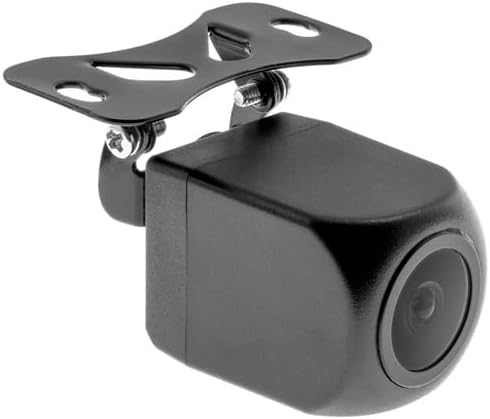
Малюнок 3.5: Збільшений план view of the compact rearview camera with its mounting bracket.
4. Налаштування та встановлення
The AMPIRE CPM 101 is designed for easy integration into most vehicles. Professional installation is recommended for optimal performance and safety.
4.1. Вміст упаковки
Перед початком встановлення перевірте наявність усіх компонентів:
- AMPIRE CPM 101 Monitor
- Комплект силових кабелів
- Задняview Camera (optional, if included in your package)
- Кабель для підключення камери
- Монтажний кронштейн
- Посібник користувача
4.2. Монтаж монітора
- Оберіть відповідне місце на приладовій панелі, яке не заважатиме view або перешкоджати роботі подушок безпеки.
- Ретельно очистіть монтажну поверхню.
- Attach the mounting bracket to the monitor.
- Securely mount the monitor to the dashboard using the provided adhesive or screws, ensuring it is stable.
4.3. Підключення проводів
Connect the power cable set to your vehicle's power source (ACC, B+, GND). If installing a rearview camera, connect its video cable to the monitor's camera input and its power cable to the vehicle's reverse light circuit for automatic activation.
- Червоний дріт: Connect to ACC (Accessory Power).
- Жовтий дріт: Connect to B+ (Constant Power).
- Чорний дріт: Connect to GND (Ground).
- Reverse Trigger Wire (if applicable): Connect to the vehicle's reverse light positive wire.
5. Інструкція з експлуатації
5.1. Увімкнення/вимкнення живлення
The monitor will power on automatically when the vehicle's ignition is turned on (ACC power). To manually turn off, press and hold the power button (if available) or turn off the vehicle's ignition.
5.2. Підключення до Apple CarPlay / Android Auto
The CPM 101 supports wireless connection to Apple CarPlay and Android Auto. Примітка: Devices with only 2.4 GHz Wi-Fi are not supported. iPhone 5 or newer is required for Apple CarPlay.
- Переконайтеся, що на вашому смартфоні ввімкнено Bluetooth та Wi-Fi.
- On the CPM 101 monitor, navigate to the "Phone" or "Connect" menu.
- Select "Pair New Device" or similar option.
- On your smartphone, search for and select the CPM 101 in the Bluetooth device list.
- Підтвердьте код сполучення на обох пристроях.
- Once paired via Bluetooth, the monitor will automatically establish a Wi-Fi connection for CarPlay or Android Auto.
5.3. Using the Rearview Камера
Якщо заднійview camera is connected, the monitor will automatically switch to the camera view when the vehicle is put into reverse gear. The image will revert to the previous screen when taken out of reverse.
5.4. Налаштування системи
Access the system settings menu on the monitor to adjust display brightness, audio output, language, and other preferences. Refer to the on-screen prompts for specific setting options.
6. Технічне обслуговування
Щоб забезпечити довговічність і оптимальну продуктивність вашого AMPIRE CPM 101 monitor, follow these maintenance guidelines:
- Очищення екрану: Використовуйте м’яку тканину без ворсу, щоб обережно протерти екран. Для стійких плям злегка протрітьampen the cloth with water or a screen-cleaning solution. Do not use abrasive cleaners or solvents.
- Генеральне прибирання: Keep the monitor and its surroundings free from dust and debris. Use a soft brush or compressed air to clean vents and connectors.
- температура: Avoid exposing the device to extreme hot or cold temperatures for prolonged periods.
- Зберігання: If storing the vehicle for an extended period, consider disconnecting the monitor's power to prevent battery drain.
7. Вирішення проблем
Якщо у вас виникли проблеми з вашим AMPIRE CPM 101 monitor, refer to the following common problems and solutions:
| проблема | Можлива причина | Рішення |
|---|---|---|
| Монітор не вмикається. | Немає живлення; нещільне з'єднання; перегорів запобіжник. | Check power cable connections. Verify vehicle's fuse box. Ensure ignition is on. |
| Не вдається підключитися до Apple CarPlay/Android Auto. | Smartphone Wi-Fi/Bluetooth off; incompatible phone; 2.4 GHz Wi-Fi only. | Ensure Bluetooth and Wi-Fi are on. Check phone compatibility (iPhone 5+). Confirm phone supports 5 GHz Wi-Fi. Re-pair device. |
| Задняview камера не відображає. | Camera not connected; reverse trigger wire not connected; faulty camera. | Check camera video and power connections. Ensure vehicle is in reverse. Test camera if possible. |
| Немає аудіо. | Volume too low; incorrect audio output setting; Bluetooth not connected. | Increase volume. Check audio output settings on monitor. Ensure Bluetooth is connected to your vehicle's audio system. |
Якщо проблема не зникає після спроби цих рішень, зверніться до служби підтримки клієнтів.
8. Технічні характеристики
Нижче наведено технічні характеристики для AMPIRE CPM 101 Smartphone Monitor:
| Особливість | Специфікація |
|---|---|
| Бренд | Ampгнів |
| Розмір дисплея | 10 дюймів |
| Тип дисплея | LCD, Color Screen |
| Технологія підключення | Bluetooth, WiFi |
| Сумісні пристрої | Smartphones with Apple CarPlay or Android Auto (wireless connection) |
| Особливості | Wireless Apple CarPlay & Android Auto, Optional Rearview Дисплей камери |
| Режим аудіовиходу | Стерео |
| Вихідна потужність | 50 Вт |
| Розміри продукту | 29 х 15 х 10 см |
| ASIN | B0CKLSWGY7 |
| Перша доступна дата | 6 жовтня 2023 р |
9. Гарантія та підтримка
For warranty information and technical support, please refer to the documentation included with your purchase or visit the official Ampгнів webсайт. Зберігайте чек про покупку для гарантійних претензій.
Інтернет-підтримка: www.ampire.de
Ask a question about this manual
Ask about setup, troubleshooting, compatibility, parts, safety, or missing instructions. Manuals+ will review the question and use this page’s manual context to help answer it.