
1. Важлива інформація з безпеки
Будь ласка, уважно прочитайте всі інструкції з безпеки та експлуатації перед використанням телевізора. Зберігайте ці інструкції для подальшого використання.
- Джерело живлення: Connect the TV only to the type of power source indicated on the marking label.
- Вентиляція: Забезпечте належну вентиляцію. Не блокуйте вентиляційні отвори.
- Вода і вологість: Do not expose the TV to rain or moisture. Do not use near water.
- Прибирання: Unplug the TV from the wall outlet before cleaning. Use a soft, dry cloth. Do not use liquid or aerosol cleaners.
- Розміщення: Розмістіть телевізор на стійкій рівній поверхні. Уникайте розміщення його під прямими сонячними променями або поблизу джерел тепла.
- Блискавка: Від’єднуйте телевізор від мережі під час грози або якщо він не використовується протягом тривалого часу.
2. Вміст упаковки
Перевірте, чи всі перелічені нижче пункти входять до комплекту вашого телевізора:
- coocaa ROKU 50R5G 50-inch UHD Smart LED TV
- Пульт дистанційного керування з батарейками
- Тумба під телевізор (2 шт.)
- Гвинти для підставки
- Кабель живлення
- Короткий посібник (цей посібник)
3. Налаштування
3.1 Розпакування та встановлення підставки
Carefully remove the TV from its packaging. It is recommended to have two people for this process. Place the TV face down on a soft, clean surface to prevent screen damage.
Щоб встановити підставку для телевізора:
- Вирівняйте кожну частину підставки з відповідними пазами на нижній панелі телевізора.
- Закріпіть підставки за допомогою наданих гвинтів. Переконайтеся, що вони міцно затягнуті.
Alternatively, for wall mounting, consult a professional installer and use a VESA-compatible wall mount (not included).

This image illustrates the coocaa Roku TV seamlessly integrated into a modern living room environment, mounted on a light blue wall. The TV is positioned above a minimalist wooden TV cabinet, demonstrating a typical installation scenario.
3.2 Підключення живлення та початкове налаштування
- Підключіть кабель живлення до входу живлення телевізора, а потім до розетки.
- Натисніть кнопку живлення на пульті дистанційного керування або на телевізорі.
- Follow the on-screen instructions to complete the initial Roku OS setup, including language selection, country, and channel scanning for the triple tuner (satellite, cable, or antenna).
3.3 Мережеве підключення
Щоб отримати доступ до функцій Smart TV та потокових сервісів, підключіть телевізор до Інтернету:
- Wi-Fi: During initial setup or via the Settings menu, select 'Network' and then 'Wireless'. Choose your Wi-Fi network from the list and enter the password.
- Локальна мережа (Ethernet): Connect an Ethernet cable from your router to the LAN port on the back of the TV. The TV will automatically detect the wired connection.
4. Керування телевізором
4.1 Roku OS Home Screen
The Roku OS home screen provides quick access to all your entertainment. It combines linear TV and streaming services into one intuitive interface.

This image shows the coocaa Roku TV from the front, powered on and displaying its intuitive home screen. The screen features icons for popular streaming services like Netflix, Disney+, Apple TV, and live TV options, alongside inputs for cable box and game console. A '2023 Heimkino Innovation Award' badge is visible on the bottom left bezel.
- Потокові канали: Access popular apps like Netflix, Disney+, and Apple TV.
- Телебачення в прямому ефірі: Watch broadcast television via the integrated triple tuner.
- входи: Easily switch between connected devices (e.g., game console, cable box).
- пошук: Use the cross-channel search to find content by title, actor, or genre.
4.2 Використання пульта дистанційного керування
The user-friendly remote control provides all necessary functions:
- Навігаційна панель: Use the arrow buttons to navigate menus and select items.
- Кнопка ОК: Підтвердьте вибір.
- Кнопка "Додому: Return to the Roku OS home screen.
- Кнопка Назад: Повернення до попереднього екрана.
- Миттєвий повтор: Replay the last few seconds of video.
- Кнопки швидкого доступу: Спеціальні кнопки для популярних потокових сервісів.
- Голосовий пошук: Use the voice search feature for hands-free control (if supported by remote model).
4.3 Джерела вхідних даних
Підключіть зовнішні пристрої до телевізора за допомогою доступних портів:
- HDMI: The TV features three HDMI inputs for connecting devices like Blu-ray players, game consoles, or set-top boxes.
- USB: One USB port is available for media playback or Timeshift functions.
- Цифровий аудіовихід: Для підключення до зовнішніх аудіосистем.
4.4 Функції смарт-телевізора
Your coocaa Roku TV offers a wide range of smart features:
- Сервіси потокового передавання: Access pre-installed apps like Netflix, Disney+, Apple TV, and more.
- Підтримка голосового помічника: Compatible with Apple AirPlay, Apple Home, Alexa, and Google Home for integrated smart home control.
- Мобільний додаток Roku: Control your TV, use voice search, and listen to audio via headphones using the free Roku app for iOS and Android devices.
4.5 Налаштування аудіо та відео
Оптимізуйте свій viewдосвід роботи:
- Режими зображення: Select from various picture modes (e.g., Standard, Movie, Sport) or customize brightness, contrast, and color settings.
- Підтримка HDR: Enjoy enhanced contrast and color with HDR10 and HLG content.
- Режими звуку: Choose sound modes (e.g., Standard, Music, Speech) or adjust equalizer settings for optimal audio.
5. Технічне обслуговування
5.1 Очищення телевізора
Щоб підтримувати зовнішній вигляд та продуктивність телевізора:
- Перед чищенням від’єднайте телевізор від мережі.
- Використовуйте м’яку, суху тканину без ворсу, щоб протерти екран і корпус.
- Для стійких плям злегка протрітьampen the cloth with water. Never spray cleaner directly onto the TV.
- Уникайте використання абразивних засобів для чищення, воску або розчинників.
5.2 Оновлення програмного забезпечення
Your Roku TV automatically checks for and installs software updates when connected to the internet. These updates provide new features, performance improvements, and bug fixes. Ensure your TV remains connected to the internet for timely updates.
6. Вирішення проблем
Якщо у вас виникли проблеми з телевізором, зверніться до наступних поширених рішень:
| проблема | Можливе рішення |
|---|---|
| Немає живлення | Перевірте, чи кабель живлення надійно підключено до телевізора та розетки. Спробуйте іншу розетку. |
| Немає зображення, але звук є | Переконайтеся, що вибрано правильне джерело вхідного сигналу. Перевірте кабельні з’єднання із зовнішніми пристроями. |
| Немає звуку, але зображення є | Check the volume level and mute status. Ensure external audio systems are correctly connected and powered on. |
| Не вдається підключитися до Wi-Fi | Verify your Wi-Fi password. Restart your router and modem. Move the TV closer to the router or use a wired connection. |
| Пульт дистанційного керування не працює | Замініть батарейки. Переконайтеся, що між пультом дистанційного керування та телевізором немає перешкод. |
7. Технічні характеристики
Detailed technical specifications for the coocaa ROKU 50R5G TV:

This image displays the official product data sheet (Produktdatenblatt) for the coocaa 50R5G television. It provides comprehensive technical specifications, including energy efficiency class, power consumption, screen resolution, panel technology, and guaranteed software/spare parts availability, as per EU regulations.
| Параметр | Значення |
|---|---|
| Бренд | какао |
| Model Name / Item Model Number | 50R5G |
| Операційна система | Roku OS |
| Розмір екрана | 50 дюймів (126 см) |
| Технологія дисплея | LCD LED |
| роздільна здатність | 3840 x 2160 пікселів (4K UHD) |
| Співвідношення сторін | 16:9 |
| Refresh Rate (Standard) | 50 Гц |
| Підключення | Wi-Fi, LAN (Ethernet), 3x HDMI, 1x USB |
| Особливості | Integrated Speaker, HDR10, HLG, Triple Tuner |
| Підтримувані Інтернет-послуги | Netflix, Disney+, Apple TV, Prime Video, RTL+ |
| Розміри виробу (Ш x В x Д) | 110 см x 65 см x 9 см (приблизно) |
| Клас енергоефективності (SDR) | G |
| Споживана потужність (SDR) | 70.0 Вт / 70 кВт·год/1000 год |
| Клас енергоефективності (HDR) | G |
| Споживання енергії (HDR) | 103 Вт / 103 кВт·год/1000 год |
| Гарантовані оновлення програмного забезпечення/прошивки | 8 years (from end of market placement) |
| Guaranteed Spare Parts Availability | 7 years (from end of market placement) |
| Гарантована підтримка продукту | 7 роки |
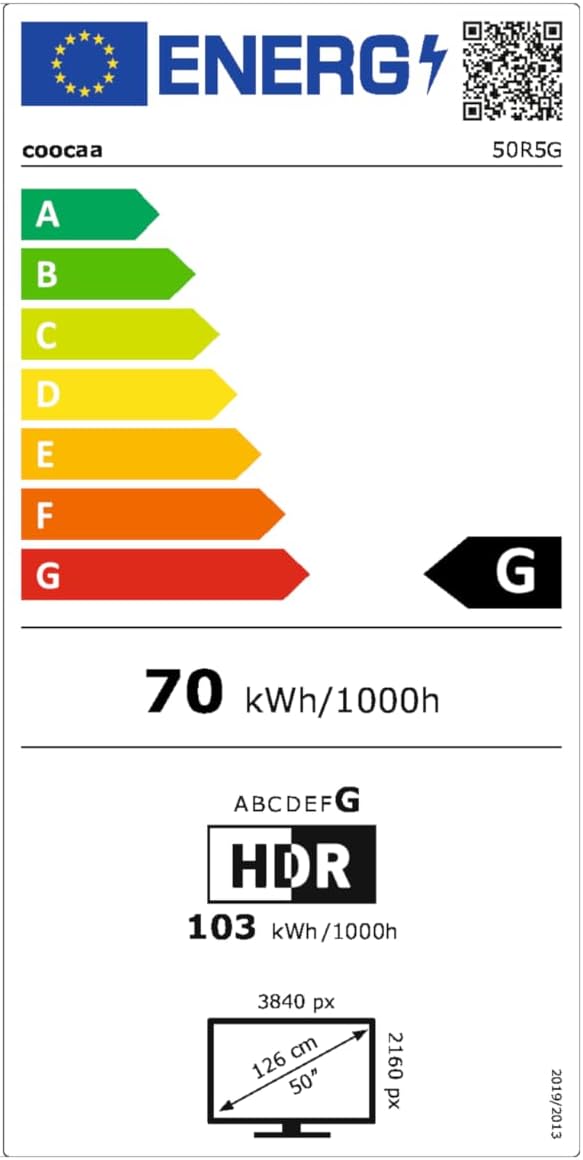
This image presents the EU Energy Label for the coocaa 50R5G TV. It indicates an energy efficiency class of 'G' for both Standard Dynamic Range (SDR) and High Dynamic Range (HDR) content, with power consumption values of 70 kWh/1000h for SDR and 103 kWh/1000h for HDR. The label also shows the screen size of 50 inches (126 cm) and resolution of 3840x2160 pixels. A QR code is included for accessing the EPREL database: Посилання на базу даних EPREL
8. Гарантія та підтримка
Your coocaa ROKU 50R5G TV comes with a manufacturer's warranty. Please refer to the official product documentation for specific terms and conditions.
- General Warranty Period: 2 роки з дати придбання.
- Підтримка продукту: Guaranteed for 7 years.
- Запчастини: Guaranteed availability for 7 years after the product is no longer placed on the market.
- Оновлення програмного забезпечення: Guaranteed for 8 years after the product is no longer placed on the market.
For technical assistance or warranty claims, please contact coocaa customer support through their official webсайт або роздрібний продавець, де було придбано товар.