
1. Вступ
Thank you for choosing the Cherry KW 7100 Mini Multi-Device Compact Keyboard. This manual provides essential information for setting up, operating, and maintaining your new keyboard. Designed for versatility and portability, this keyboard offers seamless connectivity across multiple devices.
2. Що в коробці
- Cherry KW 7100 Mini Multi-Device Compact Keyboard
- USB-C to USB-A Charging/Connection Cable
- 2 батареї AAA
- 2.4 GHz Wireless Nano Receiver (stored magnetically in the keyboard)
- Чохол для транспортування
- Інструкція з експлуатації

Рисунок 1: Зверху вниз view of the Cherry KW 7100 Mini Keyboard.
3. Налаштування
3.1. Встановлення батареї
- Знайдіть відсік для батареї на нижній стороні клавіатури.
- Відкрийте кришку відсіку для батарей.
- Вставте дві батарейки типу AAA, дотримуючись правильної полярності (+/-).
- Надійно закрийте кришку батарейного відсіку.
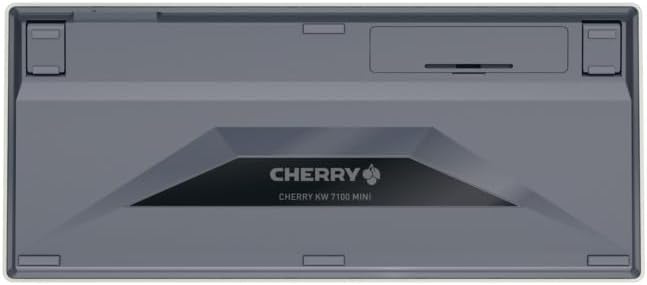
Рисунок 2: Нижня частина клавіатури з відсіком для батареї.
3.2. Підключення клавіатури
The Cherry KW 7100 Mini supports three connection methods: Bluetooth, 2.4 GHz Wireless, and Wired USB-C.
3.2.1. Підключення Bluetooth (до 3 пристроїв)
- Увімкніть клавіатуру за допомогою перемикача живлення, розташованого збоку.
- Press and hold one of the Bluetooth channel keys (F1, F2, or F3) for 3-5 seconds until the corresponding LED indicator blinks rapidly. This indicates pairing mode.
- On your device (laptop, smartphone, tablet), navigate to Bluetooth settings and search for available devices.
- Select "Cherry KW 7100" from the list to pair. The LED will stop blinking and remain solid for a few seconds upon successful connection.
- Repeat for up to two additional devices using the other Bluetooth channel keys (F1, F2, or F3).
3.2.2. Бездротове з'єднання 2.4 ГГц
- Locate the 2.4 GHz wireless nano receiver, typically stored magnetically in a slot on the underside of the keyboard.
- Insert the nano receiver into an available USB-A port on your computer.
- Увімкніть клавіатуру за допомогою вимикача живлення. Клавіатура має автоматично підключитися до приймача.
3.2.3. Дротове підключення USB-C
- Connect one end of the provided USB-C cable to the USB-C port on the keyboard.
- Connect the other end of the USB-C cable to an available USB-A port on your computer.
- The keyboard will function as a wired keyboard.
Video 1: Demonstrating the setup and typing experience of the Cherry KW 7100 Mini Keyboard.
4. Робота з клавіатурою
4.1. Перемикання між підключеними пристроями
To switch between paired Bluetooth devices, simply press the corresponding Bluetooth channel key (F1, F2, or F3) that your device is paired to. The keyboard will automatically connect to the selected device.
4.2. Function Keys (FN)
The keyboard features a dedicated FN key, typically located near the right Shift key. This key, in combination with other keys, activates secondary functions such as media controls, screen brightness, and other system commands. Refer to the keycap legends for specific FN key combinations.
4.3. Світлодіодні індикатори
LED indicators on the keyboard provide information about its status:
- Bluetooth Channel LEDs (F1, F2, F3): Indicate the currently active Bluetooth connection or pairing mode.
- Світлодіодний індикатор Caps Lock: Світиться, коли активовано Caps Lock.
- Індикатор стану батареї: Вказує на низький рівень заряду батареї.
4.4. Регульовані ноги
The keyboard is equipped with stable, fold-out feet on the underside. These allow you to adjust the typing angle for improved ergonomics and comfort.
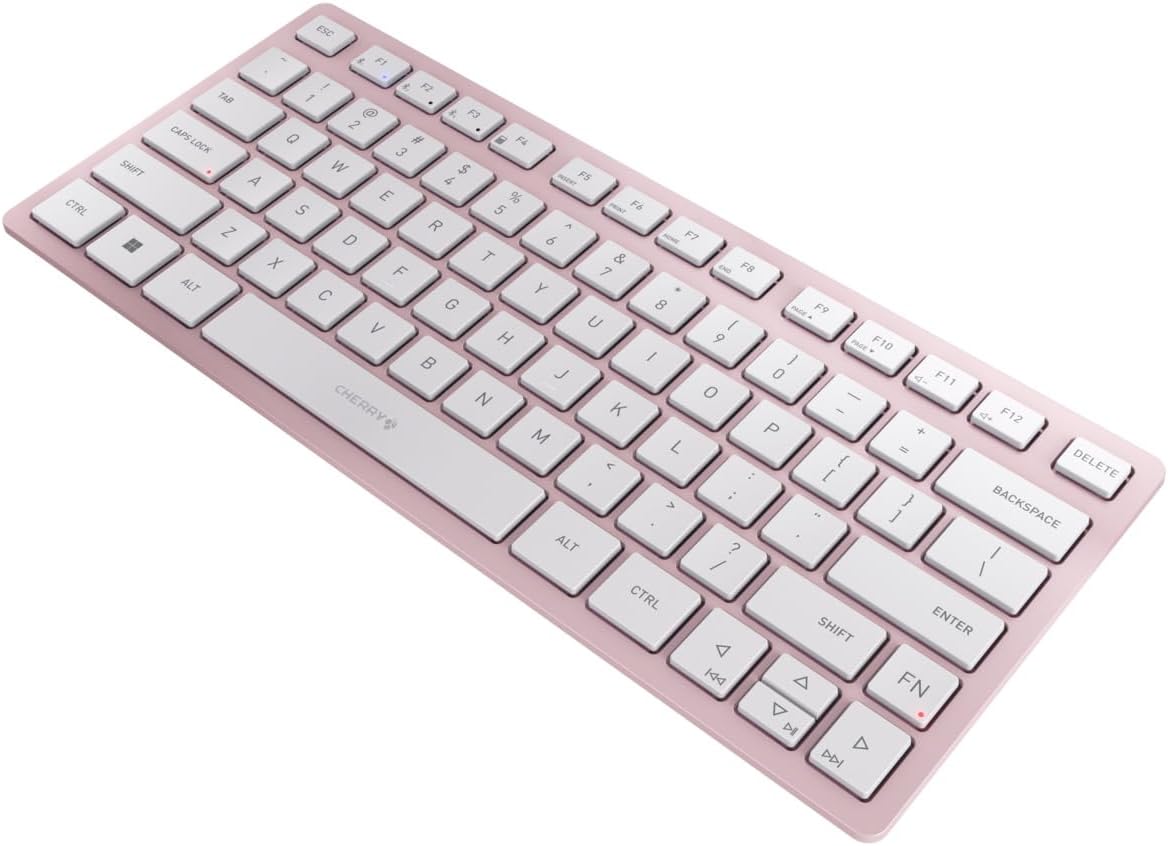
Рисунок 3: Кутовий view of the keyboard, highlighting its slim profile.

Малюнок 4: Сторона view showing the adjustable feet extended for an ergonomic typing angle.
5. Технічне обслуговування
5.1. прибирання
To clean your keyboard, gently wipe the keycaps and surface with a soft, lint-free cloth. For stubborn dirt, slightly dampПротріть тканину водою або м’яким неабразивним розчином для чищення. Уникайте надмірного зволоження та не розпилюйте засоби для чищення безпосередньо на клавіатуру.
5.2. Зберігання
When not in use, especially during travel, store the keyboard in its included carrying case to protect it from dust, scratches, and minor impacts.

Figure 5: The keyboard stored in its protective carrying case.
6. Вирішення проблем
6.1. Клавіатура не підключається
- Переконайтеся, що клавіатуру увімкнено.
- Перевірте батареї та замініть їх, якщо необхідно.
- For Bluetooth, ensure the correct channel (F1, F2, or F3) is selected and the keyboard is in pairing mode (blinking LED).
- For 2.4 GHz wireless, ensure the nano receiver is securely plugged into a USB-A port.
- Try connecting via the USB-C cable to rule out wireless issues.
- Перезапустіть пристрій і повторіть спробу створення пари.
6.2. Клавіші не реагують
- Check the connection as described above.
- Переконайтеся, що під клавішами немає сміття.
- Якщо ви використовуєте дротове підключення, спробуйте інший USB-порт або кабель.
6.3. Короткий термін служби батареї
- Переконайтеся, що ви використовуєте свіжі, високоякісні батарейки типу AAA.
- Turn off the keyboard when not in use to conserve battery power.
7. Технічні характеристики
| Особливість | Специфікація |
|---|---|
| Назва моделі | KW 7100 |
| Номер моделі товару | JK-7100US-19 |
| Бренд | вишня |
| Технологія підключення | Bluetooth 5.1 (3 channels), 2.4 GHz Wireless, USB-C Wired |
| Сумісні пристрої | Ноутбук, смартфон, планшет |
| Опис клавіатури | Compact, Multi-Device |
| Ключовий механізм | CHERRY SX Scissor Mechanism |
| Джерело живлення | 2 батареї AAA |
| Шифрування | АЕС-128 |
| Розміри продукту | 11.6 x 5.1 x 0.6 дюймів |
| Вага товару | 1.4 фунта |
| матеріал | Метал, пластик |
| Колір | Вишневий цвіт |
8. Гарантія та підтримка
This product is covered by Cherry's standard manufacturer warranty. For detailed warranty information, technical support, or service inquiries, please visit the official Cherry webсайт або зверніться безпосередньо до служби підтримки клієнтів.
Виробник: вишня
Webсайт: www.cherry.de