
1. Вступ
This manual provides detailed instructions for the setup, operation, and maintenance of your KOORUI MG27K1Q 27-inch QHD 240Hz VA Mini LED Gaming Monitor. Please read this manual thoroughly before using the product to ensure proper functionality and to prevent damage.
2. Вміст упаковки
Verify that all items listed below are included in your product package. If any items are missing or damaged, please contact KOORUI customer support.
- KOORUI MG27K1Q 27-inch Gaming Monitor
- Monitor Stand (Base and Support)
- Адаптер живлення
- Кабель DisplayPort (DP)
3. Налаштування
3.1 Збірка підставки
- Обережно вийміть компоненти монітора та підставки з упаковки.
- Attach the stand support to the monitor panel. Ensure it clicks securely into place or is fastened with screws if provided.
- Connect the stand base to the stand support. Tighten any screws to secure the assembly.
- Помістіть зібраний монітор на стійку, рівну поверхню.
3.2 Підключення до пристроїв
The monitor offers multiple connectivity options for various devices. Ensure the monitor is powered off before making any connections.
- DisplayPort (DP 1.4): Connect the included DisplayPort cable from your computer's graphics card to the DisplayPort input on the monitor for optimal performance, including 240Hz refresh rate and Adaptive Sync.
- HDMI (HDMI 2.0): Connect an HDMI cable from your device (PC, gaming console) to one of the two HDMI 2.0 inputs on the monitor.
- Аудіо вихід: Use the 3.5mm audio jack to connect external speakers or headphones.
Зображення: Задня частина view of the monitor illustrating the available connection ports (DisplayPort 1.4, 2x HDMI 2.0, Audio Out) and VESA mount points. Examples of compatible devices like PS5, Xbox, Laptop, and Nintendo Switch are shown.
3.3 Підключення живлення
- Connect the power adapter to the monitor's power input.
- Підключіть адаптер живлення до настінної розетки.
4. Експлуатація монітора
4.1 Основна операція
- Увімкнення/вимкнення живлення: Press the power button, usually located on the back or bottom right of the monitor, to turn the monitor on or off.
- Вибір входу: Use the On-Screen Display (OSD) menu to select the desired input source (DP, HDMI 1, HDMI 2).
4.2 Функції дисплея
The KOORUI MG27K1Q monitor is equipped with advanced display technologies for an enhanced visual experience.
- Роздільна здатність QHD (2560x1440): Забезпечує чіткі та деталізовані зображення.
- VA Mini LED Panel: Offers deep blacks, high contrast, and vibrant colors.
- HDR 1000: High Dynamic Range support for brighter whites and darker blacks, enhancing visual depth and realism.

Image: Visual comparison demonstrating the enhanced contrast and detail provided by HDR 1000 technology compared to a standard display.
4.3 Продуктивність у іграх
Designed for gaming, this monitor delivers smooth and responsive gameplay.
- Частота оновлення 240 Гц: Ensures ultra-smooth motion and reduced input lag.
- Час відгуку 1 мс: Мінімізує розмиття та ореоли руху для чітких, динамічних сцен.
- Adaptive Sync (G-SYNC Compatible): Синхронізує частоту оновлення монітора з частотою кадрів вашого графічного процесора, щоб усунути розриви та заїкання екрана.
- Exclusive Game Display Modes: Features like Crosshair, Timer, and FPS Counter can be enabled via the OSD for an advantagе в іграх.

Image: The monitor displaying a high-speed racing game, emphasizing its 240Hz refresh rate and 1ms response time for a fluid gaming experience.
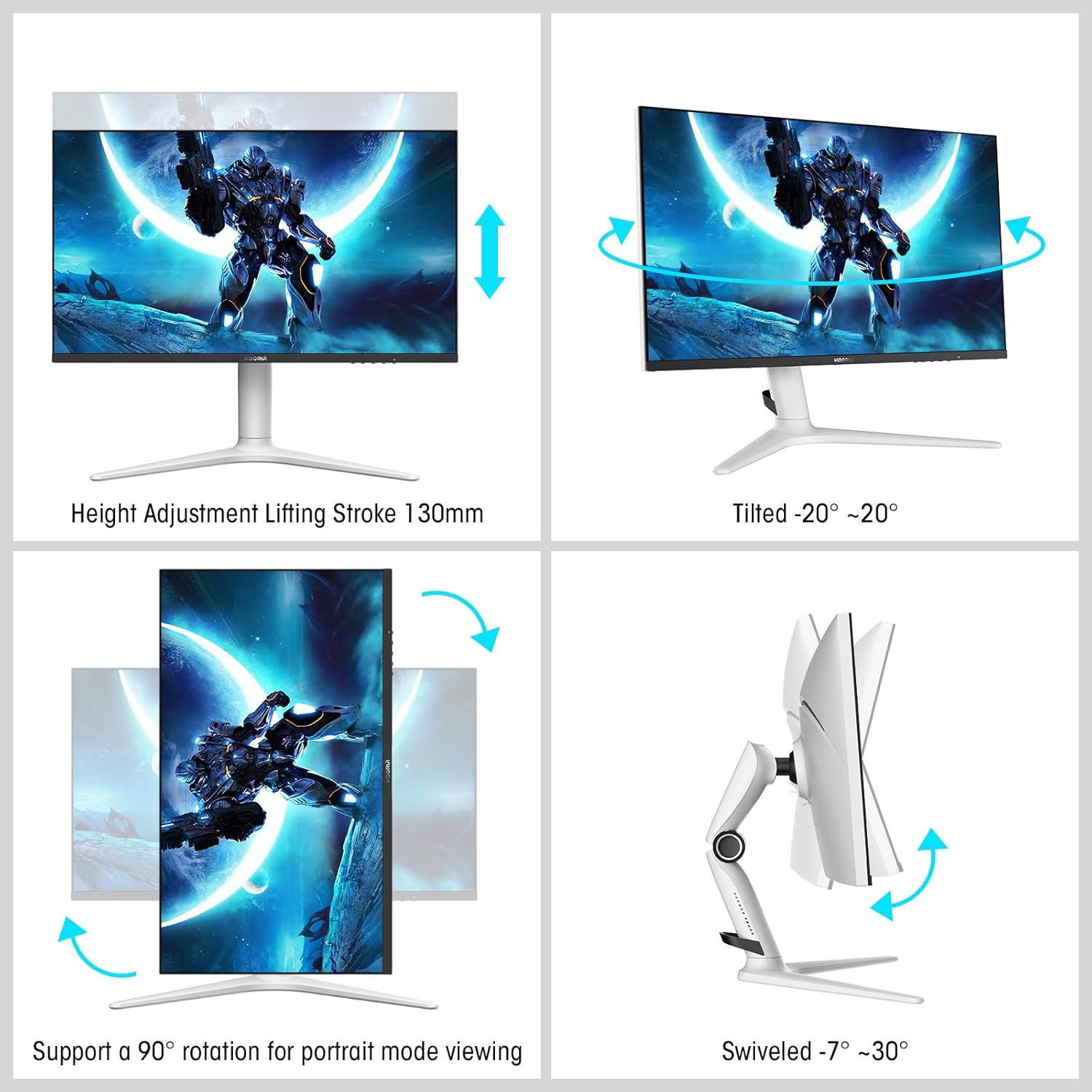
Image: A gaming scenario on the monitor, illustrating the 'Exclusive Game Display Mode' features such as Crosshair, Timer, FPS Counter, and RTS Counter, alongside Adaptive Sync functionality.
4.4 Функції догляду за очима
The monitor includes features to reduce eye strain during prolonged use.
- Фільтр синього світла: Reduces harmful blue light emissions. This can be adjusted or enabled/disabled through the OSD menu.
5. Коригування
Підставка для монітора дозволяє здійснювати різні ергономічні налаштування для оптимізації вашого viewкомфорту.
- Регулювання висоти: Adjust the monitor height up to 130mm.
- Нахил: Tilt the screen from -7° (downward) to 30° (upward).
- Поворотний: Rotate the monitor horizontally from -20° to 20°.
- Опорна точка: Rotate the screen 90° for portrait mode viewінж.
- Кріплення VESA: Compatible with VESA 75x75mm mounting solutions for alternative setups.

Image: Diagrams demonstrating the monitor's ergonomic adjustments, including height, tilt, swivel, and pivot for portrait mode.
6. Технічні характеристики
| Особливість | Специфікація |
|---|---|
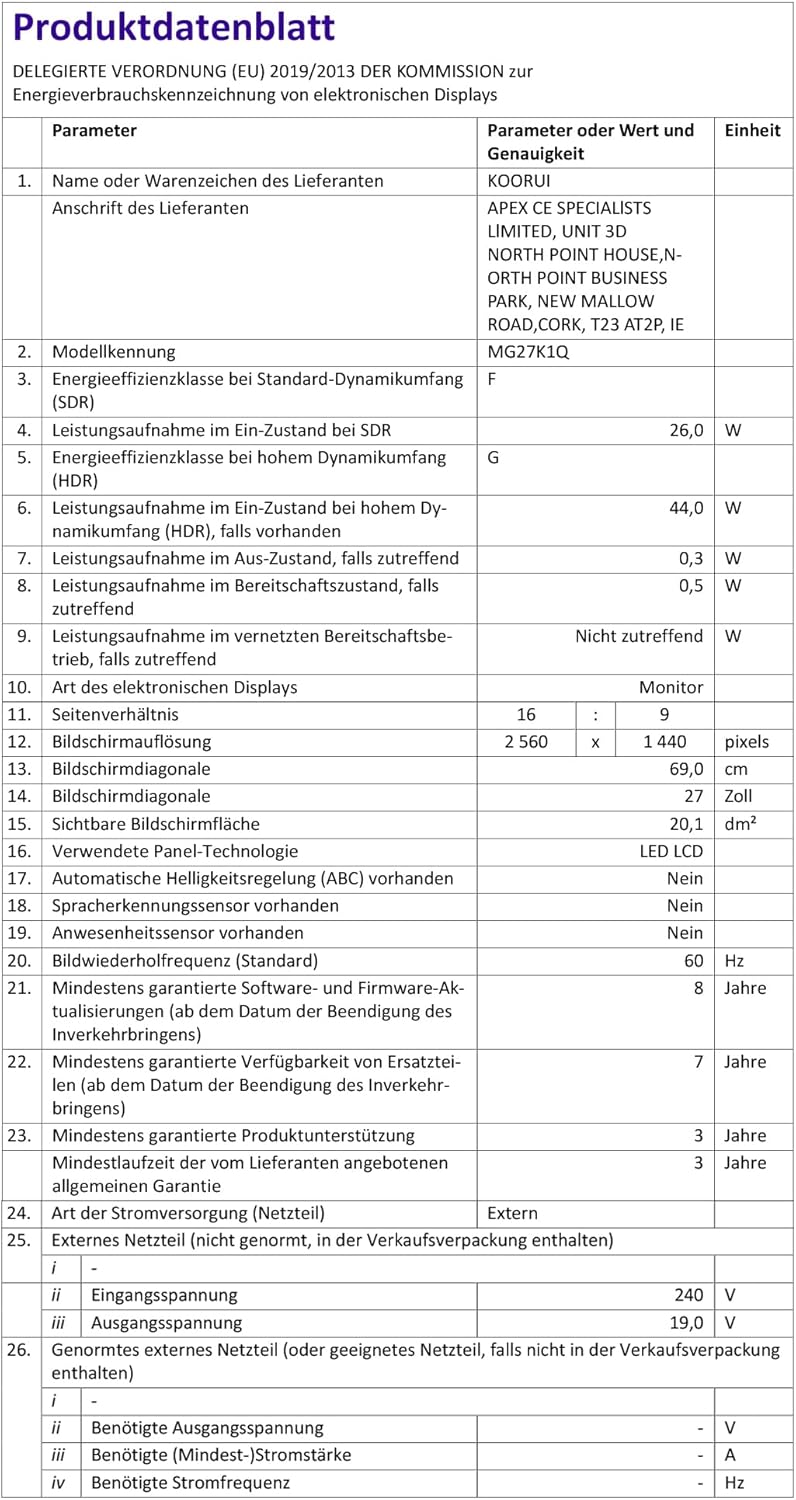
| Номер моделі | MG27K1Q |
| Розмір екрана | 27 дюймів |
| Тип панелі | VA Mini-LED |
| роздільна здатність | QHD (2560 x 1440) |
| Співвідношення сторін | 16:9 |
| Частота оновлення | 240 Гц |
| Час відгуку | 1 мс |
| Коефіцієнт контрастності (статичний) | 3000:1 |
| Коефіцієнт контрастності (динамічний) | 20,000,000:1 |
| Яскравість | 275 ніт |
| Viewкут нахилу | 178 градусів |
| Підтримка HDR | HDR 1000 |
| Адаптивна синхронізація | Compatible with NVIDIA G-SYNC |
| Підключення | 2x HDMI 2.0, 1x DisplayPort 1.4, аудіовихід |
| Гора VESA | 75х75 мм |
| Споживана потужність | 90 Вт |
| Розміри (Д x Ш x В) | 32 х 61.3 х 52.3 см |
| вага | 9.34 кілограма |
| Особливості | Blue Light Filter, Gaming Modes (Crosshair, Timer, FPS Counter) |
7. Вирішення проблем
Якщо у вас виникли проблеми з монітором, будь ласка, зверніться до наступних поширених кроків усунення несправностей:
- Немає живлення: Ensure the power adapter is securely connected to both the monitor and a working power outlet. Check if the power indicator light on the monitor is on.
- Немає сигналу: Verify that the video cable (DP or HDMI) is correctly connected to both the monitor and your computer/device. Ensure the correct input source is selected in the monitor's OSD menu. Try a different video cable or port.
- Мерехтіння/спотворене зображення: Check the video cable connections. Ensure your graphics card drivers are up to date. Try reducing the refresh rate in your display settings to see if the issue persists.
- Adaptive Sync Not Working: Ensure Adaptive Sync (G-SYNC Compatible) is enabled in both the monitor's OSD settings and your graphics card control panel. Use a DisplayPort cable for optimal performance.
- Мертві пікселі: While rare, a small number of dead pixels may be considered within manufacturing tolerances. Refer to the warranty policy for specific details regarding pixel defects.
8. Гарантія та підтримка
KOORUI provides comprehensive support for your product.
- Гарантія: This monitor comes with a 3-year warranty from the date of purchase.
- Служба заміни: A 1-year replacement service is offered for qualifying issues.
- Підтримка клієнтів: If you encounter any damages, malfunctions, or find missing accessories, please do not hesitate to contact KOORUI customer support for assistance.