
1. Вступ
This manual provides essential information for the safe and efficient use of your TCL 32L5AG 32-inch Full HD Smart Google TV. Please read these instructions thoroughly before operating the device and retain them for future reference. This television combines a Full HD display with Google TV functionality, offering a wide range of entertainment options and smart features.
2. Інформація про безпеку
Always adhere to the following safety precautions to prevent electric shock, fire, or damage to the product:
- Не піддавайте телевізор дії дощу або вологи.
- Забезпечте належну вентиляцію; не блокуйте вентиляційні отвори.
- Використовуйте лише шнур живлення, що постачається з телевізором.
- Не відкривайте телевізорasing; звертайтеся до кваліфікованого персоналу з усіма видами обслуговування.
- Тримайте телевізор подалі від прямих сонячних променів, джерел тепла та сильних магнітних полів.
- Place the TV on a stable, level surface or mount it securely to a wall using a VESA-compliant bracket.
3. Продукт закінчивсяview
The TCL 32L5AG is a 32-inch Full HD Smart Google TV designed for an immersive viewing experience. It features a sleek, bezel-less design and integrates advanced image processing technologies.

Зображення: спереду view of the TCL 32L5AG 32-inch Full HD Smart Google TV.
4. Налаштування
4.1 Розпакування
Обережно вийміть телевізор та всі аксесуари з упаковки. Переконайтеся, що всі компоненти присутні:
- TCL 32L5AG TV unit
- Дистанційне керування
- Шнур живлення
- TV stand components and screws
- Керівництво користувача (цей документ)
4.2 Встановлення підставки
Щоб встановити підставку для телевізора:
- Покладіть телевізор екраном донизу на м’яку, рівну поверхню, щоб запобігти пошкодженню екрана.
- Вирівняйте основи підставки з відповідними пазами на нижній панелі телевізора.
- Закріпіть стійки за допомогою наданих гвинтів.

Image: Diagram showing the TV dimensions and how the stand attaches to the base of the television.
4.3 З'єднувальні кабелі
Connect necessary cables to the TV's rear ports:
- Потужність: Підключіть шнур живлення до телевізора та розетки.
- Антена: Connect your terrestrial or satellite antenna cable to the ANTENNA INPUT port.
- HDMI: For external devices like Blu-ray players or game consoles, use the HDMI INPUT 1 or 2 ports.
- LAN: Для дротового підключення до Інтернету підключіть кабель Ethernet до порту LAN.
- USB: For external storage (e.g., HDD for recording), use the USB port.
- Оптичний цифровий аудіовихід: Для підключення до саундбара або домашнього кінотеатру.
- Вихід для навушників: Для підключення навушників.
- Відео вхід: Для старіших пристроїв, що використовують композитний відеосигнал.
- Слот для картки miniB-CAS: Insert your miniB-CAS card for digital broadcast reception (required for digital broadcasting in Japan).
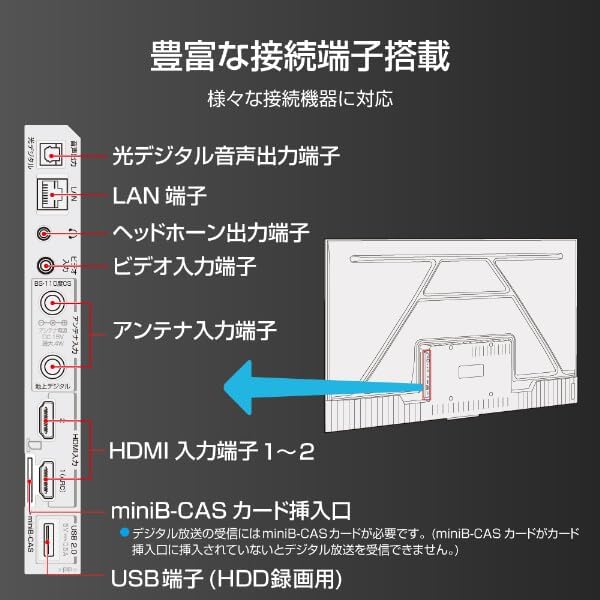
Image: Diagram illustrating the various input and output ports on the back of the TCL 32L5AG TV, including HDMI, USB, LAN, antenna, and audio outputs.
4.4 Початкове налаштування
After connecting all cables and powering on the TV for the first time, follow the on-screen instructions to complete the initial setup, which includes:
- Вибір мови.
- Мережеве підключення (Wi-Fi або дротова локальна мережа).
- Google account login for Google TV features.
- Channel scanning for broadcast TV.
5. Інструкція з експлуатації
5.1 Основні операції з телевізором
- Увімкнення/вимкнення живлення: Натисніть кнопку живлення на пульті дистанційного керування.
- Вибір входу: Use the 'Input' button on the remote to switch between HDMI, TV, and other sources.
- Регулювання гучності: Використовуйте кнопки «Збільшення/зменшення гучності».
- Зміна каналу: Use the 'Channel Up/Down' buttons for broadcast TV.
5.2 Функції Google TV
Your TCL 32L5AG comes with Google TV, providing a personalized and integrated entertainment experience.
- Content Browsing: The home screen displays recommended content based on your viewing history and preferences from various streaming services.
- Voice Search (OK Google): Press the Google Assistant button on your remote and speak into the microphone to search for movies, shows, or control your TV.
- Програми для потокового передавання: Access popular services like Netflix, YouTube, Amazon Prime Video, Disney+, Hulu, and more directly from the TV.

Зображення: Знімок екрана головного екрана Google TV, на якому відображаються різні програми для потокового передавання даних та рекомендації щодо контенту.
5.3 Вбудований Chromecast
The TV includes Chromecast built-in, allowing you to cast content from your smartphone, tablet, or computer directly to the TV screen.
- Переконайтеся, що ваш мобільний пристрій і телевізор підключені до однієї мережі Wi-Fi.
- Відкрийте на своєму мобільному пристрої програму з підтримкою Chromecast (наприклад, YouTube, Netflix).
- Торкніться значка трансляції (
 ) у програмі.
 - Select your TCL TV from the list of devices to start casting.

Image: A smartphone displaying a video, with an arrow indicating it is casting to the larger TCL TV screen.
6. особливості
6.1 Algo Engine Lite
The Algo Engine Lite utilizes an advanced image analysis algorithm to enhance picture quality for both broadcast TV and streaming services, delivering a high-quality visual experience.

Image: A close-up of a microchip labeled "Algo Engine Lite" on a circuit board, representing the TV's image processing unit.
6.1.1 Detail Restoration
The Algo Engine effectively suppresses noise around text and edges, as well as wave-like noise in flat image areas. It also intelligently upscales HD and 2K images to 4K resolution, reproducing high-definition visuals.

Image: A split image showing a cityscape. The 'Before' side appears less sharp with more noise, while the 'After' side, processed by Algo Engine, shows improved detail and reduced noise.
6.1.2 Superior Contrast (Micro Dimming)
Equipped with a "Micro Dimming" function, the Algo Engine analyzes image information in detail for each zone. By clearly distinguishing brightness and darkness down to fine details, it renders landscapes with a more realistic sense of depth.

Image: A split image of a night city scene. The 'Without Micro Dimming' side shows less defined lights and shadows, while the 'With Micro Dimming' side exhibits enhanced contrast and clearer details in both bright and dark areas.
6.1.3 Precise Color Management
With 3D color management, the Algo Engine suppresses color gamut loss during color transitions, accurately reproducing tones and colors from dark to bright areas.

Image: A split image showing various food bowls. The 'Before' side has muted or inaccurate colors, while the 'After' side, processed by Algo Engine, displays vibrant and accurate colors with a wider color spectrum indicated by a gradient bar.
6.1.4 Enhanced HDR Expression
The Algo Engine analyzes High Dynamic Range (HDR) images without omission, flexibly adapting to a wide range of brightness levels. It faithfully reproduces the bright and dark areas of the image, supporting HDR10 and HLG formats (1080p only).

Image: A split image of a sunset landscape. The 'Before' side shows less dynamic range, while the 'After' side, processed by Algo Engine, reveals richer colors, brighter highlights, and deeper shadows, enhancing the HDR effect.
6.2 Full HD LCD Display
The TV features a Full HD LCD panel with direct-lit LED backlighting, providing bright and high-quality images across the entire screen. The panel resolution is twice that of standard HD, allowing for detailed visuals and rich content expression.

Image: A split image comparing an HD display to a Full HD display, showing the difference in pixel density and clarity, particularly visible in magnified sections of the image.
6.3 Dolby Audio
Experience clear and powerful sound with Dolby Audio support, enhancing your overall entertainment experience.

Image: A visual representation of sound waves emanating from a waterfall, illustrating the immersive audio experience provided by Dolby Audio.
6.4 Безрамковий дизайн
The TV features a metal bezel-less frame, maximizing the screen area and enhancing the aesthetic presence in your living space.

Зображення: Три крупним планом views of the TCL TV, highlighting its thin metal frame and minimal bezels, showcasing the bezel-less design from different angles.
7. Технічні характеристики
| Особливість | опис |
|---|---|
| Бренд | TCL |
| Назва моделі | 32L5AG |
| Технологія дисплея | ЖК |
| роздільна здатність | Full HD (1920 x 1080) |
| Частота оновлення | 120 Гц |
| Співвідношення сторін | 1.78:1 |
| Коефіцієнт контрастності | 4000:1 |
| Підтримка HDR | HDR10 |
| Motion Enhancement Technology | Algo Engine Lite |
| Image Quality Enhancement Technology | Algo Engine |
| Технологія підключення | Bluetooth, WiFi |
| Recommended Internet Services | YouTube, Netflix |
| Аудіо вхід | RCA, Bluetooth |
| Формат сигналу | Composite, HDMI |
| Порти HDMI | 2 |
| Порти USB 3.0 | 1 |
| Розміри продукту (Д x Ш x В) | 18 х 71.6 х 46.8 см |
| Вага продукту | 5 кг |
| Особливості динаміків | Колонки 10 Вт |
| Speaker Channel Configuration | 2.0 |
| Wattage | 65 Вт |
| Споживана потужність | 64 кВт/год |
| Спосіб контролю | Дистанційний |
| Формат кодування відео | H.264, H.265 (HEVC) |
| Release Year / Model Year | 2021 |
| Стандарт кріплення VESA | 100х100 мм |
8. Технічне обслуговування
Щоб забезпечити довговічність та оптимальну роботу вашого телевізора, дотримуйтесь цих правил технічного обслуговування:
- Очищення екрану: Обережно протріть екран м’якою тканиною без ворсу. Для стійких плям злегка протрітьampПротріть тканину водою або спеціалізованим засобом для чищення екранів. Не розпилюйте рідину безпосередньо на екран.
- Очищення Casing: Використовуйте м’яку суху тканину для протирання телевізораasing. Уникайте абразивних засобів для чищення або розчинників.
- Вентиляція: Ensure the ventilation openings on the back of the TV are not blocked by dust or objects. Regularly clean any dust accumulation.
- Шнур живлення: Periodically check the power cord for any damage. If damaged, contact customer support for a replacement.
9. Вирішення проблем
Якщо у вас виникли проблеми з телевізором, зверніться до наступних поширених проблем та способів їх вирішення:
| проблема | Можливе рішення |
|---|---|
| Немає живлення | Перевірте, чи шнур живлення надійно підключено до телевізора та розетки. Спробуйте іншу розетку. |
| Немає зображення, але звук є | Переконайтеся, що вибрано правильне джерело вхідного сигналу. Перевірте кабельні з’єднання із зовнішніми пристроями. |
| Звуку немає, але зображення є | Check volume level and mute settings. Ensure external audio systems are correctly connected and powered on. |
| Пульт не працює | Замініть батарейки. Переконайтеся, що між пультом дистанційного керування та ІЧ-датчиком телевізора немає перешкод. |
| Неможливо підключитися до Wi-Fi | Перевірте свій роутер і модем. Повторно введіть пароль Wi-Fi. Спробуйте перезавантажити телевізор і роутер. |
| Google TV features not working | Ensure you are logged into your Google account and have an active internet connection. |
Якщо проблема не зникає після спроби цих рішень, зверніться до служби підтримки клієнтів.
10. Гарантія та підтримка
Your TCL 32L5AG TV comes with a limited warranty. Please refer to the warranty card included in your product packaging for specific terms and conditions. For technical support, service, or warranty claims, please contact TCL customer service through their official webсайт або контактну інформацію, зазначену у вашій гарантійній документації.
For the latest information and support, visit the official TCL webсайт: www.tcl.com