
1. Вступ
Thank you for choosing the ScopeAround M28 Digital Otoscope. This device is designed to provide a clear visual inspection of the ear canal, teeth, mouth, and other small areas. It features a 3.9mm ultra-thin HD camera with LED lights and a 2.8-inch IPS LCD screen for direct viewing. This manual provides essential information for safe and effective use, setup, operation, and maintenance of your otoscope.
2. Важлива інформація з безпеки
WARNING: Read all safety warnings and instructions before use. Failure to follow warnings and instructions may result in electrical shock, fire, and/or serious injury. Save all warnings and instructions for future reference.
- This device is intended for personal visual inspection and earwax removal. Consult a medical professional for diagnosis or treatment of ear conditions.
- Do not insert the otoscope too deeply into the ear canal. Use the included speculums to prevent excessive insertion and avoid injury.
- Always clean the camera lens and accessories with alcohol prep pads before and after each use to maintain hygiene and prevent cross-contamination.
- Keep the device out of reach of children. Adult supervision is required when used by children.
- Не використовуйте пристрій, якщо він пошкоджений або не працює.
- Уникайте впливу на пристрій екстремальних температур або прямих сонячних променів.
- Перед використанням переконайтеся, що пристрій повністю заряджений для оптимальної роботи.
3. Вміст упаковки
Перевірте наявність усіх предметів у вашій упаковці:
- Otoscope Device (Main unit with 2.8" IPS LCD screen)
- Camera Cable with 3.9mm Ultra-Thin HD Camera Lens
- Ear Spoon attachment
- Specula (3 pieces)
- Зарядний кабель USB Type-C
- Магнітна підставка
- Набір ватних паличок
- Прокладки для приготування спирту
- Посібник користувача
- Safety Warnings Card

4. Продукт закінчивсяview
The ScopeAround M28 Digital Otoscope is a compact and user-friendly device designed for visual inspection. Key features include:
- 3.9mm Ultra-Thin Camera Lens: Allows easy entry into narrow ear canals.
- 720P HD Camera with 6 LED Lights: Provides clear, bright images and videos of the inspection area.
- 2.8" IPS LCD Screen: Offers direct, real-time viewing without external apps or devices.
- Дизайн Plug & Play: Simple operation, no Wi-Fi or app required.
- Магнітна підставка: Enables hands-free operation for convenience.
- Акумулятор 1200mAh: Provides 2-3 hours of continuous use.
- Fixed Focal Length: Optimized for sharp images at 0.4 to 0.8 inches.
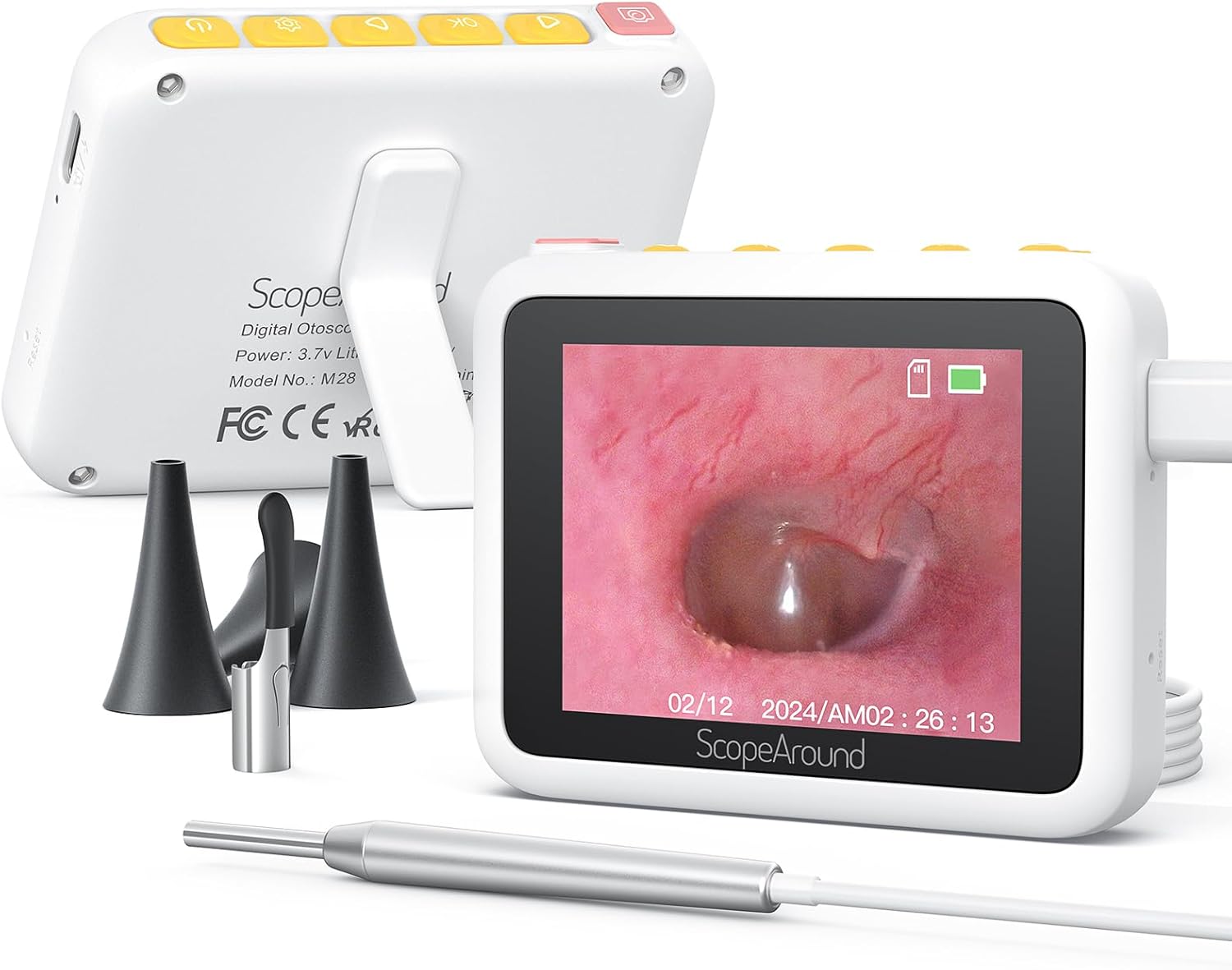


5. Інструкції з налаштування
Follow these steps to set up your ScopeAround M28 Digital Otoscope:
- Зарядіть пристрій: Before first use, fully charge the otoscope device using the provided USB Type-C charging cable. Connect the cable to the charging port on the device and a compatible USB power source. The battery indicator on the screen will show charging status.
- Attach Camera Probe: Plug the camera probe cable into the designated port on the otoscope device.
- Виберіть та прикріпіть аксесуар: Depending on your intended use, attach either an ear spoon or a speculum to the tip of the camera probe. Ensure it is securely fitted.
- Увімкнення: Long press the power button (usually located on the top right) to turn on the device. The screen will display the ScopeAround logo and then the live camera feed.
- Attach Magnetic Stand (Optional): Для використання в режимі "вільні руки" viewing, attach the magnetic stand to the back of the main unit. It can be positioned to prop up the screen at a comfortable viewкут.


6. Інструкція з експлуатації
Once the device is set up, you can begin your inspection:
- Жити View: The 2.8" IPS LCD screen will display a real-time view з камери.
- Фотографування: Press the Photo/Video button (usually the leftmost button with a camera icon) to capture a still image.
- Запис відео: Hold down the Photo/Video button to start recording a video. Press it again to stop recording.
- Функція масштабування: Use the Left/Zoom buttons to adjust the magnification of the image on the screen (up to 1.5X zoom).
- Поворот зображення: Use the Right/Image Rotate buttons to rotate the image 180 degrees for better viewкути.
- Доступ до налаштувань: Press the Setting button to enter the device menu. Here you can adjust resolution, language, date/time, and other parameters.
- ReviewЗМІ: Navigate to the Playback option in the settings menu to view зроблені фотографії та відео.
- Перенесення Files: Connect the device to a computer using the USB Type-C cable to transfer captured images and videos.


7. Технічне обслуговування та догляд
Proper maintenance ensures the longevity and hygiene of your otoscope:
- Очищення лінзи: Use the provided alcohol prep pads or Q-tips to gently clean the camera lens before and after each use. Ensure no residue remains.
- Аксесуари для чищення: The ear spoon and speculums should also be cleaned with alcohol prep pads after each use.
- Зберігання: Store the device and its accessories in a clean, dry place away from direct sunlight and extreme temperatures.
- Догляд за акумулятором: Регулярно заряджайте пристрій, навіть якщо він використовується нечасто, щоб підтримувати його в робочому стані. Уникайте повного розряджання акумулятора протягом тривалого часу.

8. Вирішення проблем
If you encounter issues with your ScopeAround M28 Digital Otoscope, try the following:
- Немає живлення: Переконайтеся, що пристрій повністю заряджений. Підключіть його до джерела живлення та зачекайте кілька хвилин, перш ніж спробувати знову ввімкнути.
- Немає зображення на екрані: Verify that the camera probe is securely plugged into the device. If the issue persists, try unplugging and re-plugging the camera probe.
- Розмите зображення: Ensure the camera lens is clean. The device has a fixed focal length, so adjust the distance between the camera tip and the object for optimal clarity (0.4-0.8 inches).
- Пристрій не відповідає: Use a thin pin to press the reset button (located near the charging port) to restart the device.
- Неможливо перенести Files: Ensure the device is properly connected to your computer via the USB Type-C cable. Check your computer's file explorer for the device.
9. Технічні характеристики
| Особливість | Специфікація |
|---|---|
| Розміри продукту | 3.94 x 3.94 x 3.94 дюймів |
| Вага товару | 8.8 унції |
| Діаметр об'єктива камери | 3.9 мм |
| Екран дисплея | 2.8" IPS LCD |
| Роздільна здатність відео | 1280 x 720 пікселів (720P HD) |
| Ємність акумулятора | Полімер літію 1200mAh |
| Час роботи | 2-3 hours (continuous usage) |
| Зберігання | Internal (8GB, not expandable) |
| Підключення | USB Type-C (for charging and data transfer) |
| Виробник | ScopeAround |
10. Гарантія та підтримка
ScopeAround is committed to customer satisfaction. This product comes with a standard warranty as per the retailer's policy. For any questions, technical support, or warranty claims, please contact our US-based after-sales support team. Contact information can typically be found on our official webсайт або через вашу платформу для покупок.
We are dedicated to providing high-quality technology and support for your health and wellness needs.