
1. Вступ
This instruction manual provides essential information for the proper assembly, operation, and maintenance of your Tilta Full Camera Cage Basic Kit for the RED KOMODO-X camera. This kit is designed to enhance the durability, versatility, and handling of your camera setup. Please read this manual thoroughly before use to ensure optimal performance and longevity of your equipment.
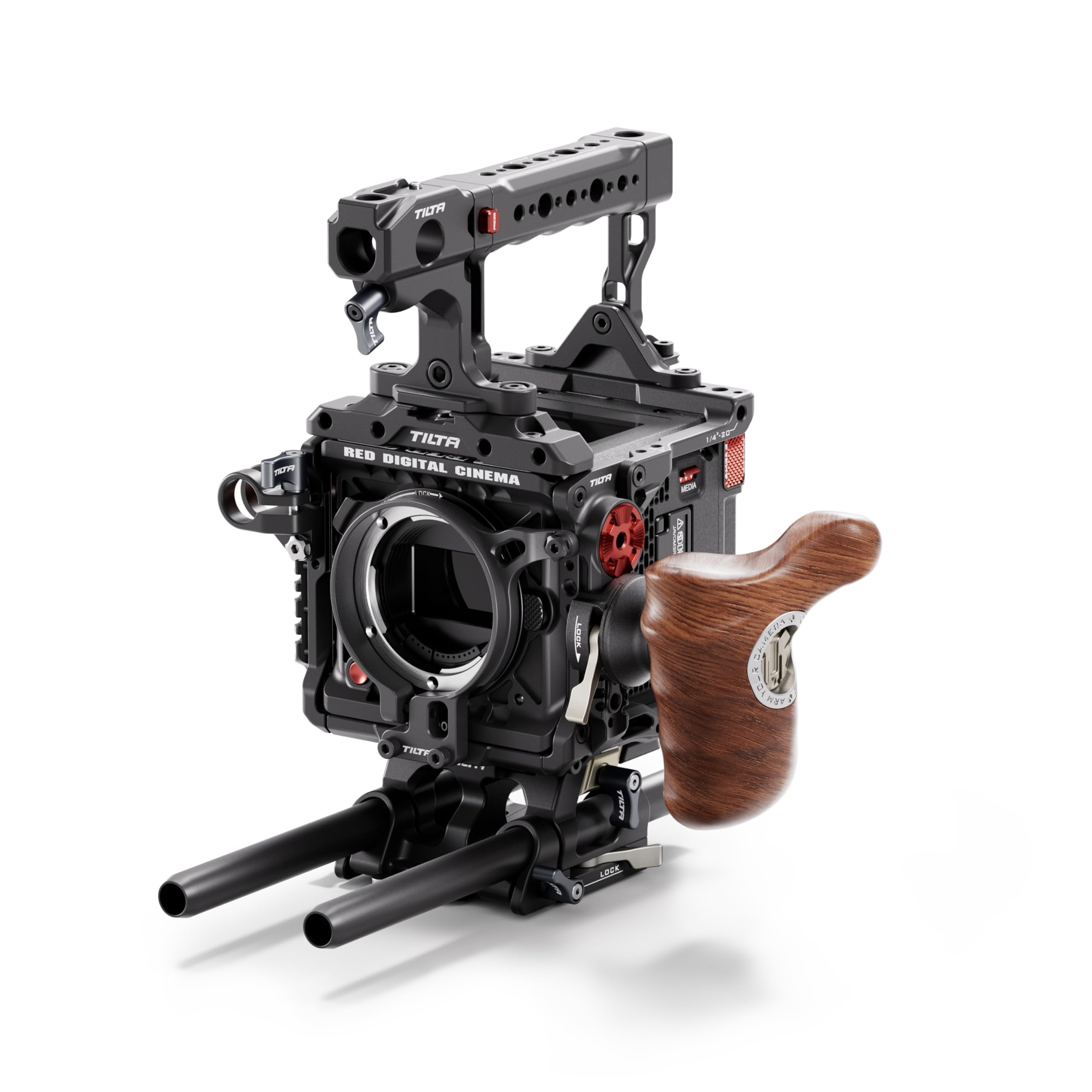
Figure 1.1: Tilta Full Camera Cage Basic Kit for RED KOMODO-X, fully assembled with camera and external monitor.
2. Що в коробці
The Tilta Full Camera Cage Basic Kit for RED KOMODO-X (Black) includes the following components:
- Full Camera Cage for RED KOMODO-X
- Foldable Top Handle
- Advanced Left Side Wooden Handle
- Quick Release Baseplate (TA-T53-QRBP-B)
- Підтримка адаптера об'єктива
3. Налаштування та складання
Follow these steps to assemble your camera cage kit:
3.1 Attaching the Camera Cage
- Ensure your RED KOMODO-X camera is powered off and any attached accessories are removed.
- Carefully align the camera with the bottom plate of the cage.
- Secure the camera to the cage using the provided screws. Ensure a snug fit without overtightening.
Малюнок 3.1: Розібраний view showing the modular components of the camera cage and how they fit around the RED KOMODO-X camera body.
3.2 Installing the Top Handle
- Attach the Foldable Top Handle to the top of the camera cage using the designated mounting points and screws.
- Ensure the handle is securely fastened for safe carrying and operation.

Figure 3.2: The foldable top handle attached to the camera cage, providing a secure grip and additional mounting options.
3.3 Attaching the Left Side Wooden Handle
- Mount the Advanced Left Side Wooden Handle to the NATO rail on the left side of the camera cage.
- Tighten the locking mechanism to secure the handle in place.
3.4 Mounting the Quick Release Baseplate
- Attach the Quick Release Baseplate (TA-T53-QRBP-B) to the bottom of the camera cage.
- This baseplate allows for rapid transitions between tripod and handheld configurations.

Figure 3.3: The quick-release baseplate facilitates easy mounting and disassembly from tripods or other support systems.
3.5 Installing the Lens Adapter Support
- If using a lens adapter, attach the Lens Adapter Support to the front of the cage to provide additional stability for heavier lenses.
- Adjust the support to cradle the lens adapter securely.

Рисунок 3.4: A clamp-based lens adapter support provides secure and firm mounting for various lens setups.
4. Інструкція з експлуатації
The Tilta Full Camera Cage provides a robust framework for your RED KOMODO-X, offering numerous mounting points and enhanced ergonomics.
4.1 Монтаж аксесуарів
- Utilize the multiple 1/4"-20, 3/8"-16, and M4 threads, NATO rails, and ARRI rosettes on the cage to attach various accessories such as monitors, microphones, lights, and wireless video transmitters.
- Ensure all accessories are securely fastened to prevent accidental detachment during operation.

Figure 4.1: The cage offers flexible mounting options for a wide range of camera accessories.
4.2 Ергономіка та керування
- The Foldable Top Handle and Advanced Left Side Wooden Handle provide comfortable and secure grips for handheld shooting, improving stability and control.
- Adjust the position of the handles as needed for optimal balance and comfort.
4.3 Quick Release Functionality
- The Quick Release Baseplate allows for swift transitions between different camera support systems, such as tripods, gimbals, or shoulder rigs.
- Familiarize yourself with the quick-release mechanism before use in a production environment.
4.4 продукт закінченоview відео
Відео 4.1: Оверview of the Tilta Camera Cage for RED KOMODO-X, demonstrating its features and assembly.
5. Технічне обслуговування
- Прибирання: Use a soft, dry cloth to wipe down the cage and handles. Avoid abrasive cleaners or solvents that could damage the finish.
- Огляд: Regularly inspect all screws and mounting points for tightness. Retighten as necessary to ensure secure operation.
- Зберігання: Store the camera cage in a clean, dry environment when not in use to prevent dust accumulation and potential damage.
6. Вирішення проблем
| Випуск | Можлива причина | Рішення |
|---|---|---|
| Cage feels loose on camera | Кріпильні гвинти не повністю затягнуті. | Ensure all camera mounting screws are securely tightened. Do not overtighten. |
| Accessories are not stable | Accessory mounting screws or clamps вільні. | Check and tighten all screws and clamps for attached accessories. |
| Difficulty attaching/detaching baseplate | Quick release mechanism is not fully disengaged or engaged. | Ensure the quick release lever is fully operated. Refer to the setup section for proper attachment. |
7. Технічні характеристики
| Особливість | Деталь |
|---|---|
| Назва моделі | TA-T53-A-B |
| Бренд | Тілта |
| Колір | чорний |
| Сумісні пристрої | RED KOMODO-X Camera |
| Вага товару | 4.92 фунта (приблизно 2.23 кг) |
| Розмір у складеному вигляді | 5 x 6 x 13 дюймів (приблизно 12.7 x 15.2 x 33 см) |
| Точки кріплення | 1/4"-20, 3/8"-16, M4 threads, NATO rails, ARRI rosettes |
| матеріал | Легкий алюміній |
8. Гарантія та підтримка
- Гарантія: Цей продукт поставляється з a 1 роки обмеженої гарантії з дати покупки. Будь ласка, збережіть чек про покупку для гарантійного обслуговування.
- підтримка: For technical assistance, troubleshooting, or warranty inquiries, please contact Tilta customer support through their official webсайт або роздрібний продавець, де було придбано товар.