
1. Вступ
Thank you for choosing the Tefola 1000W 36V/48V Brushless Motor Controller Kit. This kit provides stable speed control and sensitive braking for your electric bike or scooter. It features a durable aluminum alloy controller housing for efficient heat dissipation and an LCD display for clear riding data. Please read this manual carefully before installation and operation to ensure proper use and safety.
2. Інформація про безпеку
- Always wear appropriate safety gear when operating electric bikes or scooters.
- Ensure all connections are secure and properly insulated before powering on the system.
- Do not attempt to modify the controller or any components, as this may void the warranty and create safety hazards.
- Keep the controller and display away from water and extreme temperatures.
- Regularly inspect all wiring for damage or loose connections.
3. Вміст упаковки
Перевірте, чи всі перелічені нижче предмети входять до вашої упаковки:
- 1 x Контролер двигуна
- 1 x Throttle with LCD Display Panel
- 1 x Throttle Handle Grip
- 2 x Keys (for throttle lock)
- 1 x Інструкція з експлуатації (цей документ)
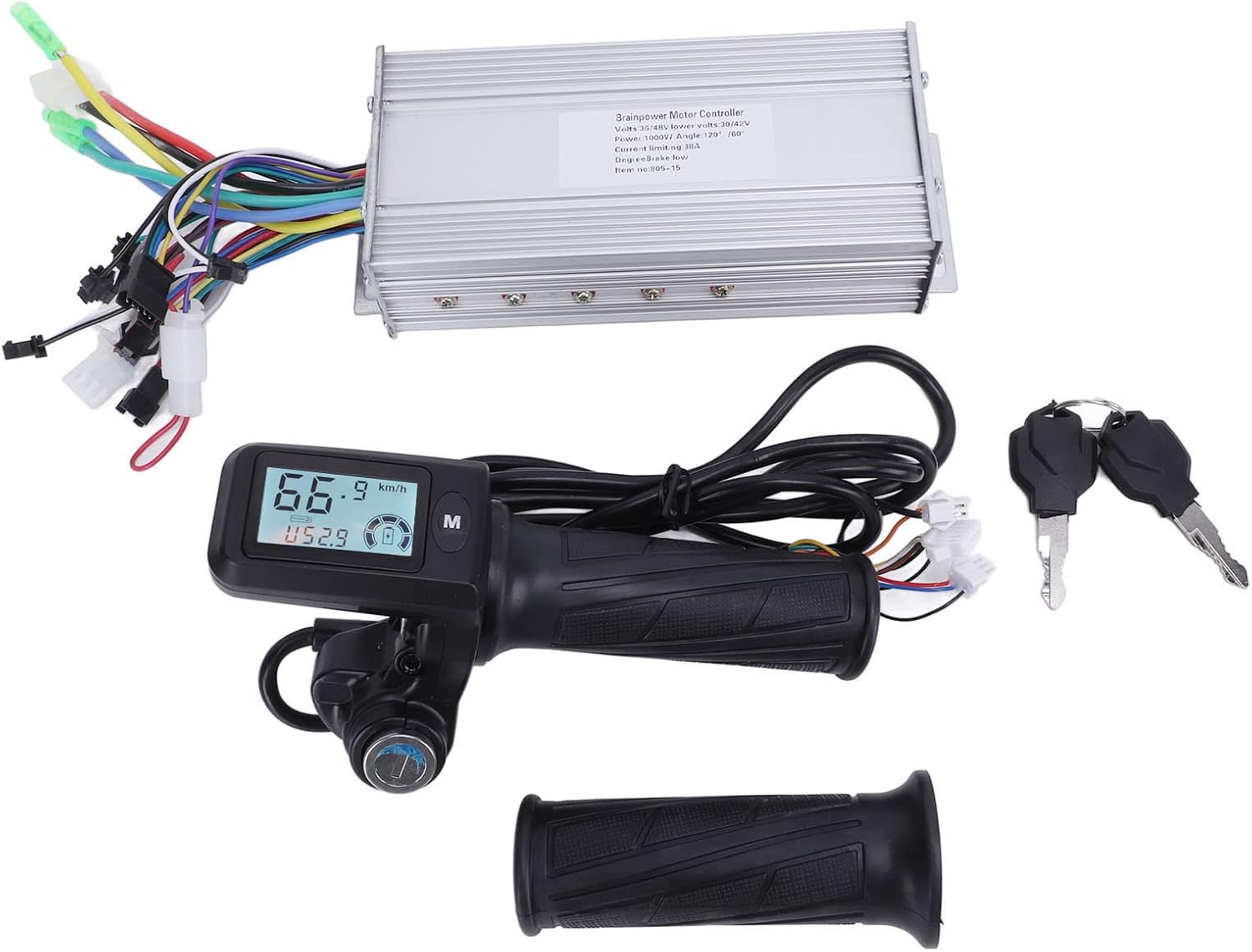
Image: Complete contents of the Tefola Motor Controller Kit.
4. Технічні характеристики
| Особливість | Специфікація |
|---|---|
| томtage | 36 В / 48 В (автоматичне визначення) |
| потужність | 1000 Вт |
| Обмеження струму | 38А |
| Низька гучністьtage Захист | 30В / 42В |
| Controller Material | Aluminum alloy (fluted design) |
| Throttle Handlebar Diameter | 22.5 мм |
| Вага товару | прибл. 1.16 кг (2.55 фунта) |
5. Налаштування та встановлення
This section outlines the general steps for installing the motor controller kit. Professional installation is recommended if you are unfamiliar with electric bike/scooter wiring.
5.1 Controller Placement
Mount the controller in a secure location on your electric bike or scooter, ensuring it is protected from direct impact and moisture. The fluted aluminum housing is designed for heat dissipation, so ensure adequate airflow around it.
5.2 Throttle and Handlebar Installation
- Remove your existing throttle and handle grip from the handlebar.
- Slide the new throttle with LCD display onto the right side of the handlebar. Ensure it fits securely on 22.5mm diameter handlebars.
- Install the additional handle grip on the left side of the handlebar.
- Secure both components firmly to prevent rotation during use.

Image: Throttle with LCD display and handle grip for handlebar installation.
5.3 Підключення проводів
The controller has multiple color-coded wires for various functions. Connect them according to your electric bike/scooter's wiring diagram. Common connections include:
- Дроти живлення: Connect to the battery (usually thicker red for positive, black for negative).
- Провід двигуна: Connect to the motor (typically three phase wires and five Hall sensor wires). Match colors carefully.
- Throttle Wires: Connect to the throttle unit.
- Brake Wires: Connect to brake levers (often with cut-off function).
- LCD Display Wires: Connect to the display unit.
- Other Wires: May include wires for lights, pedal assist sensor (PAS), speed sensor, etc. Refer to your vehicle's specific wiring diagram for these.

Image: Motor controller with its array of connection wires.
Важливо: Ensure all connections are correct and secure before applying power. Incorrect wiring can damage the components.
6. Інструкція з експлуатації
6.1 Увімкнення/вимкнення
Insert the key into the throttle's lock mechanism and turn it to the 'ON' position to power on the system. The LCD display will illuminate. Turn the key to 'OFF' to power down.
6.2 Функції РК-дисплея
The LCD display provides real-time riding data. The backlight ensures visibility in various lighting conditions. Use the 'M' button to cycle through display modes or adjust settings.

Image: LCD display showing current speed, battery level, and mileage.
На дисплеї зазвичай відображається:
- Швидкість у реальному часі: Поточна швидкість їзди.
- Рівень заряду батареї: Індикація залишкового заряду акумулятора.
- томtage: Поточний об’єм акумулятораtage.
- Single Run Mileage: Distance covered in the current trip.
- Загальний пробіг: Cumulative distance covered by the vehicle.
- Gear Indication: Current assist level or gear.
- Сповіщення про низький заряд батареї: Visual warning when battery is low.
- Значок несправності: Indicates system errors (refer to troubleshooting for details).
6.3 Робота дросельної заслінки
Gently twist the throttle grip to engage the motor and control speed. The brushless motor controller provides sensitive and stable speed control. Release the throttle to reduce speed or apply brakes.
6.4 Функція блокування клавіш
The integrated key lock on the throttle acts as a power switch, preventing unauthorized use of your electric bike or scooter when turned to the 'OFF' position and the key is removed.
7. Технічне обслуговування
Regular maintenance ensures the longevity and optimal performance of your motor controller kit.
- Прибирання: Wipe the controller and LCD display with a soft, dry cloth. Avoid using harsh chemicals or excessive moisture.
- Перевірка підключення: Periodically inspect all electrical connections for tightness and signs of corrosion or damage. Re-secure any loose connections.
- Корпус контролера: Ensure the controller's aluminum housing remains free of obstructions to allow for proper heat dissipation.
- Перевірка проводки: Check all wires for fraying, cuts, or pinches. Repair or replace damaged wiring immediately.
8. Вирішення проблем
Якщо у вас виникли проблеми, зверніться до наступних поширених проблем та способів їх вирішення:
| проблема | Можлива причина | Рішення |
|---|---|---|
| Двигун не реагує | Loose power connection, low battery, faulty throttle, controller error. | Check battery charge. Inspect all power and motor connections. Check throttle wiring. Look for fault icons on LCD. |
| РК-дисплей не вмикається | Key not in 'ON' position, loose display connection, no power to controller. | Ensure key is turned. Check display wiring. Verify main power connection to controller. |
| Непостійний контроль швидкості | Faulty throttle, motor Hall sensor issue, loose motor phase wires. | Inspect throttle for damage. Check motor wiring for secure connections. |
| Перегрів контролера | Insufficient airflow, prolonged heavy load, internal fault. | Ensure controller is in a well-ventilated area. Reduce continuous heavy load. If problem persists, contact support. |
| Fault icon on display | Specific system error (e.g., motor, Hall sensor, brake). | Consult your vehicle's specific error code guide or contact support with the displayed icon/code. |
If you cannot resolve the issue using the troubleshooting guide, please contact customer support.
9. Гарантія та підтримка
For warranty information, please refer to the purchase documentation or contact your retailer. If you require technical assistance or have questions about your Tefola Motor Controller Kit, please visit the Tefola Store on Amazon or contact customer support through your purchase platform.