
1. Вступ
The CALEX Smart Home Indoor Ambiance Aroma Diffuser 590100500 is designed to enhance your indoor environment by improving air quality, diffusing pleasant aromas, and providing ambient lighting. This smart device integrates seamlessly into your smart home ecosystem, offering control through the Calex app, voice commands, and programmable features.
Ключові особливості:
- Aroma diffusion with essential oils.
- Realistic flame effect for ambiance.
- Adjustable ambient lighting with 16 million color options.
- Smart control via Calex app (timers, programmable scenarios).
- Voice control compatibility with Google Assistant, Siri, and Amazon Alexa.
- 300ml water tank capacity with automatic shut-off.
2. Інформація про безпеку
Будь ласка, прочитайте всі інструкції з безпеки перед використанням пристрою, щоб запобігти травмам або пошкодженням.
- Always place the diffuser on a stable, flat surface away from direct sunlight, heat sources, and electronic devices.
- Do not exceed the maximum water fill line (300ml) to prevent overflow.
- Використовуйте лише чисту водопровідну або дистильовану воду. Не використовуйте гарячу воду.
- Only use 100% pure, water-soluble essential oils. Other oils or corrosive liquids may damage the device.
- Тримайте пристрій у недоступному для дітей та домашніх тварин місці.
- Do not cover the mist outlet during operation.
- Unplug the device from the power outlet before cleaning or refilling.
- The device features an automatic shut-off function when the water tank is empty, and sends a notification to your phone.
- A built-in safety configuration will cause the diffuser to flash if the remaining water in the tank needs to cool down after a maximum of 72 hours of continuous operation.
- Не намагайтеся самостійно ремонтувати або модифікувати пристрій. Зверніться до служби підтримки клієнтів для отримання допомоги.
3. Вміст упаковки
Перевірте наявність усіх елементів в упаковці:
- CALEX Smart Home Indoor Ambiance Aroma Diffuser (Model 5901000500)
- Адаптер живлення
- Посібник користувача
4. Продукт закінчивсяview
Familiarize yourself with the components of your aroma diffuser.
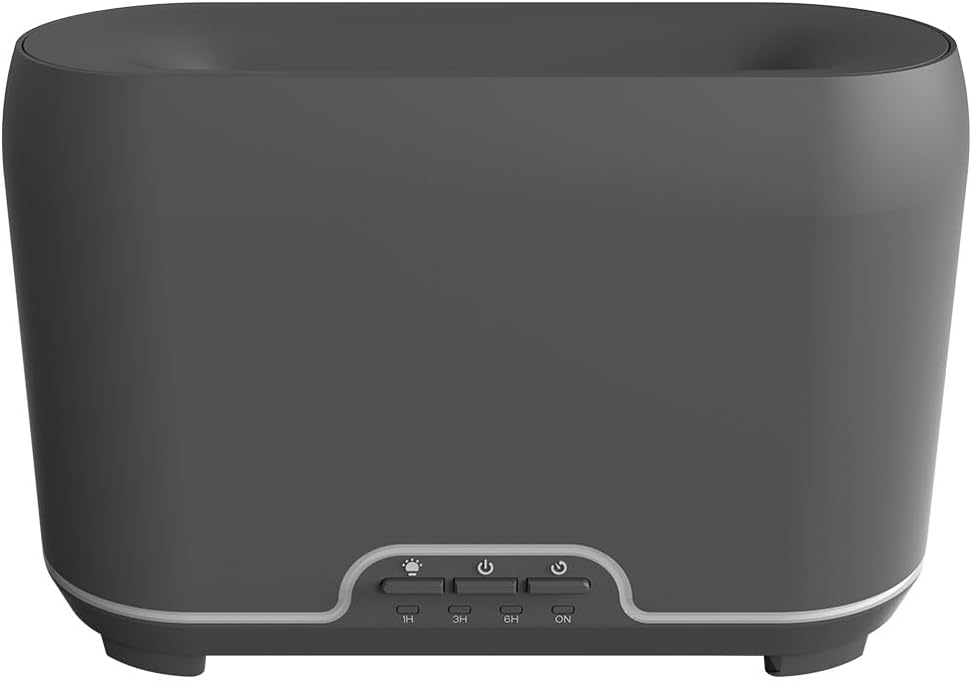
Зображення: спереду view of the CALEX Smart Home Aroma Diffuser, showing the control panel with buttons for light, power, and timer settings (1H, 3H, 6H, ON).

Image: The CALEX Smart Home Aroma Diffuser operating on a wooden table, displaying its ambient flame effect and mist output.
The diffuser typically consists of a water tank, an ultrasonic plate, a mist outlet, and a control panel with buttons for power, light, and timer functions. The power input port is usually located at the back or bottom of the device.
5. Налаштування
Для початкового налаштування виконайте такі дії:
- Розміщення: Помістіть дифузор на рівну стійку поверхню.
- Відкрита кришка: Обережно зніміть верхню кришку дифузора.
- Заповнити резервуар для води: Fill the water tank with clean water up to the 300ml maximum fill line. Do not overfill.
- Додайте ефірну олію: Add a few drops of your preferred essential oil directly into the water tank.
- Закрити кришку: Надійно закрийте верхню кришку.
- Підключіть живлення: Plug the power adapter into the diffuser's power input port, then plug the adapter into a wall outlet.
- Download Calex App: Download the free Calex Smart app from your smartphone's app store (available for iOS and Android).
- Підключення до WiFi: Follow the in-app instructions to connect your diffuser to your home WiFi network. Ensure your WiFi is 2.4GHz.
6. Інструкція з експлуатації
The CALEX Smart Home Aroma Diffuser can be operated via the Calex app or its integrated control buttons.
6.1 Using the Calex Smart App
The Calex app provides full control over your diffuser's functions:
- Увімкнення/вимкнення живлення: Turn the diffuser on or off remotely.
- Контроль туману: Adjust the mist output level.
- Контроль світла: Change the ambient light color from over 16 million options, adjust brightness, and select lighting modes.
- Ефект полум'я: Activate or deactivate the flame effect.
- Таймери: Set schedules for the diffuser to turn on or off automatically.
- Programmable Scenarios: Create custom scenarios based on time, weather, or other smart home triggers.
- Сповіщення: Receive alerts when the water tank is empty.
6.2 Голосове керування
Integrate your diffuser with voice assistants for hands-free control:
- Google Assistant: Link your Calex account in the Google Home app. Use commands like "Hey Google, turn on the diffuser."
- Siri: Create custom shortcuts in the Apple Home app or through the Calex app for Siri commands.
- Amazon Alexa: Enable the Calex skill in the Alexa app. Use commands like "Alexa, set diffuser light to blue."
6.3 Manual Control Buttons
The control panel on the diffuser allows for basic operation:
- Кнопка живлення: Press once to turn on/off the mist and flame effect.
- Світлова кнопка: Press to cycle through light colors or turn the light on/off.
- Timer Buttons (1H, 3H, 6H, ON): Select a desired operating duration. The diffuser will automatically shut off after the selected time. 'ON' typically means continuous operation until water runs out or manually turned off.
7. Технічне обслуговування
Регулярне очищення забезпечує оптимальну роботу та подовжує термін служби вашого дифузора.
- Щоденне прибирання: Після кожного використання злийте залишки води з резервуара. Протріть внутрішню частину резервуара чистою м’якою тканиною.
- Щотижневе прибирання: For a more thorough clean, unplug the device. Add a small amount of white vinegar (about 10ml) to the water tank and let it sit for 10-15 minutes to dissolve mineral buildup. Gently wipe the ultrasonic plate with a cotton swab or soft brush. Rinse the tank thoroughly with clean water, avoiding the air outlet.
- Зовнішнє очищення: Протріть зовнішню частину дифузора м’якою губкоюamp тканина. Не використовуйте абразивні засоби чи розчинники.
- Ensure the device is completely dry before refilling or storing.
8. Вирішення проблем
Якщо у вас виникли проблеми, зверніться до наступних поширених проблем та способів їх вирішення:
| проблема | Можлива причина | Рішення |
|---|---|---|
| Туман відсутній або слабкий туман | Низький рівень води Ультразвукова пластина забруднена Заблоковано вихід для розпилення | Долийте воду до потрібного рівня. Очистіть ультразвукову пластину згідно з інструкціями з технічного обслуговування. Переконайтеся, що отвір для випуску пара вільний. |
| Пристрій не включається | Немає живлення Бак для води порожній Несправність пристрою | Check power connection and wall outlet. Заповніть резервуар для води. Зверніться до служби підтримки клієнтів, якщо проблема не зникає. |
| Проблеми з підключенням програми | Неправильний пароль WiFi Маршрутизатор занадто далеко 2.4GHz vs 5GHz WiFi | Перевірте пароль Wi-Fi. Move diffuser closer to the router. Ensure your router is broadcasting a 2.4GHz network and connect to it. |
| Ефект полум'я не працює | Feature deactivated in app Несправність пристрою | Check app settings to ensure flame effect is enabled. Зверніться в службу підтримки клієнтів. |
9. Технічні характеристики
| Особливість | Специфікація |
|---|---|
| Номер моделі | 5901000500 |
| Бренд | КАЛЕКС |
| Ємність | 300 мілілітрів |
| матеріал | пластик |
| Автоматичне відключення | так |
| Підключення | WiFi (2.4 ГГц) |
| Методи контролю | Calex Smart App, Voice Control (Google Assistant, Siri, Amazon Alexa), Manual Buttons |
| Опції світла | 16 мільйонів квітів |
| Рекомендована область використання | Medium space |
| Міжнародний код товару (EAN/UPC) | 08712879157090 |
10. Гарантія та підтримка
Щоб отримати інформацію про гарантію або технічну підтримку, зверніться до документації, що надається разом із покупкою, або зверніться безпосередньо до продавця/виробника. Зберігайте чек про покупку для гарантійних випадків.