
1. Вступ
The VPFET 8K HDMI KVM Switch (Model SW223) allows two computers to share a single HDMI monitor and up to four USB 3.0 devices. This device supports high-resolution video output up to 8K@60Hz or 4K@120Hz, providing a seamless experience for managing multiple systems with one set of peripherals.
This manual provides detailed instructions for setting up, operating, and maintaining your KVM switch, along with troubleshooting tips and product specifications.

The KVM switch enables two computers to share one monitor and multiple USB devices.
2. Вміст упаковки
Будь ласка, перевірте, чи всі перелічені нижче предмети входять до вашої упаковки:
- 1 x VPFET 8K HDMI KVM Switcher (Model SW223)
- 1 x External Controller Kit
- 2 x USB 3.0 A-A Cables
- 1 x адаптер живлення постійного струму 12 В
- 1 х посібник користувача

All components included in the VPFET 8K HDMI KVM Switch package.
3. Інструкції з налаштування
Follow these steps to connect your VPFET 8K HDMI KVM Switch:
- Підключення монітора: Plug your HDMI monitor into the "HDMI OUT" port on the KVM switch.
- Connect Computers (PC1 & PC2):
- Connect the HDMI output of PC1 to the "HDMI IN" port for PC1 on the KVM switch.
- Connect one USB 3.0 A-A cable from a USB 3.0 port on PC1 to the "USB" port for PC1 on the KVM switch.
- Repeat the above steps for PC2, connecting its HDMI output to the "HDMI IN" port for PC2 and its USB 3.0 port to the "USB" port for PC2 on the KVM switch.
- Примітка: For optimal 8K@60Hz or 4K@120Hz performance, ensure you use SuperSpeed HDMI cables that support these resolutions.
- Підключення периферійних USB-пристроїв: Plug your keyboard, mouse, USB drives, printer, or other USB 3.0 devices into the four "USB 3.0" ports (labeled 1-4) on the front of the KVM switch.
- Connect External Controller (Optional): If desired, plug the external switch button cable into the "Control" port on the KVM switch.
- Підключіть живлення: Plug the DC12V power adapter into the "DC 12V" port on the KVM switch and then into a power outlet. The KVM switch requires external power for stable operation.

Connection diagram for the VPFET 8K HDMI KVM Switch.
4. Інструкція з експлуатації
The VPFET 8K HDMI KVM Switch offers two methods for switching between connected computers:
4.1. Front Panel Button Switching
Press the "SW" button located on the front panel of the KVM switch to toggle between PC1 and PC2. The LED indicators (PC1, PC2) will illuminate to show which computer is currently active.
4.2. External Switch Button Switching
If you have connected the external controller, press the button on the external controller to switch between PC1 and PC2. This allows for convenient switching if the KVM switch itself is not easily accessible.
Примітка: This KVM switch does not support hotkey switching via keyboard commands.
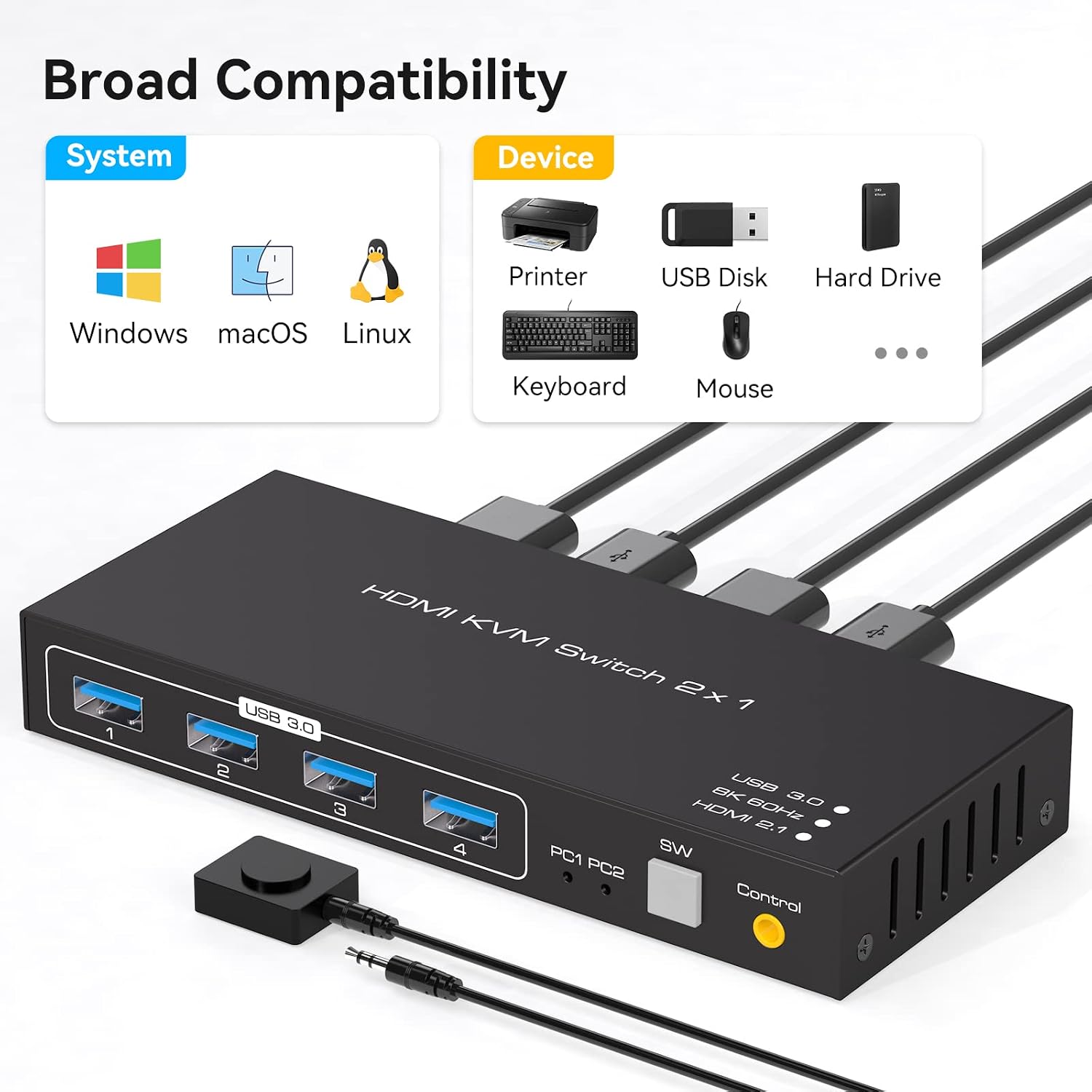
Illustration of the two available switching methods.
5. Технічне обслуговування
Щоб забезпечити довговічність та оптимальну роботу вашого KVM-перемикача, дотримуйтесь цих інструкцій з технічного обслуговування:
- Прибирання: Використовуйте м’яку суху тканину для очищення зовнішньої частини пристрою. Уникайте використання рідких засобів для чищення або розчинників.
- Вентиляція: Переконайтеся, що KVM-перемикач розміщено в добре провітрюваному приміщенні, щоб запобігти перегріву. Не блокуйте вентиляційні отвори.
- Потужність: Always use the provided DC12V power adapter. Disconnect power when the device is not in use for extended periods.
- Управління кабелем: Keep cables organized and avoid excessive bending or tension to prevent damage to connectors and ports.
6. Вирішення проблем
If you encounter issues with your VPFET 8K HDMI KVM Switch, refer to the following troubleshooting tips:
- Немає зображення або неправильна роздільна здатність:
- Ensure all HDMI cables are securely connected and support the desired resolution (e.g., 8K@60Hz or 4K@120Hz).
- Verify that your monitor and graphics cards on both PCs support the selected resolution and refresh rate.
- Try restarting the KVM switch by unplugging and re-plugging the power adapter.
- USB-пристрої не працюють:
- Check that the USB 3.0 A-A cables are securely connected between the KVM switch and both computers.
- Ensure the KVM switch is receiving power from the DC12V adapter.
- Спробуйте підключити USB-пристрій безпосередньо до комп’ютера, щоб переконатися, що він справний.
- Some high-power USB devices may require additional power. Ensure the KVM switch's power adapter is connected.
- Проблеми з перемиканням:
- Confirm that the active PC LED indicator on the KVM switch corresponds to the desired computer.
- Ensure the front panel button or external switch button is pressed firmly.
- Сумісність: The KVM switch is compatible with various operating systems, including Windows, Vista, XP, Mac OS, Linux, and Unix. Ensure your system drivers are up to date.
7. Технічні характеристики
Key technical specifications for the VPFET 8K HDMI KVM Switch (Model SW223):
| Особливість | Специфікація |
|---|---|
| Номер моделі | SW223 |
| Підтримка роздільної здатності відео | До 8K@60Hz, 4K@120Hz |
| Пропускна здатність відео | 48 Гбіт/с |
| USB порти | 4 x USB 3.0 (for peripherals) |
| Швидкість передачі даних через USB | До 5 Гбіт/с (USB 3.0) |
| Вхідні порти | 2 x HDMI, 2 x USB 3.0 (for PCs) |
| Вихідні порти | 1 x HDMI, 4 x USB 3.0 (for peripherals) |
| Спосіб перемикання | Front Panel Button, External Switch Button |
| Джерело живлення | DC 12V (Adapter included) |
| Робочий випtage | 12 вольт |
| матеріал | метал |
| Розміри продукту (Д x Ш x В) | 15 x 6.5 x 3.5 см (5.9 x 2.55 x 0.86 дюйма) |
| вага | 500 г |
| Сумісність | Windows, Vista, XP, Mac OS, Linux, Unix |

The KVM switch supports resolutions up to 8K@60Hz.

Broad compatibility with operating systems and USB devices.
8. Гарантія та підтримка
VPFET is committed to providing high-quality products and customer satisfaction. This product comes with an after-sale guarantee.
- Технічна підтримка: If you encounter any problems during the use of this product, please contact our professional technical team. We aim to provide a reply within 12 hours.
- Контактна інформація: Please refer to the contact details provided with your purchase or on the official VPFET webсайт для підтримки.