
1. Продукт закінчивсяview
The Xoopar Octopus Gamma is a versatile 4-in-1 multi-connector USB hub with an integrated 3000mAh power bank. Designed for convenience and portability, it allows you to charge various devices simultaneously and provides a power boost when an external power source is unavailable. This product is made from recycled plastic and features a compact, lightweight design.

Image 1.1: The Xoopar Octopus Gamma with its four distinct connectors: Lightning, USB-C, Micro USB, and USB-A.

Image 1.2: Key features of the Octopus Gamma, including recycled plastic construction, readiness for use, dual charging capability, and its 4-in-1 multi-adapter functionality.
2. Налаштування
The Xoopar Octopus Gamma is designed for immediate use. No complex setup is required. Simply identify the appropriate connector for your device.
2.1 Визначення роз'ємів
The device features four types of connectors:
- Блискавка: For Apple devices (iPhone, iPad, AirPods).
- USB-C: For modern Android phones, tablets, and other USB-C compatible devices.
- Micro USB: For older Android phones, power banks, and various accessories.
- USB-A: The standard USB connector for connecting to power adapters, computers, or other USB-A ports.
Зображення 2.1: Детальний опис view of the Octopus Gamma's connectors, clearly indicating Lightning, USB-C, Micro USB, and USB-A ports.
3. Інструкція з експлуатації
3.1 Заряджання ваших пристроїв
- Identify the correct connector for your device (Lightning, USB-C, or Micro USB).
- Plug the appropriate connector into your device's charging port.
- Connect the USB-A end of the Octopus Gamma to a power source. This can be a wall adapter, computer USB port, or car charger.
- Your device will begin charging. The Octopus Gamma can charge up to two devices simultaneously if connected to a sufficient power source.

Image 3.1: The Octopus Gamma actively charging a smartphone, illustrating its function as a portable power source.
3.2 Using the Integrated Power Bank
The Octopus Gamma includes a 3000mAh internal battery for portable charging when no external power source is available.
- Ensure the internal power bank is charged (see Section 3.3).
- Plug the appropriate connector (Lightning, USB-C, or Micro USB) into your device.
- The Octopus Gamma will automatically begin supplying power from its internal battery to your device.
- The power bank can provide a significant boost to your smartphone's battery, helping to prevent power loss during travel or emergencies.
3.3 Recharging the Octopus Gamma Power Bank
The internal power bank of the Octopus Gamma recharges automatically when the USB-A connector is plugged into an external power source and you are simultaneously charging another device. This ensures the power bank is always ready for use.
- Connect the USB-A end of the Octopus Gamma to a wall adapter, computer, or other USB-A power source.
- Connect one of the output connectors (Lightning, USB-C, or Micro USB) to a device you wish to charge.
- The Octopus Gamma will charge your device and its internal power bank simultaneously.
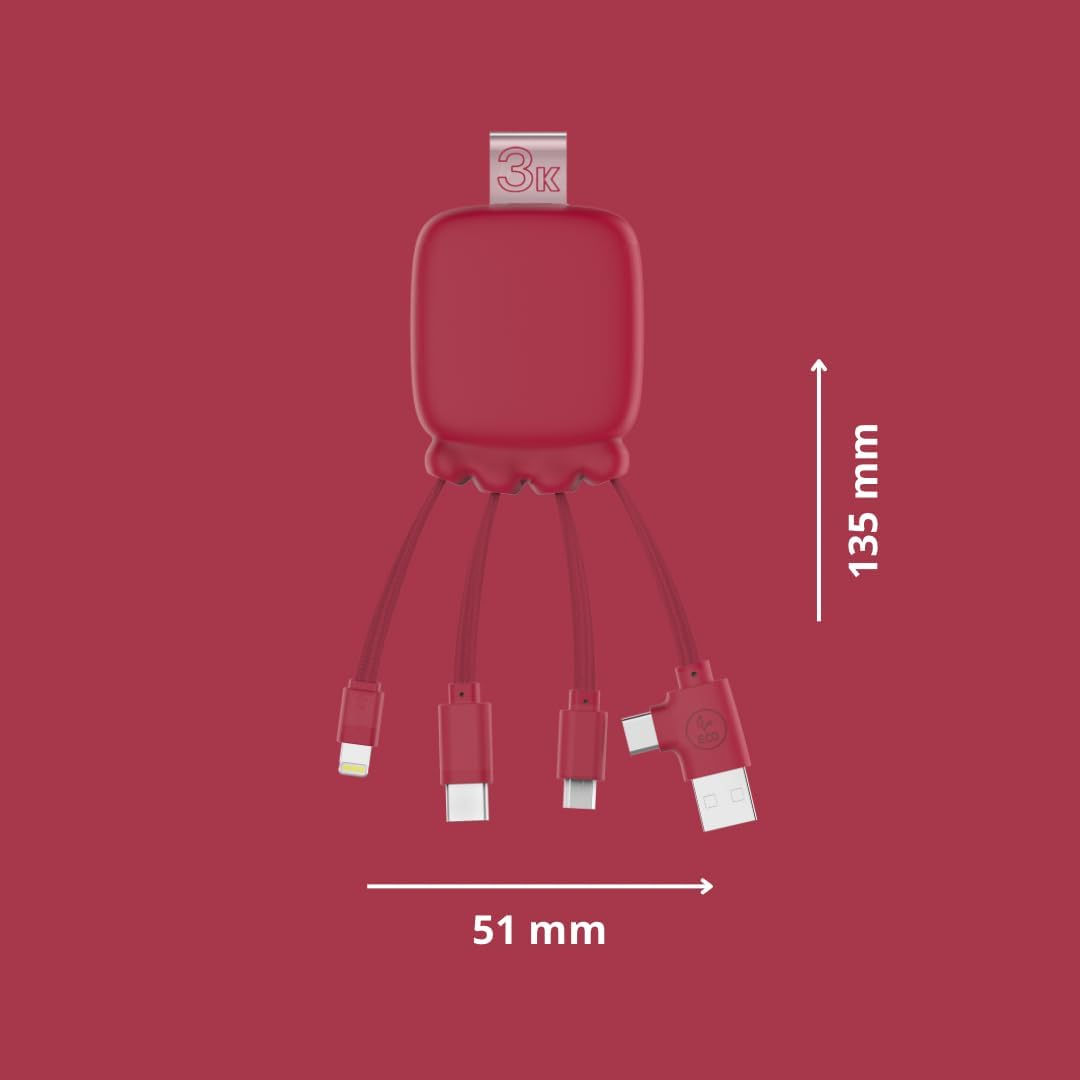
Image 3.2: The Octopus Gamma connected to a power strip, demonstrating simultaneous charging of both the connected device and the internal power bank.

Image 3.3: The Octopus Gamma in a typical use environment, connected to a laptop, alongside a keyboard and smartphone.
4. Технічне обслуговування
To ensure the longevity and optimal performance of your Xoopar Octopus Gamma, follow these maintenance guidelines:
- Прибирання: Протирайте пристрій м’якою сухою тканиною. Уникайте використання агресивних хімікатів або абразивних матеріалів.
- Зберігання: Зберігайте пристрій у прохолодному, сухому місці, подалі від прямих сонячних променів та екстремальних температур.
- Обробка: Avoid excessive bending or pulling of the cables to prevent damage to the connectors or internal wiring.
- Догляд за акумулятором: For optimal battery life, avoid fully discharging the internal power bank frequently. Recharge it regularly.
5. Вирішення проблем
| проблема | Можлива причина | Рішення |
|---|---|---|
| Пристрій не заряджається. | Incorrect connector used. Проблема з джерелом живлення. Internal power bank depleted. | Ensure the correct connector is firmly plugged into your device. Try a different USB-A port or wall adapter. Recharge the Octopus Gamma by connecting its USB-A end to a power source. |
| Повільна зарядка. | Low power output from source. Зарядка кількох пристроїв. | Використовуйте вищий ватtage адаптер живлення. Charge devices one at a time for faster charging. |
| Octopus Gamma not recharging. | Faulty USB-A connection. Проблема з джерелом живлення. | Ensure the USB-A connector is securely plugged into a working power source. Try a different USB-A port or wall adapter. |
6. Технічні характеристики
| Особливість | Деталь |
|---|---|
| Назва моделі | Gamma RP |
| Номер моделі | XP61075 |
| Роз'єми | Lightning, Micro USB, USB Type A, USB Type C |
| Ємність Power Bank | 3000 мАг |
| Тип батареї | Літій-полімерний |
| вага | 70 грамів |
| Розміри (Д x Ш x В) | 13.5 х 5.1 х 1.7 см |
| Особливості | Fast Charging, Lightweight, Recycled Plastic Construction |
| Сумісні пристрої | Smartphones, Tablets, Laptops, Speakers, Earphones (Universal compatibility) |
| Виробник | XOOPAR |
| Країна походження | Китай |

Image 6.1: Dimensions of the Octopus Gamma, showing its compact size.
7. Гарантія та підтримка
7.1 Інформація про гарантію
The Xoopar Octopus Gamma (Model XP61075) comes with a 2-річна гарантія виробникаЦя гарантія поширюється на дефекти матеріалів та виготовлення за умов нормального використання. Будь ласка, збережіть чек про покупку для пред'явлення претензій за гарантією.
Гарантія не поширюється на:
- Пошкодження, спричинені неправильним використанням, зловживанням, нещасним випадком або недбалістю.
- Несанкціонований ремонт або модифікація.
- Нормальний знос.
7.2 Підтримка клієнтів
For technical assistance, warranty claims, or any questions regarding your Xoopar Octopus Gamma, please contact Xoopar customer support through their official webсайт або роздрібний продавець, де було придбано товар.
You can visit the official Xoopar store for more information: Xoopar Official Store