
1. Вступ
This manual provides essential instructions for the installation, operation, and maintenance of your PureLink Vuelogic VB200 Huddle Space Videobar. Please read this manual thoroughly before using the product to ensure proper functionality and to prevent damage.
The PureLink Vuelogic VB200 is an all-in-one conferencing solution designed for huddle spaces and small to medium meeting rooms. It integrates a 4K camera, multiple microphones, and stereo speakers to provide a comprehensive audio and video experience.
2. Інформація про безпеку
Дотримуйтесь наступних запобіжних заходів, щоб запобігти пошкодженню пристрою та забезпечити безпеку користувача:
- Не піддавайте пристрій впливу води, вологи або екстремальних температур.
- Уникайте розміщення пристрою поблизу джерел тепла або під прямими сонячними променями.
- Використовуйте лише адаптер живлення, що постачається разом із пристроєм.
- Не намагайтеся самостійно відкривати або ремонтувати пристрій. Звертайтеся до кваліфікованого персоналу для проведення будь-яких робіт з обслуговування.
- Забезпечте належну вентиляцію навколо пристрою під час роботи.
3. Продукт закінчивсяview
The PureLink Vuelogic VB200 combines a high-quality camera, microphone array, and speakers into a single, compact unit for streamlined video conferencing.
3.1. Вміст упаковки
Перевірте наявність усіх елементів в упаковці:
- PureLink Vuelogic VB200 Videobar
- Адаптер живлення
- USB кабель
- Монтажний кронштейн (якщо входить до комплекту)
- Короткий посібник

Figure 3.1: The retail packaging for the PureLink Vuelogic VB200 Videobar, indicating it is an all-in-one conferencing solution.

Малюнок 3.2: Детально view of the product packaging, showing the model number VL-VB200 and UPC 4251364736913.
3.2. Компоненти пристрою
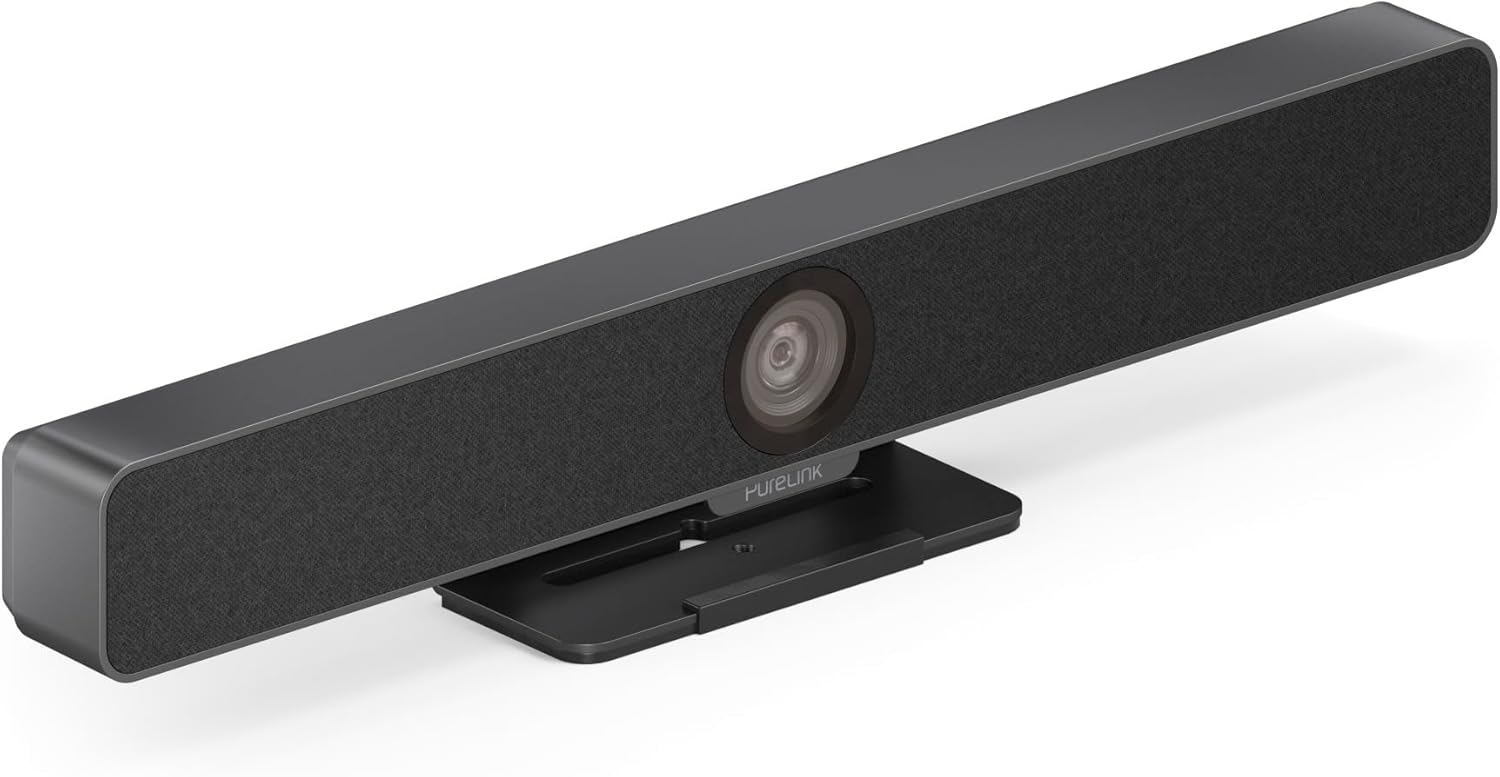
Малюнок 3.3: Спереду view of the PureLink Vuelogic VB200 Huddle Space Videobar, showcasing the integrated camera and speaker grille.

Рисунок 3.4: Передня та задня частини views of the videobar. The rear view displays the power input, USB-C port, and other connectivity options.
- Спереду: Integrated 4K camera, speaker grille, PureLink branding.
- задній: Power input, USB-C port for data and power, HDMI output (if applicable), mounting points.
4. Налаштування
Follow these steps to set up your PureLink Vuelogic VB200 Videobar:
- Розміщення: Position the videobar on a stable surface, such as a table or monitor, ensuring the camera has a clear view of the meeting participants. The integrated stand allows for flexible placement.
- Підключення живлення: Connect the provided power adapter to the videobar's power input and then to a wall outlet.
- Підключення USB: Connect the videobar to your computer using the supplied USB-C cable. The device is plug-and-play and should be recognized automatically by your operating system.
- Додаткове підключення HDMI: If your setup requires video output to a display, connect an HDMI cable from the videobar's HDMI output (if available) to your display.
- Розпізнавання програмного забезпечення: Once connected, your computer's operating system (Windows, macOS, etc.) should detect the device. You may need to select the "PureLink Vuelogic VB200" as your preferred camera, microphone, and speaker in your video conferencing application settings (e.g., Zoom, Microsoft Teams, WebНаприклад).

Figure 4.1: The videobar positioned on a surface, demonstrating its flexible mounting options for various work environments.
5. Інструкція з експлуатації
The PureLink Vuelogic VB200 is designed for ease of use with popular video conferencing platforms.
5.1. Starting a Meeting
- Ensure the videobar is connected and powered on.
- Open your preferred video conferencing application (e.g., Zoom, Microsoft Teams, WebEx, Google Meet, Skype, Slack, GoToMeeting).
- In the application's audio and video settings, select "PureLink Vuelogic VB200" as your camera, microphone, and speaker device.
- Start or join your meeting.

Figure 5.1: The videobar is compatible with leading communication platforms such as Zoom, Slack, GoToMeeting, Google Hangouts, Skype, Microsoft Teams, and Google Meet.
5.2. Ключові характеристики
- 4K Video Quality: The 120° wide-angle lens captures sharp, high-resolution video, suitable for small to medium rooms.
- Intelligent Auto Framing and Tracking: The camera automatically adjusts its frame to keep all participants visible and can track the active speaker, ensuring optimal framing during dynamic meetings.
- High-Quality Audio Capture: Equipped with 4 MEMS digital microphone arrays, offering a 3-5m range and 180° coverage. Features like Acoustic Echo Cancellation (AEC), Automatic Gain Control (AGC), and Automatic Noise Suppression (ANS) ensure clear communication.
- Hi-Fi Stereo Speakers: Two 3W stereo speakers with bass boost provide clear and powerful audio output for an immersive sound experience.
6. Технічне обслуговування
To ensure the longevity and optimal performance of your videobar:
- Прибирання: Use a soft, dry cloth to clean the exterior of the device. For the camera lens, use a lens cleaning cloth and solution specifically designed for optics. Do not use abrasive cleaners or solvents.
- Зберігання: Якщо пристрій не використовується протягом тривалого часу, зберігайте його в прохолодному, сухому місці, захищеному від прямих сонячних променів.
- Оновлення прошивки: Periodically check the PureLink website for any available firmware updates to ensure your device has the latest features and performance enhancements.
7. Вирішення проблем
If you encounter issues with your PureLink Vuelogic VB200, refer to the following common problems and solutions:
| проблема | Можлива причина | Рішення |
|---|---|---|
| Немає відеовиходу / Камера не виявлена | Loose USB connection, incorrect software settings, driver issue. |
|
| No audio from speakers / Microphone not working | Incorrect audio settings, muted device. |
|
| Auto-framing not functioning correctly | Poor lighting, obstruction, software glitch. |
|
8. Технічні характеристики
| Особливість | Деталь |
|---|---|
| Бренд | PureLink |
| Номер моделі | VL-VB200 |
| Розміри | 20.47 x 7.87 x 5.12 дюймів |
| вага | 2.2 фунта |
| Колір | чорний |
| Роздільна здатність захоплення відео | 4K |
| Оптичний зум | 5x |
| Технологія фотосенсора | CMOS |
| Особливості | Auto Framing and Tracking |
| Тип мікрофона | 4 MEMS Digital Microphone Arrays |
| Діапазон мікрофона | 3-5m, 180° coverage |
| Функції аудіо | AEC, AGC, ANS |
| Доповідачі | Two 3W Stereo Speakers with Bass Boost |
| Технологія підключення | HDMI, USB |
| Підтримуваний аудіоформат | AAC, MP3 |
| Підтримуваний формат відео | MP4 |
| Сумісність | Windows, macOS, Zoom, WebEx, Tencent Meeting, Teams, etc. |
9. Гарантія та підтримка
PureLink products are designed for reliability and performance. For specific warranty information, please refer to the warranty card included with your product or visit the official PureLink webсайт.
For technical support, troubleshooting assistance, or to inquire about service, please contact PureLink customer support through their official channels. Keep your purchase receipt and product model number (VL-VB200) handy when contacting support.
Official PureLink Webсайт: www.purelink.de