
1. Вступ
This manual provides detailed instructions for the installation, operation, and maintenance of your Tiandy TC-C32XN 2MP Fixed IP Dome Turret Camera. Please read this manual thoroughly before using the product to ensure correct usage and optimal performance. Keep this manual for future reference.
2. Інформація про безпеку
- Переконайтеся, що блок живлення відповідає вимогам камери, щоб запобігти пошкодженню.
- Не піддавайте камеру впливу екстремальних температур, вологості або агресивного середовища.
- Avoid pointing the camera directly at strong light sources for extended periods, as this may damage the image sensor.
- Поводьтеся з камерою обережно. Не кидайте та не піддавайте її сильним вібраціям.
- All installation and service should be performed by qualified personnel.
- Від’єднайте живлення перед чищенням або технічним обслуговуванням.
3. Вміст упаковки
Перевірте наявність усіх предметів у вашій упаковці:
- Tiandy TC-C32XN 2MP Fixed IP Dome Turret Camera
- Перехідник
- Монтажні гвинти та дюбелі
- Короткий посібник користувача (якщо включено)
4. Продукт закінчивсяview
The Tiandy TC-C32XN is a 2MP Fixed IP Dome Turret Camera designed for reliable surveillance. It features Smart IR for clear night vision up to 30 meters, a built-in microphone, and an SD card slot for local storage.

Малюнок 4.1: Спереду view of the Tiandy TC-C32XN camera, showing the lens and IR illuminators.
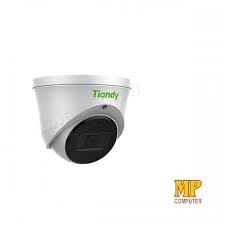
Малюнок 4.2: Сторона view of the Tiandy TC-C32XN camera, highlighting its dome turret form factor.
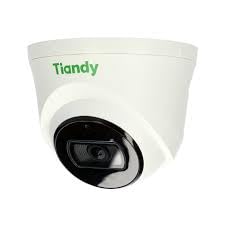
Рисунок 4.3: Кутовий view of the Tiandy TC-C32XN camera, showcasinйого компактний дизайн.
5. Налаштування та встановлення
5.1 Монтаж
- Виберіть розташування: Choose a suitable outdoor or indoor location (IP67 rated for outdoor use) that provides the desired viewing angle and is within reach of power and network connections. The camera is designed for protruding mounting.
- Свердлити отвори: Use the provided mounting template (if applicable) to mark and drill holes for the mounting screws.
- Захистіть камеру: Attach the camera base securely to the mounting surface using the provided screws and wall plugs.
5.2 Електропроводка
- Підключення живлення: Connect the provided adapter to the camera's power input and then to a power outlet. The camera operates on corded electric power.
- Підключення до мережі: Connect an Ethernet cable from your network router or PoE switch to the camera's Ethernet port. This camera supports Ethernet connectivity for data transmission.
5.3 Початкова конфігурація
- Увімкнення: Once wired, power on the camera.
- Виявлення мережі: Use the Tiandy client software or a network scanner tool to discover the camera's IP address on your local network.
- Доступ до камери: Відкрийте a web браузер і введіть IP-адресу камери, щоб отримати доступ до неї web interface. Log in using the default credentials (refer to the quick start guide for default username/password).
- Змінити пароль за замовчуванням: Для безпеки негайно змініть пароль за замовчуванням під час першого входу в систему.
- Інтеграція з мережевим відеореєстратором: If using with an NVR, add the camera to your NVR system following the NVR's instructions. This camera is compatible with all brand NVRs.
- Налаштування мобільного додатка: Download the official Tiandy mobile application (available for Android and iOS) and follow the in-app instructions to add your camera for remote viewі контроль.
6. Інструкція з експлуатації
6.1 Живий View і Запис
Доступ до прямої трансляції з камери view через web interface, NVR, or mobile app. Configure recording schedules and methods (continuous, motion-triggered) via the camera's settings.
6.2 Smart IR and Night Vision
The camera features Smart IR technology, which automatically adjusts the intensity of its infrared LEDs to prevent overexposure of objects close to the camera, ensuring clear images in low-light conditions up to 30 meters. It also supports 'Night Color' low light technology for enhanced visibility.
6.3 Виявлення руху та сповіщення
Configure motion detection zones and sensitivity in the camera settings. The camera supports 'Motion Only' alert types. When motion is detected, the camera can trigger recordings, send notifications to your mobile device, or activate other configured actions. It also supports advanced features like tripwire and perimeter intrusion detection.
6.4 Функціональність аудіо
The built-in microphone allows for audio monitoring of the surveillance area. Audio settings can be adjusted in the camera's web інтерфейс або відеореєстратор.
6.5 Пам'ять SD-карти
Insert a compatible SD card into the camera's SD card slot for local storage of recordings. Ensure the card is formatted correctly via the camera's settings. The camera supports SD flash memory type.
6.6 Кнопка скидання
A reset button is included for restoring the camera to its factory default settings. Consult the quick start guide for the exact location and procedure for your model.
7. Технічне обслуговування
- Прибирання: Обережно протріть об’єктив та корпус камери м’якою сухою тканиною. Не використовуйте агресивні хімікати або абразивні засоби для чищення.
- Оновлення прошивки: Regularly check the Tiandy official website for firmware updates. Keeping your camera's firmware up-to-date ensures optimal performance and security.
- Перевірка кабелю: Періодично перевіряйте всі кабелі на наявність ознак зносу або пошкоджень, особливо для зовнішніх прокладок.
8. Вирішення проблем
- Немає живлення: Переконайтеся, що адаптер живлення надійно підключений, а розетка справна.
- Без відео: Check network cable connections. Verify the camera's IP address and network settings. Ensure the camera is properly added to your NVR or viewпрограмне забезпечення.
- Погана якість зображення: Clean the camera lens. Adjust focus if applicable. Check lighting conditions and camera placement.
- Проблеми з мережевим підключенням: Verify router and network cable functionality. Restart the camera and network devices.
- Немає доступу Web Інтерфейс: Ensure your computer is on the same network segment as the camera. Verify the camera's IP address. Try resetting the camera to factory defaults if necessary (this will erase all settings).
9. Технічні характеристики
| Особливість | Специфікація |
|---|---|
| Модель | TC-C32XN |
| Ефективне вирішення проблеми | 2 МП (1920x1080) |
| Частота кадрів | 30 кадрів в секунду |
| Технологія фотосенсора | КМОП (1/2.8 дюйма) |
| Діапазон нічного бачення | 30 Metres (Smart IR) |
| Технологія низького освітлення | Нічний колір |
| Оптичний зум | 3 х |
| Вбудований мікрофон | так |
| Слот для SD-карти | Yes (Flash Memory Type: SD) |
| Тип сповіщення | Motion Only (supports tripwire and perimeter) |
| Технологія підключення | Wireless (IR), Ethernet |
| Джерело живлення | Провідний електричний |
| Міжнародний захист рейтингу | IP67 |
| Форм-фактор | Dome Turret |
| Тип монтажу | Виступаючі |
| Сумісність операційної системи | Android, iOS |
| Розміри продукту (Д x Ш x В) | 50 x 50 x 70 міліметри |
| Вага товару | 20 грамів |
| Включені компоненти | Перехідник |
| Колір | Білий |
10. Гарантія та підтримка
For warranty information and technical support, please refer to the warranty card included with your product or visit the official Tiandy website. Contact the seller or manufacturer directly for assistance with product issues or inquiries.