
1. Налаштування
This section guides you through the initial setup of your Natec ATX NPC-2038 Semi-Tower PC Case, from unpacking to component installation.
1.1 Розпакування
- Carefully open the packaging and remove the PC case.
- Перевірте корпус на наявність будь-яких ознак пошкоджень під час транспортування. Якщо виявлено пошкодження, негайно зверніться до продавця.
- Remove all internal packaging materials and accessories. Keep the packaging for future transport or warranty claims.
1.2 Ідентифікація компонентів
Familiarize yourself with the key components and features of your PC case.
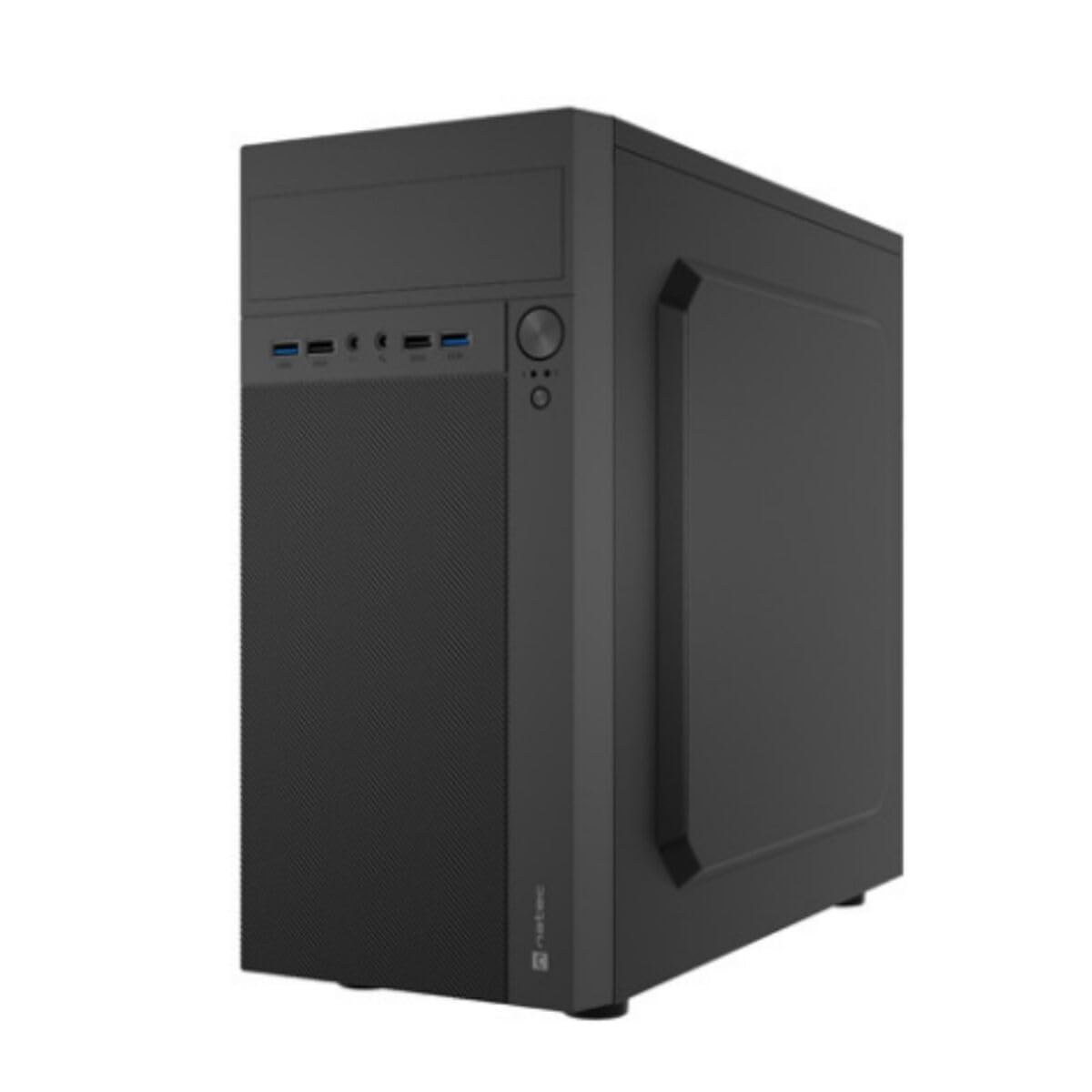
Зображення 1: Спереду і збоку view of the Natec ATX NPC-2038 Semi-Tower PC Case, highlighting its compact dimensions. The front panel features USB ports, audio jacks, and power/reset buttons. The case measures approximately 3.9 inches in depth, width, and height, indicating a compact design suitable for various setups.
- Передня панель: Includes power button, reset button, USB 2.0 ports, USB 3.0 port, and audio input/output jacks.
- Бічні панелі: Removable panels for easy access to internal components.
- Задня панель: Features expansion slots and an opening for the motherboard I/O shield.
- Внутрішні відсіки: Provides space for 3.5-inch hard drives and other storage devices.
1.3 Встановлення
- Підготуйте справу: Lay the case on its side and remove the side panel(s) by unscrewing the thumb screws at the rear.
- Встановити материнську плату: Secure the Mini ATX motherboard onto the standoffs provided. Ensure all screws are tightened appropriately.
- Встановити блок живлення: Mount the power supply unit (PSU) in the designated front mount area. Connect the necessary power cables to the motherboard and other components.
- Встановлення накопичувачів: Install 3.5-inch hard drives into the internal bays. Secure them with screws.
- Встановлення плат розширення: Remove the necessary expansion slot covers and install any graphics cards or other expansion cards.
- Підключення кабелів передньої панелі: Connect the front panel USB, audio, power, and reset cables to the corresponding headers on your motherboard. Refer to your motherboard manual for specific pin layouts.
- Управління кабелем: Route cables neatly to ensure optimal airflow and a clean build.
- Закрити справу: Reattach the side panel(s) and secure them with the thumb screws.
2. Інструкція з експлуатації
This section details how to power on your system and utilize the front panel connections.
2.1 Увімкнення
- Переконайтеся, що всі зовнішні периферійні пристрої (монітор, клавіатура, миша) підключені.
- Connect the power cable from your power supply unit to a wall outlet.
- Press the power button located on the front panel of the case. The system should initiate startup.
2.2 Підключення передньої панелі
The front panel provides convenient access to various ports for your peripherals.
- Порти USB 2.0 (x2): For connecting standard USB devices such as keyboards, mice, and printers.
- Порт USB 3.0 (x1): For connecting high-speed USB devices like external hard drives or flash drives, offering faster data transfer rates.
- Audio Input (Microphone): Підключіть мікрофон для голосового зв'язку.
- Audio Output (Headphones): Connect your headphones or speakers for audio playback.
3. Технічне обслуговування
Регулярне технічне обслуговування допомагає забезпечити довговічність та оптимальну продуктивність компонентів вашого ПК.
3.1 Очищення
- Зовні: Використовуйте м'який, damp тканиною для протирання зовнішніх поверхонь корпусу. Уникайте абразивних засобів для чищення.
- Інтер'єр: Періодично відкривайте корпус і використовуйте стиснене повітря для видалення пилу, що накопичився з вентиляторів, радіаторів та інших компонентів. Перед очищенням внутрішніх компонентів переконайтеся, що система вимкнена та відключена від мережі.
- Пилові фільтри: If your case includes dust filters, remove and clean them regularly to maintain good airflow.
3.2 Управління повітряним потоком
Proper airflow is crucial for cooling your components. Ensure that the case fans are clean and unobstructed. Consider the direction of airflow (intake vs. exhaust) to optimize cooling efficiency.
4. Вирішення проблем
This section addresses common issues you might encounter with your PC case and offers potential solutions.
| проблема | Можлива причина | Рішення |
|---|---|---|
| Система не вмикається. | Кабель живлення відключено, блок живлення вимкнено, кнопка живлення на передній панелі підключена неправильно. | Check power cable connection, ensure PSU switch is on, verify front panel power cable connection to motherboard. |
| USB-порти не працюють. | Front panel USB cables not connected to motherboard. | Ensure USB 2.0 and USB 3.0 headers are correctly connected to the motherboard. |
| Audio jacks not working. | Front panel audio cable not connected to motherboard. | Verify the HD Audio cable is securely connected to the motherboard's audio header. |
| Overheating components. | Poor airflow, dust buildup. | Clean dust filters and internal components. Ensure fans are properly oriented for optimal airflow. |
5. Технічні характеристики
Detailed technical specifications for the Natec ATX NPC-2038 Semi-Tower PC Case.
| Особливість | Значення |
|---|---|
| Бренд | Natec |
| Назва моделі | HELIX (NPC-2038) |
| Тип корпусу | Середній вежі |
| Сумісність материнської плати | Mini ATX |
| Колір | multicoloured (Black) |
| матеріал | Легована сталь (легована сталь) |
| Тип кріплення блоку живлення | Переднє кріплення |
| Спосіб охолодження | повітря |
| Розмір вентилятора | 120 міліметрів |
| Кількість шанувальників | 1 (pre-installed, if applicable) |
| Total Expansion Slots Quantity | 4 |
| Total USB 2.0 Ports | 2 |
| Total USB 3.0 Ports | 1 |
| Internal Bays Quantity | 3 (for 3.5 Inches Hard Disk Form Factor) |
| Вага товару | 1 кілограма |
| Розміри предмета (Д x Ш x В) | 3.94"D x 3.94"W x 3.94"H (Approximate, based on provided data) |
| Рекомендоване використання продукту | General-Purpose Computing |
6. Інформація про гарантію
Natec products are manufactured to high-quality standards. This product is covered by a manufacturer's warranty against defects in materials and workmanship. The specific duration and terms of the warranty may vary by region and retailer. Please retain your proof of purchase for warranty claims. For detailed warranty information, refer to the documentation provided with your purchase or visit the official Natec webсайт.
7. Підтримка
If you encounter any issues not covered in this manual or require further assistance, please contact Natec customer support or your retailer. You can typically find contact information on the official Natec webсайті або на упаковці вашого продукту.
- Інтернет-підтримка: Visit the official Natec webсайт із поширеними запитаннями, драйверами та ресурсами підтримки.
- Contact Retailer: For purchase-related issues or initial troubleshooting, your retailer may be able to provide immediate assistance.