
Cherry CHERRY MX BLACK CLEAR TOP SWITCH KIT
Комплект перемикачів CHERRY MX Black Clear TOP, інструкція з експлуатації
Model: CHERRY MX BLACK CLEAR TOP SWITCH KIT
Продукт закінченийview
The CHERRY MX Black Clear TOP Switch Kit provides 23 mechanical keyboard switches designed for DIY, hot-swap, or gaming keyboards. These switches are linear, offering a direct and powerful keystroke without an audible click. Manufactured with high-quality German engineering, they are built for durability and precise performance.

Image: The CHERRY MX Black Clear TOP Switch Kit, showing the packaging and the 23 individual switches.
Ключові особливості:
- Linear Switching: Provides a smooth, consistent keystroke without a tactile bump or audible click.
- Optimal Operating Force: Features a 63.5 cN operating force for a balanced feel.
- Міцна конструкція: Equipped with CHERRY gold crosspoint contacts, ensuring resistance to dirt and dust, and a lifespan of over 50 million keystrokes.
- Німецька інженерія: Developed and manufactured in Germany, guaranteeing high quality and precision.
- Зручна упаковка: Switches are securely packaged in a pure cardboard box to prevent pin bending and reduce waste.
Налаштування та встановлення
This kit is designed for users who wish to customize or repair mechanical keyboards, particularly those with hot-swappable sockets. Ensure your keyboard is compatible with 3-pin or 5-pin MX-style switches before proceeding.
Кроки встановлення:
- Приготування: Power off your keyboard and disconnect it from your computer. If replacing existing switches, carefully remove the keycaps using a keycap puller.
- Switch Removal (for replacement): For hot-swappable keyboards, use a switch puller tool to gently unclip and remove the old switches. For soldered keyboards, desoldering will be required (professional installation recommended).
- Перевірте нові вимикачі: Before installation, carefully inspect each CHERRY MX Black Clear TOP switch for any bent pins. If a pin is slightly bent, you can gently straighten it with fine-nose pliers.
- Insert New Switches: Align the pins of the new switch with the holes on the keyboard's PCB (Printed Circuit Board). Apply gentle, even pressure until the switch clicks into place. Ensure the switch is fully seated and flush with the plate.
- Тест функціональності: Reconnect your keyboard and test each newly installed switch to ensure it registers correctly.
- Reattach Keycaps: Once all switches are installed and tested, reattach the keycaps.

Image: A CHERRY MX switch being inserted into a mechanical keyboard, demonstrating the installation process for hot-swappable keyboards.

Зображення: Крупний план view of a hand pressing a CHERRY MX switch into a keyboard plate, illustrating the final step of switch installation.
Експлуатаційні характеристики
The CHERRY MX Black Clear TOP switches are characterized by their linear actuation, meaning the force required to press the key remains consistent throughout the keystroke. There is no tactile bump or audible click, providing a smooth and quiet typing or gaming experience.
- Тип перемикача: Лінійний
- Діючі сили: 63.5 cN (centinewtons)
- Pre Travel: 2.0 mm (distance to actuation point)
- Загальна сума подорожі: 4.0 mm (total distance key can be pressed)
- Sound Profile: Silent (no click)

Image: A user's hand typing on a mechanical keyboard, demonstrating typical use of the switches.
These characteristics make the MX Black Clear TOP switches suitable for users who prefer a direct and consistent feel, often favored in gaming for rapid, repeated key presses, or for typing environments where quiet operation is desired.
Технічне обслуговування та догляд
CHERRY MX switches are designed for long-term durability. With proper care, your switches will maintain their performance over millions of keystrokes.
Загальні поради щодо обслуговування:
- Пил і сміття: Regularly clean your keyboard to prevent dust and debris from accumulating around and inside the switches. Use compressed air to blow out particles.
- Очищення ковпачків клавіш: Periodically remove keycaps and clean them with a mild soap solution and water. Ensure they are completely dry before reattaching.
- Довговічність перемикача: The CHERRY gold crosspoint contacts are resistant to dirt and dust, contributing to the switches' impressive lifespan of over 50 million keystrokes without loss of quality.
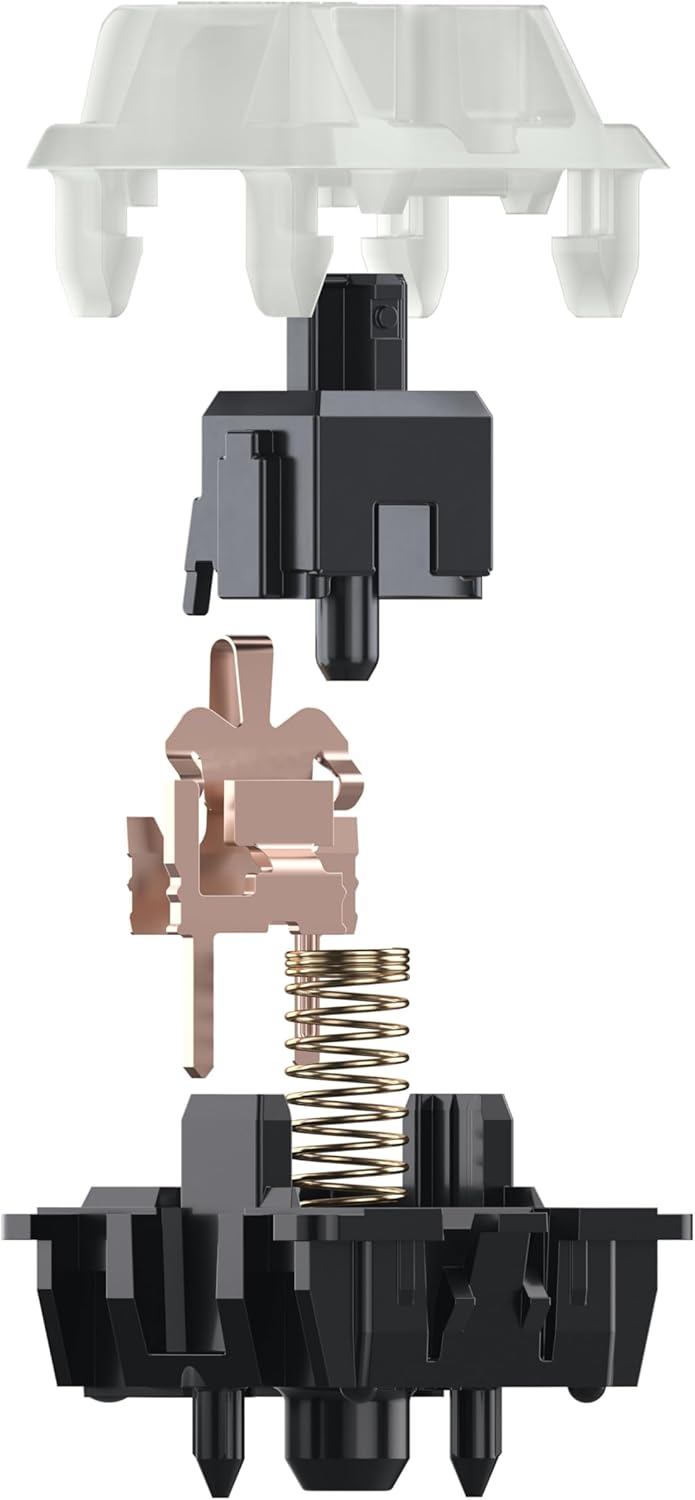
Image: An exploded diagram of a CHERRY MX switch, highlighting the durable internal components like the gold crosspoint contacts and spring.
Усунення несправностей
While CHERRY MX switches are highly reliable, occasional issues may arise. Here are some common troubleshooting steps:
- Switch Not Registering:
- Ensure the switch is fully seated in its socket. Gently press down on the switch to confirm it's flush with the keyboard plate.
- If using a hot-swappable keyboard, carefully remove the switch and inspect its pins for any bends or damage. Straighten bent pins if possible, or replace the switch if damaged.
- Clean the switch socket and the switch pins with compressed air to remove any debris.
- Bent Pins Upon Arrival:
Although switches are securely packaged, minor pin bends can sometimes occur during shipping. If you receive switches with bent pins, gently straighten them using fine-nose pliers. Be careful not to apply excessive force, as this can break the pin.
- Inconsistent Keystrokes:
- This could indicate dust or debris inside the switch. Try cleaning the switch with compressed air.
- Ensure the keycap is properly seated and not interfering with the switch stem.
If issues persist after attempting these steps, please refer to the manufacturer's support resources or consult a qualified technician.
Технічні характеристики
| Особливість | Деталь |
|---|---|
| Бренд | вишня |
| Номер моделі | CHERRY MX BLACK CLEAR TOP SWITCH KIT |
| Тип перемикача | Лінійний |
| Операційна сила | 63.5 кН |
| Попередня подорож | 2.0 мм |
| Total Travel | 4.0 мм |
| Sound Profile | Silent (no click) |
| Довговічність | >50 million keystrokes |
| Контакти | CHERRY gold crosspoint |
| Колір | MX BLACK CLEAR TOP |
| Вага товару | 3.17 унції |
| Розміри упаковки | 8.39 x 4.65 x 1.42 дюймів |
| Країна походження | Німеччина |
| Сумісні пристрої | Laptop (and other compatible mechanical keyboards) |
| Технологія підключення | USB-C (for compatible keyboards) |
| Особливість | Hot-Swappable (for compatible keyboards) |

Image: Detailed dimensions of a single CHERRY MX mechanical switch, showing its height and width.
Гарантія та підтримка
CHERRY products are manufactured to high standards of quality and reliability. For specific warranty information and support, please refer to the official CHERRY webсайт або зверніться безпосередньо до служби підтримки клієнтів.
While a specific warranty period for the switches is not detailed here, the product is designed for over 50 million keystrokes, indicating exceptional durability.
For further assistance, you may visit the official Cherry store or support page:
Visit the Official CHERRY Store on Amazon
Виробник: Cherry Europe GmbH
Країна походження: Німеччина
Офіційні відео про продукти
There are no official product videos from the seller available for embedding in this manual.
Ask a question about this manual
Ask about setup, troubleshooting, compatibility, parts, safety, or missing instructions. Manuals+ will review the question and use this page’s manual context to help answer it.