
вступ
This manual provides detailed instructions for the installation, operation, and maintenance of your EBTOOLS 4.3-inch 1080P Mirror Dash Cam. This device is designed to record video footage from both the front and rear of your vehicle, offering features such as parking monitoring and loop recording for enhanced driving safety and evidence collection. Please read this manual thoroughly before using the product to ensure proper functionality and to avoid any damage.
Особливості продукту
- Міцна конструкція: Manufactured from high-quality ABS material for robustness and extended durability.
- Wide-Angle Lenses: Equipped with wide-angle lenses to minimize blind spots and capture comprehensive road details.
- Циклічний запис: Ensures continuous recording by automatically overwriting the oldest video files when the memory card reaches its capacity.
- Всепогодні характеристики: Capable of recording clear video footage even in adverse weather conditions such as rain or fog.
- Зручний дизайн: Features a straightforward installation process and intuitive controls for ease of use.
Вміст упаковки
Будь ласка, перевірте, чи всі наступні предмети входять до вашої упаковки:
- EBTOOLS 4.3-inch Mirror Dash Cam Unit
- Задняview Камера
- Автомобільний зарядний пристрій
- Кабель для підключення задньої камери
- Mounting Straps/Adhesive
- Посібник користувача (цей документ)

Налаштування
1. Встановлення відеореєстратора
Закріпіть відеореєстратор у дзеркалі на існуючій задній частині вашого автомобіляview mirror using the provided mounting straps. Ensure it is firmly attached and does not obstruct your view.
2. Підключення задньої камери
Route the rear camera cable from the dash cam to the desired mounting location at the rear of your vehicle. Connect the rear camera to the AV IN port on the main dash cam unit. For optimal performance, ensure the cable is neatly tucked away and secured.


3. Підключення живлення
Connect the provided car charger to the dash cam's power input port and then plug the other end into your vehicle's 12V power outlet (cigarette lighter socket). The device will typically power on automatically with the vehicle's ignition.
4. Вставте картку пам'яті
Insert a compatible Micro SD card (not included) into the TF CARD slot on the dash cam. Ensure the card is inserted correctly until it clicks into place. A high-speed Class 10 or higher card is recommended for reliable recording.

Інструкція з експлуатації
Увімкнення/вимкнення живлення
- Автоматично: The dash cam will power on and begin recording automatically when your vehicle's ignition is turned on.
- Інструкція з експлуатації: Press and hold the Power button (usually marked with a power symbol) to manually turn the device on or off.
Навігація по меню
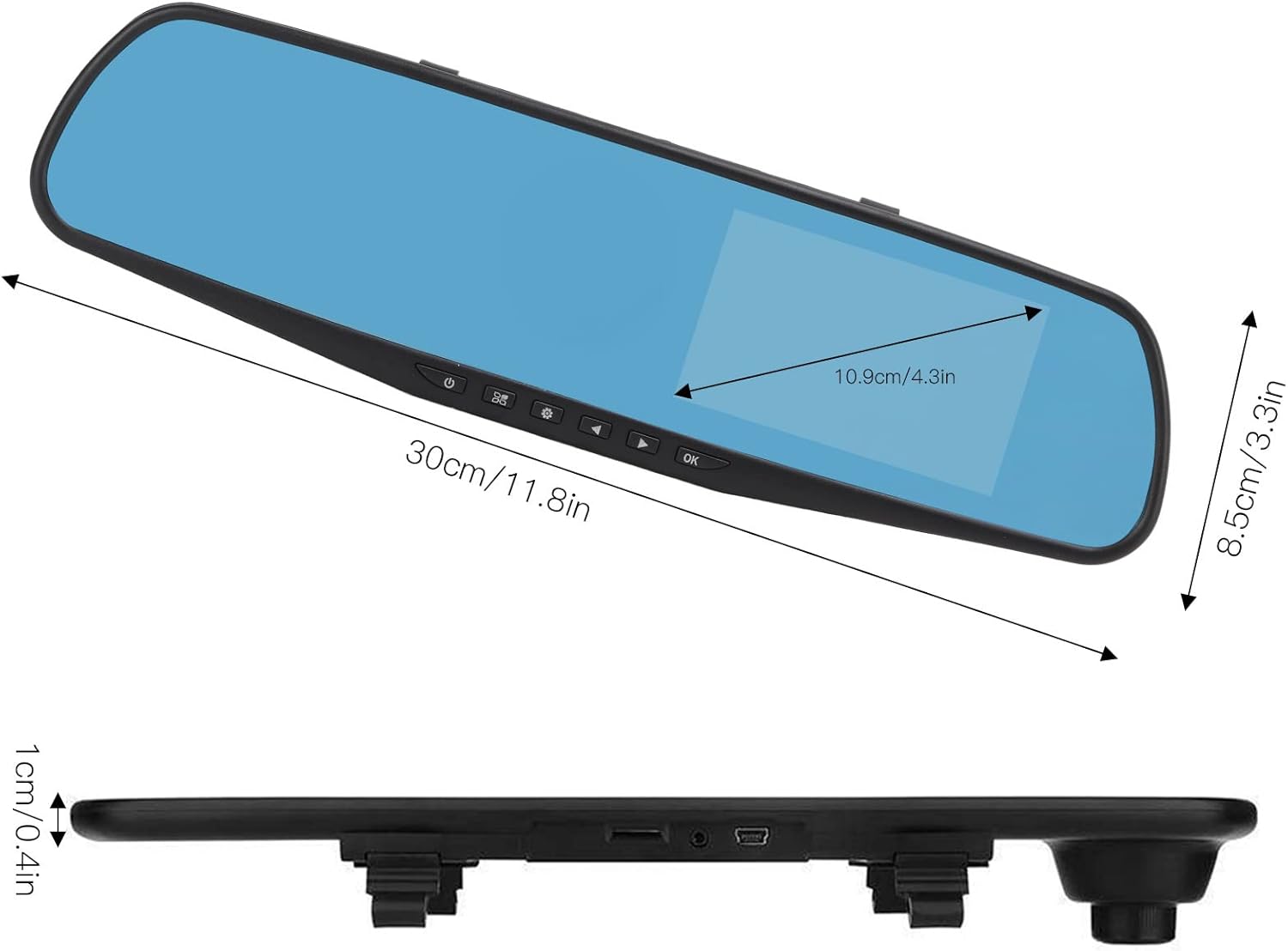
Use the physical buttons located on the bottom of the mirror unit to navigate through the menu options:
- Кнопка меню: Натисніть, щоб увійти в меню налаштувань.
- Кнопки вгору/вниз: Використовуйте для прокручування опцій меню.
- Кнопка ОК: Press to confirm a selection or setting.
Режими запису
- Циклічний запис: This feature records video in continuous segments (e.g., 1, 2, 3, or 5 minutes). When the memory card is full, the oldest fileавтоматично перезаписуються, щоб звільнити місце для нових записів.
- Виявлення руху: When enabled, the dash cam will automatically start recording if it detects movement in front of the vehicle while parked. This feature is useful for parking surveillance.
Налаштування роздільної здатності відео
You can adjust the video resolution for both front and rear cameras in the settings menu:
- Фронтальна камера: Select between 1080P (FHD 1400x1080) or 720P (HD 1280x720).
- Задня камера: Records at 720P resolution.
Налаштування мови
The device supports multiple languages. Navigate to the language settings in the menu to select your preferred language, including English, German, French, Italian, Japanese, Korean, and Simplified Chinese.

Технічне обслуговування
- Прибирання: Використовуйте м’яку суху тканину для очищення екрана та лінз відеореєстратора. Уникайте використання абразивних засобів для чищення або розчинників.
- Карта пам'яті: Regularly format your Micro SD card (at least once a month) to ensure optimal performance and prevent data corruption. Back up any important footagе перед форматуванням.
- температура: Avoid exposing the device to extreme temperatures, both hot and cold, as this can affect battery life and component integrity.
Усунення несправностей
- Пристрій не вмикається:
- Ensure the car charger is properly connected to both the dash cam and the vehicle's 12V power outlet. Check if the vehicle's ignition is on. Test the charger in another port or with another device if possible.
- Recording issues (e.g., stops recording, corrupted files):
- Verify that a compatible, high-speed Micro SD card (Class 10 or higher) is inserted correctly. Format the memory card through the dash cam's settings menu. If issues persist, try a different memory card.
- Screen display problems (e.g., black screen, distorted image):
- Check all cable connections, especially for the rear camera. Try resetting the device to factory settings via the menu. If the problem continues, contact customer support.
- Задня камера не відображає:
- Ensure the rear camera cable is securely connected to both the rear camera and the AV IN port on the main unit. Check for any damage to the cable or connectors.
Технічні характеристики
| Тип елемента | 4.3-inch Mirror Dash Cam |
| матеріал | ABS |
| Розмір екрана | 4.3 дюймів |
| Тип дисплея | TFT LCD |
| Кут фронтальної камери | 110 градусів |
| Кут задньої камери | 90-110 degrees (Adjustable) |
| Роздільна здатність фронтального відео | 1080P (FHD 1400x1080), 720P (HD 1280x720) |
| Роздільна здатність заднього відео | 720P |
| Інтервали циклічного запису | 1 хвилина, 2 хвилин, 3 хвилин, 5 хвилин |
| Виявлення руху | Підтримується |
| Роздільна здатність зображення | 12 МП, 10 МП, 5 МП, 3 МП, 2 МП, 1.3 МП |
| Формат відео | AVI |
| Формат зображення | JPEG |
| Тип об'єктива | F2.78 glass resolution multi-layer filter wide-angle lens |
| Підтримувані мови | English, German, French, Italian, Japanese, Korean, Simplified Chinese |
| Відеовихід | USB-кардрідер |
| Спосіб монтажу | Клейовий тип |
| Розміри продукту | Approx. 30cm (11.8in) L x 8.5cm (3.3in) W x 1cm (0.4in) T |
| Розміри упаковки | 34 x 12 x 6 см; 512 g |
Гарантія та підтримка
For warranty information or technical assistance, please refer to the warranty card included with your product or contact EBTOOLS customer support through the retailer's platform where the product was purchased. Our support team is available to help with any questions or issues you may encounter.