
THOMSON 50UA5S13
Інструкція користувача телевізора THOMSON 50UA5S13 з діагоналлю 4K UHD та Android TV
1. Вступ
Welcome to the user manual for your new THOMSON 50UA5S13 50-inch 4K UHD Smart Android TV. This manual provides essential information for setting up, operating, and maintaining your television. Please read it thoroughly to ensure optimal performance and safe use of your device.
Your THOMSON TV offers a stunning 4K UHD display, providing four times the detail of Full HD. It features the Android TV operating system, granting access to a vast array of applications, intelligent voice control via Google Assistant, and seamless content streaming with Chromecast built-in. Enjoy immersive audio with Dolby Audio technology and versatile content reception through its integrated triple tuner (DTT, cable, or satellite).

Малюнок 1: Спереду view of the THOMSON 50UA5S13 4K UHD Smart Android TV displaying various streaming app icons.
2. Інформація про безпеку
Before operating your television, please read all safety instructions carefully. Keep this manual for future reference.
- Джерело живлення: Переконайтеся, що телевізор підключено до розетки з правильною гучністюtage, як зазначено на етикетці продукту.
- Вентиляція: Не блокуйте вентиляційні отвори. Залиште достатньо місця навколо телевізора для належної циркуляції повітря, щоб запобігти перегріву.
- Розміщення: Place the TV on a stable, level surface. Avoid placing it in direct sunlight, near heat sources, or in environments with high humidity or dust.
- Вода і вологість: Не піддавайте телевізор впливу дощу або вологи. Не ставте на телевізор предмети, наповнені рідинами, такі як вази.
- Прибирання: Від’єднайте телевізор від мережі перед чищенням. Використовуйте м’яку суху тканину. Не використовуйте рідкі або аерозольні засоби для чищення.
- Обслуговування: Не намагайтеся самостійно обслуговувати телевізор. Звертайтеся до кваліфікованого сервісного персоналу з усіх питань.
3. Вміст упаковки
Перевірте наявність усіх елементів в упаковці:
- THOMSON 50UA5S13 50-inch 4K UHD Smart Android TV
- Remote Control (Premium backlit)
- Кабель живлення
- Тумба під телевізор (2 шт.) та гвинти
- Гарантійний талон
- Короткий посібник (може бути включений окремо)
4. Фізичне налаштування
4.1 Кріплення підставки для телевізора
- Обережно покладіть телевізор екраном донизу на м’яку, чисту поверхню, щоб запобігти пошкодженню екрана.
- Вирівняйте деталі підставки з відповідними пазами на нижній панелі телевізора.
- Закріпіть підставки за допомогою наданих гвинтів. Переконайтеся, що вони міцно затягнуті.
4.2 Настінне кріплення (додатково)
This TV supports VESA wall mounts with a 200x200 pattern. A wall mount bracket is not included and must be purchased separately. Follow the instructions provided with your wall mount bracket for proper installation. Ensure the wall can support the weight of the TV and the mount.
4.3 Розміри та розміщення
Consider the TV's dimensions for optimal placement in your viewплощі.

Figure 2: Diagram showing the dimensions of the THOMSON 50UA5S13 TV: 112 cm width, 69 cm height (with stand), 26 cm depth (with stand).
5. Зв'язки
Connect your TV to various external devices using the ports located on the back and side panels.

Figure 3: Illustration of the back panel ports including HDMI, LAN, USB, Audio Out, Satellite, Antenna, AV In, and Common Interface.
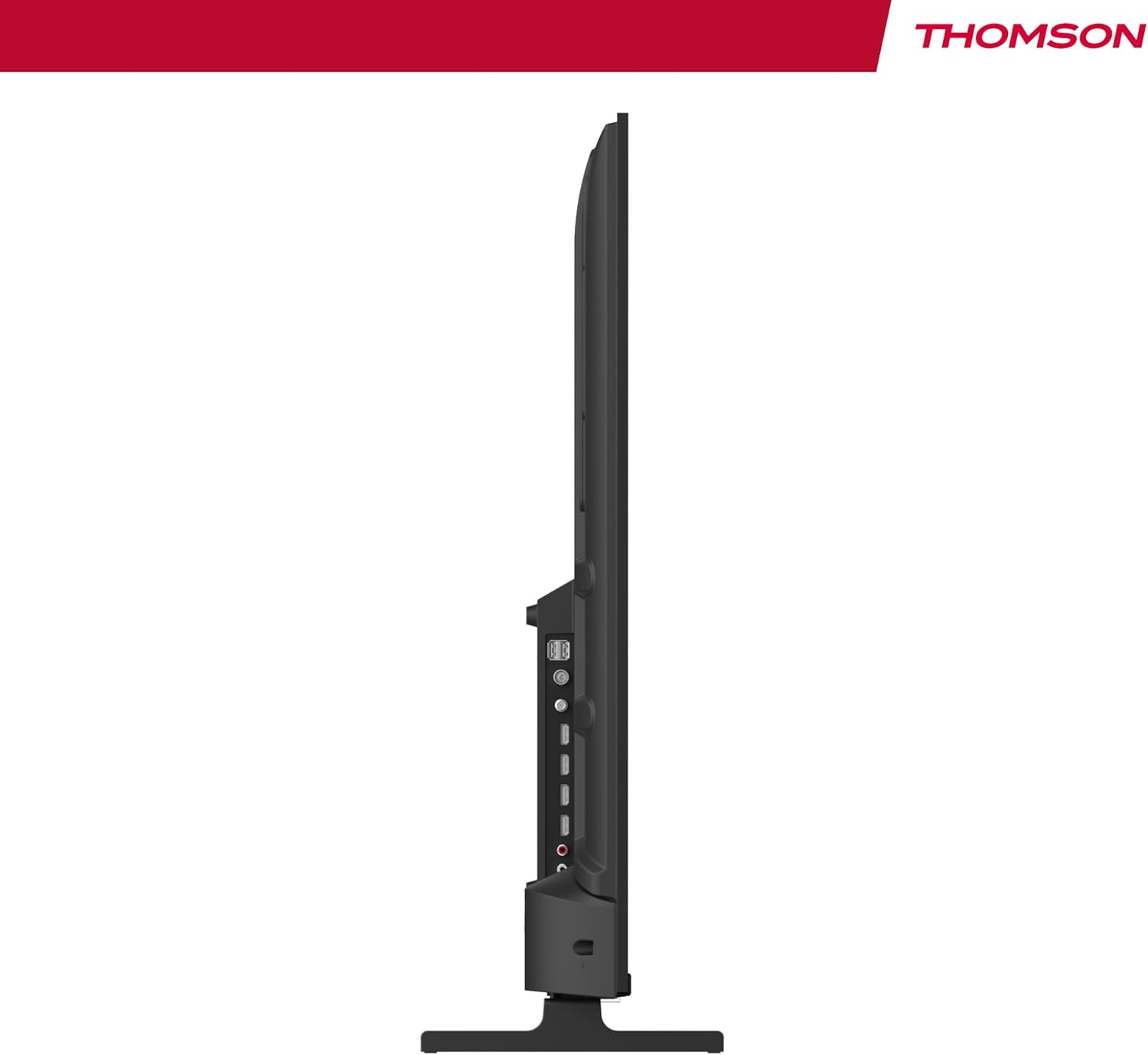
Рисунок 4: Бічний профіfile view of the TV, showing accessible ports on the side.
- Потужність: Підключіть кабель живлення до телевізора та розетки.
- Антена/Кабель/Супутник: Use the appropriate input for your broadcast signal (DTT, cable, or satellite).
- HDMI (x4): Підключіть зовнішні пристрої, такі як програвачі Blu-ray, ігрові консолі або телеприставки.
- USB (x2): Підключіть USB-накопичувачі для відтворення медіафайлів.
- LAN: Підключіть кабель Ethernet для дротового підключення до Інтернету.
- Аудіовихід (цифровий оптичний): Підключіться до зовнішньої звукової системи для покращеного звуку.
- AV-вхід: Підключіть старі пристрої за допомогою композитних відео- та стереоаудіокабелів.
- Загальний інтерфейс (CI+): Insert a CI+ module and smart card for encrypted digital services.
- Bluetooth: Pair wireless headphones, speakers, or other compatible Bluetooth devices.
6. Initial Setup and Android TV
6.1 Перше ввімкнення
- After connecting all necessary cables, plug the TV into a power outlet.
- Натисніть кнопку живлення на пульті дистанційного керування або на телевізорі.
- Дотримуйтесь підказок на екрані, щоб вибрати потрібну мову.
6.2 Налаштування мережі
Connect your TV to the internet for access to Android TV features and apps.
- Wi-Fi: Виберіть свою мережу Wi-Fi зі списку та введіть пароль.
- Дротове з’єднання (LAN): Якщо ви підключили кабель Ethernet, телевізор має автоматично розпізнати дротове з’єднання.
6.3 Google Account Sign-in
Sign in with your Google Account to access the Google Play Store, Google Assistant, and personalized recommendations.
6.4 Сканування каналів
After network setup, the TV will guide you through scanning for available channels based on your antenna, cable, or satellite connection.
7. Керування телевізором
7.1 Пульт дистанційного керування
The premium backlit remote control allows easy navigation, even in low light. Key features include:
- Кнопка живлення: Вмикає або вимикає телевізор.
- Кнопки навігації: Для навігації по меню.
- Кнопки гучності/каналів: Регулювання гучності та перемикання каналів.
- Кнопка Google Асистента: Активує голосове керування.
- Кнопка «Улюблені»: Quickly launch your designated favorite application.
- Кнопки швидкого доступу до програм: Прямий доступ до популярних потокових сервісів.
7.2 Функції Android TV
Your THOMSON TV runs on Android TV, providing a smart and intuitive user experience.

Figure 5: The Android TV home screen displaying various applications and content recommendations.
- Застосування: Access over 400,000 movies and TV shows from apps like Netflix, Prime Video, Disney+, YouTube, Spotify, and Apple TV.
- Google Assistant: Use your voice to control the TV, search for content, get answers, and manage smart home devices. Simply press the Google Assistant button on your remote and speak your command.

Figure 6: A user interacting with the Google Assistant via the TV remote control.
- Вбудований Chromecast: Wirelessly stream movies, music, and videos from compatible smartphones, tablets, or computers directly to your TV.
7.3 Налаштування зображення
Оптимізуйте свій viewдосвід роботи з передовими технологіями обробки зображень:
- 4K UHD: Enjoy ultra-high definition resolution with 8 million pixels for incredibly detailed and precise images.
- HDR (розширений динамічний діапазон) та Dolby Vision: These technologies enhance contrast, brightness, and color accuracy, providing a more realistic and vibrant picture.

Figure 7: Visual comparison illustrating the enhanced detail of 4K UHD (3840x2160) over Full HD (1920x1080).

Figure 8: Comparison showing the improved contrast and color depth with Dolby Vision compared to Standard Dynamic Range (SDR).
7.4 Параметри звуку
Experience dynamic and immersive audio:
- Dolby Audio / Dolby Atmos: Creates a rich, room-filling sound experience. (Note: Dolby Atmos requires compatible sound equipment).

Figure 9: Visual representation of Dolby Atmos sound creating an immersive audio experience around viewErs
8. Технічне обслуговування
8.1 Очищення телевізора
- Завжди відключайте телевізор від мережі перед чищенням.
- Використовуйте м’яку тканину без ворсу, щоб обережно протерти екран і корпус телевізора.
- Для стійких плям злегка протрітьampen the cloth with water or a specialized screen cleaner (ensure it's safe for TV screens) and wipe gently. Never spray liquid directly onto the screen.
8.2 Оновлення програмного забезпечення
Your Android TV may receive periodic software updates to improve performance and add new features. Ensure your TV is connected to the internet to receive these updates. You can usually check for updates in the TV's settings menu.
9. Вирішення проблем
Якщо у вас виникли проблеми з телевізором, зверніться до наступних поширених рішень:
| проблема | Можливе рішення |
|---|---|
| Немає живлення | Перевірте, чи кабель живлення надійно підключено до телевізора та розетки. Спробуйте іншу розетку. |
| Немає зображення/звуку | Ensure the correct input source is selected. Check cable connections to external devices. For sound, check volume levels and external audio system connections. |
| Пульт не працює | Перевірте або замініть батарейки. Переконайтеся, що між пультом дистанційного керування та ІЧ-датчиком телевізора немає перешкод. |
| Неможливо підключитися до Wi-Fi | Переконайтеся, що ваш Wi-Fi роутер увімкнено та працює. Повторно введіть пароль Wi-Fi. Спробуйте перезавантажити телевізор і роутер. |
| Slow performance or apps | Close unused applications. Clear cache for problematic apps in settings. Restart the TV. Ensure a stable internet connection. |
10. Технічні характеристики
Detailed technical specifications for the THOMSON 50UA5S13 TV:
| Особливість | Специфікація |
|---|---|
| Бренд | Томсон |
| Номер моделі | 50UA5S13 |
| Розмір екрана | 50 дюймів (126 см) |
| Технологія дисплея | UHD (LED LCD) |
| роздільна здатність | 3840 x 2160 (4K UHD) |
| Частота оновлення | 60 Гц |
| Особливості | Flat Screen, Android TV, Google Assistant, Chromecast built-in, HDR, Dolby Vision, Dolby Audio |
| Підключення | Bluetooth, Wi-Fi, 4x HDMI, 2x USB, LAN, Digital Optical Audio Out, AV In, CI+ |
| тюнер | Triple Tuner (ATSC for Antenna, Cable, Satellite) |
| Конфігурація звуку | 2.0 |
| Розміри (Д x Ш x В) | 111.1 x 26 x 69.2 см (з підставкою) |
| вага | 8.5 кілограма |
| Настінне кріплення VESA | 200x200 мм (кріплення не входить до комплекту) |
| Клас енергоефективності | E |
Для отримання детальної інформації про енергетику, будь ласка, зверніться до бази даних ЄС EPREL:
Інформаційний лист продукту EPREL

Figure 10: The EU Energy Label for the THOMSON 50UA5S13 TV, indicating its energy efficiency class and consumption.
11. Гарантія та підтримка
Your THOMSON 50UA5S13 TV comes with a full 3-year manufacturer's warranty, demonstrating its reliability and quality. For warranty claims or technical support, please refer to the warranty card included in your package or visit the official THOMSON support website for your region. Keep your proof of purchase for warranty validation.
Пов'язані документи50UA5S13


Ask a question about this manual
Ask about setup, troubleshooting, compatibility, parts, safety, or missing instructions. Manuals+ will review the question and use this page’s manual context to help answer it.