
1. Вступ
Thank you for choosing the GameSir T4 Cyclone Wireless Controller. This manual provides detailed instructions for setting up, operating, maintaining, and troubleshooting your controller. The GameSir T4 Cyclone is designed for a versatile gaming experience across multiple platforms.

Зображення: спереду view of the GameSir T4 Cyclone Wireless Controller.
2. Вміст упаковки
- GameSir T4 Cyclone Wireless Controller
- Кабель USB-C
- Посібник користувача
- Note: The 2.4G wireless receiver is sold separately.
3. Налаштування
3.1 Заряджання контролера
Before first use, fully charge the controller. Connect the supplied USB-C cable to the controller's charging port and the other end to a USB power source (e.g., computer, wall adapter). The controller features an 860mAh battery, providing approximately 25 hours of playtime on a full charge.

Image: Illustration showing 860mAh battery capacity and 25 hours playing time.
3.2 Сумісність
The GameSir T4 Cyclone Wireless Controller is compatible with the following platforms:
- Nintendo Switch (including Switch, Switch Lite, and Switch OLED)
- ПК з Windows 10/11
- Android devices (Android 6.0 and above)
- iOS devices (iOS 13.0 and above)
- Steam Deck
Note: Xbox consoles are NOT supported.

Image: Controller shown with icons for Switch, PC, iOS, and Android, indicating multi-platform compatibility.
3.3 Варіанти підключення
The controller offers three ways to connect to your devices:
- Підключення Bluetooth:
- Переконайтеся, що контролер заряджений.
- Увімкніть контролер.
- On your device (Switch, Android, iOS, PC), go to Bluetooth settings and search for available devices.
- Select "GameSir T4 Cyclone" to pair.
- 2.4G Wireless Connection (Receiver Sold Separately):
- Plug the 2.4G wireless receiver into an available USB port on your device (PC, Steam Deck).
- Turn on the controller. It should automatically connect to the receiver.
- Дротове підключення USB-C:
- Connect the controller to your device using the supplied USB-C cable.
- The controller will function as a wired controller and charge simultaneously.

Image: Visual representation of Bluetooth, USB-C, and 2.4G wireless connectivity options.
4. Інструкція з експлуатації
4.1 Hall Effect Sensing Joysticks
The GameSir T4 Cyclone features Hall Effect joysticks, which use magnetic sensors to detect movement. This technology provides:
- Нульова мертва зона: Ensures immediate response to even the slightest input.
- Anti-Drift Performance: Eliminates common stick drift issues found in traditional joysticks, ensuring long-term precision.
- Довговічність: Designed for up to 5 million cycles.

Image: Diagram illustrating the internal components of GameSir Hall Effect Sticks, highlighting anti-drift and longevity.
4.2 Hall Effect Analog Triggers
The analog triggers also utilize Hall Effect technology, offering precise and consistent input. You can switch between two trigger modes:
- Regular Trigger Mode: Provides a full range of motion for nuanced control in racing or driving games.
- Fast Trigger Mode (Hair Trigger): Reduces travel distance for quicker, mouse-click-like responses, ideal for FPS or RPG games.

Image: Diagram showing the internal mechanism of Hall Effect Analog Triggers with 0.1mm accuracy.
4.3 Programmable Macro Back Buttons
The controller features two programmable back buttons (L4 and R4) that can be customized for enhanced gameplay. These buttons allow you to:
- Відображення кнопок: Assign a single button function to L4 or R4.
- Турбофункція: Set a button to rapidly repeat its input.
- Combo Function: Program a sequence of button presses to execute complex actions with a single press.
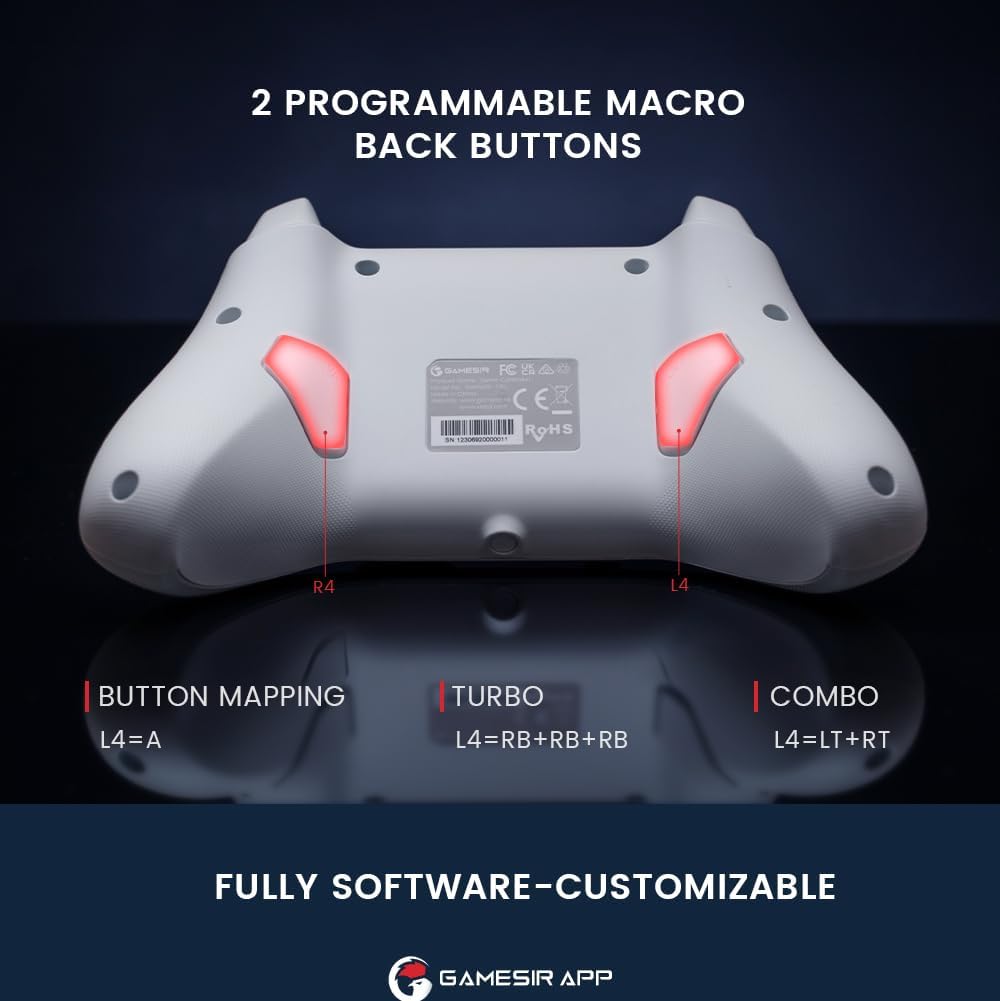
Зображення: Задня частина view of the controller highlighting the L4 and R4 programmable macro back buttons.
4.4 Multi-function M Button
The 'M' button provides quick access to various settings without needing the app:
- M + LT/RT: Switch between Hair Trigger (fast) and Linear Trigger (regular) modes.
- M + LS/RS: Adjust stick deadzone settings.
- M + D-pad Up/Down: Відрегулюйте інтенсивність вібрації.
- M + A: Change ABXY button layout (e.g., Switch layout vs. Xbox layout).

Image: Diagram showing the multi-function M button and its combinations for various settings.
4.5 Керування рухом
The controller supports motion controls, allowing for interactive gameplay in compatible Nintendo Switch titles. Tilt, shake, or rotate the controller to interact with your games.

Image: Controller shown with dynamic lines indicating motion control in action during gameplay.
4.6 GameSir App Customization
For advanced customization, download the GameSir App. The app allows you to:
- Customize button mappings.
- Adjust stick deadzone.
- Set trigger travel distance.
- Fine-tune vibration intensity.
- Оновіть прошивку контролера.

Image: Screenshots of the GameSir App interface showing options for button mapping, stick, triggers, and vibration settings.
5. Технічне обслуговування
- Прибирання: Використовуйте м’яку суху тканину для очищення контролера. Уникайте використання агресивних хімікатів або абразивних матеріалів.
- Зберігання: Зберігайте контролер у прохолодному, сухому місці, подалі від прямих сонячних променів та екстремальних температур.
- Догляд за акумулятором: Do not attempt to replace the internal battery. If the controller will not be used for an extended period, charge it periodically to maintain battery health.
6. Вирішення проблем
- Контролер не підключається:
- Переконайтеся, що контролер повністю заряджений.
- Переконайтеся, що Bluetooth увімкнено на вашому пристрої, а контролер перебуває в режимі сполучення.
- If using 2.4G wireless, ensure the receiver is properly inserted and the controller is in 2.4G mode.
- Спробуйте перезавантажити і контролер, і пристрій.
- Input Lag or Unresponsive Controls:
- Ensure there are no obstructions or excessive distance between the controller and your device.
- Мінімізуйте перешкоди від інших бездротових пристроїв.
- For critical gaming, consider using the USB-C wired connection for the lowest latency.
- Stick Drift or Inaccurate Movement:
- The Hall Effect joysticks are designed to prevent drift. If you experience issues, ensure the controller firmware is up to date via the GameSir App.
- Check the stick deadzone settings in the GameSir App and ensure it is set to 0 for optimal responsiveness.
- Rumble Motor Noise:
- Some users may notice a high-pitched squeal from the rumble motors. If this is distracting, the vibration intensity can be adjusted or disabled via the multi-function M button or the GameSir App.
- LED Indicator Too Bright:
- The LED brightness can be adjusted through the GameSir App.
- GameSir App Not Recognizing Controller:
- Ensure Bluetooth is enabled and the controller is paired with your mobile device.
- Check for app updates and controller firmware updates.
- Verify that the app has necessary permissions on your mobile device.
7. Технічні характеристики
| Особливість | Деталь |
|---|---|
| Бренд | GameSir |
| Назва моделі | GameSir T4 Cyclone |
| Сумісні пристрої | Android, iOS, Nintendo Switch, PC, Steam Deck |
| Тип контролера | Джойстик |
| Технологія підключення | Bluetooth, 2.4G Wireless (receiver sold separately), USB C |
| Додаткові функції | Wireless, Hall Effect Joysticks, Hall Effect Triggers, Programmable Back Buttons, Motion Control |
| Кількість кнопок | 16 |
| Апаратна платформа | Настільний комп'ютер, ігрова консоль, ноутбук, смартфон, планшет |
| Джерело живлення | Wireless (Rechargeable Battery) |
| Ємність акумулятора | 860 мАг |
| Час відтворення | прибл. 25 години |
| Вага товару | 400 г |
| Розміри предмета (Д x Ш x В) | 6.14 x 4.21 x 2.48 дюймів |
8. Офіційне відео продукту
Відео: Посадовець надview of the GameSir T4 Cyclone and Pro Wireless Controllers, demonstrating features and compatibility.
9. Гарантія та підтримка
GameSir products come with a limited warranty. For detailed warranty information, please refer to the warranty card included with your product or visit the official GameSir website. For technical support, troubleshooting assistance, or to download the GameSir App and firmware updates, please visit the GameSir support page or contact customer service.
GameSir App: The GameSir App is essential for unlocking the full customization potential of your controller and for keeping its firmware updated. It is available for download on Google Play and the Apple App Store.