
вступ
Дякуємо за покупкуasing the ELECOM Wireless Mouse EX-G Bluetooth Silent S-size 5-button Multi-pairing, model M-XGS30BBSKBK. This ergonomic mouse is designed to provide a comfortable and strain-free experience, developed in collaboration with orthopedic surgeons. It features silent clicks, multi-pairing capabilities, and an antimicrobial surface for enhanced hygiene. This manual will guide you through the setup, operation, and maintenance of your new mouse.

Image: The ELECOM EX-G Bluetooth Silent Mouse, model M-XGS30BBSKBK.
Ключові характеристики
- Ергономічний дизайн: Co-developed with orthopedic surgeons, the EX-G series mouse is shaped to fit the natural curve of your hand, minimizing strain on wrist and finger muscles. This design has been certified by the AskDoctors evaluation service, with 99% of 100 doctors recommending it.
- Silent Click Switches: Equipped with Panasonic silent switches for left and right clicks, as well as the scroll wheel, allowing for quiet operation in any environment, such as during web conferences or in shared workspaces.
- Multi-pairing Functionality: Connects to up to two Bluetooth-compatible devices simultaneously. Easily switch between paired devices with a dedicated button.
- Antimicrobial Surface: The mouse body and printed parts are treated with an antimicrobial coating to inhibit bacterial growth, keeping the mouse clean.
- Дизайн з 5 кнопками: Includes left click, right click, scroll wheel, and two side buttons (forward/back) for enhanced navigation and productivity.

Image: Comparison of the ergonomic EX-G mouse design (right) with a traditional mouse (left), illustrating the natural hand position.
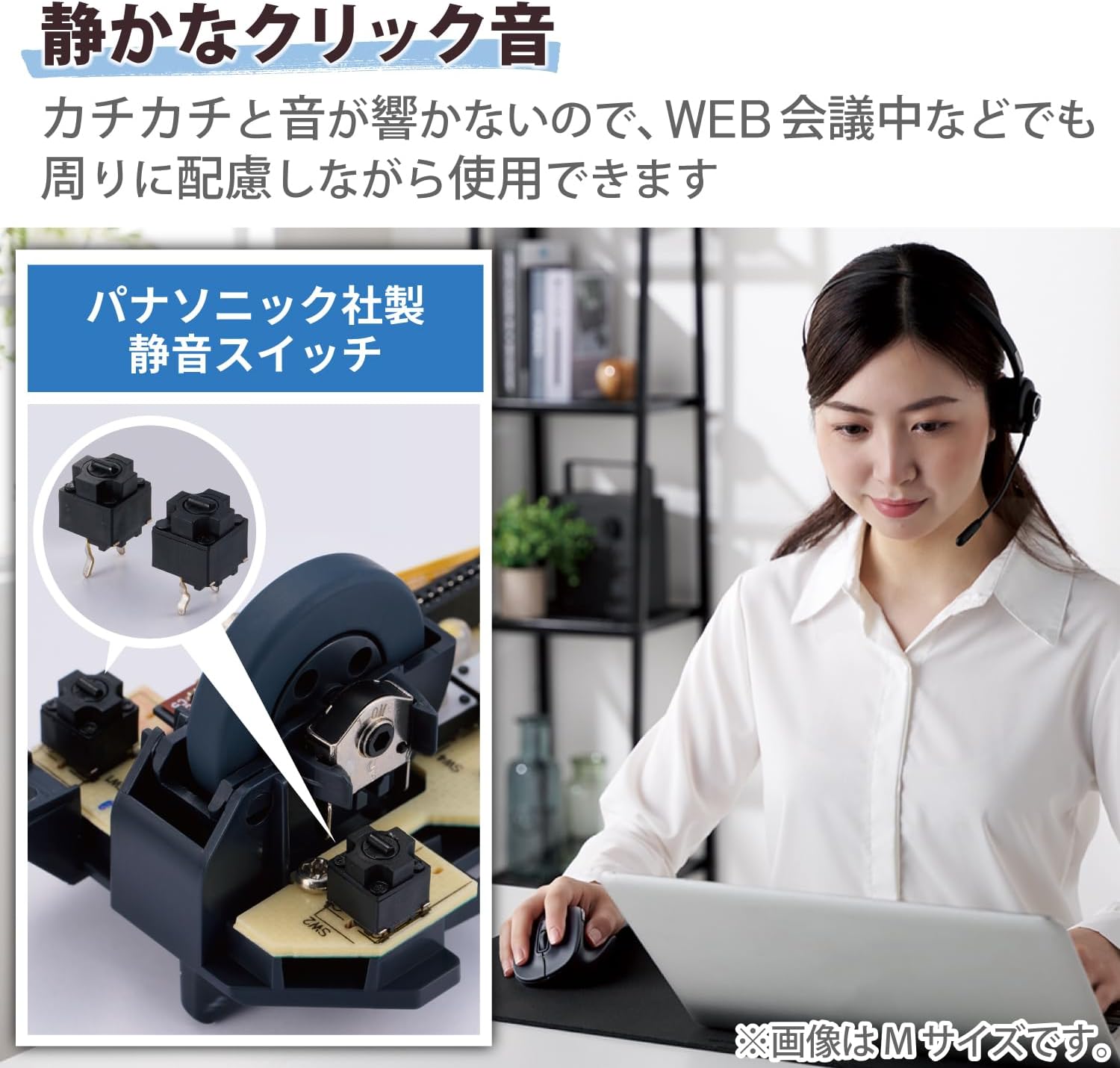
Image: A close-up of the internal Panasonic silent click switches and a user operating the mouse quietly.

Image: Illustration of the multi-pairing feature, showing indicator lights (white for device 1, green for device 2) for switching connections.

Image: Various color models of the EX-G mouse, highlighting the antimicrobial surface treatment.

Image: Diagram illustrating the functions of the 5 buttons: Left Click, Right Click, Double Click, Forward, and Back.
Налаштування
1. Встановлення батареї
- Відкрийте кришку батарейного відсіку, розташовану на нижній стороні миші.
- Insert one AAA alkaline battery (included) into the battery compartment, ensuring correct polarity (+/-).
- Надійно закрийте кришку акумулятора.
2. Підключення Bluetooth
- Увімкніть мишу за допомогою перемикача живлення внизу.
- Press and hold the pairing button on the bottom of the mouse until the LED indicator starts flashing (e.g., white for device 1, green for device 2).
- On your computer or device (Windows, macOS, Android, iOS, iPadOS, ChromeOS), navigate to the Bluetooth settings.
- шукати available Bluetooth devices and select "ELECOM EX-G" or a similar name.
- Follow any on-screen prompts to complete the pairing process. The LED indicator on the mouse will stop flashing and remain solid when successfully paired.
- To pair a second device, repeat steps 2-5, ensuring the mouse is in the correct pairing mode (e.g., green LED for device 2).
Інструкція з експлуатації
Основні функції миші
- Клацніть лівою кнопкою миші: Первинний відбір та активація.
- Клацніть правою кнопкою миші: Відкриває контекстні меню.
- Колесо прокрутки: Scrolls content vertically. Pressing the scroll wheel often acts as a middle click.
- Кнопки «Вперед/Назад»: Розташовані збоку, ці кнопки забезпечують швидку навігацію web браузери та file дослідники.
Перемикання між сполученими пристроями
If you have paired the mouse with two devices, press the device switching button (usually located near the pairing button on the bottom or a dedicated button on top) to toggle between Device 1 (white LED) and Device 2 (green LED).
Налаштування DPI
The mouse has a maximum sensitivity of 2000 dpi. While there isn't a dedicated DPI switch mentioned, sensitivity can typically be adjusted through your operating system's mouse settings for personalized control.
Технічне обслуговування
прибирання
- Wipe the mouse surface with a soft, dry cloth.
- Для стійких забруднень злегка dampПротріть тканину водою або м’яким неабразивним засобом для чищення. Уникайте агресивних хімікатів.
- Do not allow liquids to enter the mouse body.
Заміна батареї
When the mouse performance degrades or the indicator light suggests low battery, replace the AAA battery following the installation steps in the Setup section.
Усунення несправностей
- Миша не реагує:
- Check if the power switch on the bottom of the mouse is ON.
- Переконайтеся, що батарея правильно встановлена та не розряджена. За потреби замініть її.
- Verify that the mouse is paired with the correct device (check the LED indicator for Device 1 or 2).
- Try re-pairing the mouse with your device.
- Нестабільний рух курсора:
- Очистіть оптичний датчик на нижній частині миші.
- Переконайтеся, що ви використовуєте мишу на відповідній поверхні. Уникайте поверхонь із високим рівнем відбиття або прозорих поверхонь.
- Перевірте наявність перешкод від інших бездротових пристроїв.
- Scroll wheel issues (e.g., scrolling in the wrong direction, jumping):
- This can sometimes indicate a hardware issue. Ensure the scroll wheel is clean and free of debris.
- Якщо проблема не зникне, зверніться в службу підтримки.
- Cannot connect to a second device:
- Ensure the mouse is in the correct pairing mode for the second device (green LED).
- Confirm your device's Bluetooth is enabled and discoverable.
Технічні характеристики
| Бренд | ELECOM |
| Номер моделі | M-XGS30BBSKBK |
| Колір | чорний |
| Технологія підключення | Bluetooth |
| Особливості | Ergonomic Design, Silent, Multi-pairing, Wireless |
| Технологія виявлення руху | Оптичний |
| Кількість кнопок | 5 |
| Орієнтація руки | Правша |
| Сумісні пристрої | Bluetooth(R) HOGP compatible Windows OS, Android, macOS, iOS, iPadOS, ChromeOS devices |
| Операційні системи | Android 12, Chrome OS, Windows 11/10, iPadOS 16, macOS Ventura 13 |
| Кількість батарей | 1 батарея AAA (в комплекті) |
| Апаратна платформа | Mac, PC, Tablet |
| Джерело живлення | Працює від батареї |
| Mouse Max Sensitivity | 2000 dpi |
| Вага продукту | 82 грами |
| Розміри виробу (Д х Ш) | 10.8 см х 7.1 см |
| Підрахунок одиниць | 1 одиниця |
| Рекомендоване використання | Офіс, Ігри |
Size Guide (S-size)
The S-size mouse is designed to fit hands where the length from the tip of the middle finger to the base of the palm is approximately 165mm.

Image: Diagram showing the S-size mouse dimensions (Length 108mm, Width 71mm, Height 52mm) and a hand measurement guide for optimal fit.
Гарантія та підтримка
This ELECOM product comes with a Гарантія 2 рік з дати покупки. Будь ласка, збережіть чек про покупку для гарантійного обслуговування.
For technical support, troubleshooting assistance, or warranty service, please visit the official ELECOM website or contact their customer service department. You can find more information and support resources on the ELECOM Brand Store on Amazon.