1. Вступ
This manual provides instructions for the proper use and care of your Docooler Portable USB Cassette Player. This device allows you to play audio cassettes and convert their content into digital MP3 files via a USB connection to a computer. Please read this manual thoroughly before operating the device to ensure optimal performance and longevity.
2. Продукт закінчивсяview
The Docooler Portable USB Cassette Player is a compact, handheld device designed for playing and digitizing audio cassettes. It features a transparent casing, allowing visibility of the internal mechanism.
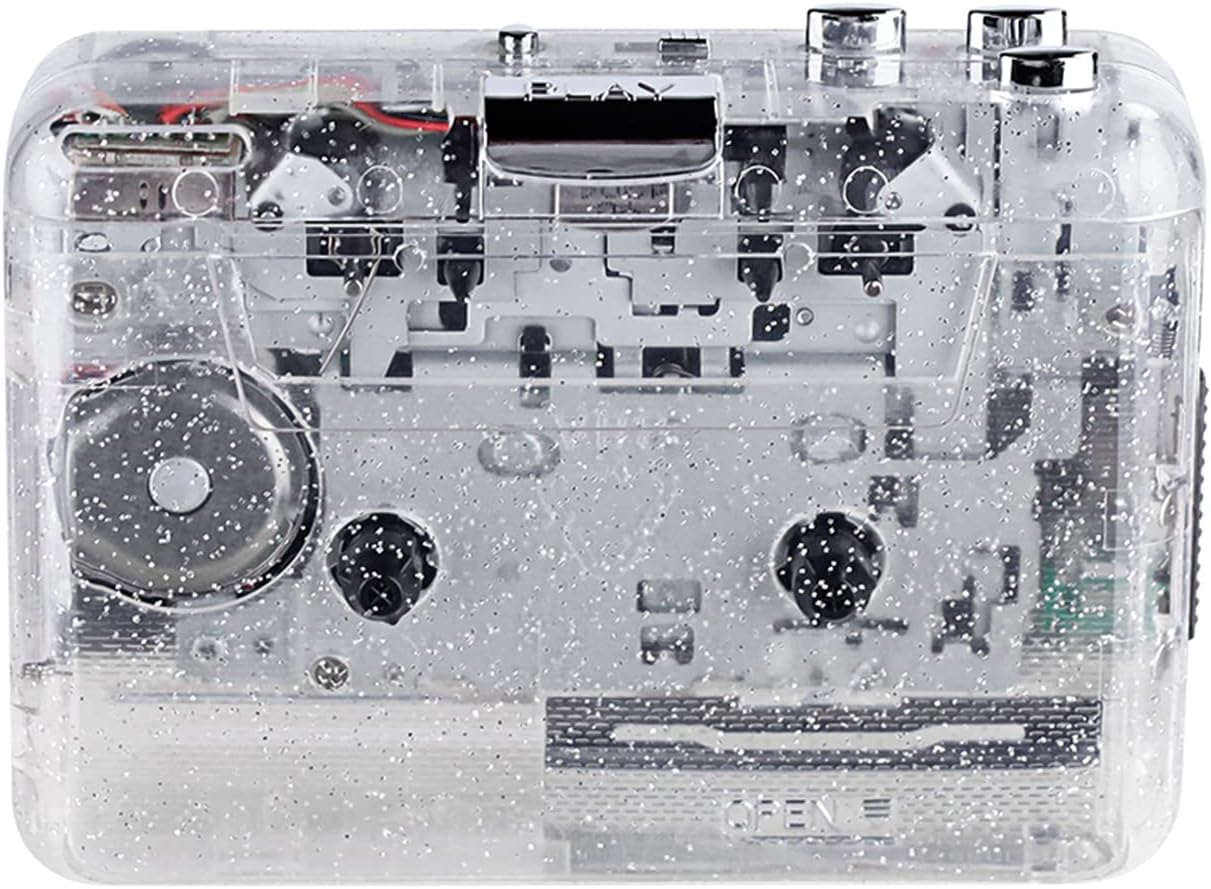
Малюнок 1: Спереду view of the Docooler Portable USB Cassette Player, showcasing its transparent design.

Figure 2: Various angles of the cassette player, including top, side, and open views.
Вміст упаковки:
- Docooler Portable USB Cassette Player
- USB кабель
- Посібник користувача (цей документ)
- Навушники (можуть відрізнятися залежно від комплекту)
3. Налаштування
3.1 Джерело живлення
The cassette player can be powered by either batteries or a USB connection.
Установка батареї:
- Знайдіть батарейний відсік на пристрої.
- Відкрийте кришку батарейного відсіку.
- Вставте 2 батарейки типу АА (не входять до комплекту), дотримуючись правильної полярності (+/-).
- Надійно закрийте кришку батарейного відсіку.
Потужність USB:
Connect the provided USB cable to the player's USB port and the other end to a powered USB port on your computer or a USB wall adapter. The device will draw power from the USB connection.
4. Інструкція з експлуатації
4.1 Відтворення касети
- Відкрийте кришку відсіку для касети.
- Insert an audio cassette tape with the open edge facing upwards.
- Щільно закрийте кришку відсіку для касети.
- Connect headphones or external speakers to the 3.5mm audio output jack.
- Натисніть ГРАТИ щоб почати відтворення.
- Використовуйте СТІЙ кнопку, щоб зупинити відтворення.
- Використовуйте FF (швидке перемотування вперед) і REW (перемотування назад) кнопки для навігації по стрічці.
- Adjust the volume using the volume control dial.
- The "DIR" button allows you to quickly flip the tape direction. The "play mode" button can be used to reverse playback once or an unlimited number of times.

Figure 3: The cassette player in use, demonstrating tape insertion and playback setup.

Figure 4: Users listening to audio through headphones connected to the cassette player.
4.2 Converting Tapes to MP3 Files
The Docooler Portable USB Cassette Player can convert your analog cassette audio into digital MP3 files. This process requires a computer and compatible audio recording software (not included).
- Ensure the cassette player is powered (via batteries or USB).
- Connect the cassette player to your computer using the provided USB cable.
- Install and open your preferred audio recording software on your computer. Software such as Audacity (free and open-source) is commonly used for this purpose.
- Configure your recording software to recognize the cassette player as an audio input device.
- Insert the cassette tape you wish to convert into the player.
- Start recording in your software, then press the ГРАТИ button on the cassette player.
- Monitor the recording process. Once the tape has finished playing, stop the recording in your software.
- Save the recorded audio as an MP3 file на вашому комп'ютері.

Figure 5: Illustration of the process to convert cassette audio to MP3 files using the player and a computer.
5. Технічне обслуговування
5.1 Очищення пристрою
- Протріть зовнішню частину програвача м’якою сухою тканиною.
- Do not use liquid cleaners or abrasive materials, as they may damage the surface.
- Periodically clean the tape heads and pinch rollers using a cotton swab lightly dampзмочений ізопропіловим спиртом для забезпечення оптимальної якості звуку та запобігання пошкодженню стрічки.
5.2 Зберігання
- Якщо пристрій не використовується протягом тривалого часу, виймайте батарейки, щоб запобігти витіканню.
- Зберігайте програвач у прохолодному, сухому місці, подалі від прямих сонячних променів та екстремальних температур.
6. Вирішення проблем
| проблема | Можлива причина | Рішення |
|---|---|---|
| Немає живлення | Dead batteries; USB cable not connected properly. | Replace batteries; ensure USB cable is securely connected. |
| Ні звуку | Headphones/speakers not connected; volume too low; dirty tape heads. | Connect audio output device; increase volume; clean tape heads. |
| Poor sound quality (hissing, muffled) | Dirty tape heads; worn-out tape; low battery. | Clean tape heads; try a different tape; replace batteries. |
| Стрічка не відтворюється або не рухається | Tape jammed; mechanism issue; low battery. | Check tape for damage; replace batteries. |
| Cannot convert to MP3 | USB connection issue; software not configured correctly; no recording software. | Ensure USB is connected; check software settings; install compatible recording software. |
7. Технічні характеристики
- модель: B0C69FDZF6
- Джерело живлення: 2 x AA Batteries or USB 5V DC
- Інтерфейс: USB 2.0
- Аудіовихід: 3.5 мм стерео роз'єм
- Розміри: 7.2 x 5.91 x 1.54 дюймів (прибл.)
- вага: 9.6 унцій (приблизно)
- Виробник: Docooler
8. Інформація про безпеку
- Не піддавайте пристрій впливу води або надмірної вологи.
- Уникайте падіння та сильних ударів пристрою.
- Не намагайтеся розбирати або ремонтувати пристрій самостійно. Зверніться до кваліфікованого сервісного персоналу.
- Зберігати в недоступному для дітей місці.
- Утилізуйте батареї згідно з місцевими правилами.
9. Гарантія та підтримка
For warranty information or technical support, please refer to the documentation included with your purchase or contact Docooler customer service through their official website or the retailer where the product was purchased. Please have your model number (B0C69FDZF6) and purchase date available when contacting support.