
1. Вступ
This user manual provides detailed instructions for the Rocketek PC/SC USB Smart Card Reader. This device is designed to facilitate secure digital interactions, including online identification, digital signatures, and access to various smart card applications. Please read this manual thoroughly before using the product to ensure proper functionality and longevity.
2. Продукт закінчивсяview
The Rocketek PC/SC USB Smart Card Reader is a versatile device supporting a wide range of smart cards. It features a compact design and a standard USB interface for easy connectivity.
2.1 Вміст упаковки
- Rocketek PC/SC USB Smart Card Reader
- Посібник користувача (цей документ)
2.2 Характеристики пристрою
The card reader includes dedicated slots for different card types and an indicator light for operational status.
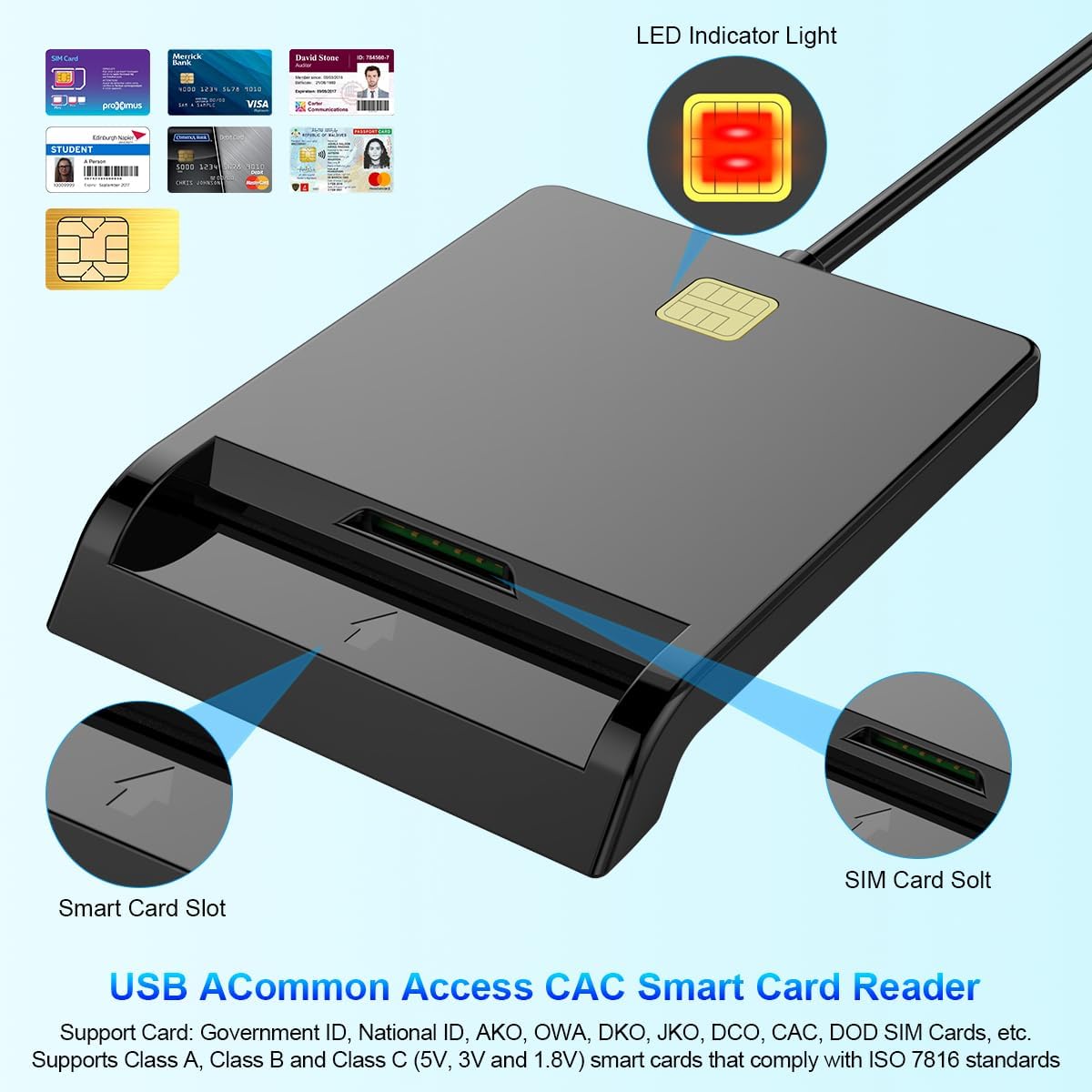
малюнок 1: Фронт view of the Rocketek Smart Card Reader, highlighting the LED indicator light, the main smart card slot, and the SIM card slot.

малюнок 2: The Rocketek Smart Card Reader shown with its USB connector, a SIM card, and a standard debit card, illustrating its multi-card compatibility.
3. Налаштування
Follow these steps to set up your Rocketek PC/SC USB Smart Card Reader.
3.1 Системні вимоги
- Операційна система: Windows 98 / Me / 2000 / NT 4.0 / XP / CE / Vista / 7 / 8 / 8.1 / 10 / 11, Chromebook OS, Linux, Ubuntu, Mac OS.
- Інтерфейс: Доступний USB-порт.

малюнок 3: The card reader is compatible with various operating systems, including different versions of Windows and Linux.
3.2 Підключення пристрою
- Знайдіть вільний порт USB на комп’ютері чи ноутбуці.
- Plug the USB connector of the Rocketek Smart Card Reader into the USB port.
- The device is generally Plug & Play for Windows systems, meaning it should be recognized automatically without manual driver installation. For Mac OS and Linux, or for specific smart card applications (e.g., Belgian eID, CAC cards), additional drivers or official software may be required. Refer to the card issuer's website for necessary software.
4. Інструкція з експлуатації
Using the Rocketek PC/SC USB Smart Card Reader is straightforward.
4.1 Вставлення смарт-картки
- Переконайтеся, що зчитувач карток підключено до комп’ютера.
- For standard smart cards (e.g., ID cards, bank cards), insert the card into the main smart card slot with the chip facing upwards and towards the reader.
- For SIM cards, insert the SIM card into the dedicated SIM card slot.
- The LED indicator light on the reader will illuminate or flash to indicate card detection and activity.
4.2 Використання пристрою для читання карток
- Once the card is inserted and recognized, you can use it with compatible software for tasks such as:
- Online banking
- Цифрові підписи
- Online tax declarations
- Accessing government services (e.g., Belgian eID)
- CAC, AKO, OWA, DKO, JKO, NKO, BOL, GKO, Marinenet, AF-Portal, Pure Edge Viewer додатків
- Важливо: The reader is designed to read only one card at a time. Do not attempt to insert multiple cards simultaneously into different slots if they are intended for active use.

малюнок 4: The card reader supports high-speed data transmission but can only process one smart card or SIM card at any given moment.
5. Технічне обслуговування
To ensure optimal performance and extend the lifespan of your card reader, follow these maintenance guidelines:
- Тримайте пристрій чистим та без пилу. Використовуйте для очищення м’яку суху тканину.
- Уникайте впливу екстремальних температур, вологості або прямих сонячних променів на зчитувач.
- Do not insert foreign objects into the card slots.
- Handle the USB cable gently to prevent damage.
- Store the reader in a safe place when not in use.
6. Вирішення проблем
If you encounter issues with your Rocketek Smart Card Reader, refer to the following common problems and solutions:
6.1 Пристрій не розпізнано
- Перевірте підключення USB: Ensure the reader is firmly plugged into a working USB port. Try a different USB port or a different computer if possible.
- Перезавантажте комп'ютер: Іноді простий перезапуск може вирішити проблеми з розпізнаванням.
- Встановлення драйвера: While the device is generally plug-and-play for Windows, some specific smart cards (e.g., certain government IDs, health cards) or operating systems (Mac OS, Linux) may require dedicated drivers or middleware. Visit the official website of your smart card issuer or the Rocketek support page for driver downloads.
6.2 Card Not Reading
- Правильна вставка: Ensure the smart card is inserted correctly with the chip facing the right direction and fully seated in the slot.
- Стан картки: Check the smart card for any visible damage or dirt on the chip. Clean the chip gently with a soft, dry cloth if necessary.
- Сумісність програмного забезпечення: Verify that you have the correct software installed for the specific type of smart card you are trying to read (e.g., eID software for Belgian ID cards).
- Single Card Rule: Ensure only one card is inserted into the reader at a time.
6.3 Повільна продуктивність
- Порт USB: Ensure you are using a high-speed USB port (e.g., USB 2.0 or 3.0).
- Системні ресурси: Close unnecessary applications running in the background that might be consuming system resources.
7. Технічні характеристики
| Бренд | Rocketek |
| Модель | B0C5LR8DTN |
| Технологія підключення | USB |
| Сумісні пристрої | Комп'ютери, ноутбуки |
| Операційні системи | Windows 98 / Me / 2000 / NT 4.0 / XP / CE / Vista / 7 / 8 / 8.1 / 10 / 11, Chromebook OS, Linux, Ubuntu, Mac OS |
| Особливість | Plug & Play |
| Підтримувані типи карток | Smart, ID, CAC, CRS, CNS, IC, SIM, etc. (ISO 7816 Class A, B, C for 5V, 3V and 1.8V smart cards) |
| Розміри (прибл.) | 84 мм (Д) x 65 мм (Ш) x 9.5 мм (В) |
| Cable Length (Approx.) | 95 см / 2.5 дюйма |

малюнок 5: Approximate dimensions of the Rocketek Smart Card Reader and its integrated USB cable.
8. Гарантія та підтримка
Rocketek stands behind the quality of its products.
8.1 Гарантія виробника
All Rocketek USB CAC smart card readers come with a worry-free 12-місячна гарантія виробника з дати покупки. Ця гарантія поширюється на дефекти матеріалів і виготовлення за нормального використання.
8.2 Підтримка клієнтів
If you have any questions, require technical assistance, or experience issues with your product, please do not hesitate to contact Rocketek customer support directly. Refer to the product packaging or the Rocketek official webсайт для контактної інформації.