
HOCO S19 Metal Grey
Hoco S19 Small Heartful ENC Noise Reduction Wireless Headphones
Посібник користувача
вступ
Thank you for choosing the Hoco S19 Small Heartful ENC Noise Reduction Wireless Headphones. This manual provides detailed instructions on how to set up, operate, and maintain your new wireless headphones. Please read this manual carefully before use to ensure optimal performance and longevity of your device.
Інформація про безпеку
- Не піддавайте пристрій впливу екстремальних температур, вологості або агресивних речовин.
- Keep the device away from water and liquids. It is not water resistant.
- Не намагайтеся розбирати або модифікувати пристрій. Це призведе до анулювання гарантії.
- Використовуйте лише надані або сертифіковані зарядні кабелі.
- Уникайте прослуховування на високій гучності протягом тривалого часу, щоб запобігти пошкодженню слуху.
Вміст упаковки
Будь ласка, перевірте упаковку на наявність наступних предметів:
- Hoco S19 Wireless Headphone
- Амбушюри
- Зарядний кабель (USB)
- Посібник користувача

Зображення: спереду view of the Hoco S19 retail packaging, showing the headphone and key features.
Продукт закінченийview
Familiarize yourself with the components of your Hoco S19 headphone.

Зображення: Правий бік view of the Hoco S19 wireless headphone, highlighting the ear hook design and control buttons.
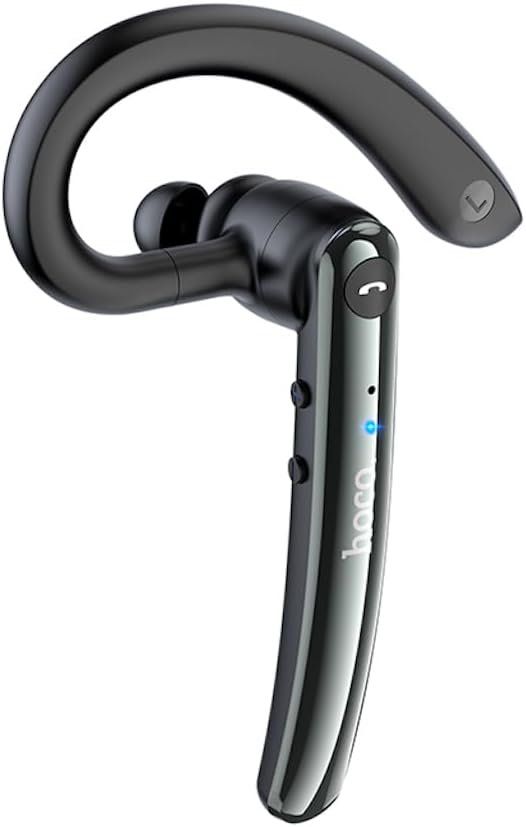
Зображення: Ліва сторона view of the Hoco S19 wireless headphone, showing the ergonomic ear hook and main body.

Зображення: Спина view of the Hoco S19 wireless headphone, displaying the charging port, model number (S19), input voltage, and various certification marks.
Ключові компоненти:
- Вушний гачок: Designed for secure and comfortable fit.
- Основний корпус: Houses the battery, chip, and controls.
- Багатофункціональна кнопка: Для живлення, сполучення, керування дзвінками та керування музикою.
- Кнопки гучності: For adjusting audio volume.
- Мікрофон: Dual microphones for ENC noise reduction.
- Порт зарядки: Для підключення зарядного кабелю.
- Світлодіодний індикатор: Показує стан живлення, сполучення та заряджання.

Image: Inside of the Hoco S19 packaging, illustrating the location of the main and auxiliary microphones for enhanced call clarity.
Налаштування
1. Заряджання навушників
Before first use, fully charge the headphone. The battery capacity is 90mAh.
- Connect the charging cable to the headphone's charging port and the other end to a USB power source (e.g., computer, wall adapter).
- The LED indicator will show charging status (e.g., red light).
- Charging takes approximately 1 hour. The LED indicator will change or turn off once fully charged.
2. Pairing with a Device (Bluetooth)
The Hoco S19 uses Bluetooth 5.0 for stable connectivity.
- Увімкнення: Press and hold the Multi-function Button until the LED indicator flashes blue and red alternately, indicating pairing mode.
- Активувати Bluetooth: На смартфоні, планшеті або іншому пристрої з підтримкою Bluetooth перейдіть до налаштувань Bluetooth і ввімкніть Bluetooth.
- шукати Пристрої: Your device will automatically search for nearby Bluetooth devices.
- Select "Hoco S19": From the list of available devices, select "Hoco S19".
- Підтвердити сполучення: Once connected, the LED indicator on the headphone will flash blue slowly or turn off, and you will hear a voice prompt confirming the connection.
If pairing fails, turn off the headphone and your device's Bluetooth, then repeat the steps.
Інструкція з експлуатації
Увімкнення/вимкнення живлення
- Увімкнення: Press and hold the Multi-function Button for approximately 3 seconds until the LED indicator flashes blue and you hear a voice prompt.
- Вимкнення живлення: Press and hold the Multi-function Button for approximately 5 seconds until the LED indicator turns red and you hear a voice prompt.
Функції виклику
- Відповісти/закінчити виклик: Press the Multi-function Button once during an incoming call to answer. Press it again during a call to end.
- Відхилити виклик: Press and hold the Multi-function Button for approximately 2 seconds during an incoming call to reject.
- Повторний набір останнього номера: Двічі натисніть багатофункціональну кнопку, коли ви не розмовляєте.
Відтворення музики
- Відтворення/пауза: Press the Multi-function Button once during music playback.
- Наступний трек: Натисніть і утримуйте кнопку збільшення гучності.
- Попередній трек: Натисніть і утримуйте кнопку зменшення гучності.
Регулювання гучності
- Збільшення гучності: Коротко натисніть кнопку збільшення гучності.
- Зменшення гучності: Коротко натисніть кнопку зменшення гучності.
Зменшення шуму ENC
The Hoco S19 features double-mark ENC (Environmental Noise Cancellation) for clearer calls. This feature is active during calls to reduce background noise.
Language Prompts
The headphone supports Chinese and English voice prompts. To switch languages, triple-click the Multi-function Button when the headphone is not connected to any device.
Технічне обслуговування
- Прибирання: Use a soft, dry cloth to clean the headphone. Do not use harsh chemicals or abrasive materials.
- Зберігання: Зберігайте навушники в прохолодному, сухому місці, подалі від прямих сонячних променів та екстремальних температур.
- Догляд за акумулятором: To prolong battery life, avoid fully discharging the battery frequently. Charge the headphone regularly, even if not in use for extended periods.
Усунення несправностей
| проблема | Можлива причина | Рішення |
|---|---|---|
| Навушники не вмикаються. | Низький заряд батареї. | Charge the headphone for at least 1 hour. |
| Не вдається з’єднати пристрій. | Bluetooth not enabled on device; headphone not in pairing mode; too far from device. | Ensure Bluetooth is on. Put headphone in pairing mode (flashing blue/red). Keep devices within 10 meters. |
| Немає звуку або погана якість звуку. | Volume too low; headphone not connected; interference. | Increase volume. Reconnect headphone. Move away from sources of interference. |
| Якість дзвінків погана. | Environmental noise; microphone obstructed. | Ensure microphone is clear. ENC noise reduction should help in noisy environments. |
Технічні характеристики
| Особливість | Деталь |
|---|---|
| Назва моделі | S19 |
| Технологія підключення | Бездротовий (Bluetooth) |
| Версія Bluetooth | 5.0 (Chip: Realtek RTL8763BMF) |
| Ємність акумулятора | 90 мАг |
| Час зарядки | Приблизно 1 година |
| Час розмов/музики | До 9 годин |
| Час очікування | До 200 годин |
| Зменшення шуму | Double-mark ENC (Environmental Noise Cancellation) |
| Supported Prompts | китайська та англійська |
| матеріал | Акрилонітрилбутадієнстирол (АБС) |
| Вага товару | 12 грамів |
| Колір | Металевий сірий |
| Рівень водонепроникності | Не водостійкий |
Гарантія та підтримка
HOCO products are designed and manufactured to the highest quality standards. For information regarding warranty coverage, please refer to the warranty card included with your purchase or visit the official HOCO webсайт.
For technical support, troubleshooting assistance, or service inquiries, please contact your local HOCO distributor or the customer service department through the contact information provided on the HOCO official webсайт або ваш чек про покупку.
Інтернет-ресурси: For additional information, FAQs, and product updates, please visit the official HOCO webсайт.
Ask a question about this manual
Ask about setup, troubleshooting, compatibility, parts, safety, or missing instructions. Manuals+ will review the question and use this page’s manual context to help answer it.