
amazon basics B0C58TDFPR
Посібник користувача портативного стабілізатора підвісу Amazon Basics
Model: B0C58TDFPR
вступ
Ручний стабілізатор підвісу Amazon Basics розроблений для забезпечення плавного та стабільного руху.tage for your smartphone photography and videography. This manual provides essential information for setting up, operating, maintaining, and troubleshooting your device.

Image: The Amazon Basics Handheld Gimbal Stabiliser with a smartphone attached, ready for use.
Вміст упаковки
Перш ніж почати, перевірте, чи всі елементи присутні в упаковці:
- 1N Ручний стабілізатор з прикріпленим тримачем
- Зарядний кабель 1N
- Посібник користувача 1N (цей документ)
- 1 Штатив
- 1N Hanging belt
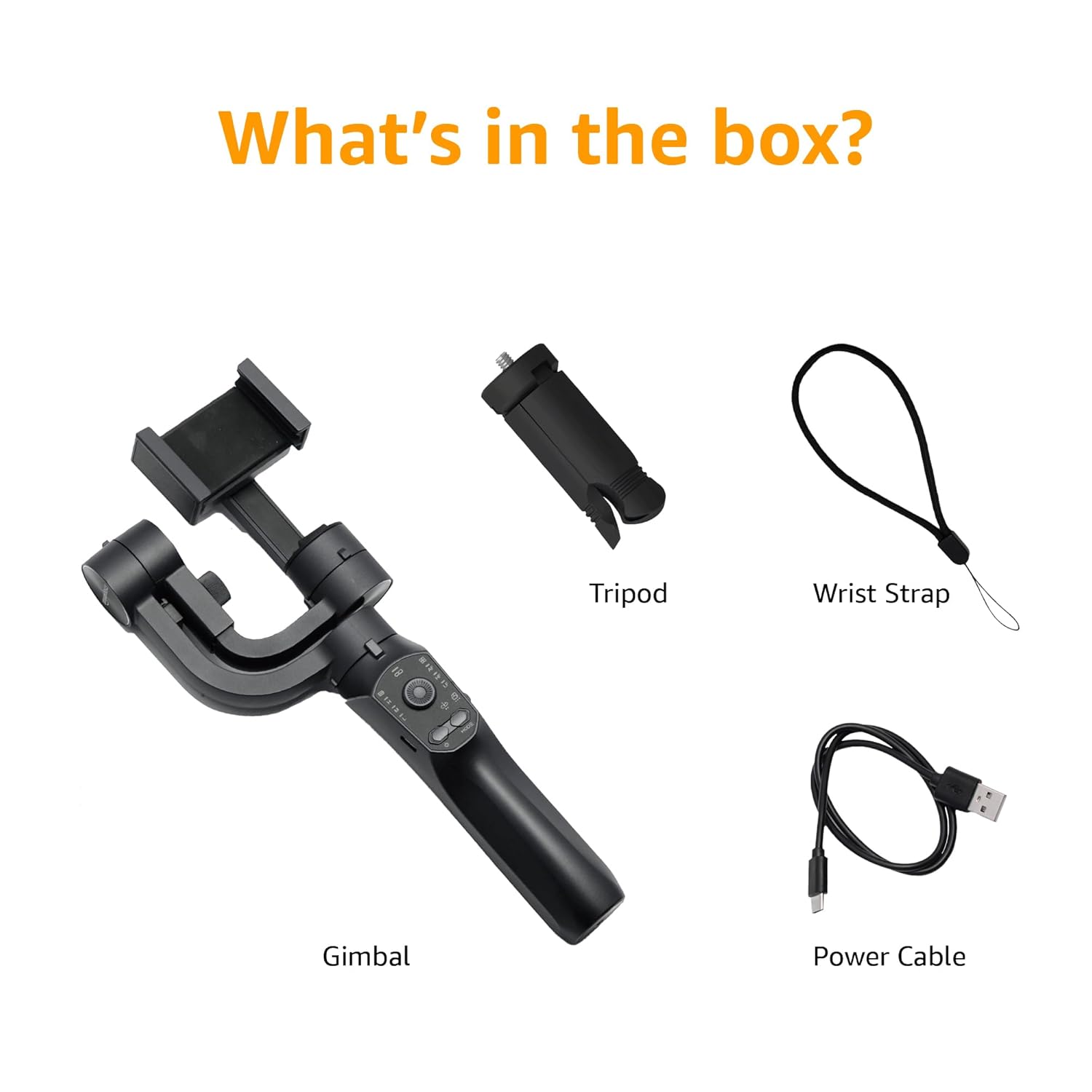
Image: A visual representation of the package contents, including the gimbal, tripod, power cable, and wrist strap.
Компоненти продукту
Familiarize yourself with the different parts of your gimbal stabiliser:
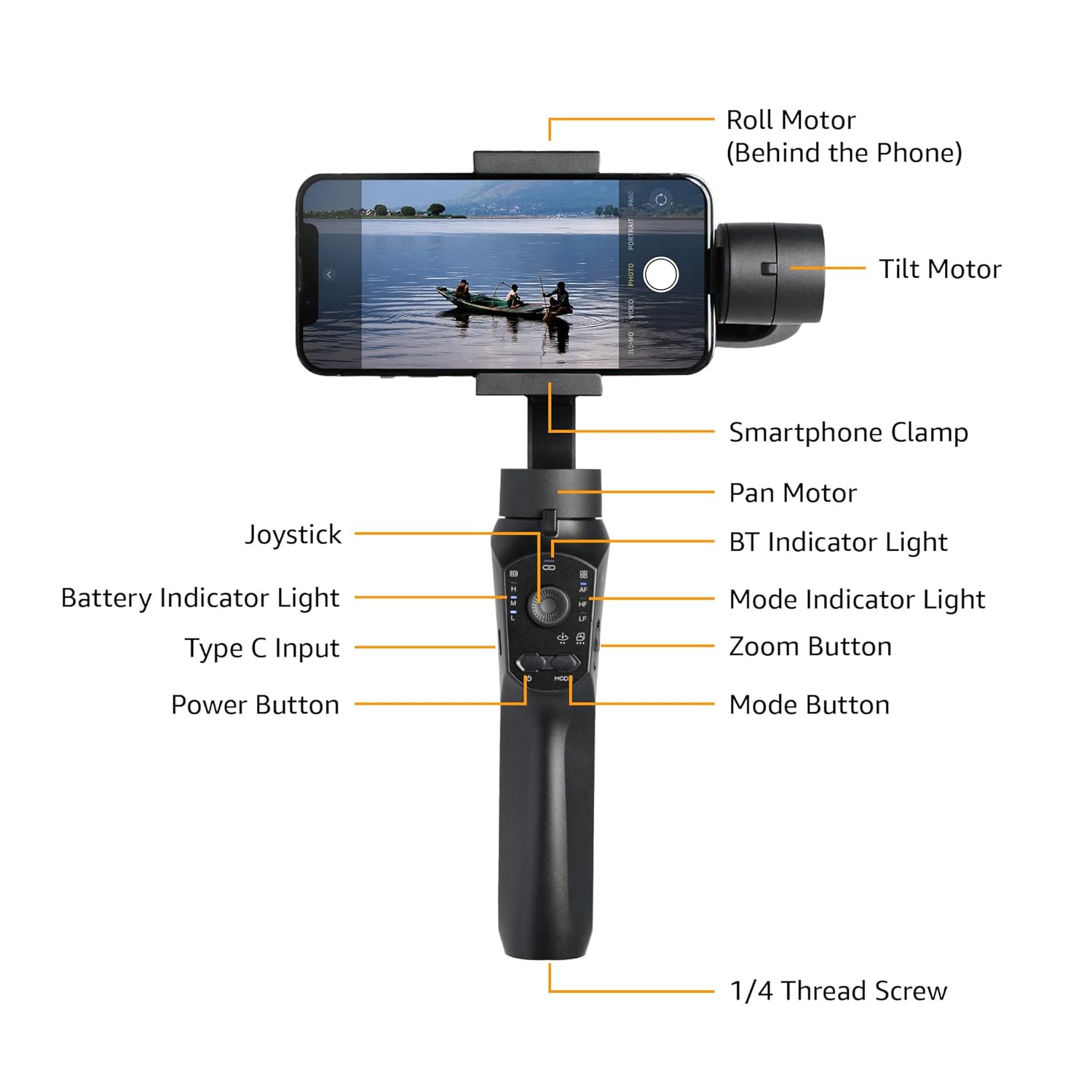
Image: Labeled diagram showing the various components of the gimbal, including the Roll Motor, Tilt Motor, Smartphone Clamp, Pan Motor, BT Indicator Light, Mode Indicator Light, Zoom Button, Mode Button, Power Button, Type C Input, Battery Indicator Light, Joystick, and 1/4 Thread Screw.
- Рулонний двигун: Controls the roll axis (rotation along the lens axis).
- Мотор нахилу: Controls the tilt axis (up and down movement).
- Смартфон Clamp: Надійно утримує ваш смартфон.
- Пан двигун: Controls the pan axis (left and right rotation).
- джойстик: For manual control of gimbal movement.
- BT Indicator Light: Вказує на статус підключення Bluetooth.
- Індикатор акумулятора: Показує поточний рівень заряду батареї.
- Вхід типу C: Charging port for the gimbal.
- Кнопка живлення: Вмикає/вимикає стабілізатор.
- Індикатор режиму: Відображає поточний режим роботи.
- Кнопка масштабування: Controls digital zoom (via app).
- Кнопка режиму: Switches between different operating modes.
- 1/4 Thread Screw: For attaching accessories like the included tripod.
Налаштування
- Зарядка карданного підвісу: Before first use, fully charge the gimbal using the provided Type-C charging cable. The battery indicator light will show charging status.
- Install the Smartphone:
- Extend the smartphone clamp та обережно помістіть свій смартфон у центр.
- Ensure the phone is balanced as centrally as possible within the clamp to reduce motor strain.
- Manual Balancing (Crucial):
Important: Do not switch on this Gimbal without manual balancing. Doing so may lead to motor damage and fast battery draining.
- With the smartphone mounted, adjust the position of the phone within the clamp until it remains level when you release it. This minimizes the work the motors need to do.
- Adjust the horizontal arm if necessary to achieve perfect balance.
- Увімкнення: Press and hold the Power Button until the gimbal powers on and stabilizes.
- Завантажте додаток: Download the "Gimbal Pro" app from your smartphone's app store (available for Android and iOS). This app unlocks advanced features and controls.
- Підключення через Bluetooth: Open the Gimbal Pro app and follow the on-screen instructions to connect your gimbal via Bluetooth. The BT Indicator Light will confirm a successful connection.

Image: An illustration demonstrating the three axes of stabilization: Tilt Axis, Roll Axis, and Pan Axis, which work together to keep footage стійкий.
Інструкція з експлуатації
Основна операція
- Увімкнення/вимкнення живлення: Натисніть і утримуйте кнопку живлення.
- Управління джойстиком: Use the joystick to manually control the pan and tilt movements of the gimbal.
- Кнопка режиму: Press the Mode Button to cycle through different operating modes (e.g., Pan Follow, Lock Mode, FPV). The Mode Indicator Light will change accordingly.
- Кнопка масштабування: Use the Zoom Button to zoom in or out within the Gimbal Pro app.
- Multifunction Push Key: This key allows you to focus or zoom, providing a more professional photography experience.
Advanced Features (via Gimbal Pro App)
The Gimbal Pro app unlocks a variety of advanced shooting modes and features:
- Facial Tracking: Automatically tracks a subject's face to keep them in frame.
- Проміжок часу: Capture stunning time-lapse videos.
- Уповільнений рух: Record high-frame-rate videos for slow-motion effects.
- Intelligent Zoom: Provides precise zoom control.
- Режим Гічкока: Creates a "Dolly Zoom" effect.
- Mad Dog Mode: A dynamic, fast-response mode.
- Початковий режим: Обертає камеру на 360 градусів вздовж осі повороту.
- Режим FPV: Follows the gimbal's orientation for an immersive first-person view.
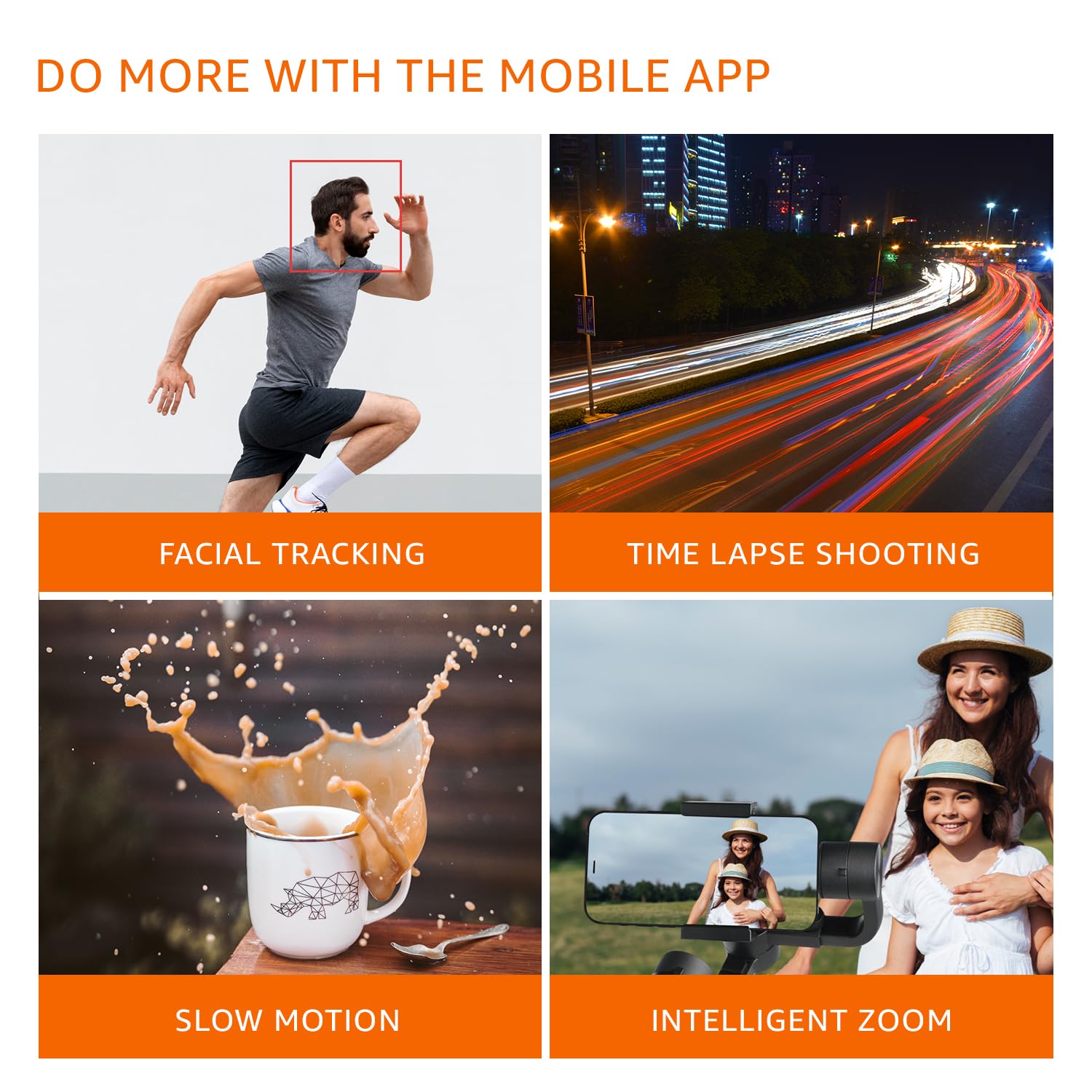
Зображення: Візуальний ексamples of features available through the mobile app, including Facial Tracking, Time Lapse Shooting, Slow Motion, and Intelligent Zoom.

Image: Icons illustrating various shooting modes such as Mad Dog Mode, Hitchcock Mode, Inception Mode, and FPV Mode, available on the gimbal.
Portrait-to-Landscape Rotation
The gimbal supports effortless rotation between portrait and landscape orientations for versatile shooting.

Image: A three-panel image demonstrating the gimbal's ability to effortlessly rotate a smartphone from portrait to landscape orientation.
Акумулятор і зарядка
The gimbal is equipped with a 3600mAh Lithium Ion battery, providing up to 10 hours of operational time.
- Зарядка: Connect the provided Type-C cable to the gimbal's charging port and a suitable USB power source.
- Функція Power Bank: The gimbal can also function as a power bank to charge your smartphone during extended shoots. Connect your smartphone to the gimbal's Type-C port using a compatible cable.
- Індикатор батареї: Monitor the battery level using the Battery Indicator Lights on the control panel.
Технічне обслуговування
- Прибирання: Використовуйте м’яку суху тканину для очищення стабілізатора. Уникайте використання агресивних хімікатів або абразивних матеріалів.
- Зберігання: Зберігайте стабілізатор у прохолодному, сухому місці, подалі від прямих сонячних променів та екстремальних температур.
- Догляд за акумулятором: For long-term storage, charge the battery to approximately 50-60% to prolong its lifespan. Recharge every 3 months if not in use.
- Уникайте перевантаження: Do not mount smartphones heavier than the recommended payload capacity (approx. 180 grams, as per user experience). Overloading can damage the motors.
Усунення несправностей
| проблема | Можлива причина | Рішення |
|---|---|---|
| Підвіс не вмикається. | Низький заряд батареї. | Повністю зарядіть стабілізатор. |
| Gimbal motors vibrate or do not stabilize properly. | Improper manual balancing. | Ensure the smartphone is perfectly balanced before powering on. Refer to the "Manual Balancing" section under Setup. |
| Gimbal disconnects from phone or app features not working. | Bluetooth connection issue; App malfunction. |
|
| Фуtage is still shaky. | Improper balancing; Exceeding gimbal's stabilization limits. |
|
Технічні характеристики
| Особливість | Деталь |
|---|---|
| Номер моделі | B0C58TDFPR |
| Стабілізація | 3-Axis (Pan, Tilt, Roll) |
| Тип батареї | Літій-іонний |
| Ємність акумулятора | 3600 мАг |
| Час роботи | До 10 годин |
| Порт зарядки | Тип-C |
| Сумісні пристрої | Смартфони |
| Розміри продукту (ДxШxВ) | 10 х 7 х 28.9 см |
| Вага товару | 460 г |
| Колір | чорний |
| Виробник | SHENZHEN JX ROBOT TECHNOLOGY CO. LTD |

Image: A diagram illustrating the dimensions of the gimbal in both folded and extended states.
Гарантія та підтримка
This Amazon Basics Handheld Gimbal Stabiliser comes with a 1 рік обмеженої гарантії з дати покупки.
For warranty claims, technical support, or any product-related inquiries, please contact Amazon Basics customer service or refer to the official Amazon support channels.
Ask a question about this manual
Ask about setup, troubleshooting, compatibility, parts, safety, or missing instructions. Manuals+ will review the question and use this page’s manual context to help answer it.