
вступ
This manual provides essential instructions for the installation, operation, maintenance, and troubleshooting of your HIKSEMI Hikvision Wave SATA 3.0 512GB Solid State Drive. Please read this manual thoroughly before using the product to ensure proper functionality and longevity.
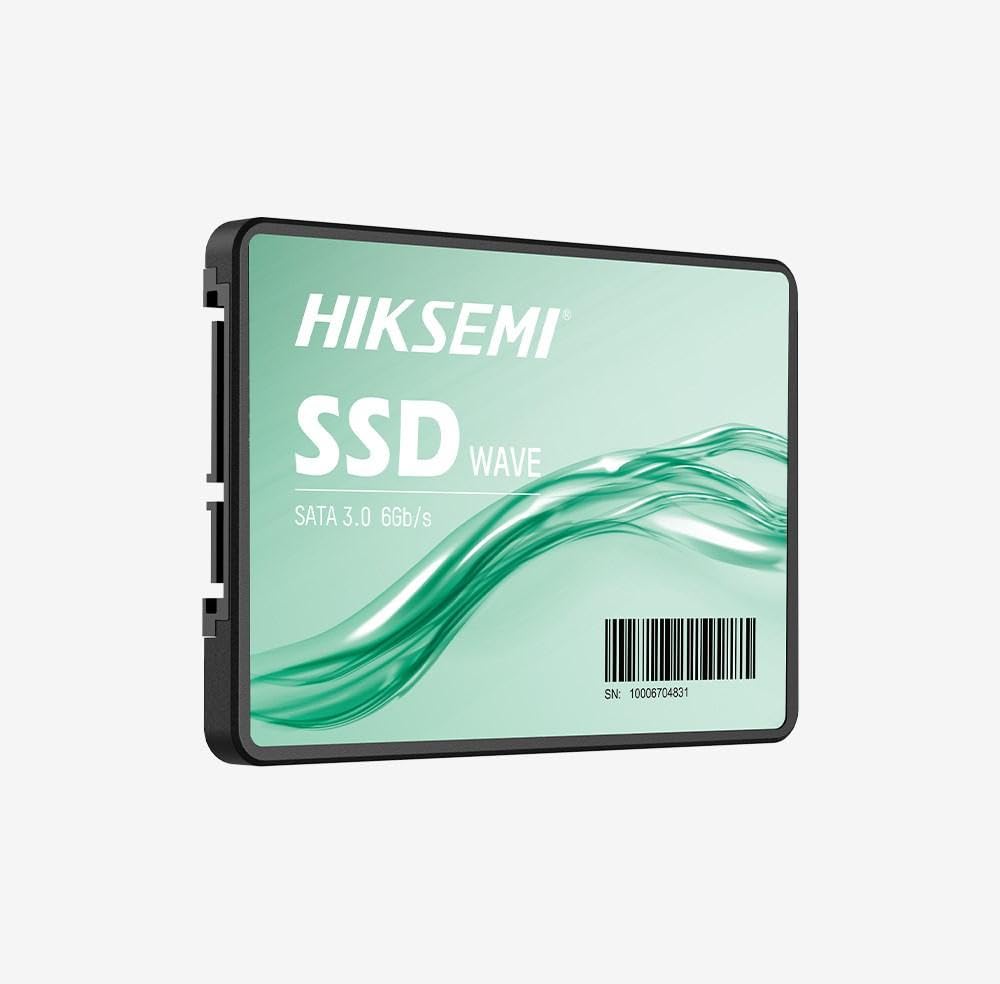
Image: HIKSEMI Hikvision Wave SATA 3.0 512GB Solid State Drive. This image displays the compact 2.5-inch form factor of the SSD, highlighting its sleek design and standard SATA interface connectors.
Інформація про безпеку
Дотримуйтесь наступних запобіжних заходів, щоб запобігти пошкодженню приводу або травмуванню себе:
- Always handle the SSD by its edges to avoid touching the circuit board or connectors.
- Ensure your computer is powered off and unplugged before installation.
- Discharge static electricity by touching a grounded metal object before handling the SSD.
- Не піддавайте SSD-накопичувач впливу вологи, екстремальних температур або сильних магнітних полів.
- Do not attempt to disassemble or modify the SSD. This will void the warranty.
Вміст упаковки
Перевірте наявність усіх елементів в упаковці:
- HIKSEMI Hikvision Wave SATA 3.0 512GB Solid State Drive (HS-SSD-WAVE-S-512G)
- Короткий посібник користувача (якщо включено)
Note: SATA data and power cables are typically not included and must be purchased separately if not already present in your system.
Налаштування та встановлення
1. Фізична інсталяція (настільний ПК)
- Підготуйте свою систему: Power off your computer and unplug the power cord. Open the computer case.
- Знайдіть відсік для дисковода: Find an available 2.5-inch drive bay. If only 3.5-inch bays are available, you may need a 2.5-inch to 3.5-inch adapter bracket (not included).
- Монтування SSD: Secure the SSD into the drive bay using screws.
- Підключіть кабелі:
- Підключіть один кінець кабелю даних SATA до SSD-накопичувача, а інший кінець – до вільного порту SATA на материнській платі.
- Підключіть кабель живлення SATA від блока живлення (БЖ) до SSD-накопичувача.
- Закрити справу: Reassemble your computer case and reconnect the power cord.
2. Фізична інсталяція (ноутбук)
- Prepare your laptop: Power off your laptop, unplug the power adapter, and remove the battery (if removable). Consult your laptop's manual for specific instructions on accessing the drive bay.
- Remove old drive (if applicable): Carefully remove the existing hard drive or SSD.
- Встановіть SSD-накопичувач: Insert the HIKSEMI Wave SSD into the drive bay. Secure it with any screws or brackets that held the previous drive.
- Зберіть: Close the drive bay cover, reinsert the battery, and reconnect the power adapter.
3. Initializing and Formatting the SSD (Windows)
- Boot your computer: Увімкніть комп'ютер.
- Відкрийте «Керування дисками»: Right-click on the Start button (Windows 10/11) or search for "Disk Management" (Windows 7/8). Select "Disk Management".
- Ініціалізуйте диск: A "Initialize Disk" window should appear automatically for new drives. Select GPT (таблиця розділів GUID) for drives larger than 2TB or for UEFI-based systems, or MBR (Master Boot Record) for older systems or drives 2TB or smaller. Click "OK".
- Створіть новий простий том: Locate your new SSD (it will likely show as "Unallocated Space"). Right-click on the unallocated space and select "New Simple Volume...".
- Follow the wizard: Follow the on-screen prompts to assign a drive letter, choose a file system (NTFS is recommended for Windows), and perform a quick format.
- Your SSD is now ready for use.
Експлуатація SSD-накопичувача
Once installed and formatted, your HIKSEMI Wave SSD functions like any other storage drive. You can use it for:
- Встановлення операційної системи: Install your operating system (Windows, macOS, Linux) for faster boot times and overall system responsiveness.
- Зберігання застосунків: Install frequently used applications and games to benefit from quicker loading times.
- Зберігання даних: Зберігайте документи, фотографії, відео та інші files.
The SSD utilizes the SATA 3.0 interface, providing theoretical transfer speeds up to 6 Gbps. Actual performance may vary based on your system hardware, software, and workload.
Технічне обслуговування
SSDs require less maintenance than traditional hard drives, but a few practices can help ensure optimal performance and longevity:
- Увімкнути TRIM: Ensure your operating system has TRIM enabled. TRIM helps the SSD manage deleted data blocks efficiently, maintaining performance over time. Modern operating systems (Windows 7+, macOS 10.6.8+, most Linux distributions) typically enable TRIM by default.
- Уникайте дефрагментації: Do not defragment an SSD. Defragmentation is unnecessary for SSDs and can reduce their lifespan by increasing write cycles.
- Оновлення прошивки: Periodically check the HIKSEMI official website for firmware updates for your specific SSD model. Firmware updates can improve performance, stability, and compatibility. Follow the manufacturer's instructions carefully when performing updates.
- Зберігайте вільний простір: While not strictly necessary, keeping some free space (e.g., 10-15%) on your SSD can help maintain performance, especially for drives with smaller capacities.
- Резервне копіювання даних: Регулярно створюйте резервні копії важливих даних на інший пристрій зберігання даних. Хоча SSD-накопичувачі надійні, жоден пристрій зберігання даних не застрахований від збоїв.
Усунення несправностей
If you encounter issues with your HIKSEMI Wave SSD, refer to the following common troubleshooting steps:
- SSD не виявлено:
- Перевірте всі підключення кабелів передачі даних та живлення SATA. Переконайтеся, що вони надійно закріплені.
- Try a different SATA port on your motherboard and a different SATA power connector from your PSU.
- Verify that the SATA controller mode in your system's BIOS/UEFI is set to AHCI (Advanced Host Controller Interface).
- Check Disk Management (Windows) or Disk Utility (macOS) to see if the drive is detected but uninitialized/unformatted.
- Повільна продуктивність:
- Ensure TRIM is enabled (as described in the Maintenance section).
- Verify that the SSD is connected to a SATA 3.0 (6 Gbps) port on your motherboard, not an older SATA 2.0 (3 Gbps) port.
- Перевірте фонові процеси, які споживають системні ресурси.
- Переконайтеся, що системні драйвери (особливо драйвери чіпсета) оновлені.
- Operating System Errors/Crashes:
- Run a disk check utility (e.g.,
chkdskin Windows) to scan for file системні помилки. - Consider reinstalling the operating system if issues persist after checking hardware connections and drivers.
- Run a disk check utility (e.g.,
Технічні характеристики
| Особливість | Специфікація |
|---|---|
| Номер моделі | HS-SSD-WAVE-S-512G |
| Ємність цифрового зберігання | 512 ГБ |
| Інтерфейс жорсткого диска | Serial ATA (SATA 3.0) |
| Форм-фактор | 2.5 дюймів |
| Швидкість читання (макс.) | 560 мегабайт на секунду |
| Швидкість запису (макс.) | 490 мегабайт на секунду |
| Сумісні пристрої | Настільний комп'ютер, ноутбук |
| Особливість | Легкий |
| Вага товару | 0.02 кілограма |
| Виробник | Ханчжоу Hikvision Digital Technology Co., Ltd. |
Інформація про гарантію
The HIKSEMI Hikvision Wave SATA 3.0 512GB Solid State Drive comes with a 3-річна обмежена гарантія from the date of purchase. This warranty covers defects in materials and workmanship under normal use. It does not cover damage caused by misuse, accident, modification, unauthorized repair, or improper installation.
Зберігайте підтвердження покупки для гарантійних претензій.
Підтримка клієнтів
For technical assistance, warranty claims, or further inquiries, please visit the official HIKSEMI support website or contact their customer service department. Refer to the product packaging or the official webсайт для отримання найактуальнішої контактної інформації.
Online resources may include FAQs, driver downloads, and firmware updates.
Інформація про утилізацію
This product contains electronic components and should not be disposed of with household waste. Please follow local regulations for the proper disposal of electronic waste. Recycling helps protect the environment and human health.