
ba3e1ef7-22a7-4a96-8cc1-22b2b3ecda7c
CP-AA Video All-in-One Wireless CarPlay and Android Auto Solution User Manual
Model: ba3e1ef7-22a7-4a96-8cc1-22b2b3ecda7c
1. Вступ
The CP-AA Video is an all-in-one solution designed to enhance your in-car entertainment and connectivity. This device integrates wireless CarPlay and Android Auto functionalities, along with built-in access to popular streaming applications like YouTube and Netflix. It provides a seamless and smooth user experience, allowing for easy switching between different operating systems and multimedia playback options, all while utilizing your vehicle's existing factory controls.
2. Ключові характеристики
- Рішення «все в одному»: Combines multiple entertainment and connectivity features into a single device for in-car use.
- Вбудовані програми потокового передавання: Access YouTube and Netflix directly for video-watching needs.
- Бездротовий CarPlay та Android Auto: Enjoy seamless wireless connectivity for both Apple and Android smartphones.
- Перемикання системи: Effortlessly switch between the Android system, wireless CarPlay, and wireless Android Auto at any time.
- Відтворення мультимедіа USB: Supports playback of various media fileчерез USB.
- Висока продуктивність: Equipped with dual-band Wi-Fi and a dual-core processor for smooth, real-time connections.
- Factory Control Integration: Fully compatible with your car's existing factory controls for intuitive operation.
3. Сумісність
The CP-AA Video is designed for broad compatibility with a wide range of vehicle models that support wired CarPlay. It is perfectly paired with your car's factory controls. Compatible car brands include, but are not limited to:
- Audi
- Volvo
- Mercedes-Benz
- Porsche
- Лінкольн
- Джип
- Nissan
- Б'юїк
- Кадилак
- Land Rover
- Peugeot
- Chevrolet
- Skoda
- І більше.
The device is compatible with both Android and Apple phones for wireless CarPlay and Android Auto functionalities.
4. Посібник із налаштування
Follow these general steps to set up your CP-AA Video device:
- Підключення до автомобіля: Plug the CP-AA Video device into your car's USB port that supports wired CarPlay. Ensure your car's infotainment system is turned on.
- Початкове завантаження: The device will automatically boot up and display its interface on your car's screen.
- Підключіться до Wi-Fi: Navigate to the device's settings menu and connect to an available Wi-Fi network (e.g., your phone's hotspot or car's built-in Wi-Fi) to enable streaming apps.
- Pair with Phone (Wireless CarPlay/Android Auto):
- On your phone, enable Bluetooth and Wi-Fi.
- On the CP-AA Video device, select the CarPlay or Android Auto icon.
- шукати the device's Bluetooth name on your phone and pair. Follow any on-screen prompts on both your phone and the car's display to complete the connection.
- Доступ до програм: Once connected, you can access the Android system, launch YouTube, Netflix, or switch to wireless CarPlay/Android Auto from the main interface.
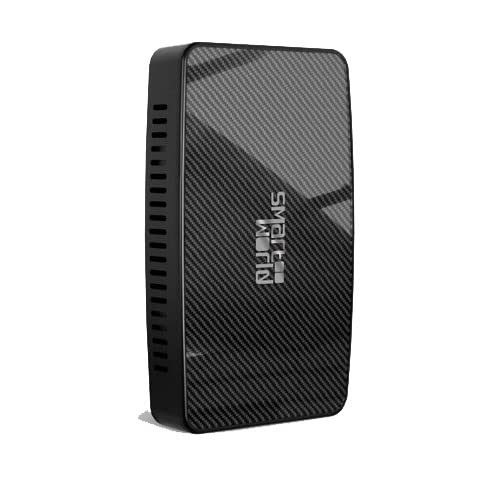
Image of the CP-AA Video device, a compact black rectangular unit with a textured carbon-fiber-like finish and the 'Smart World' logo on its front surface. Vents are visible on one side.
5. Інструкція з експлуатації
5.1. Навігація інтерфейсом
The CP-AA Video interface can be navigated using your car's factory controls (e.g., touchscreen, rotary knob, steering wheel buttons) as if it were the native system. The main screen provides access to different modes and applications.
5.2. Using Wireless CarPlay / Android Auto
- After initial pairing, CarPlay or Android Auto should connect automatically when your phone is in range and Bluetooth/Wi-Fi are enabled.
- Select the respective icon on the device's main screen to switch to the CarPlay or Android Auto interface.
- Use your car's controls to interact with navigation, music, calls, and messages through your phone's interface.
5.3. Accessing Streaming Apps (YouTube, Netflix)
- Переконайтеся, що пристрій підключено до стабільної мережі Wi-Fi.
- From the main interface, select the YouTube or Netflix application icon.
- Увійдіть, використовуючи дані свого облікового запису, якщо буде запропоновано.
- Note: For safety, video playback may be restricted while the vehicle is in motion, depending on your car's system and local regulations.
5.4. USB Multimedia Playback
- Вставте USB-накопичувач із носієм files (e.g., videos, music) into the designated USB port on the CP-AA Video device.
- Navigate to the "USB Playback" or "Media Player" application on the device's interface.
- Перегляньте та виберіть потрібний медіафайл files для відтворення.
6. Технічне обслуговування
- Прибирання: Використовуйте м’яку суху тканину для очищення пристрою. Уникайте використання рідких засобів для чищення або абразивних матеріалів.
- температура: Не піддавайте пристрій впливу екстремальних температур (високих або низьких) або прямих сонячних променів протягом тривалого часу.
- Зберігання: If storing the device for an extended period, disconnect it from the car and store it in a cool, dry place.
- Оновлення прошивки: Періодично перевіряйте дані виробника website or contact support for potential firmware updates to ensure optimal performance and compatibility.
7. Вирішення проблем
- Пристрій не вмикається:
- Переконайтеся, що USB-кабель надійно підключено як до пристрою, так і до USB-порту автомобіля.
- Перевірте, чи USB-порт автомобіля активний та забезпечує живлення.
- Немає відображення на екрані автомобіля:
- Confirm your car's infotainment system is set to the correct input (e.g., CarPlay, USB).
- Try restarting both the car's system and the CP-AA Video device.
- Бездротовий CarPlay/Android Auto не підключається:
- Переконайтеся, що на вашому телефоні ввімкнено Bluetooth та Wi-Fi.
- Видаліть пристрій із налаштувань Bluetooth телефону та повторіть сполучення.
- Check for any software updates for your phone's operating system.
- Streaming Apps Not Loading/Buffering:
- Verify the device has a strong and stable Wi-Fi connection.
- Check your internet data plan if using a mobile hotspot.
- Log out and log back into the streaming app.
- Factory Controls Not Responding:
- Ensure the device is fully booted and recognized by your car's system.
- Restart the device and your car's infotainment system.
8. Технічні характеристики
| Атрибут | Деталь |
|---|---|
| Номер моделі | ba3e1ef7-22a7-4a96-8cc1-22b2b3ecda7c |
| Бренд | загальний |
| Виробник | Smart World Company |
| Технологія підключення | USB, Wi-Fi |
| Тип контролера | Android |
| Особливість | Touchscreen (Note: Refers to car's touchscreen compatibility) |
| Сумісні пристрої | Смартфон, динамік |
| Загальна кількість портів HDMI | 1 |
| Тип роз'єму | USB 1.0 |
| Режим аудіовиходу | Об'ємний |
| Конфігурація каналу об’ємного звуку | 5.1 |
| Кодування відео | RM |
| Вага товару | 5.3 унції |
| Розміри упаковки | 3.94 x 3.94 x 1.57 дюймів |
9. Гарантія та підтримка
Щоб отримати інформацію про гарантію, технічну підтримку або звернутися до сервісного обслуговування, зверніться до документації, що надається разом із покупкою, або зверніться безпосередньо до продавця/виробника. Зберігайте підтвердження покупки для гарантійних претензій.
Manufacturer: Smart World Company
For the most up-to-date information and support resources, please visit the official product support page or contact the seller where you purchased the device.
Ask a question about this manual
Ask about setup, troubleshooting, compatibility, parts, safety, or missing instructions. Manuals+ will review the question and use this page’s manual context to help answer it.