
Dcorn 20230412002
Dcorn 10-inch LCD HDMI Digital Microscope User Manual
Модель: 20230412002
вступ
This manual provides detailed instructions for the setup, operation, and maintenance of your Dcorn 10-inch LCD HDMI Digital Microscope. Please read this manual thoroughly before using the device to ensure proper functionality and to maximize your viewнабутий досвід.

малюнок 1: Dcorn 10-inch LCD HDMI Digital Microscope. This image displays the complete microscope unit, including the 10-inch LCD screen, the adjustable stand, the microscope lens, two flexible LED side lights, a remote control, and a 32GB SD card.
Вміст упаковки
Перевірте, чи всі перелічені нижче предмети входять до вашої упаковки:
- 1 x Dcorn 10-inch Digital Microscope Unit
- 1 x Aluminum Stand
- 1 x подовжуюча трубка
- 1 x Пульт дистанційного керування
- 1 x 32 ГБ Micro SD карта
- 1 x USB кабель
- 1 кабель HDMI
- 1 x адаптер живлення
- 1 х посібник користувача
- 1 x CD (for PC software/drivers)
Інструкції з налаштування
- Розпакуйте компоненти: Акуратно вийміть усі компоненти з упаковки.
- Зберіть підставку: Attach the microscope unit to the aluminum stand. Ensure it is securely fastened. The stand allows for adjustable height and angle.
- Install Extension Tube (Optional): для viewing larger objects like entire coins, insert the provided extension tube between the lens and the microscope body.

малюнок 2: Comparison of microscope setup with and without the extension tube. The image demonstrates how the 4.7-inch extension tube allows for a wider field of view, enabling the observation of an entire coin, compared to a standard setup.
- Вставте SD-карту: Locate the Micro SD card slot on the microscope unit and insert the included 32GB card. This card is used for storing captured images and videos.
- Підключіть живлення: Connect the power adapter to the microscope and plug it into a power outlet.
- Налаштувати освітлення: Position the two flexible LED side lights to illuminate your specimen evenly. The main unit also has built-in LEDs.
Інструкція з експлуатації
1. Увімкнення/вимкнення живлення
Натисніть ПОТУЖНІСТЬ button on the microscope unit to turn it on or off. The LCD screen will display the live view.

малюнок 3: The 10-inch LCD screen displaying a magnified image of a butterfly, demonstrating the clear visual output of the microscope.
2. Налаштування збільшення та фокусування
- Збільшення: The microscope offers a magnification range of 10X to 1500X. Adjust the height of the microscope unit on the stand to change the initial magnification.
- Фокус: Use the focus wheel on the microscope lens to achieve a clear image. Fine-tune the focus for optimal detail.

малюнок 4: Візуальний ексamples of different magnification levels (50X, 500X, 1500X) on various specimens, including a plant, an ant, and a coin, illustrating the microscope's zoom capabilities.
3. Adjusting Illumination
The microscope features 6 main LEDs and 2 adjustable side lights. Use the touch controls on the unit or the remote control to adjust the brightness of the LEDs.

малюнок 5: Demonstration of the dimmable LED touch control. The image shows how to adjust the lighting from 0% to 100% using the controls, with examples of a gold coin under different illumination levels (OFF, 20%, 50%, 100%).
4. Захоплення зображень та відео
- Фотозйомка: Натисніть OK button on the unit or the corresponding button on the remote control to take a still image. Images are saved to the Micro SD card.
- Відеозапис: Натисніть МЕНЮ button and navigate to the video recording option, then press OK to start/stop recording. Videos are saved to the Micro SD card.

малюнок 6: Icons representing photo and video capture functions, indicating the microscope's capability to record both still images and moving footage.
- Пульт дистанційного керування: The included remote control allows for hands-free operation, reducing vibrations and ensuring clearer captures.

малюнок 7: The remote control for the Dcorn digital microscope, designed to prevent screen flicker and provide a seamless viewing experience by allowing adjustments without touching the main unit.
5. Connecting to External Displays (HDMI/USB)
- Вихід HDMI: Connect an HDMI cable from the microscope's HDMI port to an external monitor or TV for a larger viewнабутий досвід.
- Вихід USB: Connect the microscope to a PC (Windows/MacOS) via a USB cable. Install the provided software from the CD for live viewing and advanced controls on your computer.
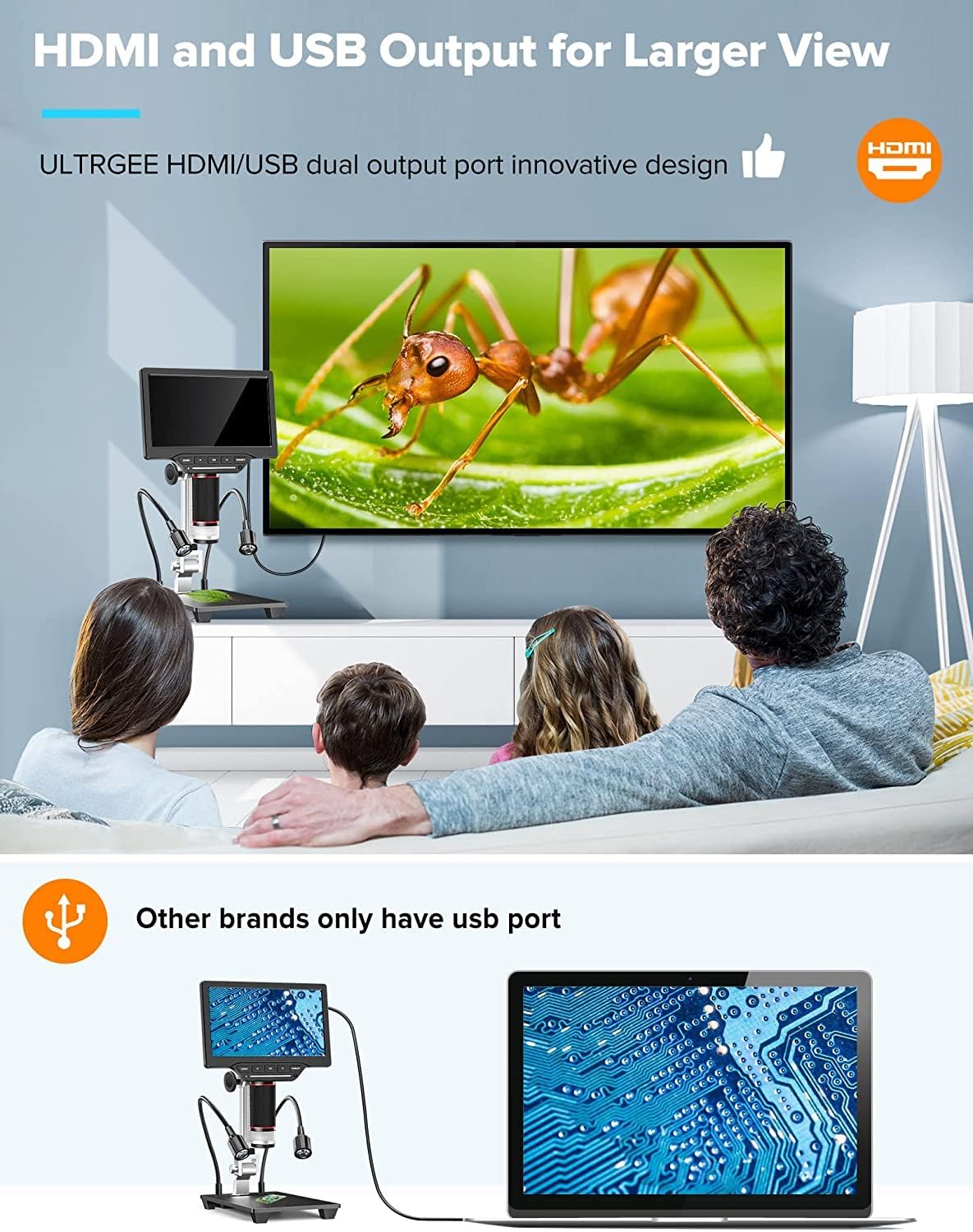
малюнок 8: The Dcorn microscope connected to an external monitor via HDMI and to a laptop via USB, illustrating its dual output capabilities for a wider viewing and sharing experience.
Технічне обслуговування
- Очищення лінзи: Use a soft, lint-free cloth specifically designed for optical lenses to gently wipe the microscope lens. Avoid using abrasive materials or harsh chemicals.
- Очищення екрану: Use a microfiber cloth to clean the LCD screen. If necessary, slightly dampпротріть тканину водою або розчином для очищення екрану.
- Генеральне прибирання: Протріть корпус мікроскопа та підставку сухою або злегка змоченою серветкоюamp тканина.
- Зберігання: When not in use, store the microscope in a clean, dry place, away from direct sunlight and extreme temperatures.
Усунення несправностей
| проблема | Можлива причина | Рішення |
|---|---|---|
| На екрані немає зображення | Power not connected; Microscope not turned on; Lens cap still on. | Ensure power adapter is connected and unit is powered on. Remove lens cap. |
| Зображення розмите | Incorrect focus; Incorrect working distance; Dirty lens. | Adjust the focus wheel. Adjust the height of the microscope. Clean the lens. |
| Cannot capture photos/videos | SD-карта не вставлена; SD-карта заповнена; SD-карта пошкоджена. | Insert SD card. Delete unnecessary files or replace SD card. Format SD card (backup data first). |
| No output to external monitor/PC | Cable not connected properly; Incorrect input selected on external display; Driver not installed (for PC). | Check HDMI/USB cable connections. Select correct input source on monitor/TV. Install software/drivers from the provided CD for PC connection. |
| Світлодіодні лампи не працюють | Lights turned off; Brightness set to 0%. | Turn on lights and increase brightness using touch controls or remote. |
Технічні характеристики
| Бренд | Dcorn |
| Номер моделі | 20230412002 |
| Розмір екрана | 10-дюймовий РК-дисплей |
| Роздільна здатність камери | 16 мегапікселів |
| Діапазон збільшення | 10X - 1500X |
| Роздільна здатність відео | 1920x1080 30 кадрів/с, 1280x1020 60 кадрів/с |
| Роздільна здатність фото | Up to 5376x3024 (16MP) |
| Зберігання | Карта Micro SD на 32 ГБ (у комплекті) |
| Вихідні порти | HDMI, USB |
| Сумісні пристрої | Devices with HDMI port, MacOS, Windows PCs |
| освітлення | 6 Main LEDs, 2 Side LEDs (Dimmable Touch Control) |
| матеріал | Метал, ABS |
| Розміри продукту (Д x Ш x В) | 11.5 х 20 х 36.5 см |
| Водонепроникний рівень | Не водонепроникний |
Гарантія та підтримка
The Dcorn 10-inch LCD HDMI Digital Microscope comes with a Гарантія 5 рік. For technical support, warranty claims, or further assistance, please refer to the contact information provided with your purchase or visit the official Dcorn webсайт.
Наявність запасних частин: інформація недоступна.
Software Updates Guaranteed Until: Information unavailable.
Ask a question about this manual
Ask about setup, troubleshooting, compatibility, parts, safety, or missing instructions. Manuals+ will review the question and use this page’s manual context to help answer it.