
1. Вступ
Thank you for choosing the TECKNET Wireless Doorbell. This manual provides detailed instructions for the installation, operation, and maintenance of your new doorbell system. Please read this manual thoroughly before use to ensure proper function and longevity of the product.
2. Вміст упаковки
Будь ласка, уважно перевірте вміст упаковки. Якщо будь-які елементи відсутні або пошкоджені, зверніться до служби підтримки клієнтів TECKNET.
- 1 х бездротовий приймач дверного дзвінка
- 1 x Wireless Doorbell Transmitter (Push Button)
- Монтажне обладнання (шурупи, анкери, клейка стрічка)
- 1 x Посібник користувача (цей документ)
3. Особливості продукту
The TECKNET Wireless Doorbell offers a range of features designed for convenience and reliability:
- 60 Selectable Melodies: Choose from a wide variety of chimes.
- 5 регульованих рівнів гучності: Ranging from 0dB (silent with LED flash) to 90dB.
- Водонепроникний передавач IP65: Розроблений для роботи з різними погодними умовами на відкритому повітрі.
- 400M (1300ft) Operating Range: Ensures reliable signal transmission across large homes or properties.
- Світлодіодний індикатор спалаху: Visual alert for visitors, especially useful in noisy environments or for hearing-impaired individuals.

Image: Features of the TECKNET Wireless Doorbell receiver, highlighting melody and volume options.
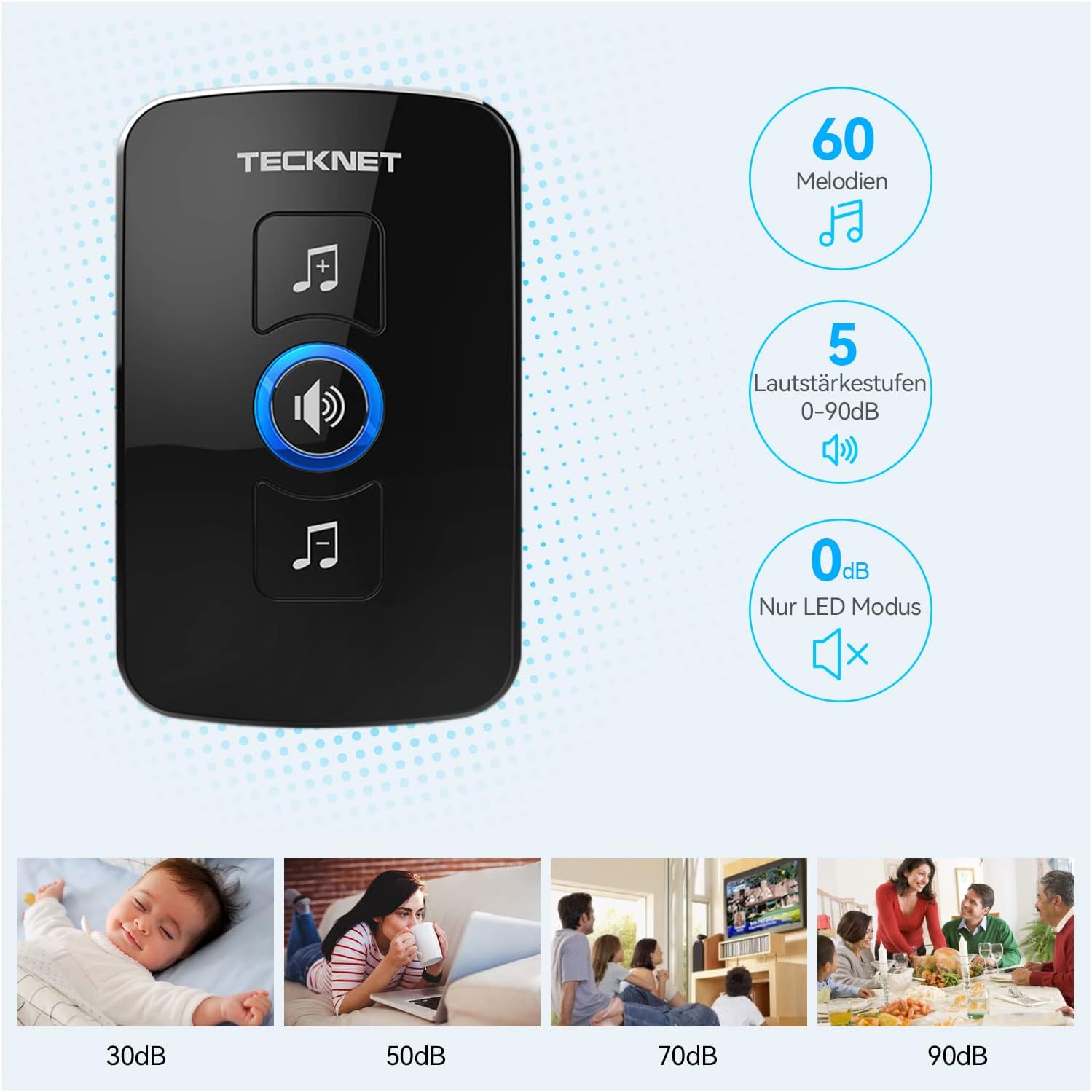
Image: The doorbell transmitter's IP65 waterproof rating and wide operating temperature range.
4. Налаштування та встановлення
Follow these steps to set up your TECKNET Wireless Doorbell system.
4.1 Встановлення батареї передавача
- Locate the small notch on the side or bottom of the transmitter.
- Use a small flat-head screwdriver to gently pry open the back cover of the transmitter.
- Insert the CR2032 lithium coin cell battery (included or purchased separately) into the battery compartment, ensuring the positive (+) side faces up.
- Надійно закрийте задню кришку.
Примітка: The transmitter typically uses a CR2032 battery. Please refer to the packaging for specific battery requirements.
4.2 Розміщення приймача
Plug the receiver into a standard electrical outlet in a central location within your home. Ensure it is within the operating range of the transmitter and not obstructed by large metal objects or thick walls, which can reduce signal strength.
4.3 Монтаж передавача
There are two primary methods for mounting the transmitter:

Image: Steps for battery installation and two mounting methods for the transmitter.
Спосіб 1: Кріплення гвинтами
- Mark the desired mounting location on your wall or door frame.
- Drill two small holes at the marked spots.
- Insert the wall anchors (if necessary for your surface).
- Align the transmitter's back plate with the holes and secure it with the provided screws.
- Attach the transmitter unit to the back plate.
Спосіб 2: Клейовий монтаж
- Ретельно очистіть монтажну поверхню, щоб переконатися, що вона суха та без пилу чи жиру.
- Peel off one side of the protective film from the adhesive tape.
- Attach the adhesive tape to the back of the transmitter.
- Peel off the other side of the protective film.
- Firmly press the transmitter onto the desired mounting surface for at least 30 seconds.
Рекомендація: For best results and long-term stability, screw mounting is recommended, especially for outdoor use.
5. Інструкція з експлуатації
5.1 Зміна мелодій
To change the melody on your receiver:
- Press the "Melody Selection" button (often indicated by a music note icon) on the receiver.
- Each press will cycle through the available 60 melodies.
- Stop pressing when you hear your desired melody. The receiver will automatically save the selection.
5.2 Регулювання гучності
Щоб налаштувати рівень гучності:
- Press the "Volume Control" button (often indicated by a speaker icon) on the receiver.
- Each press will cycle through the 5 available volume levels (including silent mode).
- Select the volume level that suits your preference.
5.3 Pairing (If Needed)
Your doorbell system usually comes pre-paired. If the transmitter and receiver lose connection or if you add additional transmitters/receivers, follow these steps to pair them:
- Увімкніть приймач.
- Press and hold the "Volume Control" button on the receiver for approximately 5 seconds until you hear a "ding" sound or the LED indicator flashes rapidly. This indicates pairing mode.
- Immediately press the transmitter (push button) once.
- You should hear the selected melody, confirming successful pairing.
- If pairing fails, unplug the receiver and repeat the process.
6. Технічне обслуговування
- Прибирання: Протріть блоки дверних дзвінків м’якою сухою тканиною. Не використовуйте абразивні засоби для чищення або розчинники.
- Заміна батареї: When the transmitter's LED indicator no longer lights up or the range decreases significantly, it's time to replace the CR2032 battery. Follow the battery installation steps in Section 4.1.
- Умови навколишнього середовища: While the transmitter is IP65 waterproof, extreme temperatures or prolonged direct exposure to harsh weather conditions may affect its lifespan.
7. Вирішення проблем
| проблема | Можлива причина | Рішення |
|---|---|---|
| Дзвінок у двері не дзвонить. |
|
|
| Короткий робочий діапазон. |
|
|
| Receiver LED flashes but no sound. | Volume is set to 0dB (silent mode). | Increase the volume using the "Volume Control" button (see Section 5.2). |
8. Технічні характеристики
| Особливість | Деталь |
|---|---|
| Бренд | ТЕКНЕТ |
| Номер моделі | B0BZVDJHCS |
| Виробник | ТЕКНЕТ |
| Вага товару | 3.87 унції (приблизно 110 грамів) |
| Розміри продукту | 2.36 x 2.32 x 3.62 inches (Receiver) |
| Джерело живлення (приймач) | Провідний електричний |
| Джерело живлення (передавач) | Battery (CR2032, typically not included as per specifications, but required for operation) |
| Водонепроникність (передавач) | IP65 |
| Робочий діапазон | До 400 метрів (1300 футів) на відкритому повітрі |
| Мелодії | 60 на вибір |
| Рівні гучності | 5 (від 0 дБ до 90 дБ) |
| Включені компоненти | Manual (and doorbell units, mounting hardware) |
| Дата першої доступності | 18 травня 2024 р |
9. Гарантія та підтримка
TECKNET products come with a standard warranty. For specific warranty details, please refer to the warranty card included with your product or visit the official TECKNET website. If you encounter any issues or have questions regarding your doorbell, please contact TECKNET customer support:
- Webсайт: www.tecknet.co.uk (або відповідні регіональні webсайт)
- Електронна пошта: Зверніться до упаковки вашого продукту або webсайт для контактної електронної пошти.
Please have your model number (B0BZVDJHCS) and purchase date ready when contacting support.