
1. Продукт закінчивсяview
The ECLIPSE AVN-HS01F is a state-of-the-art car navigation system featuring a floating 10.1-inch HD display. Designed for compatibility with approximately 400 car models, this unit provides high-definition map displays and video content. Its low-reflection screen ensures clear visibility, making route guidance and multimedia viewing a superior experience. The system integrates seamlessly with smartphones via Apple CarPlay and HDMI, allowing access to a wide range of content for an enhanced driving experience.

Image: The ECLIPSE AVN-HS01F unit displaying a detailed navigation map.
2. Ключові характеристики
- 10.1-дюймовий HD-дисплей: Features a low-reflection screen with 1280x720 resolution for crisp, clear visuals of maps and video content.
- Floating Structure: Enables installation in approximately 400 different car models, offering flexible positioning within the vehicle's dashboard.
- Apple CarPlay Support: Connect your iPhone to access navigation, music, messages, and more directly from the unit, with voice control via Siri.
- Вхід/вихід HDMI: Allows connection of external devices like smartphones for high-definition video and game playback on the large screen.
- Відтворення мультимедіа: Supports various media formats including SD cards, CDs, and DVDs, in addition to Bluetooth audio streaming.
- ВІКС ПО ВСЬОМУ РОЗТАШУВАННЮ: Provides advanced traffic information for optimized route guidance.

Image: The 10.1-inch large screen of the AVN-HS01F integrated into a car's dashboard.
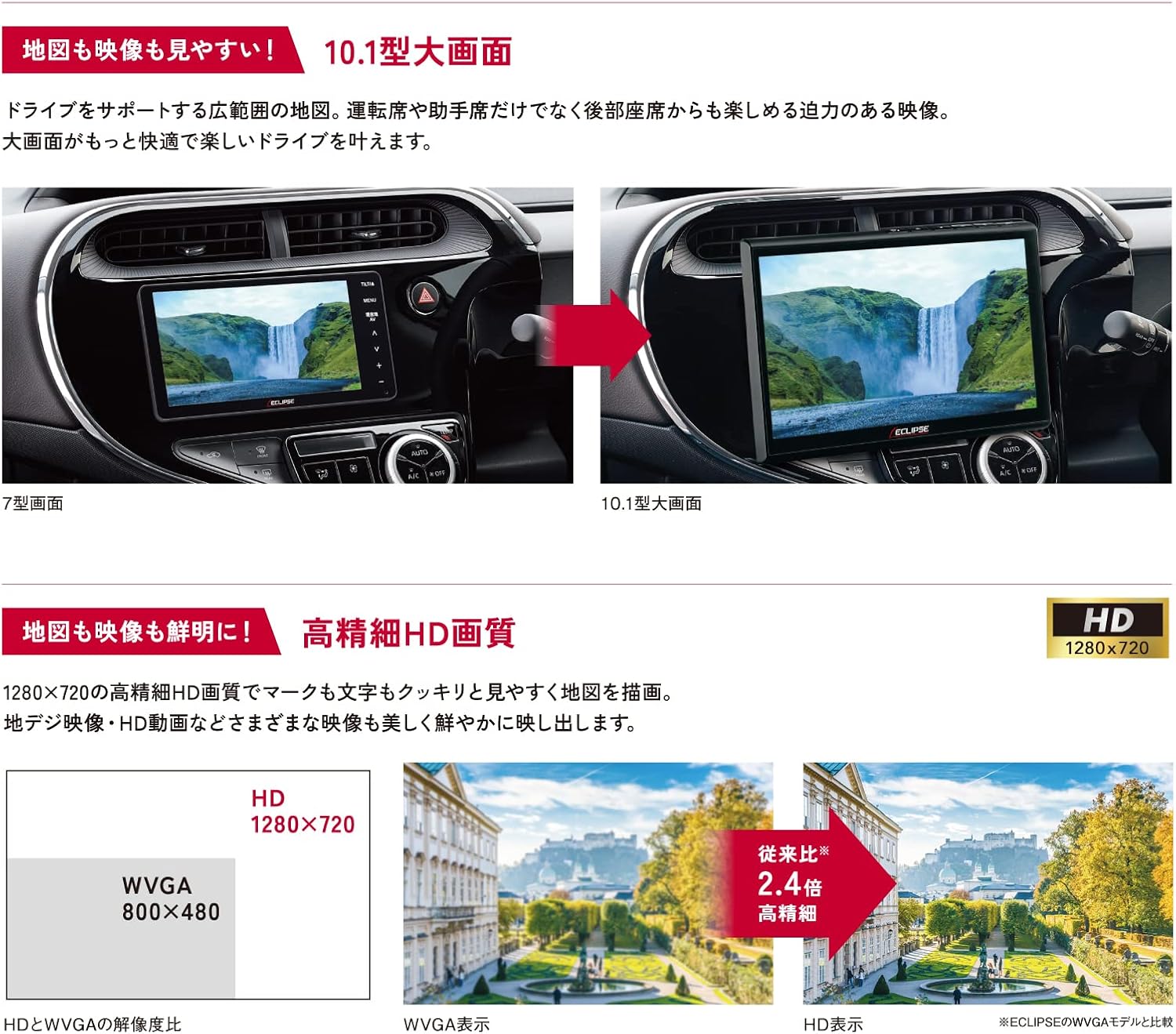
Image: Visual comparison demonstrating the superior HD quality (1280x720) of the AVN-HS01F compared to standard WVGA (800x480).
3. Налаштування та встановлення
The AVN-HS01F utilizes a floating display structure, which allows for installation in a wide variety of vehicles. For detailed installation instructions, including wiring diagrams and mounting procedures, please refer to the dedicated Інструкція по установці provided with your unit. Professional installation is recommended to ensure proper functionality and safety.

Зображення: Оверview of different ECLIPSE navigation series, highlighting the floating display and various features across models.
4. Інструкція з експлуатації
4.1 Функції навігації
- Відображення карти: View detailed maps in HD quality. Use pinch-to-zoom and swipe gestures for easy navigation.
- Керування маршрутом: Enter your destination to receive clear, turn-by-turn directions. The HD display ensures route information is highly visible.
- ВІКС ПО ВСЬОМУ РОЗТАШУВАННЮ: Access real-time traffic information to avoid congestion and optimize your travel time.
4.2 Відтворення медіафайлів
- CD/DVD: Вставте диски у призначений для цього слот для відтворення аудіо та відео.
- SD-карта: Insert an SD card containing audio or video files into the slot.
- Bluetooth Audio: Підключіть свій смартфон або інший пристрій із підтримкою Bluetooth для бездротової потокової передачі аудіо.
4.3 Apple CarPlay
Connect your iPhone via USB to enable Apple CarPlay. This allows you to use compatible iPhone apps, make calls, send messages, and control music directly from the navigation screen. Use Siri for hands-free voice commands.
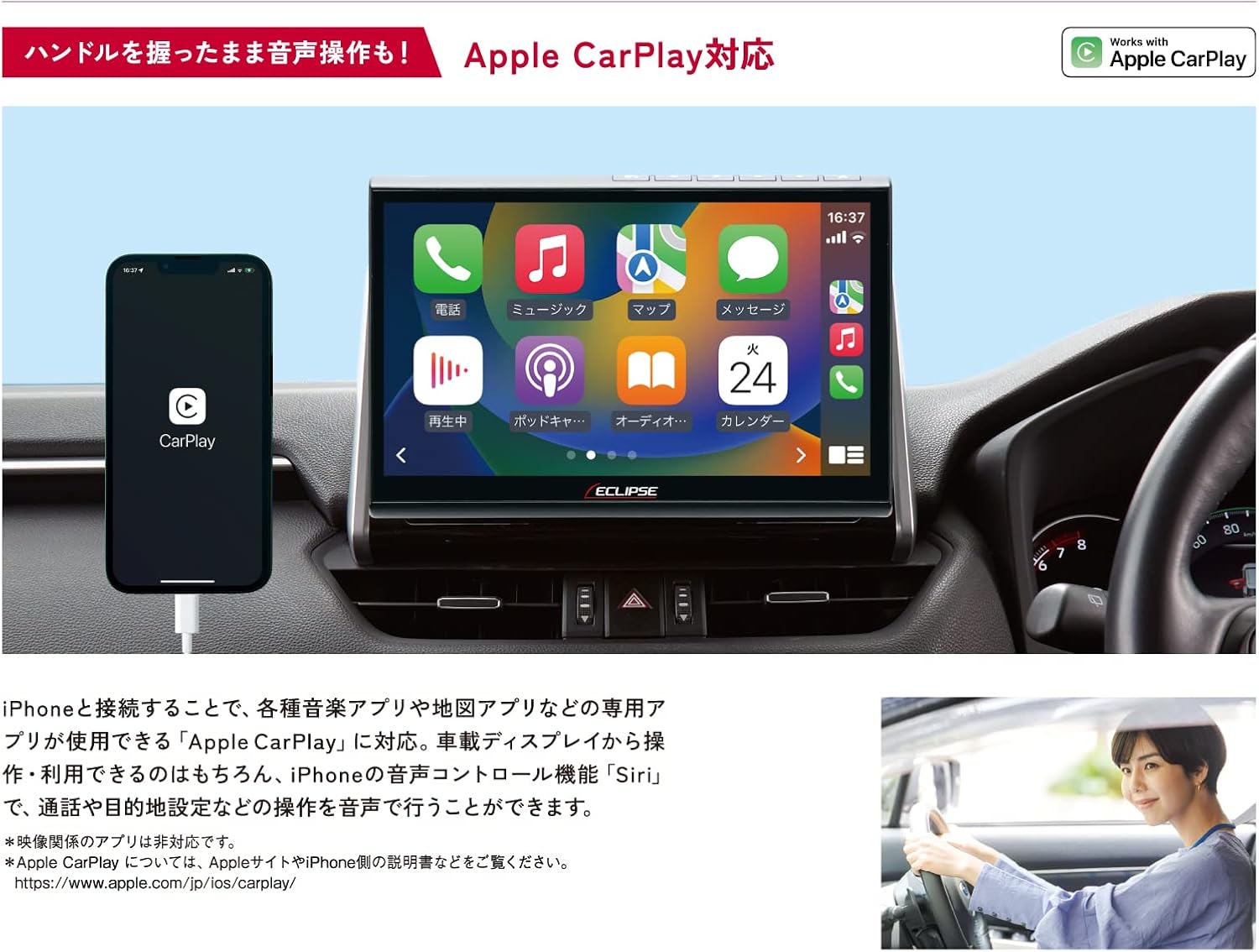
Image: The AVN-HS01F display showing the Apple CarPlay interface, with a connected iPhone.
4.4 HDMI Connectivity
Connect HDMI-compatible devices, such as smartphones or portable media players, to the unit to display their content on the large screen. Enjoy high-definition videos and games.

Image: The AVN-HS01F display showing content mirrored from a smartphone via HDMI connection.
4.5 Налаштування дисплея
The floating display allows for flexible positioning to optimize viewing angles and minimize glare. Adjust the screen's tilt (front/back), swivel (left/right), and height (up/down) manually to suit your preference.

Image: Diagrams demonstrating the various adjustable angles and positions of the AVN-HS01F display for optimal viewінж.
5. Технічне обслуговування
To ensure the longevity and optimal performance of your ECLIPSE AVN-HS01F, follow these maintenance guidelines:
- Очищення екрану: Gently wipe the display with a soft, lint-free cloth. For stubborn smudges, slightly dampПротріть тканину водою або засобом для чищення екранів. Уникайте абразивних матеріалів або агресивних хімікатів.
- Очищення агрегату: Use a dry, soft cloth to wipe the main unit and surrounding areas. Ensure no dust or debris accumulates in ports or vents.
- Догляд за дисками: Handle CDs and DVDs by their edges. Keep them clean and free of scratches to prevent playback issues.
- Оновлення програмного забезпечення: Periodically check the official ECLIPSE website for any available software or map updates to ensure your system is running the latest version.
6. Вирішення проблем
If you encounter issues with your AVN-HS01F, try the following basic troubleshooting steps:
- Немає живлення: Перевірте всі підключення живлення. Переконайтеся, що запалювання автомобіля увімкнено.
- Немає звуку: Verify volume settings. Check audio source selection. Ensure speakers are properly connected.
- Немає сигналу GPS: Переконайтеся, що GPS-антена правильно встановлена та має чіткий сигнал view неба. Перемістіть транспортний засіб на відкриту ділянку, якщо він знаходиться в критому місці.
- Проблеми з відображенням: If the screen is blank or distorted, try restarting the vehicle's ignition. Check display cable connections if accessible.
- Сенсорний екран не реагує: Perform a system reset if available (refer to the main instruction manual for specific reset procedures).
- Помилки відтворення диска: Ensure the disc is clean and free of scratches. Try a different disc to confirm the issue is not with the media.
For persistent issues or problems not covered here, please contact ECLIPSE customer support or consult a qualified service technician.
7. Технічні характеристики
| Особливість | Специфікація |
|---|---|
| Бренд | ЗАТЕМНЕННЯ |
| Назва моделі | AVN HS01F |
| Номер моделі товару | AVN-HS01F |
| Розмір екрана | 10.1 дюймів |
| Роздільна здатність дисплея | HD (1280x720) |
| Ємність пам'яті | 32 ГБ |
| Технологія підключення | Bluetooth, HDMI |
| Особливості | VICS/VICS WIDE, Apple CarPlay Support |
| Тип монтажу | Dashboard Mount (Floating) |
| Сумісний тип автомобіля | Passenger Cars (approx. 400 models) |
| Тип карти | Asia, Japan |
| Вага товару | 5.26 кілограма |
| Розміри упаковки | 35.7 х 33.8 х 20.5 см |
| Включені компоненти | Navigation unit, TV antenna, power cord, relay cord, vehicle speed cord, microphone, instruction manual, installation manual |
8. Гарантія та підтримка
The ECLIPSE AVN-HS01F comes with a Гарантія від виробника 1 рік з дати покупки. Ця гарантія поширюється на дефекти матеріалів і виготовлення за нормального використання.
For warranty claims, technical support, or further inquiries, please contact ECLIPSE customer service or visit the official ECLIPSE brand store:
Будь ласка, збережіть чек про покупку для підтвердження гарантії.