
1. Вступ
This manual provides detailed instructions for the installation, operation, and maintenance of the PeakDo Wireless HDMI Transmitter and Receiver P3 S. This device is designed to wirelessly transmit uncompressed 1080P Full HD video and digital audio with zero latency, making it ideal for various applications including gaming, home entertainment, and professional presentations. The P3 S model features a USB-C port on the receiver for compatibility with AR smart glasses and portable monitors, in addition to standard HDMI output.

Figure 1: PeakDo Wireless HDMI Transmitter (left) and Receiver (right).
2. Продукт закінчивсяview
2.1 Основні характеристики
- Wireless AR Smart Glasses Setup: Features a Type-C port on the Receiver for direct connection to AR smart glasses (e.g., XREAL Air, Rokid Max/Air, RayNeo, VITURE One) and portable monitors, enabling cable-free AR experiences.
- Uncompressed FHD Video & Digital Audio: Transmits 1080P Full HD video and digital audio without compression, ensuring high-quality output.
- Zero Latency Transmission: Provides 0 latency for real-time applications such as live sports, synchronized gaming, and interactive meetings.
- Робота за принципом «підключи та працюй»: Requires no Wi-Fi connection or app installation for setup.
- Широка сумісність: Transmitter (TX) connects to PC, Laptop, Xbox, PlayStation, Nintendo Switch, TV Box. Receiver (RX) connects to TVs, monitors, projectors via HDMI, and AR smart glasses/portable monitors via USB-C.
- Діапазон передачі: Effective wireless transmission up to 100 feet (approximately 30 meters).
2.2 Вміст упаковки
Будь ласка, перевірте наявність усіх предметів у упаковці:
- PeakDo Wireless HDMI Transmitter (TX)
- PeakDo Wireless HDMI Receiver (RX)
- USB-кабель(і) живлення
- Посібник користувача (цей документ)
3. Інструкції з налаштування
3.1 Connecting the Transmitter (TX)
- Connect the HDMI end of the Transmitter (TX) to the HDMI output port of your source device (e.g., PC, laptop, game console, TV box).
- Connect the USB power cable to the TX unit and plug the other end into a USB power source (e.g., a USB port on your source device, a USB wall adapter). Ensure the TX receives at least 5V 2A power supply.

Figure 2: Compatible input (TX) and output (RX) devices.
3.2 Connecting the Receiver (RX)
- Важливо: First, connect the USB power cable to the RX unit and plug the other end into a USB power source (e.g., a USB wall adapter). Ensure the RX receives at least 5V 2A power supply. The RX unit requires sufficient power to function correctly.
- For HDMI displays (TV, Monitor, Projector): Connect an HDMI cable from the HDMI output port of the Receiver (RX) to the HDMI input port of your display device.
- For AR Smart Glasses or Portable Monitors: Connect a USB-C cable from the Type-C port on the Receiver (RX) to the USB-C input port of your AR smart glasses or portable monitor.
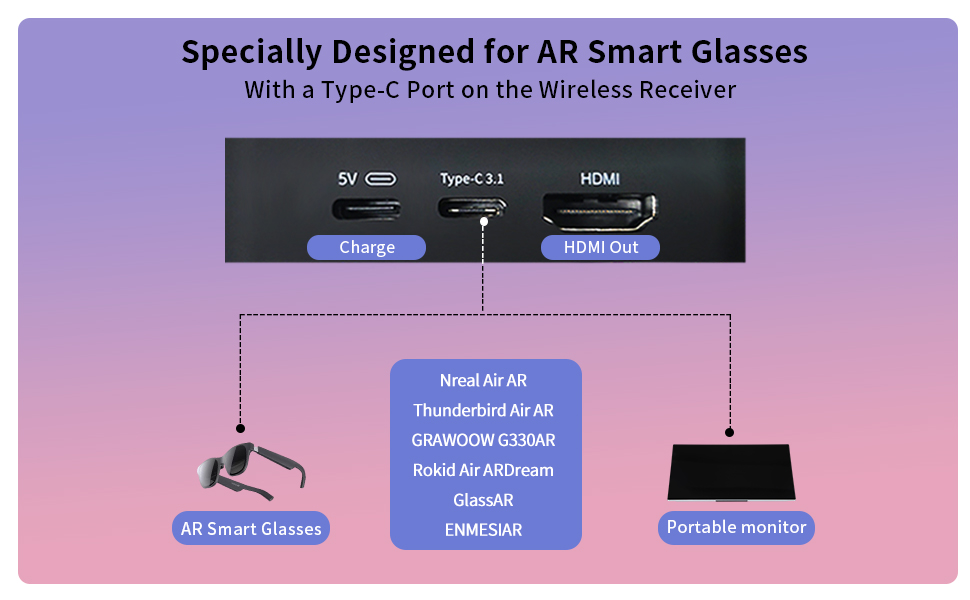
Figure 3: Receiver ports (5V power, Type-C 3.1, HDMI) and AR glasses compatibility.
Примітка: For certain AR glasses like Nreal, you may need to upgrade their firmware for optimal compatibility. Refer to your AR glasses manufacturer's instructions for firmware updates.
4. Інструкція з експлуатації
4.1 Увімкнення та сполучення
Once both the Transmitter (TX) and Receiver (RX) units are connected to their respective power sources and devices, they will automatically power on and attempt to pair. The system is designed for plug-and-play operation, requiring no manual pairing steps or software installation.

Figure 4: Plug and Play setup in a meeting environment.
4.2 Сценарії використання
- Ігри: Experience zero-latency gaming on a large screen or through AR glasses.
- Домашні розваги: Stream movies, TV shows, or other media from your PC or TV box to any display.
- Presentations/Meetings: Share content wirelessly from your laptop to a projector or large monitor in a conference room.
- AR Experiences: Connect directly to compatible AR smart glasses for immersive gaming or productivity.
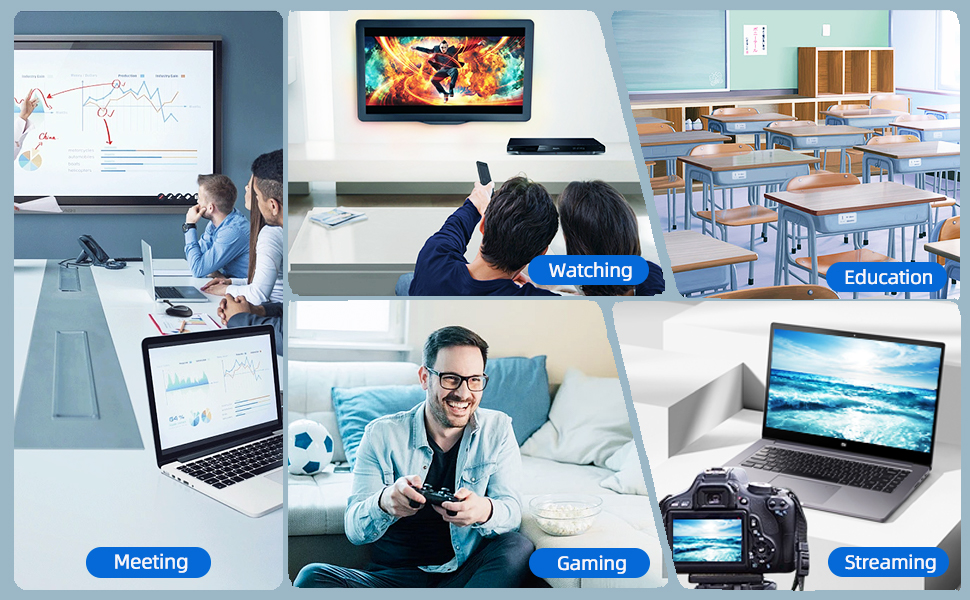
Figure 5: Diverse applications of the PeakDo Wireless HDMI system.

Малюнок 6: Впрample of a wireless AR gaming setup.
5. Технічне обслуговування
The PeakDo Wireless HDMI Transmitter and Receiver P3 S requires minimal maintenance.
- Прибирання: Use a soft, dry cloth to clean the exterior of the units. Do not use liquid cleaners or aerosols.
- Зберігання: Якщо пристрої не використовуються протягом тривалого часу, зберігайте їх у прохолодному, сухому місці, подалі від прямих сонячних променів та екстремальних температур.
- Джерело живлення: Always ensure both TX and RX units receive adequate power (5V 2A) from a stable power source.
6. Вирішення проблем
6.1 Немає сигналу / Чорний екран
- Перевірте живлення: Ensure both the Transmitter (TX) and Receiver (RX) units are properly powered. The RX unit specifically requires sufficient power (5V 2A) and should be powered first before connecting the HDMI/USB-C cable to the display.
- Кабельні з'єднання: Verify that all HDMI and USB-C cables are securely connected to their respective ports on the devices and displays.
- Вихідний сигнал вихідного пристрою: Confirm that your source device (PC, game console) is outputting video correctly. Try connecting the source device directly to the display with a cable to rule out issues with the source.
- Вхідний сигнал дисплея: Ensure your display (TV, monitor, projector, AR glasses) is set to the correct input source (e.g., HDMI 1, USB-C).
- Перезавантажте пристрої: Disconnect power from both TX and RX units, then reconnect. Also, restart your source device and display.
6.2 Intermittent Signal / Flickering
- Відстань і перешкоди: Reduce the distance between the TX and RX units. Ensure there are no significant physical obstructions (walls, large furniture) between them that could interfere with the wireless signal.
- Перешкоди: Keep the units away from other wireless devices (e.g., Wi-Fi routers, cordless phones, microwave ovens) that operate on similar frequencies.
- Джерело живлення: Ensure stable and sufficient power supply to both units. Fluctuations in power can affect signal stability.
6.3 Без звуку
- Source Audio Settings: Перевірте налаштування аудіовиходу на вашому пристрої-джерелі, щоб переконатися, що звук надсилається через HDMI.
- Display Audio: Verify that the audio on your display device (TV, monitor, AR glasses) is not muted and the volume is turned up.
- Цілісність кабелю: Ensure the HDMI or USB-C cable connecting the RX to the display is not damaged.
6.4 AR Glasses Compatibility Issues
- Оновлення мікропрограми: As mentioned in the setup, some AR glasses (e.g., Nreal) may require a firmware update to work correctly with external video sources. Consult your AR glasses manufacturer's support.
- Power to RX: Ensure the RX unit is adequately powered, especially when connecting to power-hungry AR glasses.
- Кабель USB-C: Use a high-quality USB-C cable that supports video transmission.
7. Технічні характеристики
| Особливість | опис |
|---|---|
| Номер моделі | P3 S |
| Кодування відео | YUV422 or RGB444 (uncompressed 1080P) |
| Підтримка роздільної здатності | До 1080P Full HD |
| Затримка | 0 Затримка |
| Технологія підключення | Wireless (Millimeter Wave) |
| Діапазон передачі | До 100 футів (приблизно 30 метрів) |
| Compatible Transmitter Devices | PC, Laptop, Xbox, PS4, PS5, Switch, PS3, TV Box, etc. |
| Compatible Receiver Devices | TV, Monitor, Projector (via HDMI); AR Smart Glasses, Portable Monitor (via USB-C) |
| Загальна кількість портів HDMI | 1 (on Receiver) |
| Тип роз'єму | HDMI, Micro USB (for power), USB-C (on Receiver) |
| Режим аудіовиходу | Mono (Digital Audio) |
| Конфігурація каналу об’ємного звуку | 2.0 |
| Джерело живлення | 5V 2A (for both TX and RX units) |
| Вага товару | 1.08 фунта (приблизно 0.49 кг) |
| Розміри упаковки | 6.73 x 5.83 x 2.48 дюймів (приблизно 17.1 x 14.8 x 6.3 см) |
8. Гарантія та підтримка
For warranty information and technical support, please refer to the official PeakDo webсайт або зверніться безпосередньо до служби підтримки клієнтів. Зберігайте чек про покупку для гарантійних претензій.
- Виробник: PeakDo
- Дата першої доступності: 16 березня 2023 р
- Клієнт Reviews: 3.3 out of 5 stars (based on 6 ratings at time of data extraction)