
1. Вступ
This manual provides detailed instructions for the setup, operation, maintenance, and troubleshooting of your Cosmic Byte ARES Wired Controller for PC. Designed for an enhanced gaming experience, this controller features Hall Effect joysticks and triggers, dual vibration, and customizable Turbo functions.
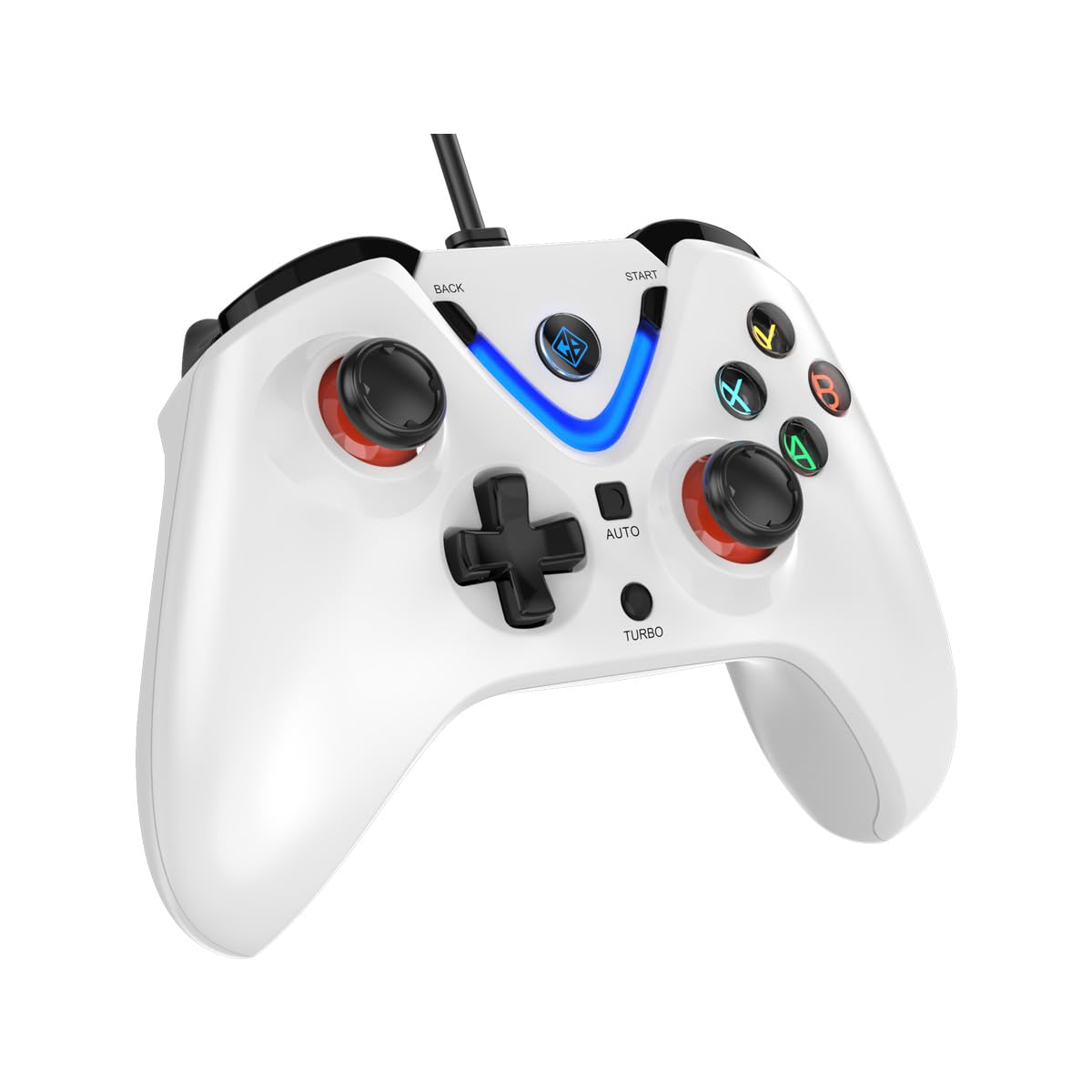
Image 1: The Cosmic Byte ARES Wired Controller in white, showcasinйого ергономічний дизайн.
2. Інструкції з налаштування
2.1 Підключення до ПК
- Переконайтеся, що ваш ПК увімкнено.
- Знайдіть вільний порт USB на комп’ютері.
- Plug the USB connector of the Cosmic Byte ARES Wired Controller into the USB port.
- Операційна система автоматично виявить та встановить необхідні драйвери. Цей процес може тривати кілька хвилин.
- Після завершення встановлення контролер готовий до використання.

Image 2: The controller connected via its wired USB connection, ensuring fast response.
3. Інструкція з експлуатації
3.1 Основні елементи керування
The Cosmic Byte ARES controller features standard gamepad layouts, including:
- Left and Right Analog Joysticks: Для точного руху та керування камерою.
- D-Pad: Для спрямованого введення, часто використовується в меню або для певних ігрових дій.
- Кнопки дій (A, B, X, Y): For primary game interactions.
- Плечові кнопки (L1, R1) та тригери (L2, R2): For various in-game functions like shooting, aiming, or accelerating.
- Start and Back Buttons: For pausing games, accessing menus, or specific in-game commands.
- Турбо кнопка: For activating rapid-fire functions.
- Автоматична кнопка: For activating automatic rapid-fire functions.
3.2 Джойстики та тригери на ефекті Холла
The controller is equipped with Hall Effect joysticks and triggers, which use magnetic sensors instead of physical contacts. This technology provides:
- Підвищена точність: More accurate and responsive input.
- Increased Durability: Reduces wear and tear, preventing stick drift over time.
- Плавна робота: Consistent and linear response for triggers, allowing for nuanced control in games.

Зображення 3: Вибух view illustrating the Hall Effect joystick mechanism and the Hall Effect triggers.
3.3 Dual Vibration Feedback
The controller features dual vibration motors that provide tactile feedback during gameplay, enhancing immersion by simulating in-game events such as impacts, explosions, or engine rumbling.
3.4 Backlit LED Buttons
The action buttons (A, B, X, Y) and the central V-shaped indicator feature LED backlighting, providing visibility in low-light conditions and adding to the controller's aesthetic.

Image 4: The controller with its LED buttons illuminated and visual representation of vibration effects.
3.5 Turbo and Auto Turbo Functions
The Turbo and Auto Turbo functions allow for rapid, repeated input of a button press without continuously pressing the button.
- Активація Turbo: Press and hold the desired action button (e.g., A) and then press the Турбо button. The button will now rapidly repeat its input as long as you hold it down.
- Activating Auto Turbo: Press and hold the desired action button (e.g., A) and then press the Авто button. The button will now rapidly repeat its input automatically without needing to be held down.
- Deactivating Turbo/Auto Turbo: To deactivate, repeat the activation steps for the specific button, or press the ясно button (if available) or disconnect and reconnect the controller.

Image 5: Close-up of the controller showing the Turbo and Auto function buttons.
4. Технічне обслуговування
- Прибирання: Використовуйте м’яку суху тканину для очищення контролера. Для стійкого бруду злегкаamp cloth can be used, ensuring no liquid enters the controller. Avoid harsh chemicals or abrasive cleaners.
- Зберігання: Store the controller in a cool, dry place away from direct sunlight and extreme temperatures. Avoid placing heavy objects on the controller.
- Догляд за кабелем: Do not sharply bend or pull the USB cable. Always grasp the plug when disconnecting from the PC.
5. Вирішення проблем
- Контролер не розпізнано:
- Переконайтеся, що USB-кабель надійно підключено як до контролера, так і до ПК.
- Спробуйте підключити контролер до іншого USB-порту.
- Перезавантажте комп'ютер.
- Check Device Manager on Windows to see if the controller is listed and if there are any driver issues.
- Кнопки/джойстики не реагують:
- Verify the controller is recognized by your PC (see above).
- Test the controller in a different game or a controller testing utility to rule out game-specific issues.
- Переконайтеся, що жодні інші пристрої введення не створюють перешкод.
- Вібрація не працює:
- Перевірте налаштування в грі, щоб переконатися, що вібраційний зворотний зв'язок увімкнено.
- Some games may not support vibration or may have limited vibration effects.
6. Технічні характеристики
| Особливість | Деталь |
|---|---|
| Бренд | Космічний байт |
| Назва моделі | Арес |
| Сумісні пристрої | PC |
| Тип контролера | Геймпад |
| Технологія підключення | USB |
| Особливості продукту | Ергономічний |
| Кількість кнопок | 16 |
| Апаратна платформа | PC |
| Тип джерела живлення | Провідний електричний, USB-кабель |
| Вага товару | 220 грамів |
| Розміри предмета | 6 х 10 х 4 сантиметрів |
| колір | Білий |
| Країна походження | Китай |

Image 6: A comparison table highlighting features of different ARES controller models.
7. Гарантія та підтримка
7.1 Інформація про гарантію
The Cosmic Byte ARES Wired Controller comes with a 1 рік гарантії на виробничі дефекти з дати покупки. Будь ласка, збережіть чек про покупку для гарантійного обслуговування.
7.2 Контактна інформація виробника
For support, service, or warranty inquiries, please contact:
Космічний байтPrakash Warehousing, S. No.163, Hissa No 1-2-3-4-5A-5B/2/1,
Phursungi, Pune 412308, Maharashtra, India
For further assistance, please visit the official Cosmic Byte webсайту або зв’яжіться з їхньою службою обслуговування клієнтів.