
вступ
The JOYROOM JR-CL16 is a versatile car accessory designed to enhance your in-car audio and charging experience. This device functions as a Bluetooth FM transmitter, allowing you to stream music and make hands-free calls through your car's stereo system. It also features dual fast-charging ports, including USB-C PD and USB-A QC3.0, to quickly charge your mobile devices. The smart LED display provides essential information such as car battery voltage and FM frequency. This manual provides detailed instructions for setup, operation, and maintenance to ensure optimal performance.
Інформація про безпеку
Please read and understand all safety instructions before using this product. Failure to follow these instructions may result in injury or damage to the device.
- Безпека батареї: Keep the device away from excessive heat and humidity. Do not short-circuit the device. Dispose of batteries (if applicable, though this device is car-powered) according to local regulations.
- Перешкоди: This device may interfere with other wireless devices. Follow the instructions in this manual to minimize potential interference.
- Безпека водіння: Do not operate the device in a manner that distracts you from driving. Only use hands-free functions when it is safe and permitted by local traffic laws.
- Джерело живлення: Ensure the device is connected to a compatible 12V-24V car cigarette lighter socket.
Вміст упаковки
Перевірте наявність усіх елементів в упаковці:
- 1 × JOYROOM JR-CL16 48W Wireless FM Transmitter Car Charger
Продукт закінченийview
Familiarize yourself with the components of your JR-CL16 FM Transmitter.

зображення: Фронт view of the JOYROOM JR-CL16 FM Transmitter, showing the LED display, multi-function knob, call button, USB-C PD port, USB-A QC3.0 port, and a standard USB port for U-disk playback.
The device features a smart LED display, a multi-function knob for volume and frequency adjustment, a dedicated call button, and multiple charging ports for convenience.
Інструкції з налаштування
- Вставте в гніздо автомобіля: Plug the JR-CL16 FM Transmitter into your car's cigarette lighter socket. The device will power on automatically, and the LED display will light up.
- Налаштування FM-частоти:
- Find an empty FM frequency on your car radio (a frequency with no active broadcast).
- Adjust the FM frequency on the JR-CL16 to match your car radio's frequency. To do this, press and hold the multi-function knob until the FM frequency on the display flashes. Rotate the knob left or right to change the frequency. Press the knob again to confirm.
- Парування Bluetooth:
- На мобільному пристрої ввімкніть Bluetooth і знайдіть доступні пристрої.
- Select "JR-CL16" from the list to pair. Once paired, the device will confirm the connection.

зображення: Diagram illustrating the Bluetooth 5.0 connection process, highlighting faster and more stable pairing with automatic connection.
Інструкція з експлуатації
Відтворення музики
The JR-CL16 supports three music playing modes:
- Потокове передавання через Bluetooth: After successful Bluetooth pairing, open your music player on your mobile device. Audio will be transmitted wirelessly to your car stereo via the selected FM frequency.
- USB Flash Drive (U-Disk) Playback: Вставте USB-флеш-накопичувач (до 64 ГБ) з файлами MP3/WMA/WAV/FLAC files into the dedicated USB port (not the charging ports). The device will automatically detect and play music from the U-disk.
- AUX Cable Playback: Connect your audio device to the JR-CL16 using a 3.5mm AUX cable. The device will switch to AUX mode for audio transmission.

зображення: Visual representation of the three music playback options: USB flash drive, AUX cable, and Bluetooth 5.0, showing the respective connection points on the device.
Керування музикою:
- Регулювання гучності: Rotate the multi-function knob to adjust the volume.
- Відтворення/пауза: Short press the multi-function knob.
- Наступний трек: Rotate the multi-function knob clockwise and hold.
- Попередній трек: Rotate the multi-function knob counter-clockwise and hold.
- Підсилення басів: Press the "B" button (Bass) to activate or deactivate enhanced bass.

зображення: The JR-CL16 FM Transmitter with an emphasis on its Deep BASS and Hi-Fi Stereo sound capabilities, indicating CD-level audio quality.
Дзвінки в режимі "вільні руки".
The built-in microphone with CVC noise cancellation ensures clear and safe hands-free calls.
- Відповісти на дзвінок: Short press the call button (green phone icon).
- Відхилити виклик: Довго натискайте кнопку виклику.
- Покласти слухавку: Short press the call button during a call.
- Повторний набір останнього номера: Double press the call button.

зображення: A driver using the JR-CL16 for a hands-free call, demonstrating the clear and stable calling feature with CVC Noise Cancellation. The image also shows controls for volume, answering, rejecting, and hanging up calls.
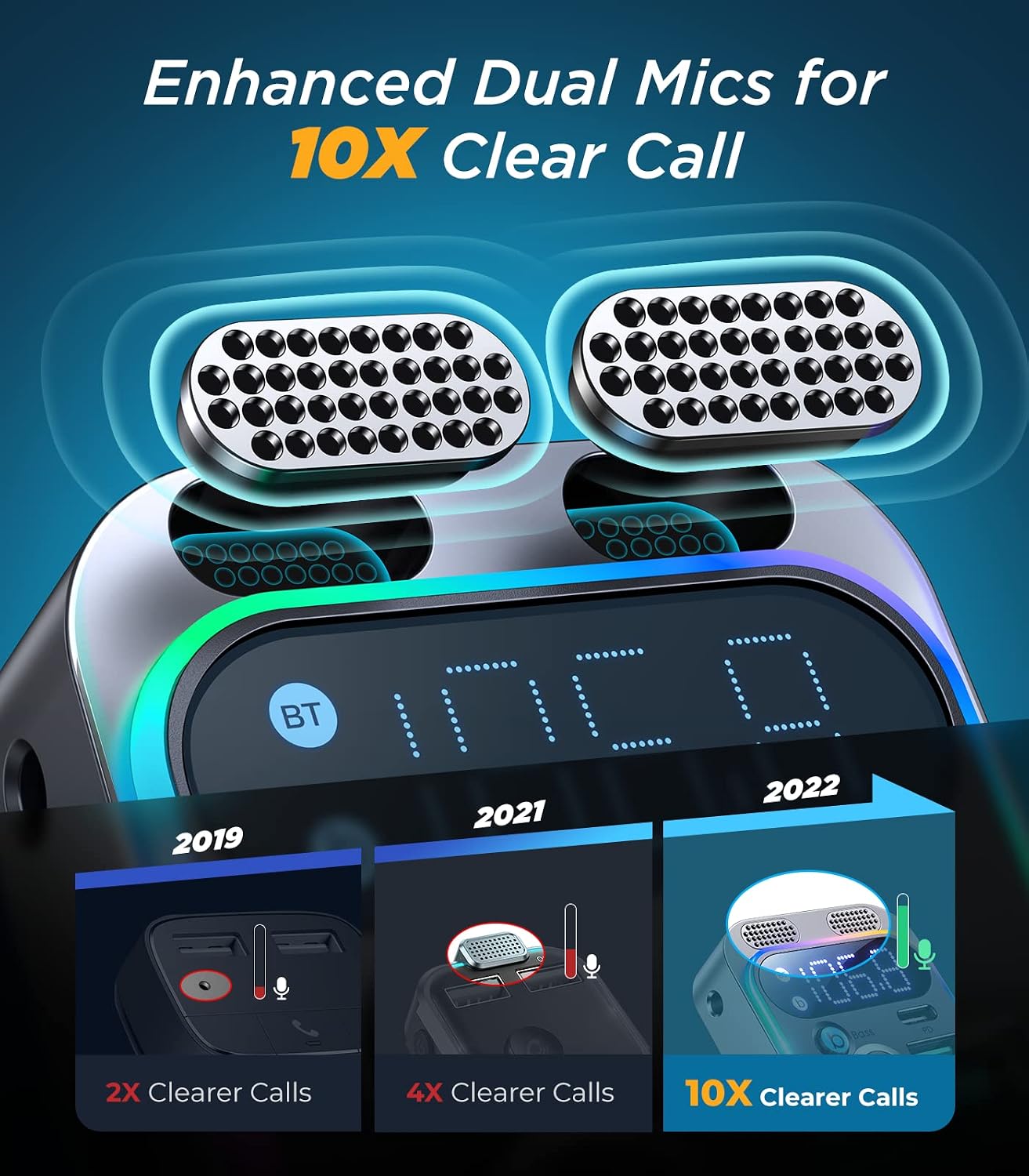
зображення: Детальний view of the JR-CL16's enhanced dual microphones, designed to provide 10 times clearer call quality compared to previous versions.
Зарядні пристрої
The JR-CL16 is equipped with two fast-charging ports:
- Порт USB-C PD 30 Вт: Для швидкої зарядки пристроїв, сумісних з USB-C.
- USB-A QC3.0 18W Port: Для швидкої зарядки пристроїв, сумісних з USB-A.
You can charge two devices simultaneously with a total output of 48W.

зображення: The JR-CL16 connected to a car's power outlet, simultaneously charging an iPhone 13 Pro via PD30W and a Samsung S22 via QC18W, demonstrating its 48W super fast charging capability.
Голосовий помічник
Activate your phone's voice assistant (Siri or Google Assistant) directly through the JR-CL16 by long-pressing the call button when not on a call.
Технічне обслуговування
- Тримайте пристрій у чистоті, протираючи його м’якою сухою тканиною.
- Уникайте впливу екстремальних температур, прямих сонячних променів або вологи на пристрій.
- Не намагайтеся самостійно розібрати або відремонтувати пристрій. Зверніться по допомогу до служби підтримки клієнтів.
Усунення несправностей
| проблема | Можлива причина | Рішення |
|---|---|---|
| Немає живлення/світлодіодний дисплей вимкнений | Loose connection; car socket issue; blown fuse in car. | Ensure the device is firmly plugged in. Check if the car's cigarette lighter socket is working. Consult a car technician if necessary. |
| Погана якість звуку/статичні перешкоди | FM frequency interference; volume too low; Bluetooth not properly connected. | Change to a different, clear FM frequency on both the device and car radio. Increase volume on both the device and car stereo. Re-pair Bluetooth. |
| Не вдається підключити пристрій через Bluetooth | Bluetooth не ввімкнено на телефоні; пристрій не в режимі сполучення; забагато сполучених пристроїв. | Ensure Bluetooth is on and visible on your phone. Restart the JR-CL16. Forget previous Bluetooth connections on your phone and try again. |
| Швидка зарядка не працює | Cable not compatible; device not supporting fast charging; incorrect port used. | Use a high-quality, fast-charging compatible cable. Ensure your device supports PD or QC3.0. Use the correct USB-C PD or USB-A QC3.0 port. |
Технічні характеристики
| Особливість | Деталь |
|---|---|
| Бренд | JOYROOM |
| Назва моделі | JR-CL16 |
| Технологія підключення | USB, Bluetooth |
| Бездротовий стандарт | Bluetooth 5.0 |
| Джерело живлення | Car Cigarette Lighter (12V-24V) |
| матеріал | Пластик, акрил |
| Розміри продукту (Д x Ш x В) | 10 х 5 х 1.3 см |
| Колір | Black (Note: Product title mentions Silver, but specifications indicate Black) |
| Сумісні пристрої | Car Stereo System, Mobile Phones |
| Особливості | USB-C PD Port, Hands-Free Calling, Voice Assistant Support, LED Display, Bass Boost |
| Підтримка типів носіїв | USB Flash Drive (MP3, WMA, WAV, FLAC), Bluetooth Audio, AUX Input |
| Вихід зарядки | USB-C PD 30W, USB-A QC3.0 18W (Total 48W) |
| Тип аудіовиходу | FM -радіо, Bluetooth |
| Аудіо вхід | 3.5 мм AUX |
| Спосіб контролю | Touch (Multi-function knob) |
| Підтримувані програми | Spotify, YouTube, MP3, AAC, etc. |
| GTIN (UPC/EAN) | 06941237199652 |
Гарантія та підтримка
Гарантія: The product description indicates "No Warranty". Please refer to your point of purchase for specific return or exchange policies.
Підтримка клієнтів: For any questions, issues, or technical assistance, please contact the retailer or JOYROOM customer service through their official website or contact channels. Keep your purchase receipt for any warranty claims or support inquiries.