
1. Вступ
This manual provides detailed instructions for the installation, operation, and maintenance of your INQMEGA Solar Security Camera. Please read this manual thoroughly before using the product to ensure proper function and safety. Keep this manual for future reference.
2. Продукт закінчивсяview
2.1 Вміст упаковки
Перевірте наявність усіх компонентів у вашій упаковці:
- 1 x Solar Tuya Camera
- 1 x Сонячна панель
- 1 х кронштейн
- 1 х посібник користувача
- 1 x 5M long cable
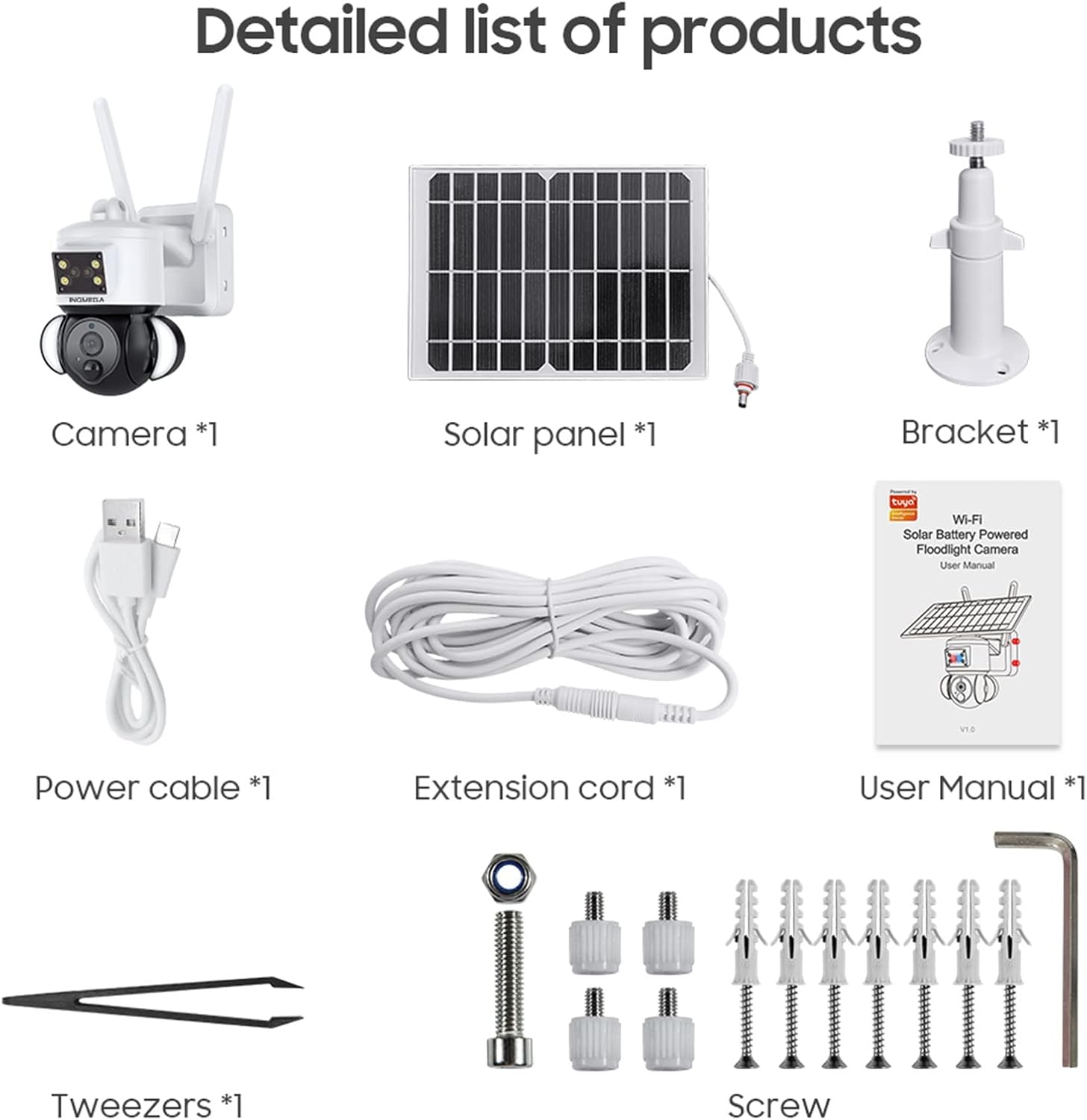
Figure 1: Package Contents. This image displays all items included in the INQMEGA Solar Security Camera package, such as the camera unit, solar panel, mounting bracket, power cable, extension cord, user manual, and installation hardware.
2.2 Основні характеристики
- 3MP FHD Resolution: Знімає чітке та детальне відео footage.
- Сонячна енергія: Equipped with a 15000mAh rechargeable battery and a solar panel for continuous operation with 2-3 hours of daily sunlight.
- 360° View (Pan & Tilt): Offers 355° horizontal pan and 120° vertical tilt for comprehensive area coverage, controllable via the TUYA SMART LIFE app.
- Виявлення руху PIR: Built-in radar PIR motion sensor provides high sensitivity detection, sending instant alerts to your app.
- Floodlight with Siren: Features 10 LEDs for color night vision up to 90ft, with the floodlight activating upon motion detection. Includes a siren for deterrence.
- Двостороннє аудіо: Allows real-time communication through the camera via the app.
- Підключення Wi-Fi 2.4 ГГц: Ensures stable network reception with 5dBi dual antennas. (Note: Does not support 5G WiFi).
- Варіанти зберігання: Supports 8-128GB SD card (not included) and cloud storage.
- Сумісність Alexa: Can be paired with Alexa-enabled smart speakers for voice control.
- Стійкий до погодних умов: IP66 International Protection Rating for outdoor use in various weather conditions.

Figure 2: PIR Human Detection. This image illustrates the camera's ability to detect human motion, activate a smart floodlight, and send phone alarms.

Figure 3: 3MP HD Image Quality and PTZ Control. This image demonstrates the camera's high-definition video capture and the pan-tilt-zoom functionality controlled through a mobile application.
3. Інструкції з налаштування
3.1 Початкове ввімкнення
- Розпакуйте всі компоненти та переконайтеся, що вони цілі.
- Connect the solar panel cable to the camera's power input.
- Locate the power button/switch on the camera and turn it on.
- Observe the LED indicator. It should blink RED initially, then turn to blink BLUE, indicating it is ready for connection.
3.2 Встановлення та підключення програми
- Download the "TUYA SMART LIFE" app from your smartphone's app store (iOS or Android).
- Зареєструйтесь або увійдіть у свій обліковий запис.
- In the app, select "Add Device" or the "+" icon to add a new camera.
- Follow the on-screen prompts to select your device type (e.g., "Security Camera").
- Confirm that the camera's LED is blinking blue.
- Enter your 2.4GHz Wi-Fi network name and password. (Note: 5GHz Wi-Fi is not supported).
- The app will generate a QR code. Aim your phone screen, displaying the QR code, in front of the camera lens at a distance of approximately 4-8 inches.
- The camera will emit a confirmation sound once the QR code is successfully scanned and connected.
- Після підключення ви можете назвати свою камеру та розпочати пряму трансляцію viewінж.
Video 1: INQMEGA 528 Solar Security Cameras Packing list. This video demonstrates the unboxing and initial setup process for the INQMEGA solar security camera, including powering on and connecting to the mobile application.
3.3 Встановлення камери
- Виберіть відповідне місце на відкритому повітрі з ampсонячне світло для сонячної панелі та чітке view для камери.
- Use the provided bracket and screws to securely mount the camera to a wall or other stable surface.
- Переконайтеся, що сонячна панель розташована таким чином, щоб отримувати максимальну кількість прямих сонячних променів протягом дня.
- Adjust the camera's angle for optimal surveillance coverage.

Figure 4: Outdoor Mounting and Solar Power. This image shows the camera and solar panel installed outdoors, emphasizing the solar charging capability and the use of a 16ft extension cord for flexible positioning of the solar panel.
4. Інструкція з експлуатації
4.1 Живий View і Відтворення
- Open the TUYA SMART LIFE app and select your camera to view живий корм.
- Використовуйте функцію відтворення для повторногоview записаний footagзберігаються на SD-карті або в хмарі.
4.2 Керування панорамуванням та нахилом
- У прямому ефірі view interface, use the directional controls to remotely adjust the camera's horizontal (355°) and vertical (120°) angles.

Figure 5: PTZ App Control. This image illustrates how to control the camera's pan (355°) and tilt (90°) movements using the mobile application.
4.3 Двосторонній аудіозв'язок
- Торкніться значка мікрофона в додатку, щоб говорити через динамік камери.
- Торкніться значка динаміка, щоб прослухати аудіо з місця розташування камери.

Figure 6: Two-Way Audio Communication. This image shows the camera's two-way audio function, allowing users to speak and listen through the device via their smartphone.
4.4 Night Vision and Floodlight
- Камера автоматично перемикається в режим нічного бачення в умовах слабкого освітлення.
- Color night vision is enabled by the built-in floodlight, which activates upon motion detection.
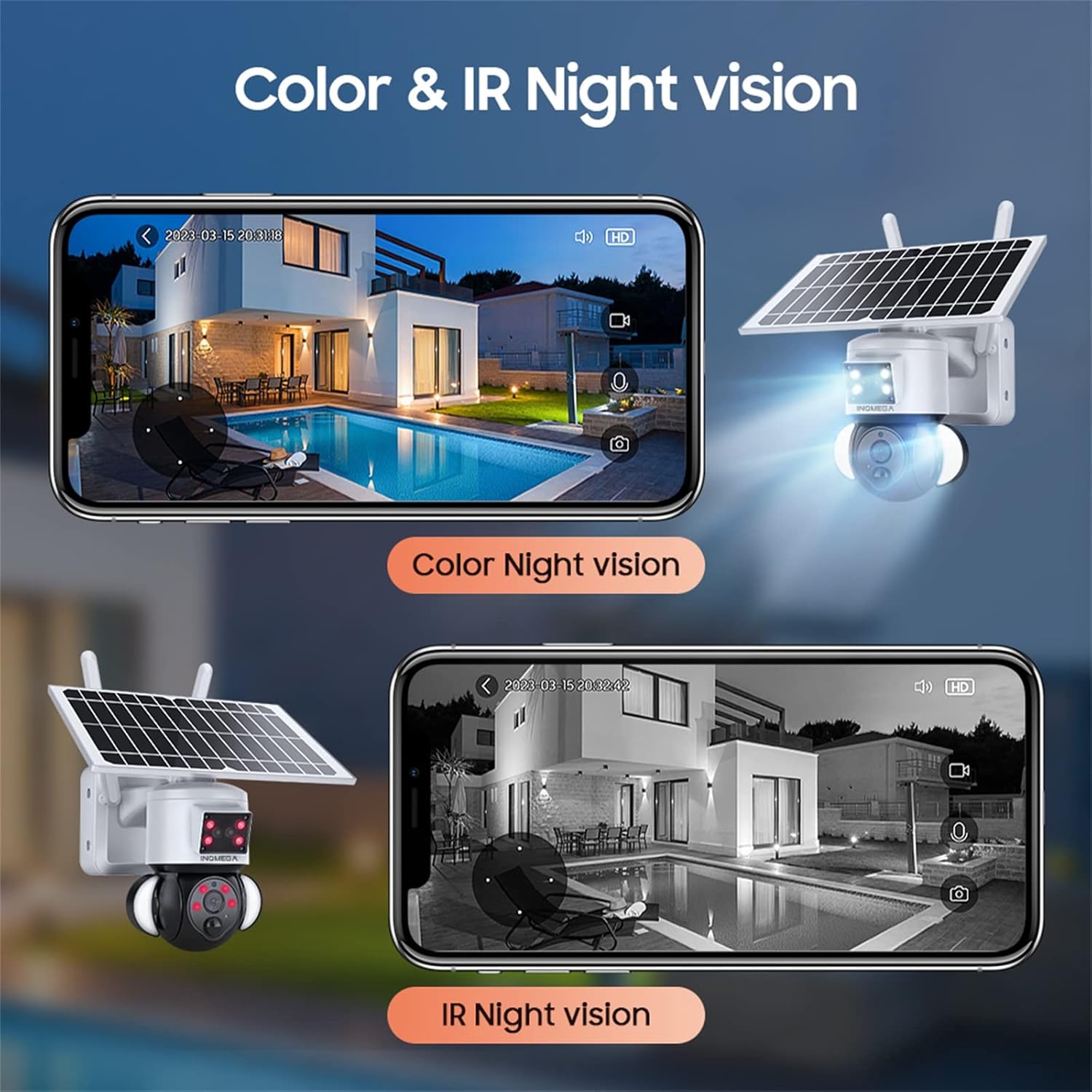
Figure 7: Color and IR Night Vision. This image compares the camera's color night vision, enabled by its floodlight, with traditional infrared (IR) night vision, both displayed on a smartphone.
4.5 Виявлення руху та сповіщення
- The PIR motion sensor detects movement and triggers recording.
- Receive instant alerts on your TUYA SMART LIFE app when motion is detected.
- Adjust sensitivity settings within the app to minimize false alarms.
5. Технічне обслуговування
- Очищення сонячних панелей: Регулярно протирайте сонячну панель м’якою серветкоюamp cloth to remove dust, dirt, and debris. A clean panel ensures optimal charging efficiency.
- Очищення об'єктива камери: Gently clean the camera lens with a microfiber cloth to maintain clear image quality. Avoid abrasive materials.
- Оновлення прошивки: Check the TUYA SMART LIFE app periodically for available firmware updates to ensure your camera has the latest features and security enhancements.
- Здоров'я акумулятора: While solar-powered, ensure the camera receives adequate sunlight. If the camera is in a shaded area for extended periods, consider temporarily relocating it or manually charging the battery if possible (refer to product specifications for charging options).
- Захист навколишнього середовища: Although the camera is IP66 rated, avoid direct high-pressure water jets or prolonged submersion.
6. Вирішення проблем
- Камера не підключається до Wi-Fi:
- Переконайтеся, що ваша мережа Wi-Fi працює на частоті 2.4 ГГц. Камера не підтримує Wi-Fi 5 ГГц.
- Перевірте, чи правильно введено пароль Wi-Fi у застосунку.
- Перевірте, чи камера знаходиться в зоні дії вашого Wi-Fi роутера.
- Restart the camera and your router, then attempt the connection process again.
- Ensure the camera's LED is blinking blue before scanning the QR code.
- Погана якість зображення:
- Очистіть об'єктив камери.
- Переконайтеся, що в полі зору камери немає перешкод view.
- Перевірте силу сигналу Wi-Fi; слабкий сигнал може вплинути на якість потокового передавання.
- Акумулятор не заряджається:
- Переконайтеся, що сонячна панель чиста та не має перешкод.
- Verify the solar panel is receiving direct sunlight for at least 2-3 hours daily.
- Перевірте з'єднання між сонячною панеллю та камерою.
- Motion Detection Not Working or Too Sensitive:
- Adjust the PIR motion detection sensitivity settings in the TUYA SMART LIFE app.
- Переконайтеся, що камера view не перешкоджає.
- Немає звуку або погана якість двостороннього звуку:
- Перевірте налаштування гучності на смартфоні та в додатку.
- Ensure there is no interference near the camera's microphone or speaker.
7. Технічні характеристики
| Особливість | Специфікація |
|---|---|
| Назва моделі | ST-S528M-3M-TY |
| Бренд | INQMEGA |
| Використання в приміщенні/зовні | Відкритий |
| Джерело живлення | Сонячна енергія |
| Протокол підключення | Wi-Fi (лише 2.4 ГГц) |
| Роздільна здатність захоплення відео | 3 Мп |
| Тип монтажу | Настінне кріплення |
| Діапазон нічного бачення | Up to 90ft (Color Night Vision) |
| матеріал | пластик |
| Розміри предмета (Д x Ш x В) | 6 x 8.5 x 6 дюймів |
| Вага товару | 3.74 фунта (1.7 кілограма) |
| Акумулятори | 3 Lithium Polymer batteries required (15000mAh capacity) |
| Міжнародний захист рейтингу | IP66 |
| Спосіб контролю | App (TUYA SMART LIFE) |
| Особливості | Motion Sensor, Night Vision, Floodlight, Two-Way Audio |
8. Гарантія та підтримка
For warranty information, please refer to the documentation included with your product packaging or contact INQMEGA customer support directly. INQMEGA is committed to providing reliable brand reputation and professional technical services. If you encounter any product problems, please contact support in a timely manner.
For further assistance, please visit the official INQMEGA website or refer to the TUYA SMART LIFE app's help section.