
Лінді 38365
Lindy 38365 Extender, SDVoE HDMI 4K60 and USB Transmitter User Manual
Модель: 38365
1. Вступ
The Lindy 38365 Extender is an advanced SDVoE (Software Defined Video over Ethernet) device designed for transmitting high-quality 4K@60Hz 4:4:4 HDMI video and USB signals over a 10G network. This device supports uncompressed resolution with HDR10 and no latency, making it ideal for professional AV installations. It can operate in either Encoder (Transmitter) or Decoder (Receiver) mode, offering flexibility for various system configurations.
2. Інформація про безпеку
- Перед використанням пристрою уважно прочитайте всі інструкції.
- Не піддавайте пристрій впливу вологи, екстремальних температур або прямих сонячних променів.
- Use only the provided power supply and mounting hardware.
- Не намагайтеся самостійно відкривати або ремонтувати пристрій. Звертайтеся до кваліфікованого персоналу для проведення будь-яких робіт з обслуговування.
- Забезпечте належну вентиляцію, щоб запобігти перегріву.
3. Вміст упаковки
- Lindy 38365 Extender Unit
- Блок живлення
- Монтажна фурнітура
- Посібник користувача (цей документ)
4. Продукт закінчивсяview
The Lindy 38365 Extender is a versatile unit capable of functioning as both an SDVoE HDMI 4K60 and USB Transmitter (Encoder) or Receiver (Decoder). It features multiple ports for video, audio, USB, and network connectivity.
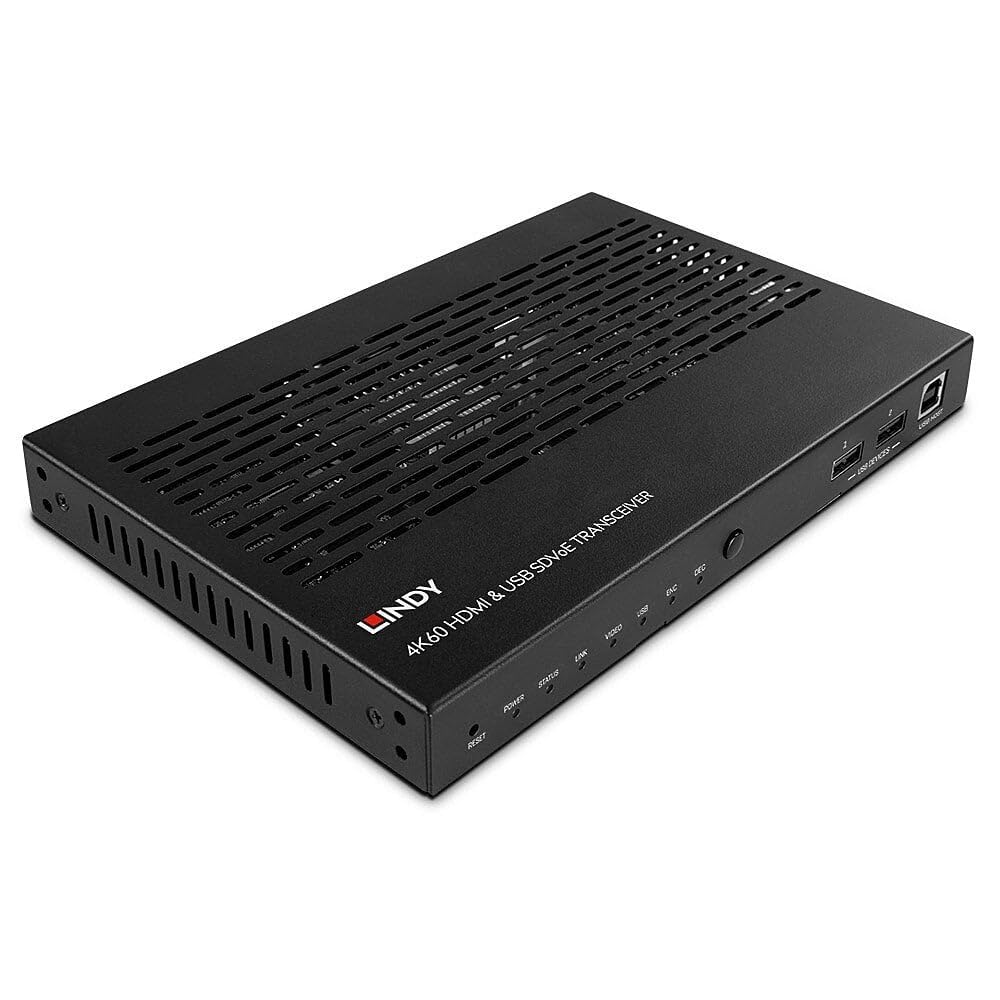
Figure 4.1: Lindy 38365 Extender - Overall View. This image displays the top and side panels of the black extender unit, highlighting its ventilation grilles and various input/output ports.
4.1 Передня панель

Figure 4.2: Front Panel. The front panel includes LED indicators for Power, Status, Link, Video, USB, Encoder (ENC), and Decoder (DEC) modes. It also features a Reset button, a Mode button, two USB device ports, and one USB Host port.
- Кнопка скидання: Скидає налаштування пристрою.
- Світлодіодні індикатори: Power, Status, Link, Video, USB, ENC (Encoder), DEC (Decoder).
- Кнопка MODE: Toggles between Encoder and Decoder modes.
- USB DEVICES (1, 2): USB ports for connecting peripheral devices.
- ХОСТ USB: USB port for connecting to a host computer.
4.2 Задня панель

Figure 4.3: Rear Panel. This view shows the DC 12V power input, RS-232 terminal block, IR In/Out jacks, HDMI In/Out ports, 10G (PoE) SFP+ port, 1G LAN port, and Audio In/Out jacks.
- 12 В постійного струму: Вхідний роз'єм живлення.
- RS-232 (TX, RX): Послідовний порт керування.
- IR IN / IR OUT: Infrared signal input and output for remote control.
- Вхід HDMI: Вхідний порт HDMI.
- Вихід HDMI: Вихідний порт HDMI.
- 10G (PoE) SFP+: 10 Gigabit Ethernet port with SFP+ cage, supporting Power over Ethernet.
- 1G LAN: 1 Gigabit Ethernet port.
- AUDIO IN / AUDIO OUT: Analog audio input and output jacks.

Figure 4.4: Rear Panel Close-up. A detailed view of the power, control, and HDMI ports on the rear panel, showing the DC 12V input, RS-232 terminal, IR In/Out, and HDMI In/Out connectors.
5. Налаштування
Follow these steps to set up your Lindy 38365 Extender:
- Determine Mode: Decide whether the unit will function as an Encoder (Transmitter) or a Decoder (Receiver). Use the MODE button on the front panel to switch between modes. The corresponding LED (ENC or DEC) will illuminate.
- Підключення живлення: Connect the provided 12V DC power supply to the DC 12V port on the rear panel. Alternatively, if using a PoE-enabled 10G network switch, the unit can be powered via the 10G (PoE) SFP+ port.
- Підключення до мережі: Connect the 10G (PoE) SFP+ port to your 10 Gigabit Ethernet network switch using an appropriate SFP+ module and fiber or copper cable. The 1G LAN port can be used for additional network connectivity or control.
- HDMI Connection (Encoder Mode):
- Connect your HDMI source (e.g., Blu-ray player, PC) to the HDMI-IN порт.
- If local monitoring is required, connect an HDMI display to the HDMI OUT порт.
- HDMI Connection (Decoder Mode):
- Connect your HDMI display (e.g., TV, projector) to the HDMI OUT порт.
- Підключення USB:
- In Encoder mode, connect a host computer to the ХОСТ USB порт.
- Connect USB peripheral devices (e.g., keyboard, mouse) to the USB ПРИСТРОЇ ports (1, 2).
- Аудіоз'єднання: If using external analog audio, connect your audio source to АУДІО ВХОД and your audio receiver/speakers to АУДІО ВИХІД.
- RS-232 & IR Control: Connect RS-232 control devices to the terminal block and IR emitters/receivers to the IR IN/OUT jacks as needed for system integration.
6. Інструкція з експлуатації
Once all connections are made and the unit is powered on, the Lindy 38365 Extender will automatically detect the connection type and begin operation based on its configured mode (Encoder or Decoder).
- Перемикання режимів: Натисніть РЕЖИМ button on the front panel to toggle between Encoder (ENC) and Decoder (DEC) functionality. The active mode is indicated by the illuminated LED.
- Світлодіодні індикатори: Monitor the front panel LEDs to confirm power, network link, video signal presence, and USB activity.
- SDVoE Features: The device supports advanced SDVoE features such as Multicast, Video Wall, and Multiview configurations. These advanced functionalities typically require a compatible SDVoE controller and software for configuration and management. Refer to your SDVoE system documentation for detailed setup of these features.
- Розширення USB: USB devices connected to the "USB DEVICES" ports on the Decoder unit will be extended to the host connected to the "USB HOST" port on the Encoder unit.
7. Технічне обслуговування
- Прибирання: Протирайте пристрій м’якою сухою тканиною. Не використовуйте рідкі або аерозольні засоби для чищення.
- Вентиляція: Переконайтеся, що вентиляційні отвори не заблоковані, щоб запобігти перегріванню.
- Оновлення прошивки: Periodically check the Lindy webсайт для отримання будь-яких доступних оновлень прошивки, щоб забезпечити оптимальну продуктивність та сумісність.
8. Вирішення проблем
- Немає відеовиходу:
- Перевірте, чи всі кабелі HDMI надійно підключені.
- Ensure the unit is in the correct mode (Encoder/Decoder).
- Check the network connection and ensure the 10G link is active.
- Confirm the source and display are powered on and functioning correctly.
- No USB Functionality:
- Ensure USB cables are properly connected to the USB HOST and USB DEVICES ports.
- Verify the unit is in the correct mode for USB extension.
- Проблеми з підключенням до мережі:
- Check the 10G (PoE) SFP+ port and 1G LAN port connections.
- Confirm your network switch supports 10G and PoE (if used).
- Перевірте цілісність мережевого кабелю.
- Пристрій не вмикається:
- Ensure the 12V DC power supply is correctly connected and plugged into a working outlet.
- If using PoE, confirm the 10G network switch is providing power.
9. Технічні характеристики
| Особливість | Деталь |
|---|---|
| Бренд | Лінді |
| Номер моделі | 38365 |
| Технологія підключення | Ethernet |
| Підтримувана роздільна здатність | Up to 4K@60Hz 4:4:4 with HDR10 (uncompressed) |
| Затримка | Без затримки |
| Режими роботи | Кодер або декодер |
| Мережеві порти | 1x 10G (PoE) SFP+, 1x 1G LAN |
| Порти HDMI | 1x HDMI In, 1x HDMI Out |
| USB порти | 1x USB Host, 2x USB Devices |
| Режим аудіовиходу | Stereo, Surround (5.1) |
| Методи контролю | Push Button (Mode), RS-232, IR, Remote |
| Вхідна потужність | DC 12V, PoE (Power over Ethernet) |
| Wattage | 5 Вт |
| Вага товару | 1.29 кілограма |
| Колір | чорний |
10. Гарантія
The Lindy 38365 Extender comes with a Гарантія 3 рік from the date of purchase. Please retain your proof of purchase for warranty claims. This warranty covers manufacturing defects and faults under normal use conditions.
11. Підтримка
For technical support, troubleshooting assistance, or further information regarding your Lindy 38365 Extender, please visit the official Lindy website or contact your local Lindy customer service representative. Ensure you have your product model number and purchase details available when seeking support.
Ask a question about this manual
Ask about setup, troubleshooting, compatibility, parts, safety, or missing instructions. Manuals+ will review the question and use this page’s manual context to help answer it.