
1. Вступ
This manual provides detailed instructions for the amazon basics Wired Gaming Mouse, Model ABIM03. This mouse is designed to enhance your gaming and computing experience with its adjustable DPI, customizable RGB lighting, and programmable buttons. Please read this manual thoroughly before use to ensure proper operation and longevity of your device.
2. Особливості продукту
- Регульований DPI: Up to 6400 DPI for precise cursor control and quick movements.
- Настроюване освітлення RGB: Personalize your mouse with various RGB lighting modes and driver customization options for PC.
- Програмовані кнопки: Equipped with multiple programmable buttons for assigning custom functions or macros.
- Gaming-Grade Sensor: Ensures accurate tracking and rapid response for gaming.
- Міцний дизайн: Features extra durable switches and enhanced build quality for extended use.
- Honeycomb Grip: Ergonomic honeycomb design provides a comfortable and secure grip.

Image: The amazon basics Wired Gaming Mouse highlighting its adjustable DPI settings, ranging from 1200 to 7200 (though product states up to 6400).
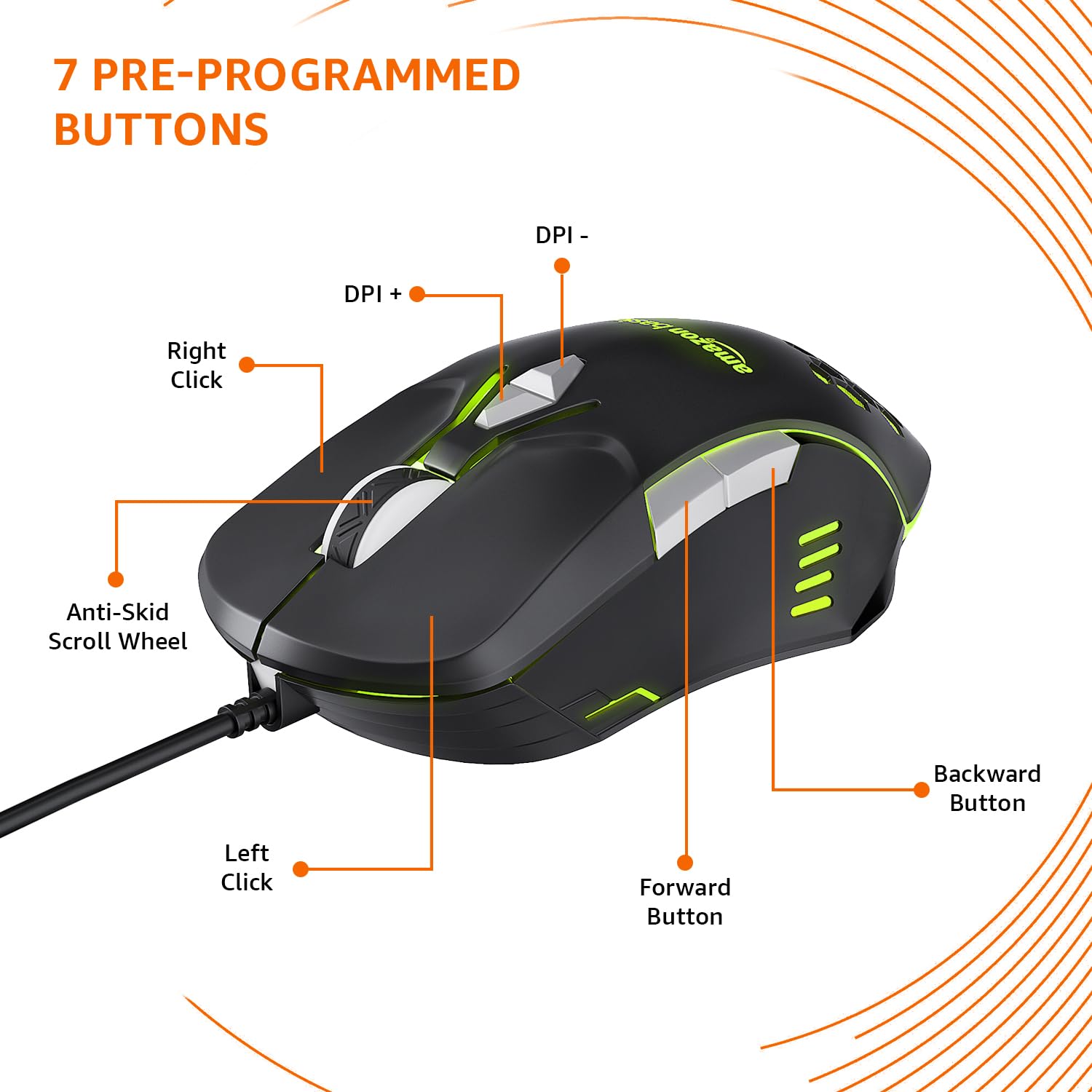
Image: The amazon basics Wired Gaming Mouse showing its 7 pre-programmed buttons, including Left Click, Right Click, Anti-Skid Scroll Wheel, DPI+, DPI-, Forward Button, and Backward Button.

Зображення: Зверху вниз view of the amazon basics Wired Gaming Mouse, emphasizing its honeycomb-designed surface for improved grip and airflow.

Image: The amazon basics Wired Gaming Mouse illuminated with red RGB lighting, showcasing its light and comfortable design.
3. Інструкції з налаштування
- Розпакуйте мишу: Carefully remove the gaming mouse from its packaging.
- Підключення до ПК: Підключіть USB-роз’єм миші до вільного USB-порту комп’ютера.
- Встановлення драйвера: Your operating system (Windows, Linux) should automatically detect and install the necessary drivers. If prompted, follow the on-screen instructions. For advanced customization of RGB and programmable keys, refer to the manufacturer's website for specific driver software.
- Розміщення: Для оптимальної роботи покладіть мишу на рівну, чисту поверхню або килимок для миші.
4. Інструкція з експлуатації
4.1 Основні функції
- Клацніть лівою кнопкою миші: Первинна дія, вибір.
- Клацніть правою кнопкою миші: Secondary action, context menus.
- Колесо прокрутки: Scroll up/down pages. Pressing the scroll wheel often acts as a middle click.
- Кнопки «Вперед/Назад»: Зазвичай використовується для навігації в web браузери або file дослідники.
4.2 Налаштування DPI (точок на дюйм)
The mouse features dedicated DPI adjustment buttons (DPI+ and DPI-) to change cursor sensitivity on the fly. Press these buttons to cycle through different DPI levels up to 6400. A higher DPI setting results in faster cursor movement across the screen with less physical mouse movement.
4.3 Customizing RGB Lighting
The mouse includes customizable RGB lighting. Specific lighting modes can often be cycled through using a dedicated button (if present) or through the optional driver software. Refer to the driver software for advanced customization options, including color selection, effects, and brightness.
4.4 Кнопки програмування
The mouse is equipped with programmable buttons. To assign custom functions, macros, or key combinations to these buttons, you will need to install and use the specific driver software provided by the manufacturer. This software typically allows you to create profileдля різних програм або ігор.
Video: A short product highlight video demonstrating the key features of the amazon basics Wired Gaming Mouse, including adjustable DPI, RGB lighting, programmable buttons, and durable design.
5. Технічне обслуговування
- Прибирання: Використовуйте м’яку суху тканину для очищення зовнішньої частини миші. Для стійкого бруду злегкаamp cloth can be used, ensuring no liquid enters the mouse.
- Очищення датчика: Час від часу використовуйте ватний тампон, злегка промокнітьampened with isopropyl alcohol to gently clean the optical sensor on the underside of the mouse. Ensure the mouse is disconnected before cleaning.
- Уникайте рідин: Do not immerse the mouse in water or any cleaning solutions.
- Зберігання: Зберігайте мишу в прохолодному, сухому місці, подалі від прямих сонячних променів та екстремальних температур.
6. Вирішення проблем
| проблема | Рішення |
|---|---|
| Миша не реагує. |
|
| Рух курсора нерівномірний або стрибкоподібний. |
|
| Програмовані кнопки не працюють. |
|
| RGB-підсвічування не працює або зависає. |
|
7. Технічні характеристики
| Особливість | Деталь |
|---|---|
| Бренд | основи Amazon |
| Номер моделі | ABIM03 |
| Технологія підключення | Дротова (USB) |
| Технологія виявлення руху | Оптичний |
| Діапазон DPI | До 6400 DPI |
| Програмовані клавіші | 4 (in addition to standard left/right click and scroll) |
| Освітлення | RGB |
| Колір | чорний |
| Вага товару | 145 г |
| Розміри продукту (ДxШxВ) | 15.8 х 10.4 х 5.4 см |
| Апаратна платформа | PC |
| Сумісність операційної системи | Linux, Windows 7 and above |
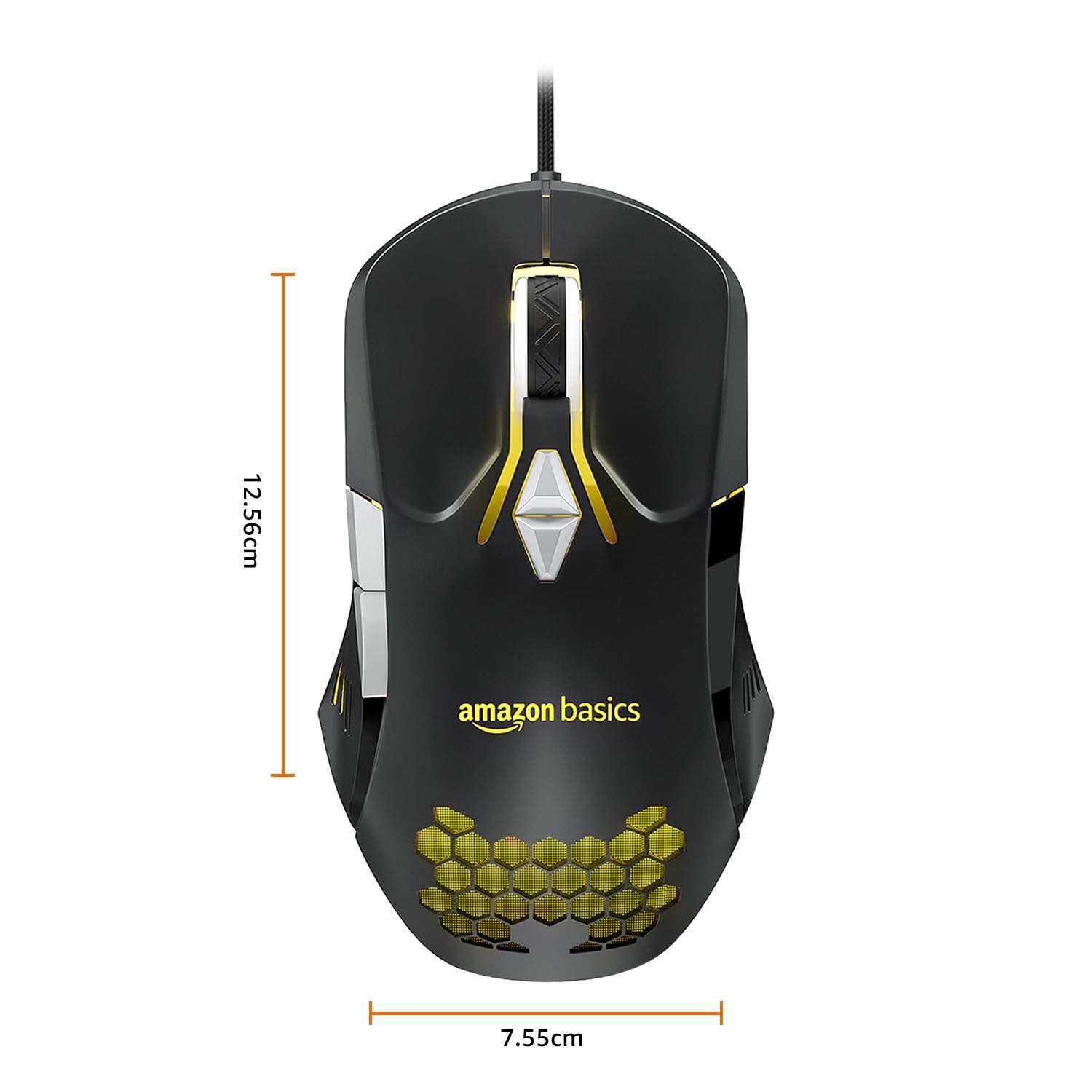
Image: The amazon basics Wired Gaming Mouse with its length (12.56cm) and width (7.55cm) dimensions indicated.
8. Інформація про гарантію
This amazon basics Wired Gaming Mouse comes with a 1 роки гарантії from the date of purchase. This warranty covers manufacturing defects and issues arising from normal use. It does not cover damage caused by misuse, accidents, unauthorized modifications, or normal wear and tear. Please retain your proof of purchase for warranty claims.
9. Підтримка
For further assistance, technical support, or warranty claims, please visit the official amazon basics support page or contact customer service through your purchase platform. Ensure you have your product model number (ABIM03) and proof of purchase ready when contacting support.
Інтернет-ресурси:
- Сторінка продукту: amazon.in/dp/B0BTD2YN6Y
- amazon basics Store: Основи магазину Amazon