
Temtop M2000C
Інструкція користувача вимірювача якості повітря Tempop M2000C
Model: M2000C | Brand: Temtop
вступ
The Temtop M2000C Air Quality Meter is designed to provide essential insights into your indoor and outdoor air quality. This device accurately detects levels of CO2, PM2.5, and PM10, and also provides temperature and humidity readings. Equipped with an audio alarm, it notifies you when air quality levels exceed safe thresholds, helping you maintain a healthier living environment. Its user-friendly design and rechargeable battery make it a convenient tool for monitoring air quality in various settings.
Ключові характеристики
- Affordable Quality Monitoring: Delivers essential air quality data for cost-conscious homes and offices.
- Streamlined Air Quality Insights: Features a professional-grade laser sensor for precise PM2.5 and PM10 detection and a sensitive NDIR sensor for CO2 levels.
- Intuitive Alerts and Clear Display: Audio alarm for threshold breaches and a vibrant TFT display for real-time air quality overview.
- User-centered Design: Ergonomic construction and rechargeable battery for simple operation and portability.
- Robust Support & Assurance: Backed by Temtop's 12-month warranty and round-the-clock customer support.
Продукт закінченийview
Familiarize yourself with the components and interface of your Temtop M2000C Air Quality Meter.

Зображення: спереду view of the Temtop M2000C Air Quality Meter with labels indicating its various parts, including the USB port, display, and control buttons.
Компоненти інтерфейсу:
- Порт USB: Для зарядки пристрою.
- Стан зумера: Indicates if the audio alarm is active.
- Measuring Status: Shows current measurement activity.
- Дисплей: Vibrant TFT screen showing real-time readings and menu options.
- Кнопка меню: Доступ до головного меню.
- Increase/Up Button: Навігація вгору в меню або збільшення значень.
- Кнопка Назад: Повернення до попереднього екрана.
- Кнопка живлення / OK: Powers the device on/off or confirms selections.
- Decrease/Down/Switch (Start/Pause) Button: Navigates down in menus, decreases values, or starts/pauses measurements.
- Дата й час: Відображає поточну дату та час.
- Рівень потужності: Indicates battery charge.
Налаштування
- Розпакування: Carefully remove the Temtop M2000C from its packaging. Ensure all components listed in the "What's in the Box" section are present.
- Початкова оплата: Before first use, fully charge the device using the provided USB charging cable. Connect the cable to the device's USB port and a compatible USB power adapter (not included) or computer USB port. The power level indicator on the display will show charging status.
- Увімкнення: Press and hold the Power/OK button to turn on the device.
- Initial Acclimation: For optimal accuracy, allow the device to acclimate to its environment for at least 8 hours before taking critical measurements. This allows the sensors to stabilize.
Інструкція з експлуатації
The Temtop M2000C offers straightforward operation for monitoring various air quality parameters.
Навігація по меню:
- Натисніть Меню кнопку для доступу до головного меню.
- Використовуйте Збільшення/збільшення і Зменшити/Знизити buttons to scroll through options like PM2.5, CO2, HCHO, View all info, and Set.
- Натисніть Живлення / ОК щоб вибрати параметр.
- Натисніть Назад кнопку, щоб повернутися до попереднього екрана.
Вимірювання:
- From the main menu, select the desired parameter (e.g., PM2.5, CO2) using the navigation buttons and press OK.
- The device will immediately begin displaying real-time readings for the selected parameter.
- The display will show the current concentration, along with a status indicator (e.g., "Good", "Moderate").
- For PM2.5 and CO2, a bar graph feature is available to show concentration trends over time. Use the navigation buttons to switch to the graph view якщо є.
Аудіосигнал:
- The device features an audio alarm that activates when air quality levels exceed preset thresholds.
- Refer to the "Air Quality Parameter for Reference" table in the "Understanding Readings" section to understand these thresholds.
- The buzzer status icon on the display indicates if the alarm is active.
Відео: Оверview of the Temtop M2000C's functions, demonstrating how to navigate the menu, view particle counts, CO2 levels, and interpret the data using the on-screen charts and reference guide. It also highlights the device's portability and rechargeable battery.
Розуміння читаних текстів
The Temtop M2000C measures several key air quality parameters. Understanding these readings is crucial for assessing your environment.
PM2.5 і PM10:
PM2.5 refers to fine inhalable particles, with diameters that are generally 2.5 micrometers and smaller. PM10 refers to inhalable particles, with diameters that are generally 10 micrometers and smaller. These particles can come from various sources like combustion (vehicles, fires), industrial processes, and dust. High levels can impact respiratory and cardiovascular health.
CO2 (вуглекислий газ):
CO2 is a gas naturally present in the atmosphere. In indoor environments, elevated CO2 levels often indicate inadequate ventilation. While not directly toxic at typical indoor concentrations, high CO2 can lead to drowsiness, headaches, and reduced cognitive function.
Air Quality Parameter for Reference:
The following table provides a general guide for interpreting the air quality readings from your device. These values are based on common air quality standards.
| Забруднювач | Статус | добре | Помірний | Нездоровий для чутливих груп | Нездоровий | Дуже нездоровий | небезпечний |
|---|---|---|---|---|---|---|---|
| PM2.5 (µg/m³) | ≤12 | 12.1~35.4 | 35.5~55.4 | 55.5~150.4 | 150.5~250.4 | ≥250.5 | N/A |
| PM10 (µg/m³) | ≤54 | 55~154 | 155~254 | 255~354 | 355~424 | ≥425 | N/A |
| CO2 (ppm) | ≤700 | 701~1000 | 1001~1500 | 1501~2500 | 2501~5000 | ≥5001 | N/A |
| HCHO (mg/m³) | ≤0.1 | N/A | N/A | N/A | >0.1 | N/A | N/A |
Note: HCHO (Formaldehyde) detection is not available on the M2000C model. This table is for general reference across Temtop models.
For more detailed information on air quality and health impacts, please consult official environmental health resources.
Технічне обслуговування
- Прибирання: Використовуйте м’яку суху тканину для очищення зовнішньої частини пристрою. Не використовуйте абразивні засоби для чищення або розчинники.
- Зберігання: Якщо пристрій не використовується протягом тривалого часу, зберігайте його в прохолодному, сухому місці, подалі від прямих сонячних променів та екстремальних температур.
- Догляд за акумулятором: Щоб продовжити термін служби акумулятора, уникайте частого повного розряджання акумулятора. Регулярно заряджайте пристрій, навіть якщо він не використовується постійно.
- Догляд за датчиком: Avoid exposing the sensor inlet to dust, water, or other contaminants. Do not attempt to clean the internal sensors.
- Калібрування: The device features a calibration function for CO2 readings. Refer to the device's settings menu for instructions on how to perform calibration to ensure accurate measurements.
Усунення несправностей
If you encounter issues with your Temtop M2000C, try the following steps:
- Пристрій не вмикається: Ensure the battery is charged. Connect the device to a power source using the USB cable and try turning it on again.
- Неточні показання:
- Allow the device to acclimate to the environment for at least 8 hours.
- Perform a CO2 calibration if available in the settings menu.
- Ensure the sensor inlet is not obstructed.
- Audio Alarm Constantly On: Check the current air quality readings against the reference table. If levels are high, take appropriate action (e.g., improve ventilation). You can mute the buzzer through the device settings if needed.
- Проблеми з відображенням: If the display is frozen or unresponsive, try restarting the device by holding the power button. If the issue persists, contact customer support.
Для отримання додаткової допомоги зверніться до розділу «Гарантія та підтримка».
Технічні характеристики
| Атрибут | Деталь |
|---|---|
| Розміри продукту | 1.4 см (Г) x 2.8 см (Ш) x 8.8 см (В) (1.4 x 2.8 x 8.8 см) |
| Номер моделі товару | M2000C |
| Акумулятори | Потрібні 1 літій-іонні батареї (у комплекті) |
| Дата першої доступності | 2 липня 2020 р |
| Виробник | Елітех |
| Бренд | Темтоп |
| Стиль | CO2, PM2.5/10, Particle, T&H |
| Джерело живлення | Працює від батареї |
| Колір | M2000C |
| Вага товару | 14.4 унції |
| сигналізація | Звуковий |
| Робоча вологість | 90 відсотків |
| Верхня температура | 50 градусів Цельсія |
| Тип датчика | NDIR (for CO2) |
| Країна походження | Китай |
Що в коробці
- Temtop Air Quality Monitor (M2000C)
- USB-кабель для зарядки
- Посібник користувача (цей документ)
- Storage Box (for M2000 2nd, may vary for M2000C)

Image: The Temtop M2000C Air Quality Monitor, its USB charging cable, and the user manual, neatly packed within a protective storage box.
Гарантія та підтримка
Each Temtop M2000C purchase is backed by a Гарантія 12 місяців з дати покупки. Ця гарантія покриває виробничі дефекти та забезпечує надійну роботу вашого пристрою.
For any questions, technical assistance, or warranty claims, Temtop provides round-the-clock customer support. Please visit the official Temtop website or refer to the contact information provided in your physical user manual for support details.
Ви також можете відвідати Магазин Tempop на Amazon щоб отримати додаткову інформацію про продукт і ресурси підтримки.
Additional Information: Important Considerations
To help you better understand air quality monitoring and the readings from your Temtop device, here are some important points:
Що таке PM2.5?
PM2.5, which are tiny particles that we can breathe in. They come from things like cars, factories, fires, homes and buildings. PM2.5 can harm our health and cause problems like heart disease, lung cancer, asthma, stroke, diabetes and COPD.
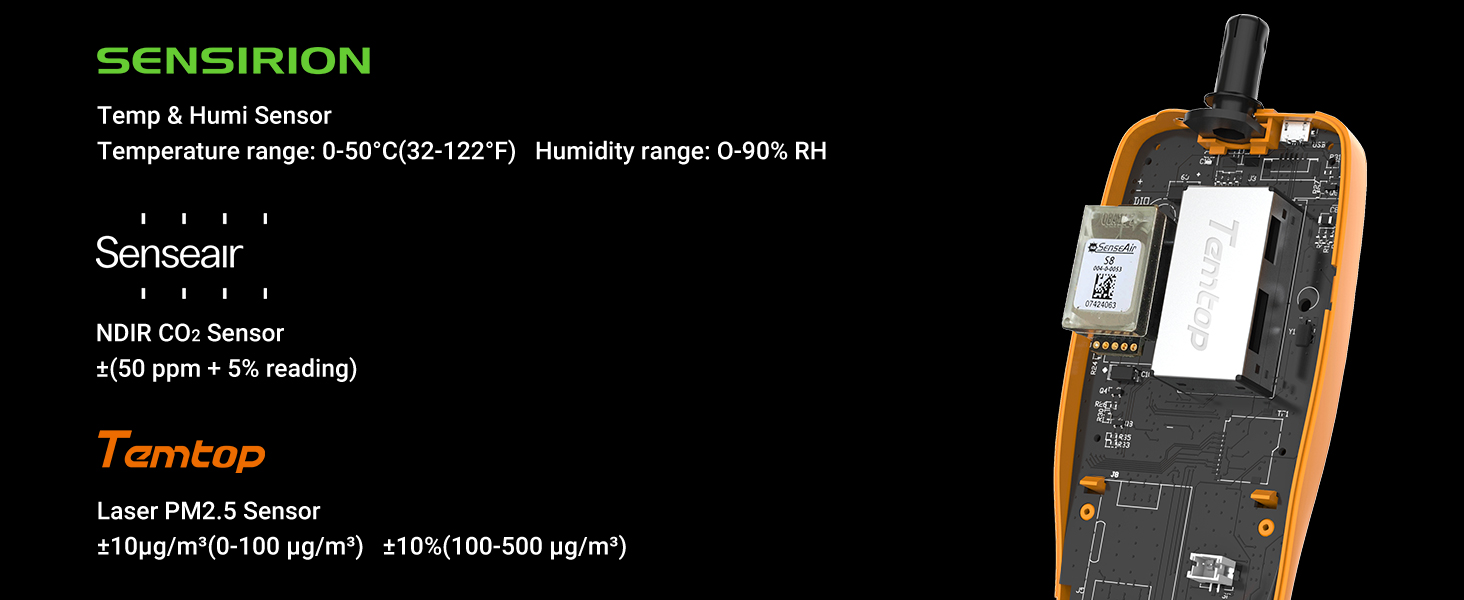
Image: An industrial scene with smoke stacks emitting plumes, illustrating common sources of PM2.5 particles in the air.
Why PM2.5 values vary in different locations of the same room?
PM2.5 in the air is not evenly distributed so the readings of PM2.5 monitors within the same room may also vary.

Image: A comfortable living room setting, demonstrating how PM2.5 levels can differ even within the same indoor space due to uneven distribution.
Why air quality monitor readings differ from official data?
Official data such as PurpleAir or Airnow reflect the average air quality of a region or city, while your air quality monitor reflects the specific air quality of your location, which may differ due to factors such as geography, weather, traffic, etc.

Image: An office environment, highlighting that personal air quality monitors provide localized readings, which can differ from broader official regional data due to various environmental factors.
How do I fix my PM2.5 problem?
To reduce the harmful effects of PM2.5, you can drive less or take public transport, use air purifiers or humidifiers at home, avoid outdoor activities or exercise when the air is polluted, wear masks or glasses to protect yourself, and eat more vitamin-rich foods to boost your immunity.

Image: A family relaxing at home, representing a healthy indoor environment and suggesting lifestyle adjustments to reduce PM2.5 exposure.
Tell me something about the history of air sensors.
In the 1900s, expensive air equipment was used in dangerous scenarios such as mining. In 2013-2016, the EPA first determined the accuracy of low-cost air sensors, and some sensors began popularizing in 2016. Now, Temtop has developed PM2.5 sensors since 2013 and is committed to providing professional-grade air testers at the best value.

Image: A laboratory setting featuring multiple air quality monitors, illustrating the historical development and increasing accessibility of air sensing technology.
Ask a question about this manual
Ask about setup, troubleshooting, compatibility, parts, safety, or missing instructions. Manuals+ will review the question and use this page’s manual context to help answer it.