
1. Вступ
Thank you for choosing the DELTACO Gaming PM80 Wireless Optical Gaming Mouse. This manual provides essential information for setting up, operating, and maintaining your new gaming mouse. Please read these instructions carefully before use to ensure optimal performance and longevity of your device.
2. Вміст упаковки
- DELTACO Gaming PM80 Wireless Optical Gaming Mouse
- Бездротовий USB-приймач
- USB-кабель для зарядки
- Посібник користувача
3. Продукт закінчивсяview
The DELTACO Gaming PM80 is a high-performance wireless optical gaming mouse designed for precision and comfort. It features 7 programmable buttons, adjustable DPI up to 4800, and customizable illumination. The mouse is rechargeable, ensuring uninterrupted gaming sessions.
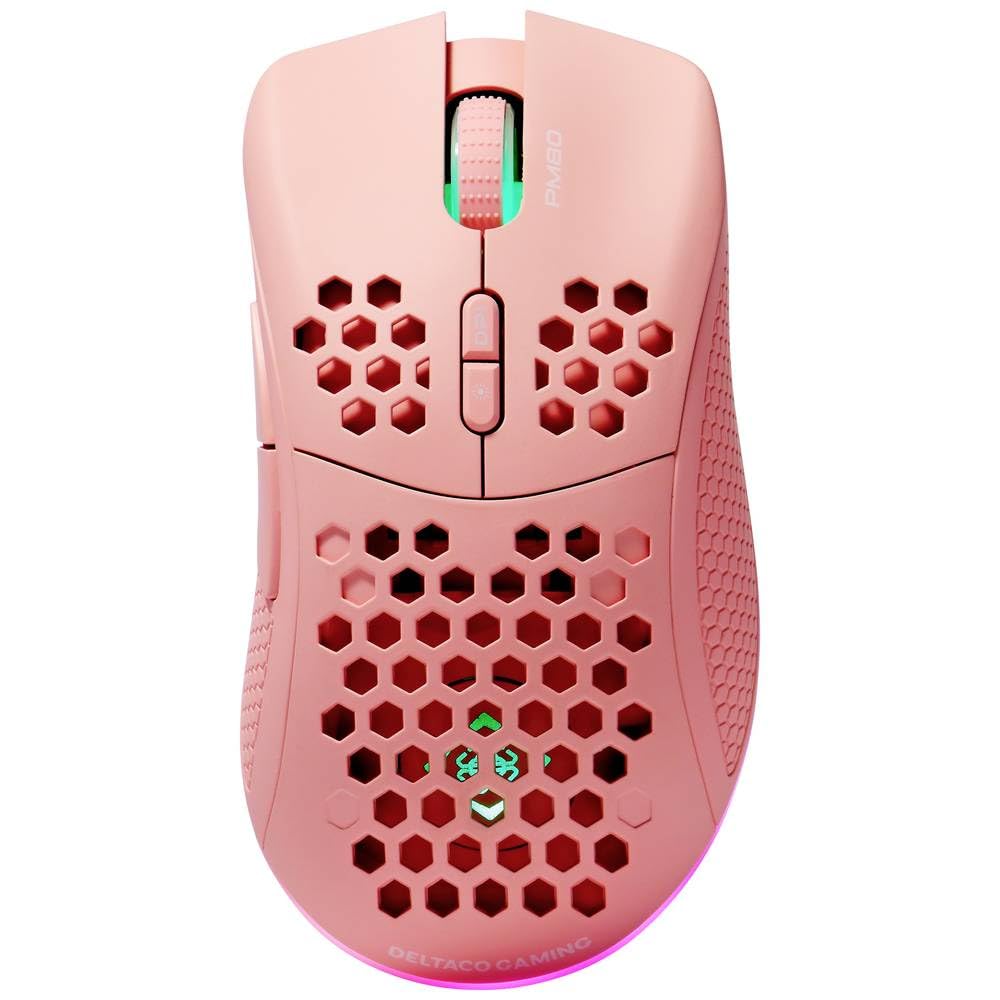
Image: DELTACO Gaming PM80 Wireless Optical Gaming Mouse. This image displays the mouse from a top-down perspective, highlighting its ergonomic design, the central scroll wheel, and the arrangement of its seven buttons.
Функції кнопок:
- Ліва кнопка миші: Стандартна функція первинного клацання.
- Клацніть правою кнопкою миші: Стандартна функція вторинного клацання.
- Колесо прокрутки: Прокручує вгору/вниз і діє як кнопка середнього клацання.
- Кнопка циклу DPI: Changes the mouse's sensitivity (DPI).
- Кнопка вперед: Переміщується вперед web браузери або file дослідники.
- Кнопка "Назад": Переміщується назад web браузери або file дослідники.
- Illumination Mode Button: Cycles through different lighting effects or turns illumination on/off.
4. Налаштування
4.1. Заряджання миші
- Підключіть менший кінець USB-кабелю для заряджання до порту заряджання на передній панелі миші.
- Connect the larger end of the USB charging cable to an available USB port on your computer or a USB wall adapter.
- The mouse's illumination will indicate charging status (e.g., breathing effect, specific color). A full charge typically takes 2-3 hours.
- Once fully charged, the illumination may change or turn off. Disconnect the charging cable.
4.2. Підключення бездротового USB-приймача
- Locate the USB wireless receiver, usually stored in a compartment on the underside of the mouse.
- Вийміть приймач з його гнізда для зберігання.
- Підключіть бездротовий USB-приймач до вільного USB-порту на вашому комп'ютері.
- Ваш комп’ютер має автоматично виявити та встановити необхідні драйвери. Це може зайняти кілька хвилин.
4.3. Увімкнення/вимкнення живлення
- Знайдіть перемикач живлення на нижній частині миші.
- Slide the switch to the 'ON' position to power on the mouse. The illumination will light up.
- To conserve battery life, slide the switch to the 'OFF' position when the mouse is not in use for extended periods.
5. Інструкція з експлуатації
5.1. Основне використання
Once connected and powered on, the mouse is ready for use. Move the mouse on a flat surface to control the cursor on your screen. Use the left and right click buttons for primary and secondary actions, and the scroll wheel for navigation.
5.2. Налаштування роздільної здатності
The DPI (Dots Per Inch) setting determines the sensitivity of your mouse. The DELTACO Gaming PM80 offers multiple DPI levels up to 4800 DPI. To adjust the DPI:
- Натисніть Кнопка циклу DPI (typically located behind the scroll wheel).
- Each press will cycle through the available DPI settings. The mouse's illumination may change color or flash to indicate the current DPI level.
- Select the DPI setting that best suits your preference for gaming or general use.
5.3. Illumination Control
The DELTACO Gaming PM80 features customizable illumination. To change the lighting effects:
- Натисніть Illumination Mode Button (refer to Product Overview для розташування).
- Each press will cycle through different lighting modes, such as static colors, breathing effects, or off.
6. Технічне обслуговування
6.1. прибирання
- Перед чищенням переконайтеся, що миша вимкнена.
- Використовуйте м’яку, суху тканину без ворсу, щоб протерти поверхню миші.
- Для стійкого бруду злегкаampПротріть тканину водою або м’яким неабразивним засобом для чищення. Уникайте надмірного зволоження.
- Do not use harsh chemicals, solvents, or abrasive materials, as these can damage the mouse's finish.
- Використовуйте ватний тампон або стиснене повітря для очищення щілин навколо колеса прокручування та кнопок.
6.2. Зберігання
When not in use for extended periods, store the mouse in a cool, dry place away from direct sunlight and extreme temperatures. Ensure the power switch is in the 'OFF' position to preserve battery life.
7. Вирішення проблем
- Миша не реагує:
- Переконайтеся, що миша увімкнена.
- Перевірте, чи бездротовий USB-приймач надійно підключено до робочого USB-порту.
- Verify the mouse battery is charged. Connect the charging cable and try again.
- Спробуйте підключити приймач до іншого USB-порту.
- Перезавантажте комп'ютер.
- Затримка або переривчасте з'єднання:
- Ensure the mouse is within close proximity to the USB receiver (ideally within 10 meters).
- Avoid placing the receiver near other wireless devices or sources of interference (e.g., Wi-Fi routers, cordless phones).
- Переконайтеся, що миша повністю заряджена.
- Рух курсора нерівномірний або неточний:
- Протріть оптичний датчик на нижній стороні миші м’якою сухою тканиною.
- Переконайтеся, що ви використовуєте мишу на відповідній поверхні (наприклад, килимку для миші). Уникайте поверхонь із високим рівнем відбиття або прозорих поверхонь.
- Зменште чутливість DPI, якщо курсор рухається занадто швидко.
- Illumination not working:
- Переконайтеся, що миша увімкнена.
- Press the Illumination Mode Button to cycle through modes, ensuring it's not set to 'off'.
- Check battery level; low battery might disable illumination.
8. Технічні характеристики
| Особливість | Деталь |
|---|---|
| Бренд | DELTACO GAMING |
| Номер моделі | ГАМ-120-П |
| Підключення | Бездротовий (USB-приймач) |
| Тип датчика | Оптичний |
| DPI | До 4800 DPI (регульована) |
| Кількість кнопок | 7 |
| Орієнтація руки | правильно |
| освітлення | так |
| Перезаряджається | так |
| Потрібні батареї | No (Internal Rechargeable) |
9. Гарантія та підтримка
For warranty information and technical support, please refer to the warranty card included with your product or visit the official DELTACO Gaming webсайт. Зберігайте чек про покупку для будь-яких гарантійних претензій.