
Інформація про безпеку
Please read and understand the following safety guidelines before operating your XTUGA C-977 wireless system to ensure safe and optimal performance.
- Поводження з акумулятором: Do not expose batteries to excessive heat, direct sunlight, or fire. Do not short-circuit, disassemble, or modify the batteries. Dispose of used batteries according to local regulations.
- Перешкоди: This device operates on UHF frequencies and may experience interference from other wireless devices, Wi-Fi equipment, or strong electromagnetic fields. Maintain a reasonable distance from such sources.
- Умови навколишнього середовища: Avoid using the device in extremely hot, cold, humid, or dusty environments. Protect it from water and other liquids.
- Технічне обслуговування: Не намагайтеся самостійно відкривати або обслуговувати пристрій. Зверніться до кваліфікованого персоналу для проведення будь-яких робіт з обслуговування.
- Утилізація: At the end of its lifespan, dispose of the product and its accessories responsibly, following local environmental regulations.
Продукт закінченийview
The XTUGA C-977 is a versatile UHF wireless audio transmitter and receiver system designed to convert wired XLR microphones and instruments into wireless setups. It offers reliable performance for dynamic microphones, condenser microphones, audio mixers, electric guitars, and basses.
Ключові характеристики
- Бездротова технологія УВЧ: Utilizes the UHF band to minimize interference from electronic products like phones, TVs, routers, and Wi-Fi equipment.
- 16 каналів на вибір: Provides 16 frequency points, allowing multiple systems to be used simultaneously without interference.
- Extended Working Distance: Offers a working range of up to 164 feet (50 meters), providing freedom of movement.
- Тривалий термін служби батареї: Equipped with built-in rechargeable lithium batteries, ensuring 5-8 hours of continuous operation for the transmitter and 8 hours for the receiver.
- Універсальна сумісність: Supports XLR microphones (with selectable 0V/5V/48V modes) and is suitable for guitar audio reception.
- Інтелектуальний екранний дисплей: Features a clear display showing real-time battery level, frequency, and working status.
- Нульова затримка: Delivers high-quality audio with 24-bit resolution and a 48KHz sampling frequency, ensuring minimal delay.
Вміст упаковки
- Приймач (x1)
- Transmitter (x1)
- XLR to 6.35mm plug adapter (x1)
- 6.35mm to XLR plug adapter (x1)
- USB -кабель для зарядки (x1)
- Посібник користувача (x1)
Діаграма продукту

Transmitter (Left Unit in Diagram):
- XLR-адаптер
- Екран дисплея
- Frequency adjustment buttons (CH+/CH-)
- Power charging port (USB-C)
- Volume adjustment buttons (VOL+/VOL-)
- Кнопка живлення
Receiver (Right Unit in Diagram):
- XLR-адаптер
- Charging display light (CHR)
- радіочастотне світло
- Power charging port (USB-C)
- Electric display light (AF)
- Кнопка живлення
Інструкції з налаштування
Початкова зарядка
Before first use, fully charge both the transmitter and receiver using the provided USB charging cable. The charging indicator light will show the charging status. A full charge typically takes approximately 4 hours.
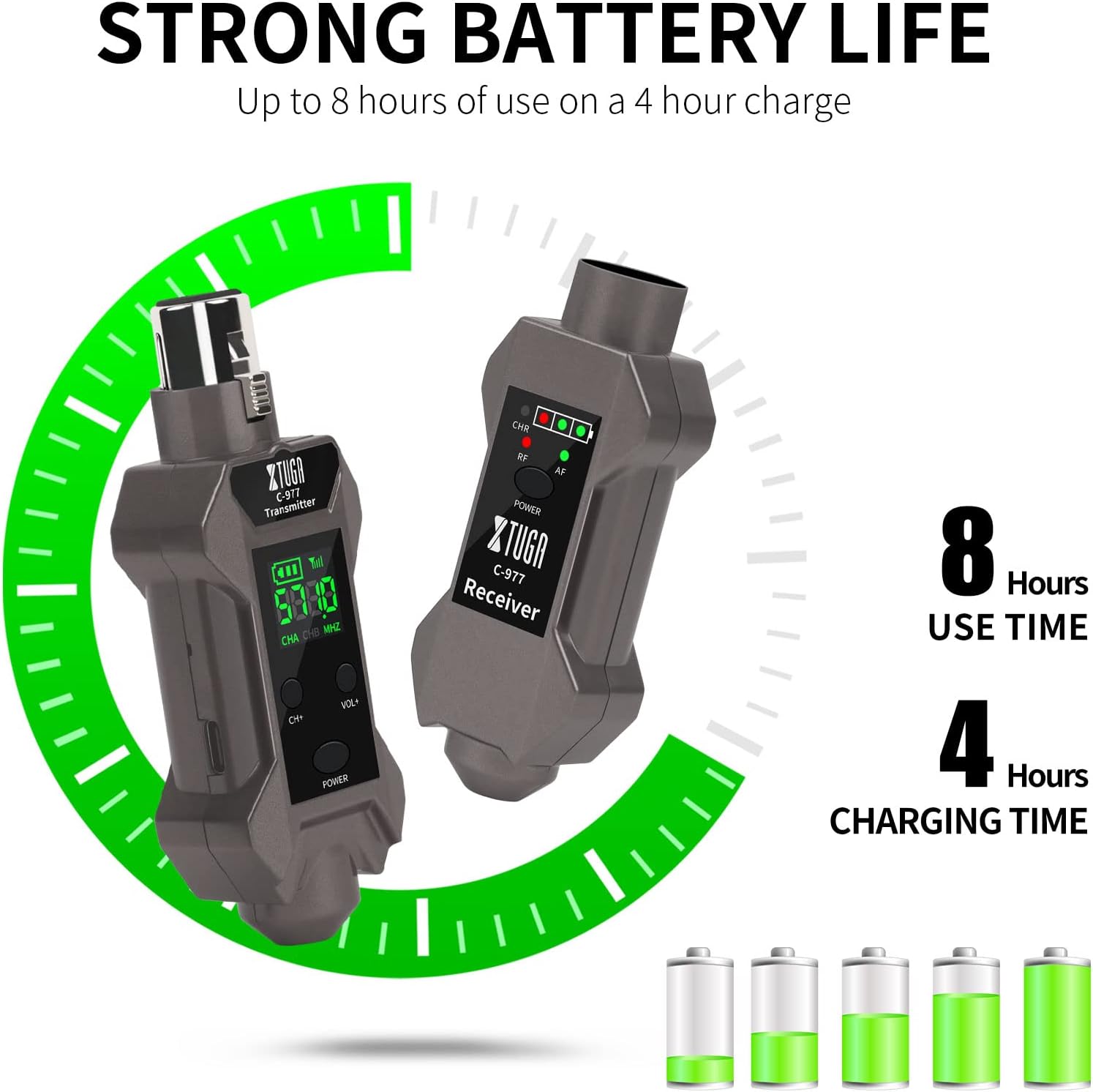
Text description: The image displays the transmitter and receiver units, highlighting their battery life and indicating approximately 8 hours of use time after 4 hours of charging.
Підключення передавача
- Connect the XTUGA C-977 transmitter directly to your dynamic microphone's XLR output. For condenser microphones, ensure the appropriate 0V/5V/48V mode is selected on the transmitter (refer to 'Microphone Mode Selection' in Operating Instructions).
- If using with a guitar or other instrument with a 6.35mm output, attach the provided XLR to 6.35mm plug adapter to the transmitter, then plug it into your instrument's output jack.
Підключення приймача
- Connect the XTUGA C-977 receiver to the XLR input of your audio mixer, PA system, or ampліфірник.
- If your input device uses a 6.35mm jack, attach the provided 6.35mm to XLR plug adapter to the receiver, then plug it into your device's input jack.

Text description: This image illustrates the receiver connected to an electric guitar, demonstrating its compatibility with mixers, keyboards, electric drums, guitars, and violins, and showing the 180-degree rotatable plug for flexible positioning.
Інструкція з експлуатації
Увімкнення/вимкнення
Press and hold the "POWER" button on both the transmitter and receiver for approximately 3 seconds to turn them on or off.
Automatic Frequency Pairing
The C-977 system features automatic IR frequency pairing. Once both units are powered on, they should automatically connect. The RF light on the receiver will illuminate when a stable connection is established.

Text description: The image depicts the receiver and a microphone with the transmitter, indicating automatic IR frequency pairing within the 500-950MHz range, automatic frequency search, manual FM, and infrared pairing capabilities.
Вибір каналу
If you encounter interference or need to operate multiple wireless systems simultaneously, you can change the operating channel:
- Short press the "CH+" or "CH-" buttons on the transmitter to cycle through the available 16 UHF channels.
- The receiver will automatically sync to the new channel.

Text description: This image shows a stage setup with a singer and multiple microphones connected to a mixer using XTUGA C-977 receivers, illustrating the system's ability to use 16 frequency points simultaneously.
Регулювання гучності
Use the "VOL+" and "VOL-" buttons on the transmitter to adjust the input volume level as needed.
Microphone Mode Selection (for XLR Transmitter)
The transmitter supports three microphone modes (0V, 5V, 48V) for compatibility with various microphone types:
- Long press the "CH+" button for 3 seconds to switch between 0V (for dynamic microphones), 5V (for condenser microphones requiring 5V bias), and 48V (for condenser microphones requiring phantom power).
- The display will show the currently selected mode. The system retains the last adjusted mode after restarting.
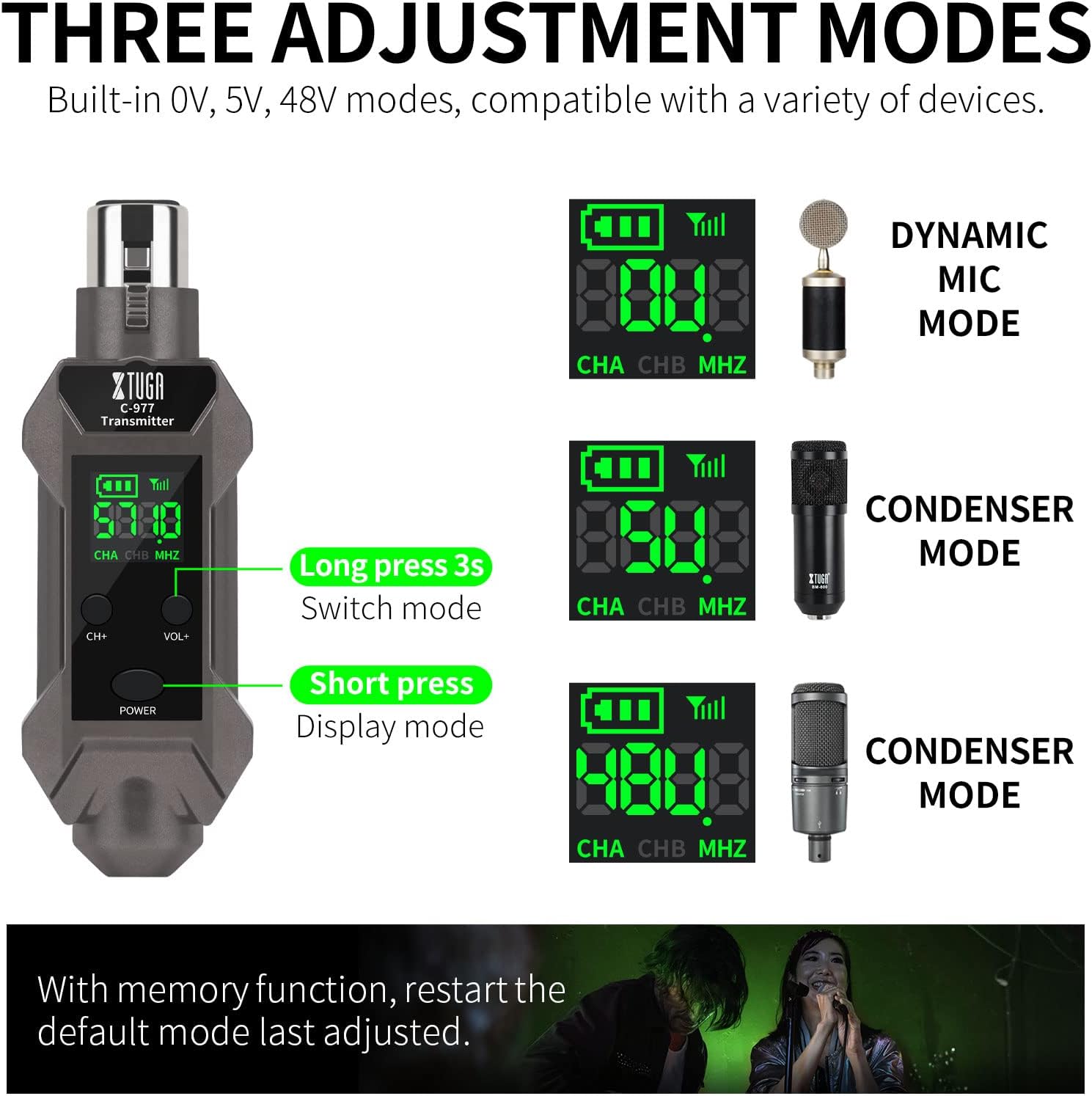
Text description: The diagram details how to long-press the CH+ button for 3 seconds to switch between 0V (dynamic mic), 5V (condenser mic), and 48V (condenser mic) modes, with corresponding display indicators.
Технічне обслуговування
Proper maintenance will extend the lifespan of your XTUGA C-977 wireless system.
- Прибирання: Regularly wipe the devices with a soft, dry cloth. Avoid using harsh chemicals, solvents, or abrasive cleaners, as these can damage the finish or internal components.
- Зберігання: Store the units in a cool, dry place away from direct sunlight, high humidity, and extreme temperatures when not in use.
- Догляд за акумулятором: Recharge the built-in batteries regularly, even if the units are not in frequent use, to maintain optimal battery health and prevent deep discharge.
- Порти: Ensure all charging ports and connectors are free from dust, dirt, and debris to prevent connection issues.
Усунення несправностей
If you encounter any issues with your XTUGA C-977 system, refer to the following table for common problems and solutions.
| проблема | Можлива причина | Рішення |
|---|---|---|
| Немає звуку / Періодичний звук | Низький заряд батареї передавача або приймача. | Recharge both units fully. |
| Немає звуку / Періодичний звук | Units are not paired or on different channels. | Ensure both units are powered on and the RF light on the receiver is solid. If not, try changing channels on the transmitter to re-sync. |
| Немає звуку / Періодичний звук | Занадто велика відстань або перешкоди. | Reduce distance between transmitter and receiver. Ensure a clear line of sight. |
| Немає звуку / Періодичний звук | Incorrect microphone mode selected (for XLR). | Long press CH+ on transmitter to select the correct 0V/5V/48V mode for your microphone. |
| Hissing / Static Noise | Перешкоди від інших електронних пристроїв. | Move the receiver away from Wi-Fi routers, phones, TVs, or other wireless equipment. Try a different channel. |
| Hissing / Static Noise | Нещільні зв'язки. | Check all cable connections (XLR, 6.35mm adapters) for secure fit. |
| Короткий термін служби батареї | Old battery or frequent heavy use. | Ensure full charge before use. Battery life naturally degrades over time. |
Технічні характеристики
Detailed technical specifications for the XTUGA C-977 wireless system.
| Особливість | Деталь |
|---|---|
| Номер моделі | С-977 |
| Бренд | Xtuga |
| Технологія підключення | XLR, AUX |
| Діапазон бездротових частот | UHF (500-950 МГц) |
| Канали | 16 |
| Робочий діапазон | До 164 футів (50 метрів) |
| Роздільна здатність звуку | 24-біт / 48 кГц |
| Затримка | Zero latency (<0ms) |
| Джерело живлення | Battery Powered (Built-in rechargeable lithium battery) |
| Термін служби батареї передавача | 5-8 годин |
| Термін служби батареї приймача | 8 години |
| Час зарядки | прибл. 4 години |
| Microphone Modes (Transmitter) | 0V (Dynamic), 5V (Condenser), 48V (Condenser) |
| Розміри продукту | 6.1 x 5.91 x 2.36 дюймів |
| Вага товару | 10.5 унції |
| Колір | чорний |
| Дата першої доступності | 20 грудня 2022 р |
Гарантія та підтримка
XTUGA is committed to providing quality products and customer satisfaction. For detailed warranty information, technical support, or any service inquiries regarding your C-977 wireless system, please refer to the contact information provided in your product packaging or visit the official XTUGA website. Our support team is available to assist you with any questions or concerns.