
1. Вступ
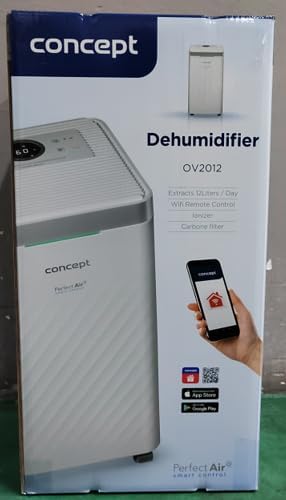
The Concept OV2012 is a versatile appliance designed to improve indoor air quality by combining dehumidification with air purification. This device effectively reduces excess humidity, which can contribute to mold growth and discomfort, while simultaneously filtering airborne pollutants. It features a triple filtration system, intuitive touch controls, and smart app connectivity for convenient operation.

Малюнок 1: Спереду view of the Concept OV2012 Dehumidifier.
2. Інформація про безпеку
Будь ласка, уважно прочитайте всі інструкції з безпеки перед використанням приладу. Недотримання цих інструкцій може призвести до ураження електричним струмом, пожежі або серйозних травм.
- Переконайтеся, що блок живлення обtage відповідає етикетці з характеристиками на приладі.
- Не використовуйте пристрій з пошкодженим шнуром живлення або вилкою.
- Keep the appliance away from water and other liquids. Do not immerse it.
- Не блокуйте вхідні та вихідні отвори для повітря. Забезпечте достатній простір навколо пристрою для належної циркуляції повітря.
- Unplug the unit before cleaning, maintenance, or when not in use for extended periods.
- Цей прилад не призначений для використання особами (включаючи дітей) з обмеженими фізичними, сенсорними або розумовими здібностями, або без досвіду та знань, окрім випадків, коли вони перебувають під наглядом або отримали інструкції.
- Не використовуйте прилад у місцях, де присутні легкозаймисті гази або пари.
3. Компоненти продукту
Familiarize yourself with the main parts of your Concept OV2012 dehumidifier.
- Панель керування: Touch-sensitive interface for setting modes and functions.
- Вихід повітря: Where processed air is released.
- Кришка вхідного повітря/фільтра: Located at the rear, provides access to the air filters.
- Бак для води: Збирає конденсовану воду.
- Випускний отвір безперервного дренажу: Port for attaching a hose for continuous water drainage.
- 360° Rolling Wheels: Для легкого переміщення агрегату.

Малюнок 2: Задня частина view of the dehumidifier, showing air intake and water tank.
4. Панель керування та дисплей
The OV2012 features an intuitive touch control panel with a digital display and LED indicators.
Малюнок 3: Детально view сенсорної панелі керування.
- Кнопка живлення: Вмикає або вимикає пристрій.
- Вибір режиму: Cycles through operating modes (Automatic, Continuous, Laundry Drying, Fan).
- Humidity Slider/Buttons: Регулює потрібний рівень вологості.
- Кнопка таймера: Sets the delayed on/off time (up to 24 hours).
- Швидкість вентилятора: Adjusts fan speed (usually two levels).
- Кнопка іонізатора: Активує або деактивує функцію іонізатора.
- LED Humidity Indicator: Changes color based on current room humidity:
- Червоний: High humidity (RH > 70%)
- Зелений: Satisfactory humidity (70% ≥ RH ≥ 50%)
- Синій: Low humidity (RH < 50%)
5. Початкове налаштування
- Розпакування: Обережно вийміть осушувач повітря з упаковки. Зберігайте упаковку для подальшого зберігання або транспортування.
- Розміщення: Place the unit on a firm, level surface. Ensure there is at least 20 cm of clear space around all sides for optimal airflow. The 360° rolling wheels allow for easy positioning.
- Підключення живлення: Вставте шнур живлення в заземлену електричну розетку.
- Бак для води: Переконайтеся, що резервуар для води правильно вставлено в пристрій.
6. Режими роботи
The OV2012 offers four distinct operating modes to suit various needs:
- Автоматичний режим: The dehumidifier automatically maintains the humidity level you select. The unit will cycle on and off to achieve and sustain the target humidity.
- Безперервна робота: Ideal for long-term drying of very wet areas. In this mode, the unit runs continuously regardless of the ambient humidity. It is recommended to use the continuous drainage hose in this mode.
- Режим сушіння білизни: Accelerates the drying of laundry and helps prevent moisture buildup in the room, reducing the risk of mold.
- Fan Mode (Air Purification without Dehumidification): In this mode, the compressor is off, and only the fan and filtration system operate to purify the air without removing moisture.
Using the Concept Home Mobile Application
The OV2012 can be controlled remotely via the Concept Home mobile application, available for iOS and Android devices. This app allows you to:
- Увімкніть або вимкніть пристрій.
- Select desired operating modes.
- Check the current air status in the room.
- Create a precise operating schedule for the dehumidifier.

Figure 4: The Concept Home mobile application for remote control.
7. Відведення води
Дренаж резервуара для води
When the 2.2-liter water tank is full, the unit will automatically shut off, and an indicator light will illuminate. Carefully remove the water tank, empty it, and reinsert it securely to resume operation.
Безперервний дренаж
For continuous operation without needing to empty the water tank, attach the included hose to the continuous drainage outlet. Direct the hose to a suitable drain, ensuring it is sloped downwards for proper water flow. This allows the unit to operate uninterrupted.
8. Технічне обслуговування та очищення
Регулярне технічне обслуговування забезпечує оптимальну продуктивність та довговічність вашого осушувача повітря.
Система фільтрів
The OV2012 features a triple filter system:
- Пиловий фільтр: Captures coarse impurities like dust particles, hair, fur, and pollen. This filter should be cleaned regularly.
- Фільтр з активованим вугіллям: Absorbs toxic, suffocating, and foul-smelling gases and vapors, such as formaldehyde, benzene, and cigarette smoke. This filter requires periodic replacement (Optional accessory: Carbon filter - 42394390).
- Іонізатор: Refreshes and purifies the air by increasing negatively charged ions, neutralizing odors and absorbing positively charged particles, viruses, and bacteria.
To clean the dust filter, remove the rear filter cover, gently remove the filter, and clean it with a vacuum cleaner or rinse it with water. Ensure it is completely dry before reinserting. Replace the activated carbon filter as recommended by the manufacturer or when you notice a decrease in odor removal effectiveness.

Figure 5: Illustration of the triple filtration system.
Очищення резервуара для води
Periodically clean the water tank with mild detergent and warm water to prevent mold and bacterial growth. Rinse thoroughly and dry before reinserting.
Зовнішнє прибирання
Протріть зовнішню поверхню пристрою м’якою, damp тканина. Не використовуйте абразивні засоби чи розчинники.
9. Посібник з усунення несправностей
Якщо у вас виникли проблеми з осушувачем повітря, зверніться до наступних поширених проблем та способів їх вирішення:
| проблема | Можлива причина | Рішення |
|---|---|---|
| Пристрій не вмикається | Немає живлення; резервуар для води повний або неправильно вставлений. | Перевірте підключення шнура живлення; правильно спорожніть та вставте резервуар для води. |
| Без осушення | Room temperature too low; Air filters clogged; Humidity setting too high. | Ensure room temperature is above 5°C; Clean or replace filters; Lower the desired humidity setting. |
| Блок шумить | Пристрій не стоїть на рівній поверхні; повітряний фільтр засмічений. | Place unit on a flat, stable surface; Clean or replace air filters. |
| Water tank full indicator remains on after emptying | Water tank not fully inserted; Sensor malfunction. | Push the water tank firmly into place; If problem persists, contact customer support. |
Якщо проблема не зникає після спроби цих рішень, зверніться до служби підтримки клієнтів.
10. Технічні характеристики
| Особливість | Специфікація |
|---|---|
| Номер моделі | OV2012 |
| Dehumidification Performance (max) | 12 літрів/день (при 30°C, 80% відносної вологості) |
| Об'єм резервуара для води | 2.2 літра |
| Споживана потужність | 210 W (Note: Product description also mentions 245W, refer to product label for exact value) |
| Рівень шуму | ≤ 45 дБ |
| Розміри (Ш x Г x В) | 250 x 250 x 460 мм (25 x 25 x 46 см) |
| Вага товару | 10.82 кг |
| Довжина кабелю | 1.8 м |
| Режими роботи | 4 (Automatic, Continuous, Laundry Drying, Fan) |
| Система фільтрів | Dust filter, Activated Carbon filter, Ionizer |
| КОНТРОЛЬ | Touch control, Mobile App (Concept Home) |
| Особливості | Automatic Shut-off, Timer, 360° wheels, LED Humidity Indicator |

Рисунок 6: Розміри виробу.
11. Гарантія та підтримка клієнтів
For warranty information, please refer to the warranty card included with your product or contact your local Concept distributor. For technical support, spare parts, or service inquiries, please contact Concept customer service. Contact details may be found on the product packaging or the official Concept webсайт.
Example contact information from product packaging (may vary by region):
- CZ: Zavolejte nám +420 465 471 400, www.my-concept.cz
- SK: Zavolajte nám +421 326 583 465, www.my-concept.sk
- PL: Zadzwoń do nas +48 71 339 04 44, www.my-concept.pl