
1. Вступ
This manual provides instructions for the setup, operation, and maintenance of your FightBox F1-UFB-UP5 All Buttons Leverless Arcade Game Controller. This controller is designed for use with various gaming platforms including PlayStation 5, PlayStation 4, PlayStation 3, PC, Xbox Series X, and Nintendo Switch.
2. Продукт закінчивсяview
The FightBox F1-UFB-UP5 is a high-performance leverless arcade controller, featuring an all-button layout for precise input. It incorporates the Brook Universal Fighting Board (UFB) and UFB-UP5 for broad platform compatibility and low-latency performance. The controller is equipped with Sanwa buttons, known for their responsiveness and durability.

This image illustrates the FightBox F1-UFB-UP5 controller alongside its internal components, specifically highlighting the Brook Universal Fighting Board and the UFB-UP5 module, which enable multi-platform compatibility.

Зверху вниз view of the FightBox F1-UFB-UP5 controller, showcasing its all-button layout with red and black Sanwa buttons and the 'FIGHTBOX' branding.
3. Налаштування
The FightBox F1-UFB-UP5 controller connects to your gaming platform via a standard USB cable. No additional drivers are typically required for console use, but PC users may need to ensure proper drivers are installed for optimal performance.
- Connect the USB cable from the controller to an available USB port on your gaming console (PlayStation 5, PlayStation 4, PlayStation 3, Xbox Series X, Nintendo Switch) or PC.
- The controller should be automatically recognized by most systems. For PC, if not automatically recognized, check your operating system's device manager for driver updates or visit the Brook webсайт для завантаження певних драйверів.
- Ensure the correct input mode is selected if your console requires it (refer to your console's documentation).
4. Інструкція з експлуатації
The F1-UFB-UP5 features a leverless button layout, replacing the traditional joystick with directional buttons for precise movement inputs. The primary action buttons are arranged for intuitive gameplay.

This diagram illustrates the button assignments for the PlayStation versions of the FightBox F1-UFB-UP5 controller. It identifies the USB port, Touchpad, Share, R3, L3, Option, and Home buttons, along with the directional and action buttons.
- Напрямні кнопки: The four red buttons on the left side control movement (Up, Down, Left, Right).
- Кнопки дій: The eight black buttons on the right side are for primary game actions.
- Кнопка вибору: Typically used for pausing games or accessing menus.
- Кнопка «Додому».: Returns to the console's main menu or dashboard.
- Кнопка "Поділитися": Used for sharing gameplay content (on PlayStation platforms).
- Сенсорна панель: Functions as a touchpad input (on PlayStation platforms).
- R3/L3 Buttons: These buttons correspond to pressing down the right and left analog sticks on a standard controller.
For specific button mappings on different platforms (Xbox, Nintendo Switch), the controller automatically adapts. Consult your game's control settings for customization options.
5. Технічне обслуговування
Proper maintenance ensures the longevity and performance of your FightBox F1-UFB-UP5 controller.
- прибирання: Use a soft, dry cloth to wipe down the surface of the controller. For stubborn marks, a slightly damp Можна використовувати тканину з м’яким милом, а потім протерти насухо. Уникайте абразивних засобів для чищення або розчинників.
- ЗберіганняЗберігайте контролер у прохолодному, сухому місці, подалі від прямих сонячних променів та екстремальних температур.
- Догляд за кабелем: Avoid sharp bends or kinks in the USB cable. Disconnect by pulling the plug, not the cable itself.
- Догляд за кнопками: Do not apply excessive force to the buttons. If a button feels sticky, it may require professional cleaning or replacement.
6. Вирішення проблем
If you encounter issues with your FightBox F1-UFB-UP5 controller, refer to the following common solutions.
- Контролер не розпізнано:
- Переконайтеся, що USB-кабель надійно підключено як до контролера, так і до консолі/ПК.
- Спробуйте інший USB-порт.
- Перезавантажте консоль або ПК.
- For PC, check device manager for driver issues and update if necessary.
- Кнопки не відповідають:
- Verify the controller is powered on and connected.
- Test buttons in a different game or system menu to isolate the issue.
- If only specific buttons are affected, they may require cleaning or replacement.
- Затримка введення:
- Ensure you are using a direct USB connection, avoiding unpowered USB hubs.
- Перевірте наявність фонових процесів на вашому ПК, які можуть споживати ресурси.
- Ensure your console's firmware and game software are up to date.
7. Технічні характеристики
Detailed specifications for the FightBox F1-UFB-UP5 All Buttons Leverless Arcade Game Controller.
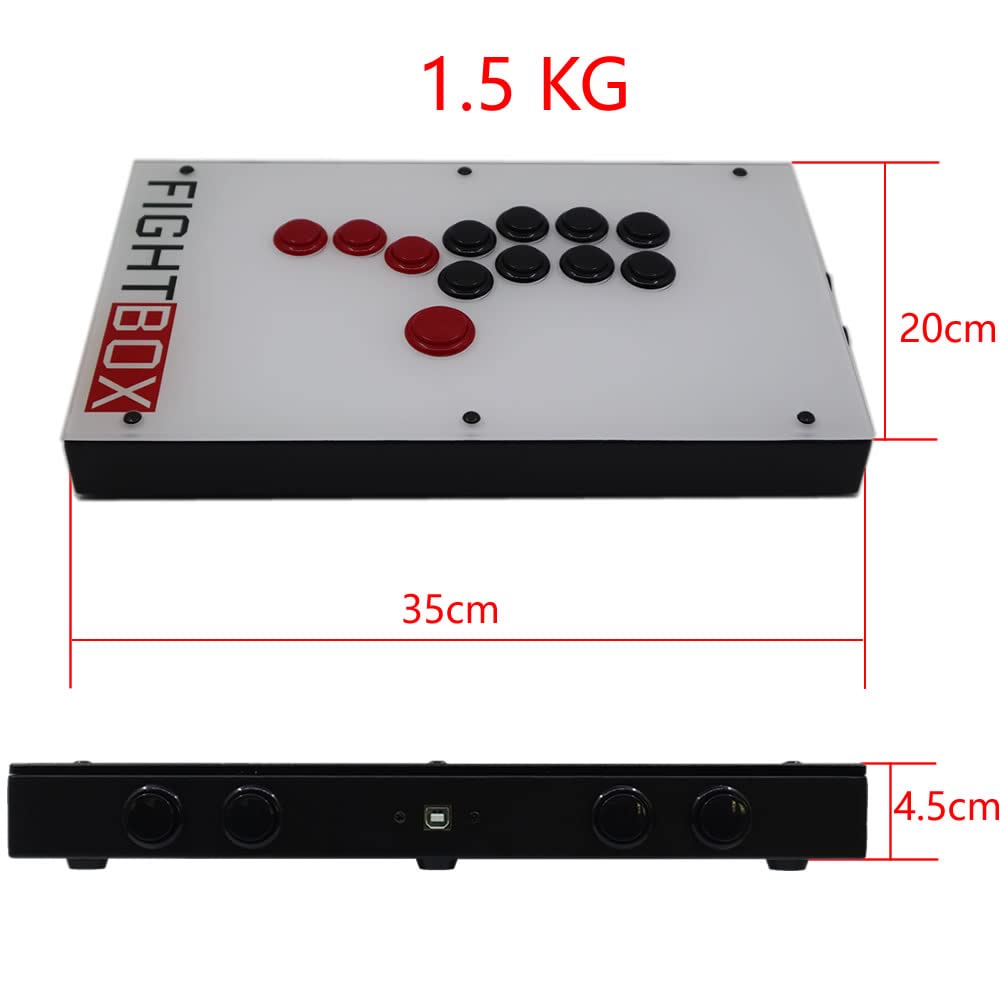
This image provides the physical dimensions of the FightBox F1-UFB-UP5 controller, showing a length of 35cm, width of 20cm, and height of 4.5cm, with a total weight of 1.5 kg.
| Особливість | Деталь |
|---|---|
| Модель | F1-UFB-UP5 |
| Бренд | FightBox |
| Підключення | USB |
| Тип контролера | Leverless Arcade Controller |
| Кількість кнопок | 12 |
| Особливості | Сенсорна панель |
| Сумісні пристрої | PlayStation 5, PlayStation 4, PlayStation 3, PC, Xbox Series X, Nintendo Switch |
| Розміри (Д x Ш x В) | 15.75 x 9.84 x 3.94 дюймів (приблизно 35 x 20 x 4.5 см) |
| вага | 1.5 кілограма |
| Внутрішня рада | Brook Universal Fighting Board (UFB) + UFB-UP5 |
| кнопки | Санва |
| UPC/GTIN | 635648885254 |
8. Гарантія та підтримка
For warranty information and technical support, please refer to the official FightBox webсайт або зверніться до продавця. Зберігайте чек про покупку як підтвердження покупки.
Для отримання додаткової допомоги відвідайте: FightBox Official Store