
1. Важлива інформація з безпеки
Будь ласка, уважно прочитайте всі інструкції з безпеки перед використанням цього виробу. Недотримання цих інструкцій може призвести до травм або пошкодження майна.
- Розміщення: Avoid placing the camera in unstable locations or within reach of children or pets.
- Потужність: Use only the provided AC adapter and power cable. Disconnect power before moving the device.
- Середовище: Keep the camera away from high humidity, dust, and extreme temperatures. This product is not waterproof.
- Технічне обслуговування: Do not attempt to disassemble or repair the camera yourself. Contact customer support for any issues.

Image: General safety guidelines for camera usage.
2. Вміст упаковки
Перевірте, чи всі предмети входять до вашої упаковки:
- Galayou G2 Camera Unit
- Адаптер змінного струму
- Кабель живлення
- Монтажний комплект (гвинти, анкери)
- Інструкція з експлуатації японською мовою

Image: The Galayou G2 camera and a smartphone displaying its live feed.
3. Посібник із налаштування
3.1 Початкове налаштування
- Увімкнення: Connect the camera to power using the provided AC adapter and cable. The indicator light will turn red.
- Завантаження програми: Download the dedicated 'blurams' app from the App Store (iOS) or Google Play Store (Android).
- Дозволи програми: Ensure Bluetooth and Location permissions are enabled for the 'blurams' app in your smartphone settings.
- Скинути налаштування камери: Press and hold the reset button on the camera until you hear a beep sound. The indicator light will flash red and blue alternately, indicating it's ready for network connection.
- Додати пристрій у застосунку: Open the 'blurams' app, tap 'Add Device' or the '+' icon. Select your camera model (G2 or similar D1 model) and choose 'Wi-Fi connection via Bluetooth'.
- Wi-Fi підключення: Enter your 2.4GHz Wi-Fi network name and password. The camera only supports 2.4GHz Wi-Fi.
- Сканування QR-коду: The app will display a QR code. Hold your smartphone in front of the camera lens to scan the QR code. You will hear a beep sound from the camera upon successful scan.
- Підтвердження підключення: The camera will announce 'Connection successful' and then 'Connecting to network'. Once connected, the indicator light will turn solid blue.
3.2 Video Guide: Bluetooth Wi-Fi Connection
Video: This video demonstrates the Bluetooth-assisted Wi-Fi connection method for the D1 camera, which is similar to the G2 model. It shows the steps from app permissions to successful network connection.
3.3 Video Guide: Camera Setup Method
Video: This video provides a general guide on how to set up a Skyworth pet camera, which can be used as a reference for the Galayou G2's setup process.
4. Інструкція з експлуатації
4.1 Живий View та керування панорамуванням/нахилом
Once connected, you can access the live feed through the 'blurams' app. The camera offers a 355° horizontal rotation and 52° vertical rotation for comprehensive coverage.
- Панорамування/нахил: Використовуйте елементи керування напрямком у додатку, щоб дистанційно налаштувати положення камери. viewкут.
- Цифрове збільшення: The camera supports 4x digital zoom to view деталі.

Image: The camera's pan and tilt capabilities, offering a wide field of view.
4.2 Video Quality and Night Vision
The G2 camera features 2K high-resolution video (1440p) and a 3-megapixel CMOS sensor for clear images. It also provides advanced night vision capabilities.
- Роздільна здатність 2K: Enjoy clear and detailed video footage.
- Режими нічного бачення: The camera supports three night vision modes: Smart Night Vision (auto-switches between color and black & white based on motion), Color Night Vision (always color), and Infrared Night Vision (always black & white).
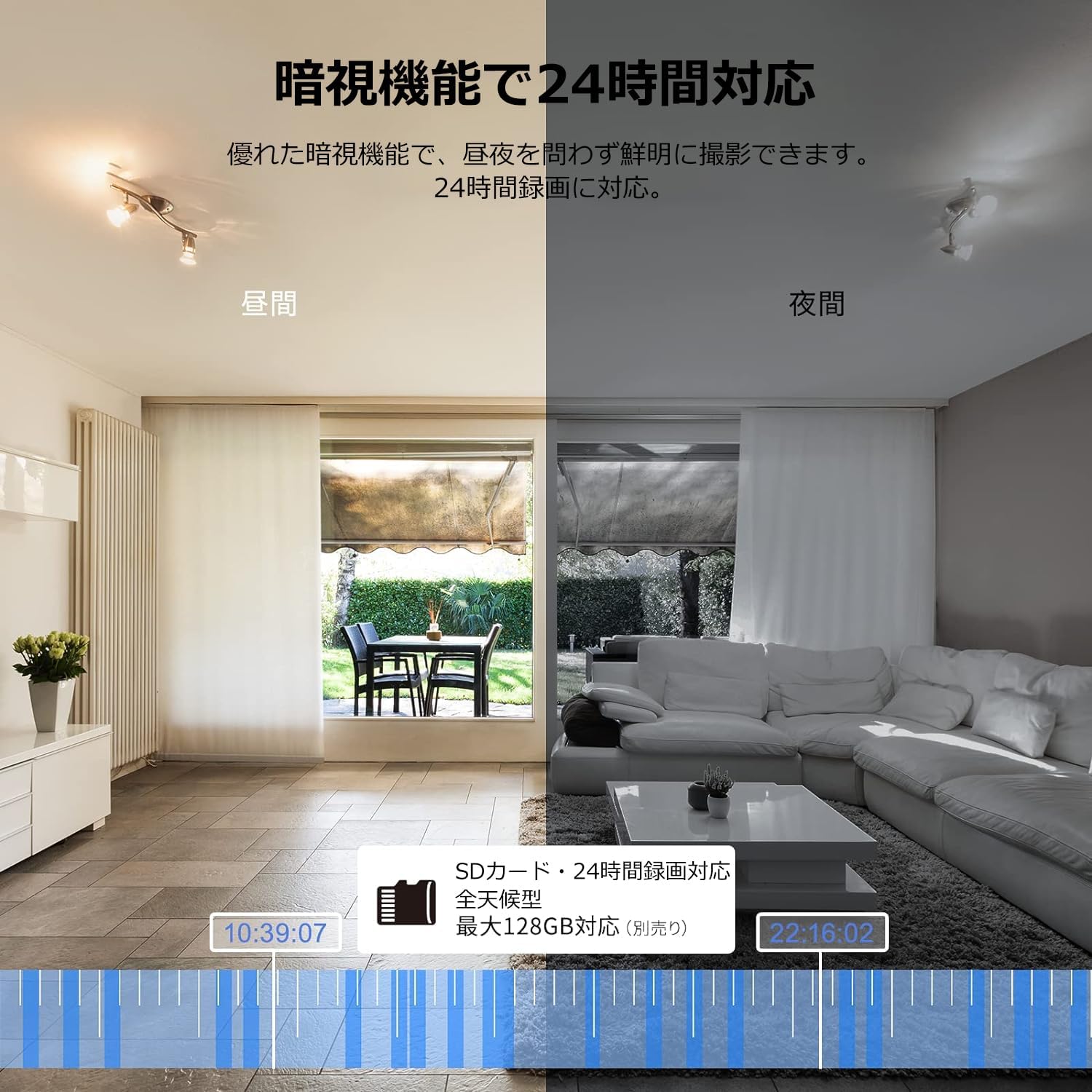
Image: Comparison of day and night vision, demonstrating the camera's ability to record clearly in low light.
4.3 Двосторонній аудіозв'язок
Equipped with a microphone and speaker, the camera allows for real-time two-way communication.
- Speak and Listen: Talk to family members or pets through the app, and hear their responses.
- Зменшення шуму: The two-way audio features noise reduction for clearer sound.

Image: The camera's two-way audio feature, allowing interaction with pets.
4.4 Motion Detection & Automatic Tracking
The camera can detect motion and automatically track subjects within its field of view.
- Сповіщення про рух: Отримуйте миттєві сповіщення на свій смартфон, коли виявляється рух.
- Автоматичне відстеження: The camera will follow detected movement, keeping the subject in frame.
- Виявлення людини: Advanced AI can differentiate between humans and other moving objects, reducing false alarms.
- Функція сигналізації: Trigger an alarm sound from the camera via the app to deter intruders.

Image: Motion detection and alarm features, showing alerts on a smartphone.
4.5 Запис і зберігання
The camera supports both local and cloud storage options for continuous recording.
- Картка MicroSD: Supports up to 128GB microSD cards (sold separately) for 24-hour continuous recording with automatic overwriting.
- Хмарне сховище: Optional paid cloud storage service is available for extended recording and backup.
- Стиснення відео: Utilizes H.264 and H.265 compression formats for efficient storage.


Images: MicroSD card recording and cloud storage options.
4.6 Режим конфіденційності
Activate privacy mode to physically cover the camera lens, ensuring your privacy when needed.
- One-Tap Activation: Easily turn off the lens via the app.
- Physical Cover: The camera physically rotates its lens downwards, blocking the view.

Image: Privacy mode icon.
4.7 Інтеграція з Alexa
The Galayou G2 is Alexa-certified, allowing for voice control and viewing the camera feed on compatible Alexa devices.
- Голосові команди: Використовуйте голосові команди для view the camera feed on an Echo Show or other Alexa-enabled screen.

Image: Alexa integration with the Galayou G2 camera.
4.8 Multi-Camera Support & Sharing
The app supports adding multiple cameras and sharing access with family members.
- Кілька камер: Monitor different areas of your home by adding several cameras to the app.
- Сімейний доступ: Share camera access with up to 4 family members simultaneously.

Image: Family sharing and multi-camera viewінж.
4.9 Video Guide: Product Features
Video: This video showcases various features of a Skyworth pet camera, including its monitoring capabilities, which are comparable to the Galayou G2.
4.10 Video Guide: Blurams 300万画素 見守りカメラ
Video: This video highlights the features of a Blurams 3-megapixel monitoring camera, demonstrating functionalities similar to the Galayou G2.
4.11 Video Guide: JUFLSKY 300万画素 360°PTZ機 (Preview)
Відео: Короткий попередній оглядview відеошоуasing a 300-megapixel 360° PTZ camera, similar in functionality to the G2.
5. Вирішення проблем
- Не вдається підключитися до Wi-Fi:
- Переконайтеся, що ваша мережа Wi-Fi працює на частоті 2.4 ГГц. Камера не підтримує мережі 5 ГГц.
- Перевірте правильність пароля від Wi-Fi.
- Перемістіть камеру ближче до вашого Wi-Fi роутера.
- Perform a factory reset on the camera and try the setup process again.
- No Live Feed:
- Перевірте підключення до Інтернету.
- Ensure the camera is powered on and the indicator light is solid blue.
- Перезапустіть програму та/або смартфон.
- Виявлення руху не працює:
- Перевірте, чи в налаштуваннях програми ввімкнено функцію виявлення руху.
- Налаштуйте чутливість виявлення руху.
- Переконайтеся, що немає перешкод, що блокують камеру view.
- Погана якість відео:
- Check your internet speed. A stable connection is required for optimal streaming.
- Переконайтеся, що об’єктив камери чистий.
- Adjust the video quality settings in the app (e.g., from SD to 2K).
6. Технічні характеристики
| Особливість | Специфікація |
|---|---|
| Назва моделі | G2 |
| Тип монтажу | Tabletop and Ceiling Mount |
| Роздільна здатність захоплення відео | 1440p (2K) |
| Колір | Automatic Tracking Camera |
| Включені компоненти | Camera body, AC adapter, Japanese instruction manual, mounting set, power cable |
| Технологія бездротового зв'язку | Wi-Fi (лише 2.4 ГГц) |
| Ефективна роздільна здатність відео | 2 Megapixels (300万画素) |
| Поле в View | 95 градусів |
| Діапазон нічного бачення | 7 метрів |
| Частота кадрів | 15 кадрів/с |
| матеріал | пластик |
| Розміри продукту (ДxШxВ) | 7.2 х 7.2 х 10.9 см |
| Рівень водонепроникності | Не водонепроникний |
| Джерело світла | Інфрачервоний |
| Рекомендоване використання | Безпека в приміщенні |
| Використання в приміщенні/на вулиці | закритий |
| Сумісні пристрої | Smartphone, Tablet, Desktop, Laptop |
| Джерело живлення | Провідний електричний |
| Тип контролера | додаток |
7. Гарантія та підтримка
The Galayou G2 camera comes with a manufacturer's warranty and customer support.
- Гарантія: Гарантія виробника 1 рік.
- Технічна підтримка: For any issues or questions, please contact GALAYOU customer support through the app or visit the official GALAYOU store on Amazon.