

вступ
This manual provides comprehensive instructions for the Xtrfy M8 Wireless Gaming Mouse. Designed for professional gamers, the M8 offers an ultra-lightweight design, symmetrical shape, and lag-free 2.4 GHz wireless connectivity.
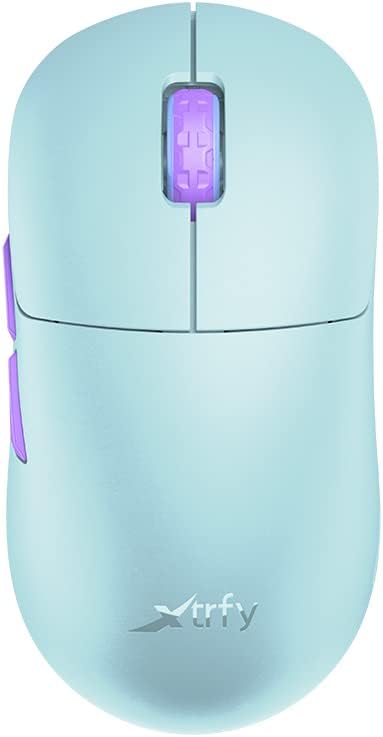
Image: The Xtrfy M8 Wireless Gaming Mouse in Frosty Mint, showcasinйого ергономічний дизайн.
A key design feature is its ultra-low front, measuring just 4mm, which allows for a unique grip style.

Зображення: Крупний план view of the Xtrfy M8 mouse's front, highlighting its low profile 4 мм.
Вміст упаковки
Перевірте наявність усіх предметів у вашій упаковці:
- Xtrfy M8 Wireless Gaming Mouse
- Зарядний кабель USB-C
- Бездротовий USB-приймач (адаптер)
- USB-A to USB-C Adapter (for receiver extension)
- Інструкція з експлуатації (цей документ)

Image: The USB-C charging cable and the USB wireless receiver (dongle) for the Xtrfy M8 mouse.
Налаштування
- Зарядіть мишку: Before first use, connect the USB-C charging cable to the mouse and a powered USB port. The mouse has an internal Lithium Ion battery.
- Connect the USB Wireless Receiver:
- Insert the USB wireless receiver directly into an available USB-A port on your computer.
- For optimal signal strength or if your computer's USB port is not easily accessible, use the provided USB-A to USB-C adapter with the charging cable to extend the receiver closer to the mouse.
- Увімкнення миші: Locate the power switch on the underside of the mouse. Slide the switch to the "ON" position.
- Автоматичне підключення: The mouse should automatically connect to the receiver. No additional pairing software is typically required for 2.4 GHz wireless operation.

Image: The underside of the Xtrfy M8 mouse, displaying the power switch, optical sensor, and hardware adjustment buttons.
Інструкція з експлуатації
The Xtrfy M8 mouse features standard left and right click buttons, a scroll wheel, and two side buttons. All functions are plug-and-play compatible with most operating systems.
Hardware Adjustments
The Xtrfy M8 allows for on-the-fly adjustment of key performance settings directly from the mouse hardware, without the need for software. These settings are typically located on the underside of the mouse.
- DPI/CPI (Dots Per Inch / Counts Per Inch): Adjusts mouse sensitivity. Use the dedicated button on the mouse bottom to cycle through preset DPI levels. An indicator light may change color to show the current setting.
- Polling Rate (PR): Determines how often the mouse reports its position to the computer. Higher polling rates (e.g., 1000 Hz) provide smoother tracking but consume more battery.
- Lift-off Distance (LOD): Controls how high the mouse can be lifted before tracking stops. A lower LOD prevents unwanted cursor movement when repositioning the mouse.
Refer to the markings near the buttons on the mouse's underside for specific adjustment procedures.

Зображення: Збоку view of the Xtrfy M8 mouse, highlighting the main click buttons, scroll wheel, and two programmable side buttons.
Зарядка та акумулятор
The Xtrfy M8 Wireless Gaming Mouse is equipped with a rechargeable Lithium Ion battery. To charge the mouse, connect the supplied USB-C cable to the front port of the mouse and the other end to a powered USB port on your computer or a USB wall adapter.
- A small LED indicator on the mouse will typically show charging status (e.g., solid light for charging, off or different color for fully charged).
- The mouse can be used while charging, though the cable connection point may feel unusual during active use.
- Battery life varies based on usage and polling rate settings.
Технічне обслуговування
Proper maintenance ensures the longevity and performance of your Xtrfy M8 mouse.
- Прибирання: Використовуйте м’яку суху тканину для протирання поверхні миші. Для стійкого бруду злегкаampпрополощіть тканину водою. Уникайте агресивних хімікатів або абразивних матеріалів.
- датчик: Тримайте оптичний датчик на нижній стороні миші чистим та без пилу чи сміття. За потреби використовуйте ватний тампон або стиснене повітря.
- Зберігання: When not in use for extended periods, store the mouse in a dry, cool place.
- Догляд за кабелем: Avoid sharp bends or excessive pulling on the USB-C charging cable to prevent damage.
Усунення несправностей
If you encounter issues with your Xtrfy M8 mouse, refer to the following common solutions:
- Миша не реагує:
- Переконайтеся, що миша увімкнена.
- Перевірте, чи бездротовий USB-приймач надійно підключено до робочого USB-порту.
- Verify the mouse battery is charged. Connect the charging cable and observe the indicator light.
- Спробуйте підключити приймач до іншого USB-порту.
- Затримки або відключення:
- Ensure the receiver is close to the mouse and not obstructed by metal objects.
- Уникайте розміщення приймача поблизу інших бездротових пристроїв, які можуть створювати перешкоди (наприклад, Wi-Fi маршрутизаторів, інших бездротових периферійних пристроїв).
- Lower the polling rate setting on the mouse if experiencing frequent disconnections in a crowded wireless environment.
- Неточне відстеження:
- Очистіть оптичний датчик на нижній стороні миші.
- Переконайтеся, що ви використовуєте мишу на відповідній поверхні (рекомендується використовувати килимок для миші).
- Adjust the DPI/CPI settings to a comfortable level.
- Scroll Wheel Issues (e.g., jumping):
- Ensure the mouse firmware is up to date (check the Xtrfy official website for any available updates).
- If the issue persists, contact Xtrfy customer support.
Технічні характеристики
| Номер моделі | M8 |
| Бренд | Xtrfy |
| Технологія підключення | Radio Frequency (2.4 GHz), USB (for charging/wired mode) |
| Технологія виявлення руху | Оптичний |
| Особливості | Легкий, бездротовий |
| Вага товару | 1.94 унції (приблизно 55 грамів) |
| Акумулятори | 1 літій-іонний акумулятор (у комплекті) |
| Розміри упаковки | 7.32 x 4.06 x 2.44 дюймів |
| ASIN | B0BMLF5FMT |
| Дата першої доступності | 16 листопада 2022 р |
Гарантія та підтримка
The Xtrfy M8 Wireless Gaming Mouse typically comes with a 1-year manufacturer's warranty. For specific warranty details, claims, or technical support, please contact Xtrfy directly through their official webсайт.
Xtrfy Official Webсайт: www.xtrfy.com
Always refer to the manufacturer's official resources for the most current support information and firmware updates.