
1. Вступ
1.1 продукт закінченоview
The ZKTeco MB2000 is an advanced access control and attendance recording device designed for efficient management of personnel entry and exit. It features fingerprint recognition technology for secure and reliable identification. This manual provides detailed instructions for the installation, operation, and maintenance of your MB2000 device.
1.2 Основні характеристики
- Розпізнавання відбитків пальців: High-accuracy biometric identification for access and attendance.
- IPX7 International Protection Rating: Забезпечує захист від занурення у воду на глибину до 1 метра протягом 30 хвилин.
- Легкий дизайн: Facilitates easy installation and portability.
- Бездротове підключення: Enables flexible data transfer and device management.
1.3 Вміст упаковки
Перевірте наявність усіх елементів в упаковці:
- ZKTeco MB2000 Fingerprint Device
- Монтажна підставка
- User Card (for initial setup or specific functions)
- Адаптер живлення (не вказано прямо, але мається на увазі для роботи)
- Посібник користувача (цей документ)
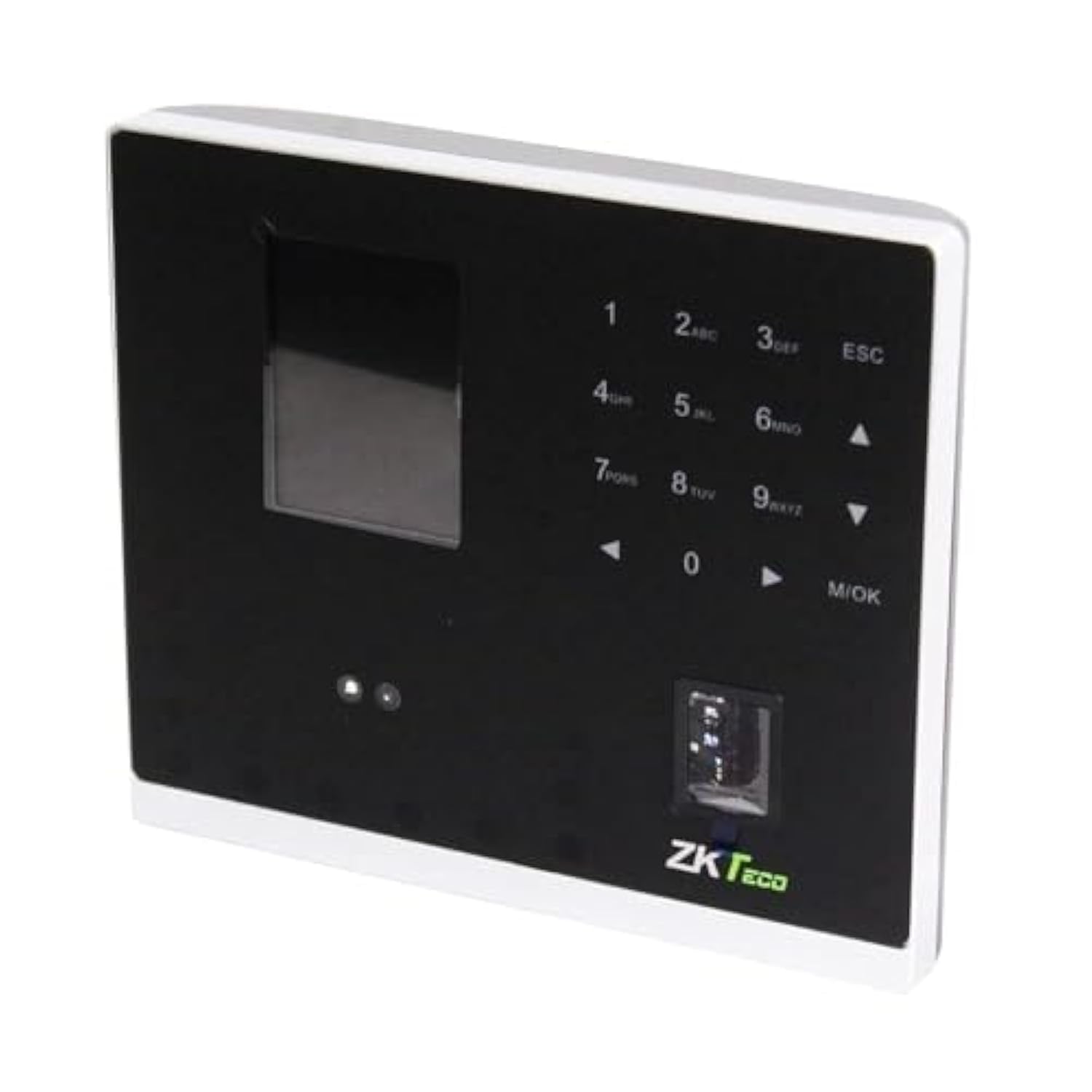
малюнок 1.1: ZKTeco MB2000 Access Control and Attendance Recording Device. This image shows the front view of the compact device, highlighting its fingerprint sensor and display screen.
2. Інформація про безпеку
Please read and understand all safety instructions before operating the device to prevent injury or damage.
- Джерело живлення: Use only the specified power adapter provided with the device. Using an incorrect power supply may damage the device and void the warranty.
- Середовище: Do not expose the device to extreme temperatures, direct sunlight, or corrosive substances. While rated IPX7, prolonged submersion or exposure to high-pressure water jets is not recommended.
- Обробка: Avoid dropping or subjecting the device to strong impacts. Do not attempt to disassemble or repair the device yourself. Contact qualified service personnel for assistance.
- Прибирання: Use a soft, dry cloth for cleaning. Do not use liquid or aerosol cleaners.
3. Посібник із налаштування
3.1 Розпакування та перевірка
Carefully remove the device and all accessories from the packaging. Inspect for any signs of damage. If any components are missing or damaged, contact your supplier immediately.
3.2 Монтаж пристрою
The MB2000 can be mounted using the provided stand. Choose a stable, flat surface for placement. Ensure the device is positioned at a comfortable height for users to access the fingerprint sensor.
- Attach the stand securely to the back of the MB2000 device.
- Place the device with the stand on your desired surface.
- Ensure the device is stable and will not easily tip over.
3.3 Підключення живлення
Підключіть адаптер живлення до вхідного порту живлення пристрою, а потім підключіть його до стандартної електричної розетки. Пристрій увімкнеться автоматично.
3.4 Початкова конфігурація
Upon first power-on, the device may prompt you to set up an administrator. Follow the on-screen instructions to register the first administrator fingerprint or card. This administrator will have privileges to manage users and device settings.
4. Інструкція з експлуатації
4.1 Реєстрація користувача
Щоб зареєструвати нового користувача:
- Access the device menu using the administrator's fingerprint or card.
- Navigate to the 'User Management' section.
- Виберіть «Додати користувача».
- Enter the user's ID and name (if applicable).
- Register the user's fingerprint by placing their finger on the sensor multiple times as prompted.
- Alternatively, register a user card by presenting it to the device's card reader.
- Збережіть інформацію про користувача.
4.2 Контроль доступу
For access control, registered users can gain entry by:
- Перевірка відбитків пальців: Place a registered finger on the sensor. The device will verify the fingerprint and grant access if authorized.
- Презентація картки: Present a registered user card to the device's card reader. The device will verify the card and grant access if authorized.
4.3 Облік відвідуваності
The device automatically records attendance when a user successfully verifies their identity for access. The timestamp of the verification is logged as an attendance record.
4.4 Керування даними
Attendance logs and user data can be managed through the device's interface or by connecting to a compatible software (if available). Refer to the device's on-screen menu for options to download data via USB or network connection.
5. Технічне обслуговування
5.1 Очищення
Регулярне очищення допомагає підтримувати оптимальну продуктивність:
- Датчик відбитків пальців: Gently wipe the sensor surface with a soft, lint-free cloth. Do not use abrasive materials or harsh chemicals.
- Поверхня пристрою: Clean the device's exterior with a slightly damp cloth, then dry immediately with a soft, dry cloth.
5.2 Оновлення програмного забезпечення
Перевірте виробника website periodically for software or firmware updates. Updates can improve performance, add features, or fix bugs. Follow the provided instructions carefully when performing updates.
5.3 Резервне копіювання даних
Regularly back up attendance logs and user data to prevent loss. This can typically be done via USB export or through connected management software.
6. Вирішення проблем
This section addresses common issues you might encounter with the MB2000 device.
| проблема | Можлива причина | Рішення |
|---|---|---|
| Пристрій не включається. | No power, faulty adapter, or power outlet issue. | Check power connection. Ensure the adapter is correctly plugged in. Test the power outlet with another device. |
| Відбиток пальця не розпізнано. | Відбиток пальця не зареєстрований, брудний датчик або неправильне розташування. | Ensure the fingerprint is registered. Clean the sensor. Place the finger flat and centered on the sensor. Try re-registering the fingerprint. |
| Картку не розпізнано. | Card not registered or incorrect card type. | Verify the card is registered. Ensure it is a compatible card type. |
| Проблеми з передачею даних. | Incorrect settings, cable issues, or software incompatibility. | Check network settings or USB cable connection. Ensure the management software is compatible and correctly configured. |
7. Технічні характеристики
| Специфікація | Деталь |
|---|---|
| Номер моделі | MB2000 |
| Бренд | ZKTeco |
| Розміри доставки | 31 х 25.5 х 12.5 см |
| Вага товару | 1.5 кг |
| Особливості | Легкий |
| Підключення | Бездротовий |
| Колір | чорний |
| Включені компоненти | Fingerprint device, stand, card |
| Міжнародний захист рейтингу | IPX7 (водонепроникний) |
| Кількість каналів | 1 |
| Перша доступна дата | 6 листопада 2022 р |
8. Гарантія та підтримка
For warranty information, please refer to the warranty card included with your product or the purchase documentation. For technical support or service inquiries, please contact your local ZKTeco distributor or visit the official ZKTeco webна сайті для отримання контактної інформації.