
Miofive Dash Cam Dual
Miofive Dash Cam Front and Rear User Manual
Model: Dash Cam Dual
вступ
The Miofive Dash Cam Front and Rear system provides comprehensive video recording for your vehicle, featuring 4K resolution for the front camera and 2K for the rear. Designed for reliability and ease of use, this dual dash camera system incorporates advanced features such as 5G WiFi connectivity, built-in GPS, motion detection, and G-sensor technology, all powered by a durable super capacitor. This manual provides detailed instructions for setup, operation, maintenance, and troubleshooting to ensure optimal performance of your device.
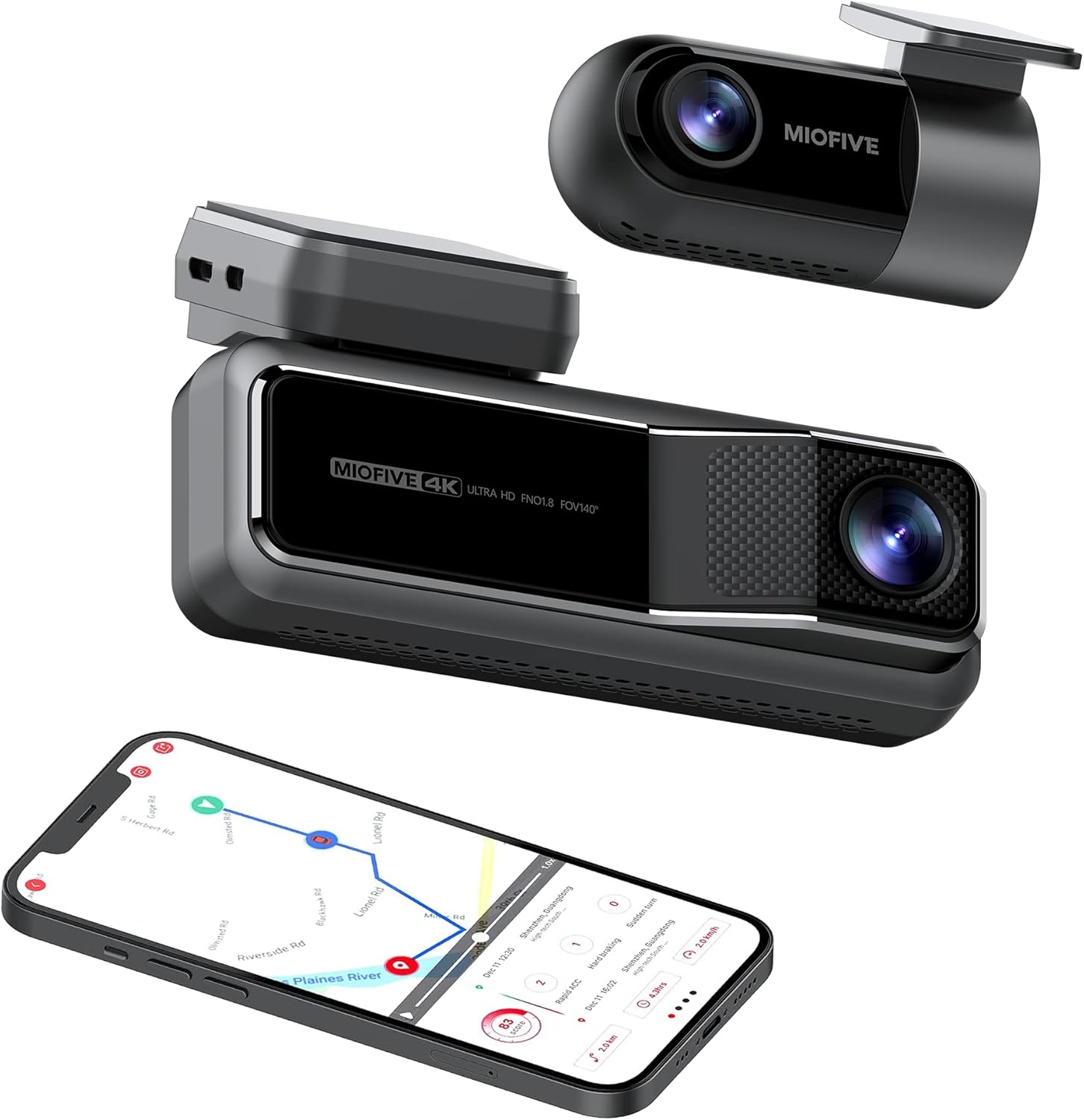
The Miofive Dash Cam system, featuring both front and rear cameras, along with its companion mobile application.
Що в коробці
Будь ласка, перевірте, чи всі перелічені нижче предмети входять до вашої упаковки:
- Miofive 4K Dash Cam x 1
- Автомобільний зарядний пристрій x 1
- Crow Bar x 1
- Зарядний кабель x 1
- Static Sticker x 4
- Посібник користувача x 1
- A Set of Backup Double-sided Adhesive Tapes x 1
- Кабель для передачі даних х 1
- Задня камера x 1
- Rear Cam Cable x 1

All components included in the Miofive Dash Cam Front and Rear package.
Налаштування та встановлення
Монтаж відеореєстратора
- Очистіть ділянку лобового скла, де буде встановлено відеореєстратор. Переконайтеся, що на ній немає пилу та жиру.
- Apply one of the static stickers to the cleaned area on the windshield. This helps protect your windshield and makes removal easier.
- Attach the main dash cam unit to the static sticker using the provided adhesive tape. Press firmly for 30 seconds to ensure a secure bond.
- Adjust the camera lens angle to ensure it captures the road ahead clearly, typically centered with the horizon.
Підключення живлення
- Підключіть наданий автомобільний зарядний пристрій до вхідного порту живлення відеореєстратора.
- Підключіть автомобільний зарядний пристрій до розетки 12 В вашого автомобіля (гніздо прикурювача).
- Route the power cable neatly along the edge of the windshield and dashboard using the crow bar to tuck it into crevices, ensuring it does not obstruct your view або елементи керування транспортним засобом.
- For continuous parking monitoring, an optional hardwire kit (sold separately) is required to provide constant power to the dash cam. Refer to the hardwire kit's instructions for installation.
Підключення задньої камери
- Mount the rear camera on your rear windshield, typically at the top center, ensuring a clear view of the road behind. Use a static sticker and adhesive tape as with the front camera.
- Connect the rear camera cable to the rear camera and route it to the main dash cam unit.
- Plug the rear camera cable into the designated rear camera input port on the main dash cam.

Illustration of the Miofive Dash Cam Front and Rear installation process.
Інструкція з експлуатації
Увімкнення/вимкнення живлення
The dash cam will automatically power on and begin recording when connected to your vehicle's power supply and the ignition is turned on. It will power off automatically when the vehicle's power is cut.
Базовий запис
Once powered on, the dash cam will automatically start loop recording. This means it continuously records video in segments, overwriting the oldest footage when the storage is full. Important footage можна заблокувати, щоб запобігти перезапису.
5G WiFi and App Control
The Miofive Dash Cam features built-in 5G WiFi for seamless connection to the Miofive mobile application. Download the Miofive app from your smartphone's app store. Once connected, you can:
- View live video feed from both cameras.
- Відтворення записане footage directly on your phone.
- Download important video clips to your device.
- Adjust camera settings and preferences.
- Receive real-time Over-The-Air (OTA) updates for bug fixes and software enhancements.


The Miofive App provides comprehensive control and access to your dash cam's features and recordings.
G-Sensor and Motion Detection
The built-in G-sensor automatically detects sudden impacts or collisions. When an event is detected, the dash cam will automatically lock the current video segment, preventing it from being overwritten by loop recording. This ensures critical evidence is preserved.

The G-sensor ensures automatic recording and locking of footage during impacts.
Паркувальний монітор
With the optional hardwire kit, the dash cam can monitor your vehicle even when parked. The 24-hour parking monitor and time-lapse recording features capture disturbances or continuous footage, providing security when you're away from your car.

The parking monitor feature provides continuous surveillance for your vehicle when parked.
Нічне бачення
Equipped with the Sony Starvis IMX415 sensor and High Dynamic Range (HDR) technology, the Miofive Dash Cam delivers clear and bright video quality in low-light conditions, enhancing visibility during nighttime driving or in dimly lit environments.

Enhanced night vision capabilities for clear recordings in low light.
AI Algorithm and Go Assist
The intelligent AI algorithm monitors road conditions and provides helpful alerts. The Go Assist feature can notify you of sudden turns, braking, and accelerations, and prompt you to proceed when the vehicle ahead moves, improving driving awareness.

AI algorithm for smart driving assistance and alerts.
GPS відстеження
Built-in GPS technology records your driving route, speed, and coordinates, providing detailed information for each journey. This data can be accessed and reviewed through the Miofive app.

Integrated GPS technology records essential driving data.
Технічне обслуговування
Regular maintenance helps ensure the longevity and optimal performance of your Miofive Dash Cam:
- Очищення лінзи: Gently wipe the camera lenses with a soft, lint-free cloth to remove dust or smudges. Avoid using abrasive cleaners that could scratch the lens.
- Оновлення прошивки: Periodically check the Miofive app for available firmware updates. Keeping your dash cam's firmware up-to-date ensures you have the latest features and bug fixes.
- Перевірка підключень: Ensure all cables (power, rear camera) are securely connected to prevent intermittent power loss or recording issues.
- Управління сховищем: While the dash cam uses loop recording, it's good practice to regularly review and back up any important footage. The built-in 128GB eMMC storage is designed for durability, but managing critical files is always recommended.
Усунення несправностей
Поширені проблеми та рішення
- Відеореєстратор не вмикається:
- Ensure the car charger is properly plugged into both the dash cam and the vehicle's 12V power outlet.
- Перевірте, чи працює розетка 12 В автомобіля (наприклад, підключивши інший пристрій).
- If using a hardwire kit, verify its installation and power connection.
- App Connectivity Issues (WiFi):
- Ensure the dash cam's WiFi is enabled.
- Confirm your smartphone is connected to the dash cam's WiFi network (SSID and password usually found on the device or in the manual).
- Try restarting both the dash cam and your smartphone.
- Missing or Corrupted Footage:
- Перевірте, чи в налаштуваннях увімкнено циклічний запис.
- Ensure the built-in 128GB eMMC storage is not full of locked files. Regularly back up and delete unnecessary locked files.
- Check if the G-sensor sensitivity is set appropriately; overly sensitive settings can lead to many locked files filling up storage quickly.
- Погана якість відео:
- Clean the camera lenses as described in the Maintenance section.
- Переконайтеся, що з лінз знято захисну плівку.
- Check video resolution settings in the app; ensure it's set to 4K (front) and 2K (rear) for optimal quality.
- Verify that the dash cam is securely mounted and not vibrating excessively.
Технічні характеристики
| Особливість | Деталь |
|---|---|
| Бренд | Міофів |
| Назва моделі | Dash Cam Dual |
| Розміри продукту | 2.87 x 5.98 x 6.94 дюймів |
| Вага товару | 1.81 фунта |
| Виробник | MIOFIVE Technology Limited Co., Ltd. |
| ЦП | Novatek Processor |
| Датчик зображення | Sony Starvis |
| Екран | 2.2-дюймовий IPS дисплей |
| Камера FOV | 140° по горизонталі та вертикалі Viewкути нахилу |
| Діафрагма | F1.8 |
| Image Resolution (Front) | 4K UHD (3840x2160) @30fps |
| Image Resolution (Rear) | 2K QHD (2560x1440) @30fps |
| Зберігання | Вбудований 128 ГБ eMMC |
| G-сенсор | Built-in 6 Gyro sensor |
| Wi-Fi | 2.4 / 5 ГГц |
| Джерело живлення | Супер конденсатор |
| Вхідна потужність | 5 В / 2.4 А |
| Робоча температура | -10°C до 45°C (14°F до 113°F) |
| Технологія підключення | Wi-Fi |
| Тип обслуговування автомобіля | Мінівен, автобус, автомобіль, вантажівка |
| Тип монтажу | Кріплення лобового скла |
| Колір | чорний |

Detailed specifications for the Miofive Dash Cam Dual.
Гарантія та підтримка
Miofive is committed to providing excellent customer service and support for its products:
- 30-денна гарантія повернення грошей: Якщо ви не задоволені своєю покупкою, ви можете мати право на повернення коштів протягом 30 днів.
- 18-місячна гарантія: Your Miofive Dash Cam is covered by an 18-month warranty from the date of purchase, protecting against manufacturing defects.
- 24/7 Dedicated Customer Support: Assistance is available around the clock for any queries or issues you may encounter.
- Lifetime Technical Solution Support: Miofive provides ongoing technical support for the lifetime of your product.
З питань підтримки звертайтеся:
Електронна пошта: support@miofive.com

Miofive's commitment to customer satisfaction and product support.
Ask a question about this manual
Ask about setup, troubleshooting, compatibility, parts, safety, or missing instructions. Manuals+ will review the question and use this page’s manual context to help answer it.