
1. Вступ
This manual provides detailed instructions for the installation, operation, and maintenance of your ASUS Prime B650M-A AX Micro-ATX Motherboard. Designed to support AMD Ryzen 7000 series processors, this motherboard offers robust performance, comprehensive cooling, and extensive connectivity options for daily users and PC builders.
Please read this manual thoroughly before beginning installation to ensure proper setup and to maximize the performance and longevity of your system.
2. Вміст упаковки
Перевірте, чи всі перелічені нижче елементи присутні в упаковці вашої материнської плати. Якщо будь-який елемент відсутній або пошкоджений, зверніться до продавця.
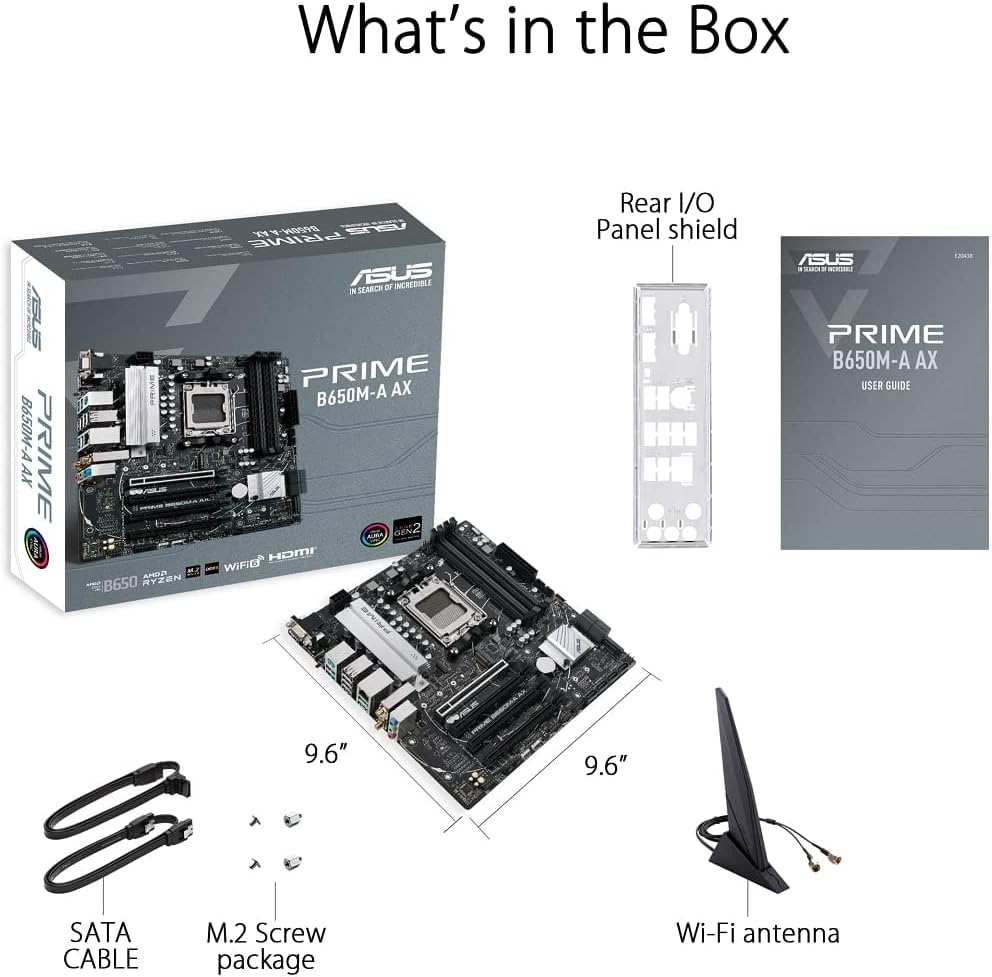
Figure 2.1: Contents of the ASUS Prime B650M-A AX Motherboard package.
- ASUS Prime B650M-A AX Motherboard
- Щит задньої панелі вводу/виводу
- User Guide (Printed Manual)
- SATA Cables (x2)
- Пакет гвинтів M.2
- Антена Wi-Fi
3. Продукт закінчивсяview і особливості
The ASUS Prime B650M-A AX motherboard is designed to provide a stable and high-performance foundation for your PC build. Key features include:
3.1. Component Layout and Power Delivery

Figure 3.1: Motherboard layout highlighting power delivery and cooling components.
- Роз'єм AMD AM5: Готовий до роботи з процесорами AMD Ryzen серії 7000 для настільних комп'ютерів.
- Надійне живлення: Features a comprehensive VRM heatsink and thermal pads for stable power delivery to the CPU.
- Комплексне охолодження: Includes VRM heatsink, PCH heatsink, hybrid fan headers, and Fan Xpert 2+ for efficient thermal management.
3.2. Пам'ять і зберігання
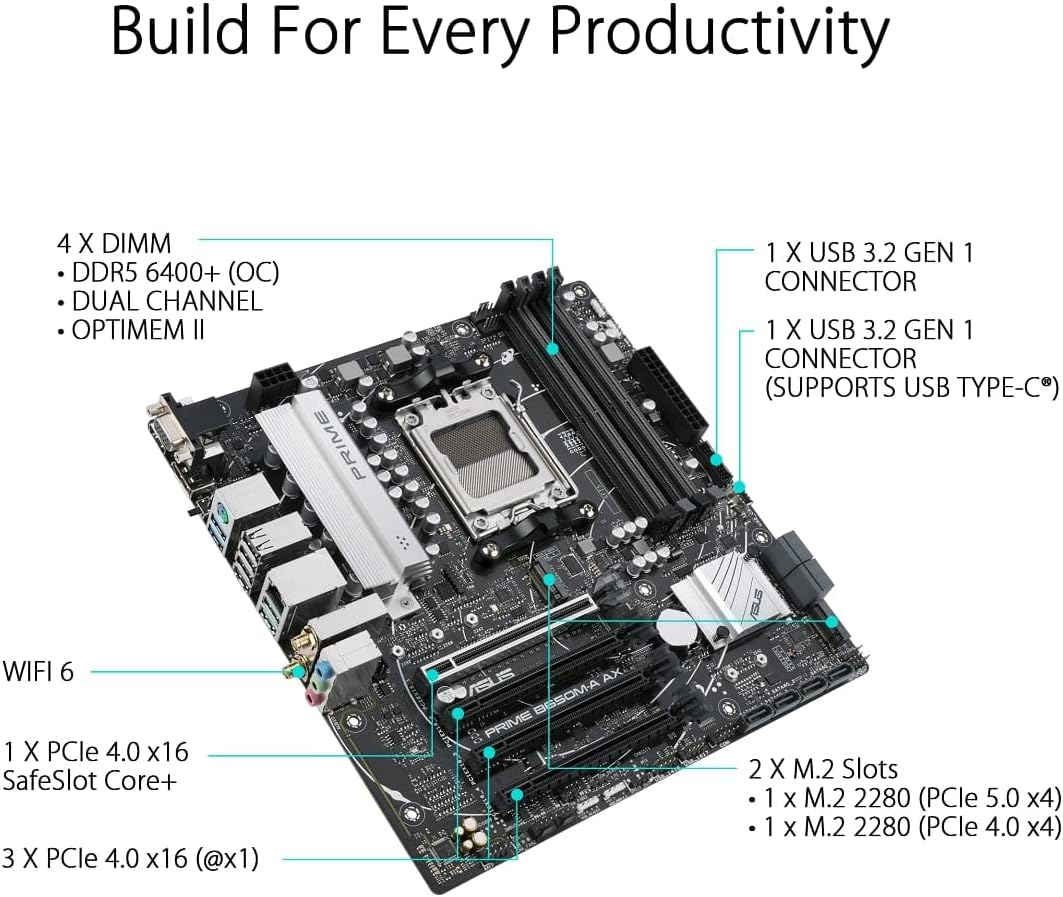
Figure 3.2: Motherboard layout highlighting memory and storage options.
- Підтримка DDR5: Four DIMM slots supporting DDR5 memory with ASUS OptiMem II for improved memory overclocking and signal integrity.
- PCIe 5.0 M.2: One PCIe 5.0 M.2 slot for ultra-fast storage, alongside another PCIe 4.0 M.2 slot.
- Розширення PCIe: One PCIe 4.0 x16 SafeSlot Core+ and three PCIe 4.0 x1 slots for expansion cards.
3.3. Підключення

Figure 3.3: Rear I/O Panel connectivity options.
- Wi-Fi 6: Integrated Wi-Fi 6 for high-speed wireless networking.
- 2.5Gb LAN: Realtek 2.5Gb Ethernet for fast wired network connections.
- Порти USB: Multiple USB 3.2 Gen 2 ports, USB 3.2 Gen 1 ports (including front USB 3.2 Gen 1 Type-C®), and USB 2.0 ports.
- Відеовиходи: DisplayPort, HDMI, and VGA for display connectivity.
- BIOS FlashBack™: Dedicated button for easy BIOS updates without a CPU or memory installed.
3.4. Personalization and Audio
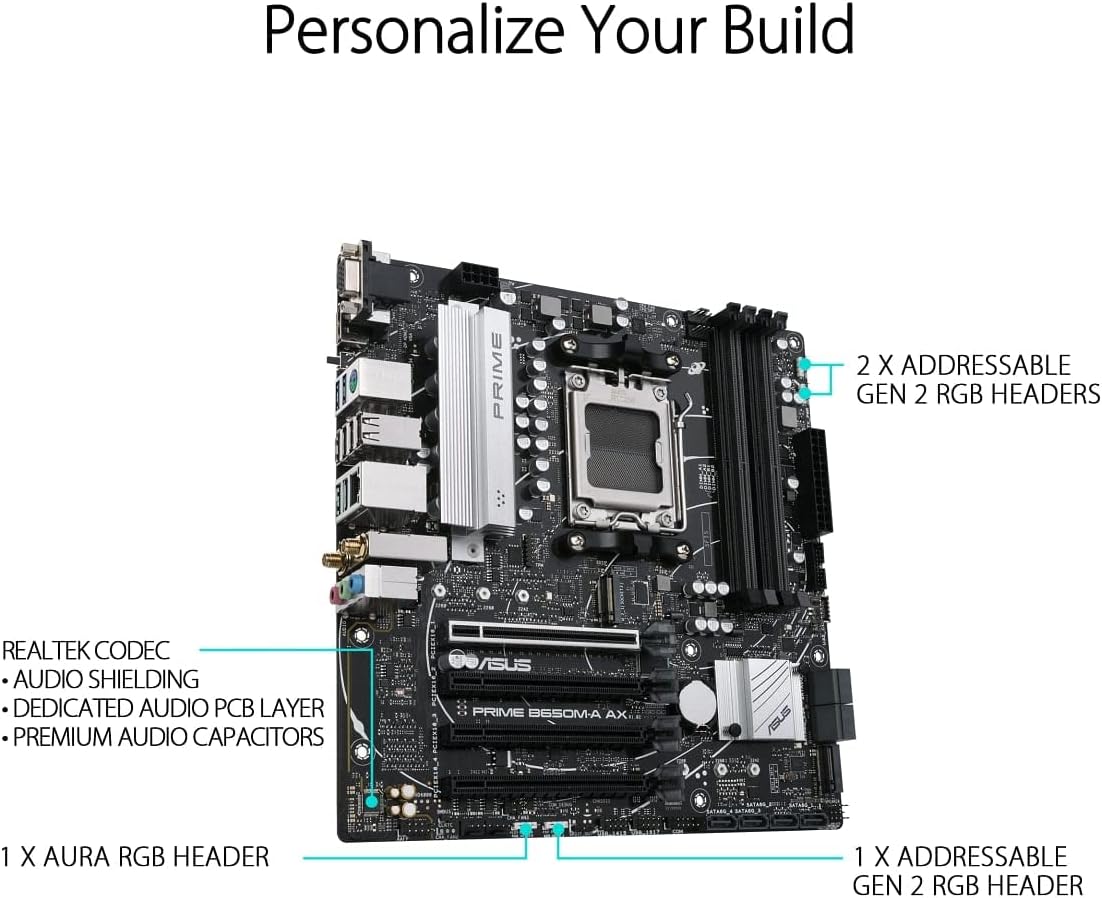
Figure 3.4: Motherboard layout highlighting audio and RGB features.
- Синхронізація RGB-підсвічування Aura: Onboard Addressable Gen 2 headers and an Aura RGB header for RGB LED strips, easily synced with Aura Sync-capable hardware.
- Покращений звук: Features Realtek Codec, audio shielding, a dedicated audio PCB layer, and premium audio capacitors for high-quality sound.
4. Налаштування та встановлення
Before you begin, ensure your system is powered off and unplugged from the wall outlet. Always handle the motherboard by its edges to prevent damage from static electricity.
- Підготовка шасі: Install the I/O shield into your PC case. Ensure proper standoffs are installed in the chassis for the Micro-ATX form factor.
- Встановіть материнську плату: Carefully place the motherboard into the chassis, aligning the screw holes with the standoffs. Secure the motherboard with screws.
- Встановіть процесор: Open the CPU socket lever, align the CPU with the socket (triangle mark on CPU to triangle mark on socket), gently place the CPU, and close the lever to secure it.
- Встановлення кулера процесора: Mount your CPU cooler according to its manufacturer's instructions. Ensure thermal paste is applied.
- Встановлення пам'яті (ОЗП): Open the clips on the DIMM slots. Align the memory module's notch with the slot's key. Press down firmly on both ends until the clips snap into place. For dual-channel operation, refer to your motherboard's specific manual for recommended slot configurations.
- Встановлення твердотільних накопичувачів M.2: Insert the M.2 SSD into the M.2 slot at an angle, then gently push it down and secure it with the provided M.2 screw.
- Встановлення відеокарти (необов'язково): Insert your graphics card into the PCIe 4.0 x16 slot (SafeSlot Core+). Ensure it clicks into place and secure it with a screw to the chassis.
- Підключення кабелів живлення: Підключіть 24-контактний роз'єм живлення ATX та 8-контактний роз'єм живлення процесора від блока живлення до материнської плати.
- Підключення кабелів передньої панелі: Connect the power button, reset button, HDD LED, power LED, and front panel USB/audio cables to their respective headers on the motherboard. Refer to the motherboard manual for exact pin layouts.
- Connect Storage Drives: Connect SATA data cables from your SATA SSDs/HDDs to the SATA ports on the motherboard, and connect power cables from your power supply to the drives.
- Connect Wi-Fi Antenna: Screw the included Wi-Fi antenna onto the rear I/O panel connectors.
5. Інструкція з експлуатації
Після встановлення та підключення всіх компонентів можна ввімкнути систему.
- Перше завантаження: After powering on, the system will typically enter the BIOS/UEFI setup utility.
- Налаштування BIOS/UEFI:
- Прес DEL or F2 під час POST (самотестування при ввімкненні), щоб увійти до налаштувань BIOS/UEFI.
- Configure boot order, enable XMP/EXPO for memory, and set other system parameters as needed.
- Save changes and exit BIOS to proceed with operating system installation.
- Встановлення операційної системи: Insert your Windows or Linux installation media and follow the on-screen prompts to install your preferred operating system.
- Встановлення драйвера: After OS installation, install the latest drivers for your motherboard (chipset, LAN, Wi-Fi, audio, etc.) from the ASUS support webсайт для забезпечення оптимальної продуктивності та стабільності.
6. Технічне обслуговування
Регулярне технічне обслуговування допомагає забезпечити довговічність та оптимальну продуктивність вашої материнської плати.
- Видалення пилу: Періодично очищайте материнську плату та компоненти від пилу за допомогою стисненого повітря. Перед чищенням переконайтеся, що система вимкнена та відключена від мережі.
- Оновлення BIOS: Перевірте службу підтримки ASUS website for the latest BIOS updates. Updating the BIOS can improve compatibility, stability, and performance. Use the BIOS FlashBack™ feature for convenient updates.
- Оновлення драйверів: Регулярно оновлюйте драйвери материнської плати, щоб забезпечити сумісність з новим програмним та апаратним забезпеченням, а також отримати покращення продуктивності та виправлення помилок.
- Фізичний огляд: Періодично перевіряйте материнську плату на наявність нещільних з'єднань, пошкоджених компонентів або ознак перегріву.
7. Вирішення проблем
У цьому розділі розглядаються поширені проблеми, з якими ви можете зіткнутися.
| проблема | Можлива причина | Рішення |
|---|---|---|
| Система не вмикається. | Нещільно закріплені кабелі живлення, несправний блок живлення, неправильні підключення передньої панелі. | Перевірте 24-контактні роз'єми живлення ATX та 8-контактні роз'єми живлення процесора. Перевірте підключення вимикача живлення на передній панелі. Перевірте блок живлення. |
| Немає зображення на моніторі. | Incorrect video cable connection, faulty graphics card/integrated graphics, loose RAM. | Ensure monitor cable is securely connected to the correct port. Reseat graphics card and RAM modules. Test with integrated graphics if available. |
| Система несподівано перезавантажується. | Перегрів, нестабільне живлення, несправна оперативна пам'ять, проблеми з драйверами. | Check CPU/GPU temperatures. Ensure adequate cooling. Test RAM with diagnostic tools. Update drivers. |
| Wi-Fi/LAN not working. | Missing drivers, antenna not connected (Wi-Fi), loose Ethernet cable (LAN). | Install/update Wi-Fi and LAN drivers from ASUS website. Ensure Wi-Fi antenna is securely attached. Check Ethernet cable connection. |
Для отримання детальнішої інформації про усунення несправностей зверніться до вичерпного посібника користувача, доступного на сайті підтримки ASUS. webсайт або зверніться до Керівництво користувача (PDF).
8. Технічні характеристики
Below are the key technical specifications for the ASUS Prime B650M-A AX Motherboard:
| Особливість | Деталь |
|---|---|
| Бренд | ASUS |
| Назва моделі | PRIME B650M-A AX |
| Гніздо ЦП | Розетка AM5 |
| Сумісні процесори | Серія AMD Ryzen 7000 |
| Тип чіпсета | AMD B650 |
| Технологія оперативної пам'яті | DDR5 |
| Швидкість пам'яті | До 6400 МГц (розгін) |
| Місткість пам'яті (макс.) | 128 ГБ |
| Бездротовий тип | 802.11ax (Wi-Fi 6) |
| LAN | Realtek 2.5 Гбіт/с Ethernet |
| Розміри продукту | 10.8 x 10.9 x 2.7 дюймів |
| Вага товару | 2.9 фунта |
| томtage | 12 вольт |
| Перша доступна дата | 12 жовтня 2022 р |
9. Гарантія та підтримка
ASUS provides a limited warranty for its products. For specific warranty terms and conditions, please refer to the warranty card included with your product or visit the official ASUS support webсайт.
For technical support, driver downloads, BIOS updates, and further documentation, please visit the official ASUS support webсайт. Ви також можете звернутися до вичерпного Керівництво користувача (PDF) для отримання детальної інформації.
Підтримка ASUS Webсайт: https://www.asus.com/support/