
1. Продукт закінчивсяview
The havit GK59 Gaming Microphone is designed for clear audio capture during gaming, streaming, and voice communication. It features a condenser microphone for high-quality sound and a versatile design for ease of use.

Малюнок 1.1: Спереду view of the havit GK59 Gaming Microphone, showcasing its main body, stand, and control buttons.
Ключові характеристики:
- Простий у використанні: Проста функція plug-and-play.
- Good Performance: Delivers clear and consistent audio.
- Good Quality: Durable construction for reliable use.
- Портативний дизайн: Компактний та зручний у транспортуванні.
- Регульована підставка: Allows for flexible positioning.
2. Інструкції з налаштування
2.1 Вміст упаковки
Будь ласка, перевірте упаковку на наявність наступних предметів:
- havit GK59 Gaming Microphone
- USB-з'єднувальний кабель
- Посібник користувача (цей документ)
2.2 Підключення мікрофона
The GK59 microphone offers versatile connectivity options for various devices.
- Підключення USB: Connect the provided USB cable to the USB-C port on the back of the microphone and the other end to an available USB port on your computer or gaming console. The microphone is plug-and-play and should be automatically recognized by most operating systems.
- 3.5mm Jack Connection: For devices supporting a 3.5mm auxiliary input, connect a 3.5mm audio cable (not included) to the 3.5mm jack on the back of the microphone and to your device's audio input.
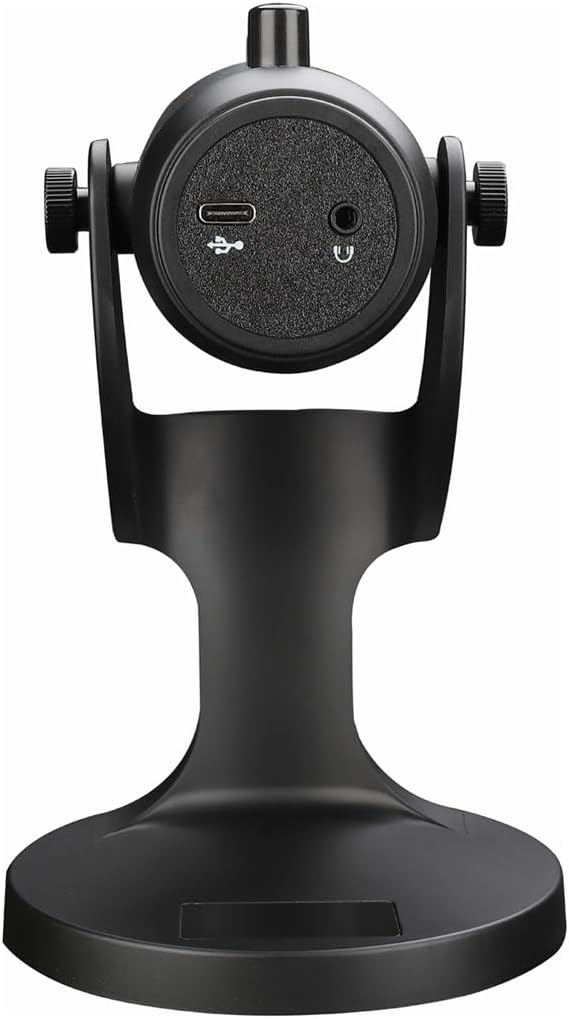
Малюнок 2.1: Задня частина view of the havit GK59 Gaming Microphone, highlighting the USB-C port for data and power, and the 3.5mm headphone jack for monitoring.
After connecting, ensure the microphone is selected as the default input device in your system's sound settings or your gaming/streaming software.
3. Інструкція з експлуатації
3.1 Основні елементи керування
The havit GK59 features intuitive controls located on the front of the microphone body:
- Кнопка вимкнення звуку: Press to mute or unmute the microphone. An indicator light will typically show the mute status.
- MIC +/- Buttons: Adjust the microphone input sensitivity (gain). Press '+' to increase, '-' to decrease.
- Кнопки VOL +/-: Adjust the headphone output volume for monitoring. Press '+' to increase, '-' to decrease.
- ECHO +/- Buttons: Adjust the echo effect level. Press '+' to increase, '-' to decrease.
Малюнок 3.1: Детально view of the microphone's control panel, including the mute button, microphone gain, volume, and echo adjustment buttons.
3.2 Adjusting Microphone Position
The microphone is equipped with an adjustable stand, allowing you to optimize its position for best sound capture and comfort.
- Gently hold the microphone body and the base of the stand.
- Tilt the microphone forward or backward to achieve the desired angle. The stand's design helps reduce vibration and abnormal sounds during use.
- Position the microphone approximately 6-12 inches (15-30 cm) from your mouth for optimal voice clarity.

Figure 3.2: The havit GK59 microphone demonstrating its adjustable tilt feature on the stand, designed for anti-vibration.
4. Технічне обслуговування
4.1 Очищення
To maintain the microphone's performance and appearance:
- Disconnect the microphone from its power source before cleaning.
- Використовуйте м’яку, суху тканину для протирання зовнішніх поверхонь.
- Не використовуйте рідкі засоби для чищення, аерозолі або розчинники, оскільки вони можуть пошкодити покриття або внутрішні компоненти.
4.2 Зберігання
When not in use, store the microphone in a cool, dry place away from direct sunlight and extreme temperatures. Protect it from dust and moisture.
5. Вирішення проблем
If you encounter issues with your havit GK59 Gaming Microphone, please refer to the following table for common problems and solutions:
| проблема | Можлива причина | Рішення |
|---|---|---|
| No sound input from microphone | Мікрофон не підключений належним чином Вибрано неправильний пристрій введення Мікрофон вимкнено | Переконайтеся, що USB-кабель надійно підключено. Check system sound settings and select GK59 as input. Press the Mute button on the microphone to unmute. |
| Низька гучність мікрофона | Microphone gain too low Гучність системного входу занадто низька | Press the 'MIC +' button on the microphone. Adjust input volume in your system's sound settings. |
| Спотворений або нечіткий звук | Microphone gain too high Мікрофон занадто близько до рота Екологічний шум | Press the 'MIC -' button on the microphone. Відрегулюйте положення мікрофона (6-12 см від рота). Зменште фоновий шум у вашому оточенні. |
| No headphone monitoring sound | Навушники не підключені Headphone volume too low | Ensure headphones are plugged into the 3.5mm jack. Press the 'VOL +' button on the microphone. |
6. Технічні характеристики
Below are the technical specifications for the havit GK59 Gaming Microphone:
| Особливість | Специфікація |
|---|---|
| Бренд | хавіт |
| Номер моделі | GK59 |
| Технологія підключення | USB, 3.5 mm Jack (Auxiliary) |
| Рекомендоване використання | Ігри |
| Полярний візерунок | Односпрямований |
| Форм-фактор мікрофона | Handheld (with desktop stand) |
| Вага товару | 429 грамів |
| Імпеданс | 250 Ом |
| Співвідношення сигнал-шум | 18 дБ |
| Чутний шум | 18 децибели |
| Джерело живлення | Дротове живлення (через USB) |
| Сумісні пристрої | Gaming Consoles, PCs |
| Розміри виробу (ДхШхВ) | 5.59 x 4.92 x 9.06 дюймів |
| Колір | чорний |
7. Гарантія та підтримка
7.1 Інформація про гарантію
The havit GK59 Gaming Microphone comes with a standard manufacturer's warranty. Please refer to the warranty card included in your product packaging or visit the official havit webсайт для отримання детальних гарантійних умов.
7.2 Підтримка клієнтів
For technical assistance, troubleshooting not covered in this manual, or warranty claims, please contact havit customer support through their official channels. You can find more information and contact details on the havit Store on Amazon або їх посадова особа webсайт.