
1. Більшеview
The ASRock X670E PG Lightning is a high-performance motherboard designed to support AMD AM5 Ryzen 7000 Series Processors. It features advanced connectivity, robust power delivery, and extensive expansion options, making it suitable for demanding computing tasks and gaming. This manual provides essential information for the proper installation, operation, and maintenance of your motherboard.
Ключові характеристики:
- Supports AMD AM5 Ryzen 7000 Series Processors
- Чіпсет AMD X670
- Dual Channel DDR5 Memory, up to 128GB
- Multiple PCIe 5.0 and PCIe 4.0 slots for expansion
- Integrated AMD RDNA2 Graphics (actual support varies by CPU)
- 7.1-CH HD Audio (Realtek ALC897)
- LAN Realtek 2.5G
- Six SATA3 ports and three Hyper M.2 slots
- Extensive I/O with USB 3.2 Gen2x2 Type-C, HDMI, and DisplayPort
2. Налаштування та встановлення
Before beginning installation, ensure your workspace is clean and static-free. Always handle components by their edges to avoid damage from electrostatic discharge.
2.1. Встановлення процесора
Carefully open the CPU socket lever. Align the triangular mark on your AMD AM5 Ryzen processor with the corresponding mark on the socket. Gently place the CPU into the socket without applying force. Close the lever to secure the processor.

Зображення: Зверху вниз view of the ASRock X670E PG Lightning motherboard, showing the CPU socket ready for processor installation.
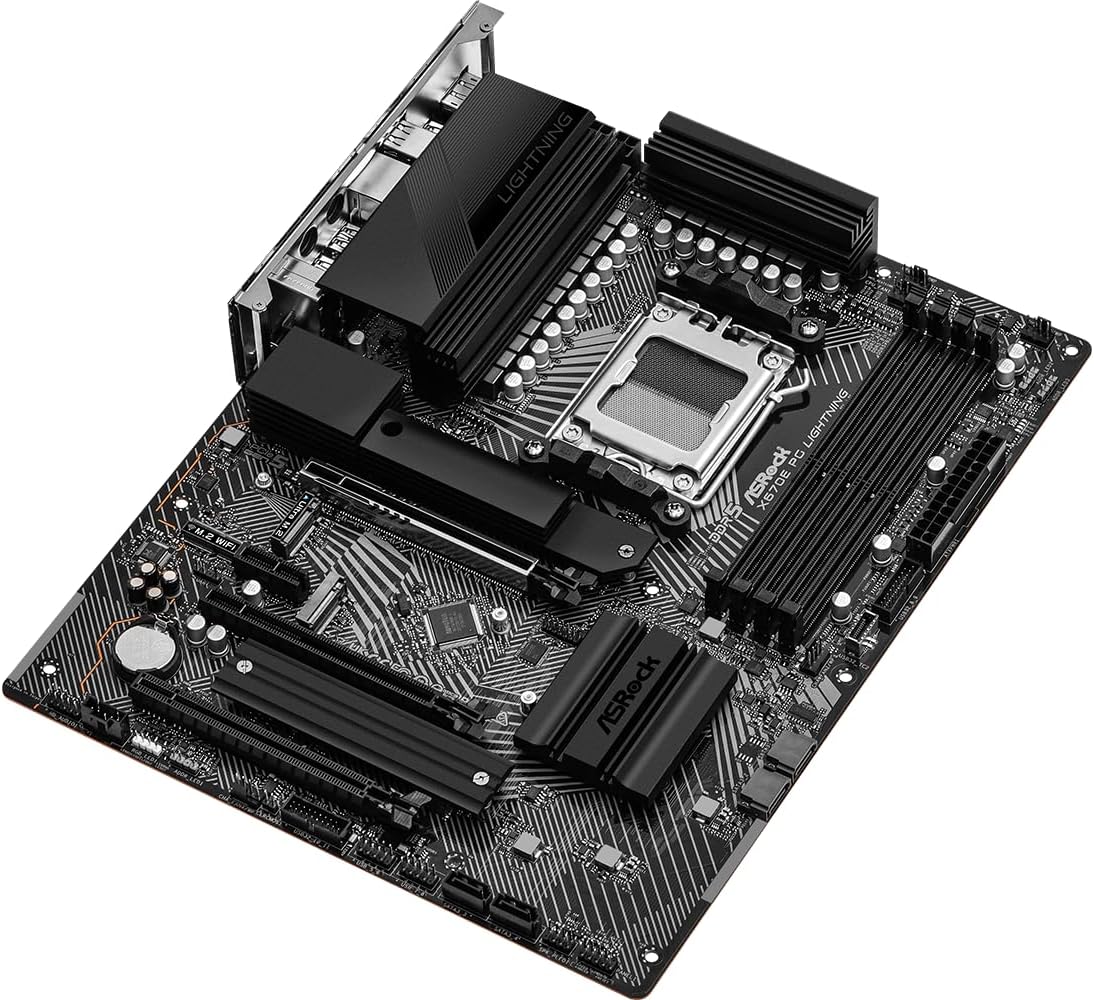
Image: Close-up of the CPU socket on the ASRock X670E PG Lightning motherboard with the retention arm open, illustrating the installation readiness.
2.2. Встановлення пам'яті
The motherboard supports DDR5 memory. For optimal performance, install memory modules in a dual-channel configuration. Refer to the motherboard manual for specific slot population guidelines. Open the clips on the DIMM slots, align the memory module notch with the slot key, and press down firmly on both ends until the clips snap into place.
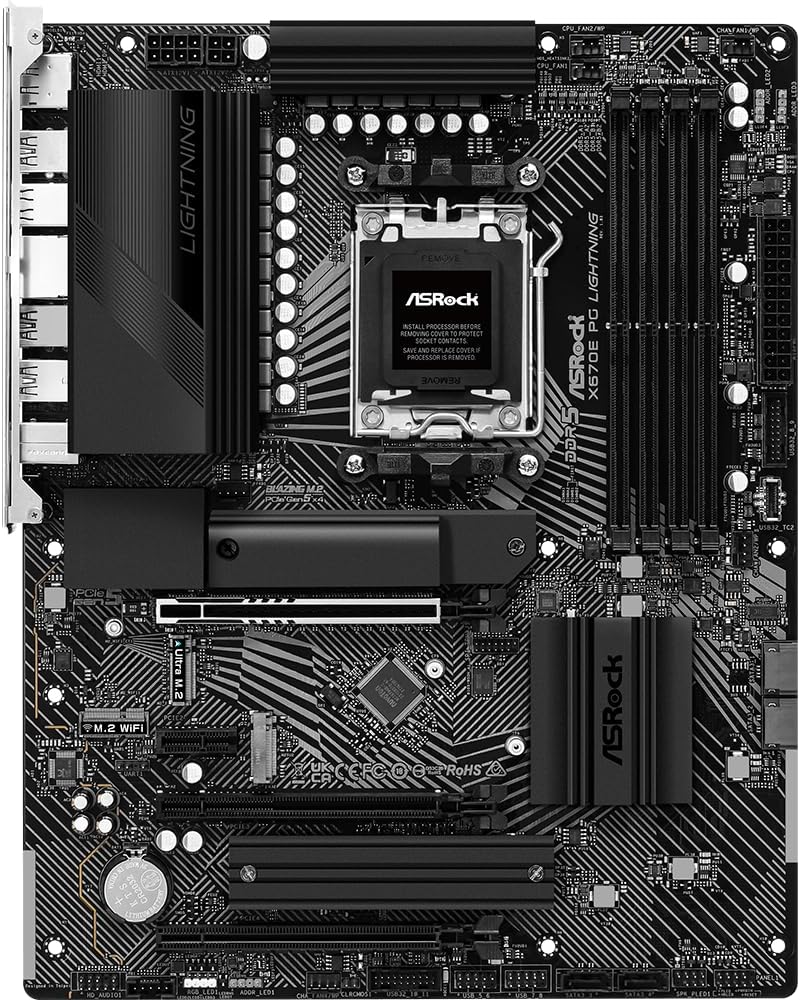
Зображення: Кутове view of the ASRock X670E PG Lightning motherboard, showing the four DDR5 memory slots and the CPU socket area.
2.3. Встановлення пристрою зберігання даних
Install M.2 NVMe SSDs into the available M.2 slots. Secure them with the provided screws or standoffs. For SATA drives, connect the SATA data cables to the motherboard's SATA ports and the power cables from your power supply to the drives.

Зображення: Крупний план view of the ASRock X670E PG Lightning motherboard, detailing the M.2 slots, heatsinks, and chipset area.
2.4. Встановлення графічної карти
Insert your PCIe graphics card into the primary PCIe 5.0 x16 slot. Ensure it is seated firmly and secure it with the case screw. Connect the necessary PCIe power cables from your power supply to the graphics card.
2.5. Підключення джерела живлення
Connect the 24-pin ATX power connector and the 8-pin (or 4+4-pin) CPU power connector from your power supply to the corresponding headers on the motherboard. Ensure all connections are secure.
3. Інструкція з експлуатації
3.1. Перше завантаження
After assembling your system, connect your monitor, keyboard, and mouse. Power on the system. The first boot may take longer than usual due to memory training. If the system does not display, check all power connections and component seating.
3.2. Конфігурація BIOS/UEFI
Press the 'Delete' or 'F2' key during startup to enter the BIOS/UEFI setup utility. Here you can configure boot order, enable XMP/EXPO profiles for memory, adjust fan speeds, and monitor system status. Save changes before exiting.
3.3. Встановлення драйвера
After installing your operating system, install the latest drivers for your motherboard's chipset, LAN, audio, and any other integrated components. These can typically be found on the ASRock support webсайт для вашої конкретної моделі.
4. Технічне обслуговування
4.1. Оновлення BIOS
Регулярно перевіряйте ASRock website for BIOS/UEFI updates. Updates can improve system stability, compatibility, and performance. Follow the provided instructions carefully when performing a BIOS update to avoid system damage.
4.2. прибирання
Періодично очищуйте внутрішні компоненти комп’ютера, щоб запобігти накопиченню пилу, яке може призвести до перегріву та зниження продуктивності. Використовуйте стиснене повітря для видалення пилу з вентиляторів, радіаторів та інших компонентів. Перед чищенням переконайтеся, що система вимкнена та від’єднана від мережі.
4.3. Перевірка компонентів
Occasionally inspect all internal connections (power cables, data cables, expansion cards) to ensure they are securely seated. Loose connections can cause intermittent issues or system instability.
5. Вирішення проблем
5.1. Поширені проблеми
- Немає дисплея: Verify monitor connection, graphics card seating, and power cables. Try reseating RAM modules.
- Boot Loops/System Instability: Reset BIOS to default settings. Check memory compatibility and seating. Ensure CPU cooler is properly installed.
- Периферійний пристрій не виявлено: Ensure USB devices are connected to the correct ports. Update chipset drivers.
5.2. Діагностичні світлодіоди
The motherboard features four single LEDs to indicate the boot state (CPU, DRAM, VGA, BOOT). If an issue occurs during startup, the corresponding LED will remain lit, helping to identify the problematic component.
5.3. Зверніться до служби підтримки
If you encounter persistent issues that cannot be resolved using the troubleshooting steps, please contact ASRock technical support for further assistance.
6. Технічні характеристики
| Особливість | Специфікація |
|---|---|
| Бренд | ASRock |
| Назва моделі | X670E PG LIGHTNING |
| Гніздо ЦП | Розетка AM5 |
| Сумісні процесори | Процесори AMD Ryzen серії 7000 |
| Тип чіпсета | AMD X670 |
| Технологія оперативної пам'яті | DDR5 |
| Доступні слоти пам'яті | 4 |
| Max RAM Memory Size | 128 ГБ |
| Інтерфейс графічної карти | Integrated (actual support varies by CPU) |
| Total PCIe Ports | 4 (1x PCIe 5.0 x16, 1x PCIe 4.0 x16, 1x PCIe 4.0 x1, 1x M.2) |
| Total SATA Ports | 6 |
| Загальна кількість портів USB | 16 (including USB 3.2 Gen2x2 Type-C) |
| Кількість портів Ethernet | 1 (2.5G LAN) |
| Розміри предмета Д х Ш х В | 11.7 см (Д) x 2.8 см (Ш) x 13.8 см (В) |
7. Гарантія та підтримка
This ASRock motherboard comes with a Гарантія 3 рік. For detailed warranty terms and conditions, please refer to the official ASRock webсайту або зв’яжіться з їхньою службою обслуговування клієнтів.
For technical support, driver downloads, and further product information, visit the official ASRock support page: Магазин ASRock на Amazon
8. Візуалізація продукту
8.1. Зображення продукту

Image: Rear I/O panel of the ASRock X670E PG Lightning motherboard, featuring multiple USB ports, 2.5G LAN, HDMI, DisplayPort, and audio jacks.

Зображення: Кутове view of the ASRock X670E PG Lightning motherboard, showcasing the overall layout and design from the top-right perspective.
8.2. Офіційні відео про продукт
Відео: Демонстраційне відео продуктуasing the features and design of the ASRock X670E PG Lightning motherboard.