
1. Вступ
Thank you for choosing the YENKEE YMS 3030BK RGB Gaming Mouse Ultra Light Shotgun. This manual provides detailed instructions for setting up, operating, and maintaining your new gaming mouse. Please read this manual carefully before use to ensure optimal performance and longevity of your device.
The YENKEE YMS 3030BK RGB Gaming Mouse features an ergonomic design for comfortable use. Its unique ultra-light perforated construction promotes airflow, helping to keep your palm cool during extended use. Equipped with an accurate IC 6651 sensor, it offers precise tracking with a resolution of up to 6400 DPI, and includes customizable RGB backlighting.
2. Вміст упаковки
Будь ласка, перевірте упаковку на наявність наступних предметів:
- 1 x YENKEE YMS 3030BK RGB Gaming Mouse Ultra Light Shotgun
- Посібник користувача (цей документ)
3. Продукт закінчивсяview
3.1 Основні характеристики
- Unique ultra-light perforated construction for improved airflow
- Ergonomic design for comfortable grip and to prevent palm sweat
- Customizable RGB backlight
- Accurate IC 6651 sensor with up to 6400 DPI resolution
- Wired USB connectivity
3.2 Компоненти миші
The YMS 3030BK mouse typically includes the following components:
- Клацніть лівою кнопкою миші
- Клацніть правою кнопкою миші
- Коліщатко прокручування / Середня кнопка
- DPI Adjustment Button (usually located behind the scroll wheel)
- Forward/Backward Side Buttons (typically on the left side)
- Optical Sensor (on the underside)
- USB кабель
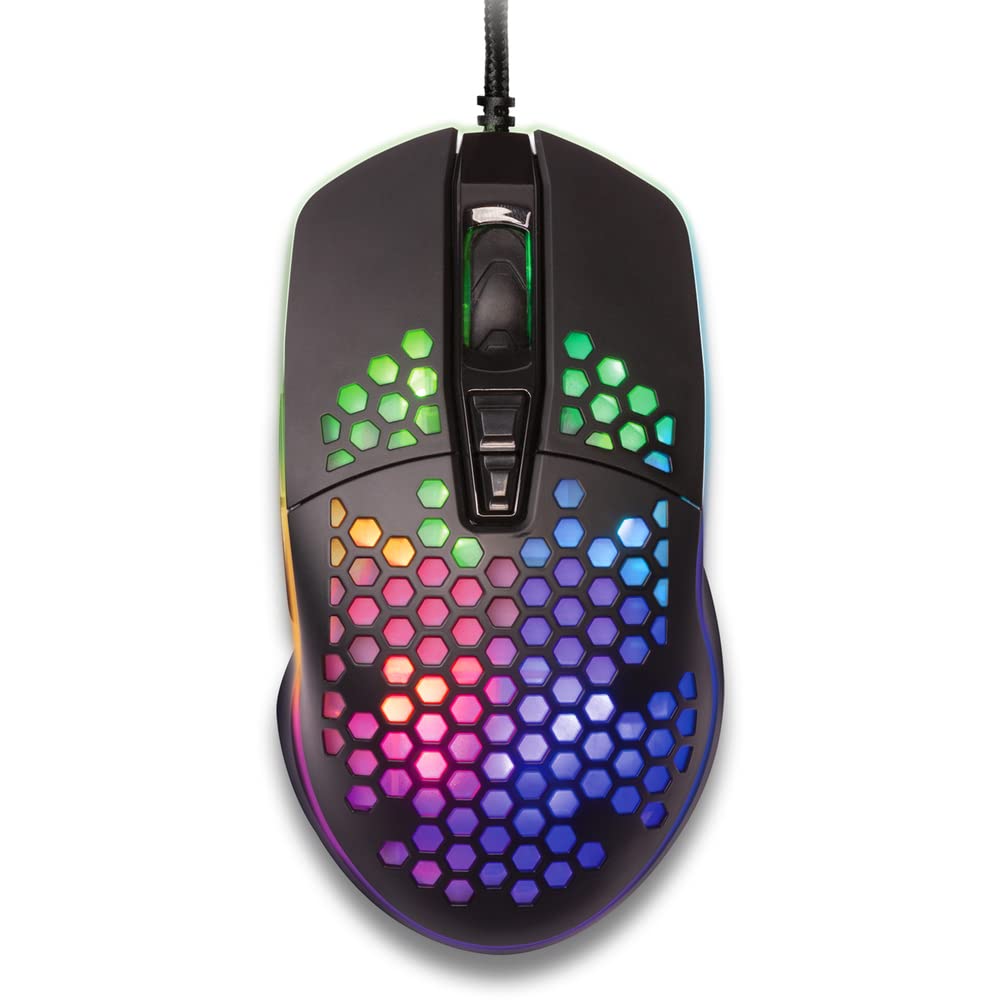
Рисунок 1: Зверху вниз view of the YENKEE YMS 3030BK RGB Gaming Mouse, highlighting its ultra-light perforated design and ergonomic contours.
4. Налаштування
Follow these steps to set up your YENKEE YMS 3030BK gaming mouse:
- Підключіть мишку: Підключіть USB-роз’єм миші до вільного USB-порту комп’ютера.
- Встановлення драйвера: Your operating system (Windows 7, 8, Vista, XP) should automatically detect and install the necessary drivers. No additional software installation is typically required for basic functionality.
- Додаткове програмне забезпечення: For advanced customization of RGB lighting and button assignments, please visit the official YENKEE website to check for any dedicated software for the YMS 3030BK model.
5. Інструкція з експлуатації
5.1 Основна операція
- Клацніть лівою кнопкою миші: Первинна дія, вибір.
- Клацніть правою кнопкою миші: Контекстне меню, додаткова дія.
- Колесо прокрутки: Scroll up/down, middle click for specific functions (e.g., opening links in new tabs).
- Бічні кнопки: Default functions are typically 'Forward' and 'Backward' in web браузери або file дослідники. Їх часто можна налаштувати за допомогою програмного забезпечення.
5.2 Налаштування DPI
The YMS 3030BK mouse features an IC 6651 sensor with a maximum resolution of 6400 DPI. You can adjust the DPI (Dots Per Inch) sensitivity on-the-fly using the dedicated DPI button, usually located behind the scroll wheel. Pressing this button will cycle through preset DPI levels, indicated by changes in the mouse's RGB lighting color or pattern. Refer to the optional software for precise DPI level configuration and customization.
5.3 Налаштування RGB-підсвічування
The RGB backlight of your mouse can be customized to match your preferences. While some mice offer onboard controls for basic lighting effects, full customization of colors, patterns, and brightness is typically achieved through the dedicated YENKEE software (if available). Please download and install the software from the official YENKEE website for advanced lighting options.
6. Технічне обслуговування
Щоб забезпечити довговічність та оптимальну продуктивність вашої ігрової миші, дотримуйтесь цих рекомендацій щодо технічного обслуговування:
- Прибирання: Use a soft, dry cloth to wipe the surface of the mouse. For perforated areas, a soft brush or compressed air can help remove dust. Avoid using harsh chemicals or abrasive materials.
- Очищення датчика: Occasionally clean the optical sensor on the underside of the mouse with a cotton swab lightly dampened with isopropyl alcohol. Ensure it is completely dry before use.
- Догляд за кабелем: Уникайте різких згинів або надмірного натягування USB-кабелю, щоб запобігти його пошкодженню.
- Зберігання: Зберігайте мишу в чистому, сухому місці, коли вона не використовується.
7. Вирішення проблем
If you encounter issues with your YENKEE YMS 3030BK mouse, refer to the table below for common problems and solutions:
| проблема | Можлива причина | Рішення |
|---|---|---|
| Миша не відповідає | Нещільне USB-з'єднання, несправний USB-порт, проблема з драйвером. | Ensure USB cable is securely plugged in. Try a different USB port. Restart your computer. Check Device Manager for driver status. |
| Рух курсора нерівномірний або стрибкоподібний | Брудний оптичний датчик, невідповідна поверхня килимка для миші. | Clean the optical sensor. Use a clean, uniform mouse pad. |
| Регулювання DPI не працює | Конфлікт програмного забезпечення, несправність кнопок. | Ensure no conflicting software is running. If using custom software, check its settings. |
| RGB-підсвічування не працює або зависає | Проблема з програмним забезпеченням, проблема з живленням. | Check the YENKEE software settings. Unplug and replug the mouse. Restart your computer. |
8. Технічні характеристики
| Особливість | Деталь |
|---|---|
| Бренд | ЙЕНКІ |
| Номер моделі | YMS 3030BK |
| Технологія підключення | USB (дротовий електричний) |
| Технологія виявлення руху | Optical (IC 6651 Sensor) |
| Макс. DPI | 6400 DPI |
| Особливості | Ergonomic Design, Lightweight, Perforated Construction, RGB Backlight |
| Колір | чорний |
| Вага товару | 4.2 унції (приблизно 119 грамів) |
| Розміри продукту (ДxШxВ) | 5.43 x 2.44 x 9.06 дюймів (приблизно 13.8 x 6.2 x 23 см) |
| Апаратна платформа | Ігри |
| Сумісність операційної системи | Windows 7, Windows 8, Windows Vista, Windows XP |
9. Гарантія та підтримка
Інформація про гарантію: For detailed warranty terms and conditions, please refer to the warranty card included with your product or visit the official YENKEE website. Warranty periods may vary by region and retailer.
Підтримка клієнтів: If you require technical assistance or have questions regarding your YENKEE YMS 3030BK gaming mouse, please contact your retailer or visit the support section of the official YENKEE webсайт для контактної інформації та поширених запитань.