
1. Вступ
This manual provides instructions for the Generic RC-799M infrared replacement remote control. This remote is designed to operate various Onkyo A/V receivers and components. It offers a straightforward, ready-to-use solution without complex programming.
Важлива примітка: This is a replacement remote and may not offer all functions of your original Onkyo remote. Please review the compatibility section carefully.
2. Сумісність
The Generic RC-799M remote control is compatible with a range of Onkyo A/V receivers. Please ensure your specific model is listed below before use. If your model is not listed, this remote may not be compatible.
Compatible Onkyo Models include:
- RC-717M
- RC-763M
- TX-NR906
- TX-NR626
- HT-R520
- RC-687M
- RC-690M
- RC-649M
- RC-807M
- TX-NR1008
- TX-SR502
- TX-SR706
- HT-S5600
- TX-SR502S
- TX-SR706S
This remote is designed to control Onkyo and INTEGRA components only. It cannot be programmed to control other brands of televisions or devices.
3. Налаштування
The Generic RC-799M remote control requires two AA batteries (not included) for operation. No programming is required; simply insert the batteries, and the remote will be ready to use with compatible Onkyo A/V receivers.
3.1. Встановлення батарей
- Знайдіть кришку батарейного відсіку на задній панелі пульта дистанційного керування.
- Посуньте кришку вниз або натисніть на засувку, щоб відкрити її.
- Insert two new AA batteries, ensuring the positive (+) and negative (-) terminals align correctly with the markings inside the compartment.
- Встановіть кришку відсіку для батарейок, зсунувши її на місце до клацання.

Зображення 1: Задня частина view пульта дистанційного керування, що ілюструє батарейний відсік.
Once batteries are installed, the remote is ready for immediate use with your compatible Onkyo A/V receiver.
4. Робота з дистанційним керуванням
This remote control operates using infrared (IR) technology. Point the remote directly at your Onkyo A/V receiver and ensure there are no obstructions between the remote and the receiver's IR sensor.
4.1. Основні функції
The remote features standard buttons for common A/V receiver functions. While the exact layout may vary slightly from your original remote, the functions are generally intuitive.
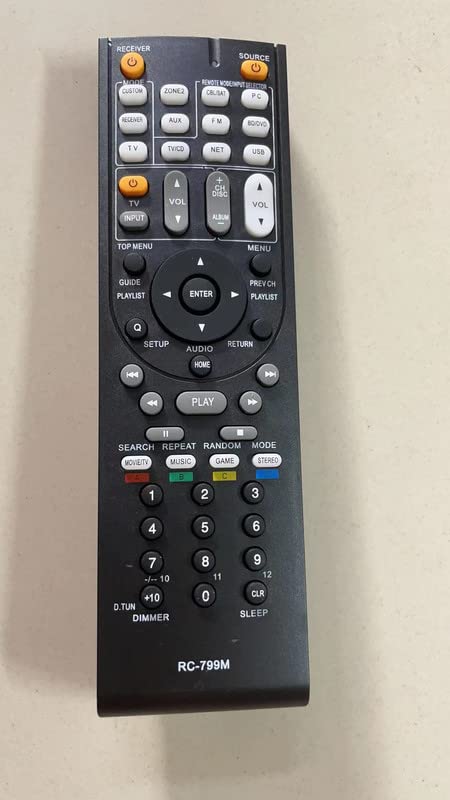
Зображення 2: спереду view of the remote control, displaying its button layout.
- Потужність: Вмикає або вимикає приймач.
- Збільшення/зменшення гучності: Регулює гучність звуку.
- Селектор введення: Cycles through available audio/video inputs.
- Кнопки навігації: For menu navigation (if supported by your receiver).
- Елементи керування відтворенням: Play, Pause, Stop, Fast Forward, Rewind (for connected media devices, if supported).
Refer to your Onkyo A/V receiver's original manual for specific button functions and their corresponding operations.
5. Технічне обслуговування
To ensure optimal performance and longevity of your remote control, follow these simple maintenance guidelines:
- Прибирання: Wipe the remote control with a soft, dry cloth. Do not use liquid cleaners, solvents, or abrasive materials, as these can damage the surface or internal components.
- Заміна батареї: Replace batteries when the remote's response becomes sluggish or stops working. Always replace both batteries at the same time with new AA batteries. Do not mix old and new batteries, or different types of batteries.
- Зберігання: If the remote will not be used for an extended period, remove the batteries to prevent leakage, which can damage the remote. Store the remote in a cool, dry place away from direct sunlight and extreme temperatures.
- Уникайте крапель: Protect the remote from drops and impacts, which can damage its internal circuitry.
6. Вирішення проблем
Якщо у вас виникли проблеми з пультом дистанційного керування, спробуйте виконати такі дії з усунення несправностей:
- Пульт не відповідає:
- Ensure the remote has fresh AA batteries installed correctly.
- Check for any obstructions between the remote and the A/V receiver's IR sensor.
- Make sure you are pointing the remote directly at the receiver.
- Verify that your Onkyo A/V receiver model is listed in the compatibility section of this manual.
- Деякі функції не працюють:
- As a replacement remote, it may not support all advanced or specific functions of your original Onkyo remote. This is normal.
- Confirm that the function you are trying to use is supported by your specific Onkyo A/V receiver model.
- Remote controls other devices unintentionally:
- This remote is designed for Onkyo and INTEGRA components only. It cannot be programmed for other brands. Ensure you are not attempting to control non-compatible devices.
7. Технічні характеристики
| Особливість | Деталь |
|---|---|
| Назва моделі | RC-799M |
| Бренд | загальний |
| Технологія підключення | Інфрачервоний (ІЧ) |
| Сумісні пристрої | Various Onkyo A/V Receivers (see Compatibility section) |
| Джерело живлення | 2 батарейки типу АА (не входять в комплект) |
| Кількість кнопок | 10 |
| Особливості | Cannot be programmed; controls Onkyo & INTEGRA components only; no mute button. |
8. Інформація про гарантію
Цей продукт поставляється з a Гарантія 90 днів from the date of purchase. This warranty covers manufacturing defects. It does not cover damage caused by misuse, accidents, unauthorized modifications, or battery leakage. Please retain your proof of purchase for warranty claims.
9. Підтримка
For further assistance or inquiries regarding this product, please contact the seller directly through the platform where the purchase was made. Provide your order number and a detailed description of the issue for prompt support.