
Baseus Bowie WM02
Baseus Bowie WM02 TWS Bluetooth Earbuds
Посібник користувача
вступ
Thank you for choosing the Baseus Bowie WM02 TWS Bluetooth Earbuds. These ultra-compact and lightweight earbuds are designed for comfortable, long-term wear, offering a seamless audio experience with advanced Bluetooth 5.3 technology and an impressive 25-hour battery life (with charging case). This manual will guide you through the setup, operation, and maintenance of your new earbuds.

Image: Baseus Bowie WM02 TWS Bluetooth Earbuds in white, with their charging case.
Налаштування
1. Розпакування та компоненти
Before first use, please ensure all components are present in the package:
- Baseus Bowie WM02 TWS Earbuds
- Зарядний футляр
- Зарядний кабель USB-C
- Кілька розмірів вушних вкладишів (S, M, L)
- Посібник користувача
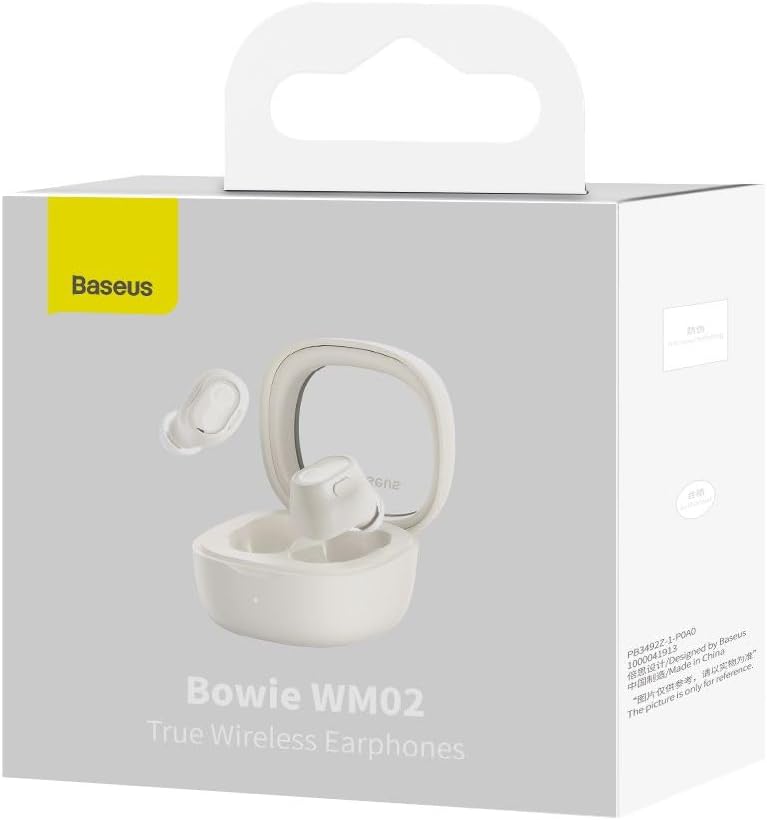
Image: The Baseus Bowie WM02 earbuds, charging case, USB-C cable, and ear tips laid out with the product packaging.
2. Заряджання навушників та кейса
Для оптимальної роботи повністю зарядіть навушники та зарядний футляр перед першим використанням.
- Вставте навушники в зарядний футляр. Переконайтеся, що вони правильно встановлені у відповідних гніздах.
- Підключіть зарядний кабель USB-C до порту зарядки на корпусі, а інший кінець – до джерела живлення USB (наприклад, комп’ютера, адаптера живлення).
- The indicator light on the charging case will show the charging status. Once fully charged, the light will typically turn solid or turn off.
A 10-minute quick charge provides approximately 2 hours of listening time, and a full charge offers up to 5 hours of continuous use, extending to 25 hours with the charging case.

Image: Graphic illustrating the 25-hour battery life of the Baseus Bowie WM02 earbuds and charging case.
3. Підключення Bluetooth
Виконайте такі дії, щоб з’єднати навушники з пристроєм із підтримкою Bluetooth:
- Відкрийте зарядний футляр. Навушники автоматично перейдуть у режим сполучення (індикатори блиматимуть).
- На вашому пристрої (смартфоні, планшеті, ноутбуці) перейдіть до налаштувань Bluetooth та увімкніть Bluetooth.
- шукати available devices and select "Baseus Bowie WM02" from the list.
- Once connected, the earbud indicator lights will typically turn off or show a steady light.
Навушники оснащені Bluetooth 5.3 для стабільного та ефективного з'єднання.

Image: A visual representation of the Wireless 5.3 chip, highlighting fast and smooth connection.
4. Baseus App Integration
Enhance your experience by downloading the official Baseus app. The app allows you to:
- Знайдіть свої навушники.
- Check real-time battery levels.
- Налаштуйте сенсорне керування.
- Access additional features and updates.

Image: Screenshot of the Baseus app interface, demonstrating features like earbud location and battery status.
Інструкція з експлуатації
1. Носіння навушників
The Baseus Bowie WM02 earbuds are designed for a comfortable and secure fit, even for smaller ears. They weigh only 3.8g per earbud and have a 108-degree elevation angle for ergonomic wear.
- Оберіть амбушури, які забезпечують найкраще прилягання та комфорт для ваших вух.
- Gently insert each earbud into your ear canal and twist slightly to secure them.

Image: A woman demonstrating the comfortable and seamless fit of the Baseus Bowie WM02 earbuds.
2. Торкніться Елементи керування
The earbuds feature intuitive touch controls. You can customize these controls via the Baseus app.
| Дія | КОНТРОЛЬ |
|---|---|
| Відтворення/Пауза | Один раз торкніться будь-якого навушника |
| Наступний трек | Двічі торкніться правого навушника |
| Попередній трек | Двічі торкніться лівого навушника |
| Відповісти/закінчити виклик | Один раз торкніться будь-якого навушника |
| Відхилити виклик | Тривале натискання на будь-який навушник |
| Активуйте голосовий помічник | Потрійне торкання будь-якого навушника |
| Увімкнути/вимкнути режим низької затримки (ігровий режим) | Long press on either earbud (check app for specific gesture) |
3. Увімкнення/вимкнення живлення
- Увімкнення: Відкрийте зарядний футляр, і навушники автоматично увімкнуться та підключаться до останнього сполученого пристрою.
- Вимкнення живлення: Помістіть навушники назад у зарядний футляр і закрийте кришку. Вони автоматично від’єднаються та вимкнуться.
4. Gaming Mode (Low Latency)
The Bowie WM02 features a 60ms low-latency mode, ideal for gaming, ensuring instant response and synchronized audio. Activate this mode via the touch controls or the Baseus app for an immersive gaming experience.
Технічне обслуговування
1. прибирання
Регулярне прибирання допомагає підтримувати якість звуку та гігієну.
- Використовуйте м’яку, суху тканину без ворсу, щоб протерти навушники та зарядний футляр.
- Щодо вушних насадок, зніміть їх та помийте м’яким милом і водою, потім ретельно висушіть перед тим, як знову прикріпити їх.
- Обережно очистіть зарядні контакти на навушниках і футлярі сухим ватним тампоном.
- Уникайте використання абразивних засобів для чищення, спирту або розчинників.
2. Зберігання
Коли навушники не використовуються, зберігайте їх у зарядному футлярі, щоб захистити від пилу та пошкоджень.
3. Догляд за акумулятором
- Уникайте впливу екстремальних температур (як високих, так і низьких) на навушники та кейс.
- Do not leave the battery completely drained for extended periods. Charge them regularly.
Усунення несправностей
If you encounter any issues with your Baseus Bowie WM02 earbuds, please refer to the following common solutions:
| проблема | Можливе рішення |
|---|---|
| Навушники не підключаються | Переконайтеся, що навушники заряджені. Вимкніть і ввімкніть Bluetooth на вашому пристрої. Забудьте про пристрій у налаштуваннях Bluetooth і повторіть сполучення. |
| Немає звуку з одного навушника | Check battery level of both earbuds. Place both earbuds back in the case, close the lid, then open again. Re-pair if necessary. |
| Проблеми із зарядкою | Ensure charging cable is securely connected. Try a different USB port or charger. Clean charging contacts on earbuds and case. |
| Низька гучність або погана якість звуку | Adjust volume on your device. Ensure ear tips provide a good seal. Clean earbud mesh to remove debris. |
| Сенсорне керування не реагує | Ensure your fingers are clean and dry. Try resetting the earbuds (refer to Baseus app or online support for specific reset instructions). |
If the problem persists, please contact Baseus customer support.
Технічні характеристики
| Особливість | Деталь |
|---|---|
| Назва моделі | Боуї WM02 |
| Номер моделі виробника | NGTW180002 |
| Технологія підключення | Бездротовий (Bluetooth) |
| Технологія бездротового зв'язку | Bluetooth 5.3 |
| Форм-фактор навушників-вкладишів | Вкладиші |
| Контроль шуму | Жодного |
| Вага продукту | 60 грамів |
| Діапазон частот | 20 Гц - 20 000 Гц |
| Імпеданс | 140 Ом |
| Середній час роботи від батареї (навушники) | 5 години |
| Загальний час роботи від батареї (з футляром) | До 25 годин |
| Час зарядки | Приблизно 1.5 години (для повної зарядки) |
| Порт зарядки | USB Type-C |
| Особливості | Fast Charging, Low Latency Mode (60ms) |
| Сумісні пристрої | Bluetooth-enabled devices such as smartphones, tablets, laptops, and desktop computers. |
Гарантія та підтримка
Інформація про гарантію
The Baseus Bowie WM02 TWS Bluetooth Earbuds come with a 12-month manufacturer's warranty from the official Baseus Brazil store. Please retain your proof of purchase for warranty claims.
Підтримка клієнтів
For further assistance, technical support, or warranty inquiries, please contact Baseus customer support through the official Baseus website or the Baseus app. You can also visit the Магазин Baseus на Amazon для отримання додаткової інформації.